
1. สินค้าหมดview
The QCY T16 Mini Wireless Earbuds are designed for a comfortable audio experience with advanced features. This manual provides instructions for optimal use.

Image: QCY T16 Mini Wireless Earbuds and charging case.
คุณสมบัติหลัก:
- Ultra Light-Weight: แต่ละเอียร์บัดมีน้ำหนักประมาณ 4 กรัม เพื่อการสวมใส่ที่สบาย
- Comfortable In-Ear Design: Ergonomic design with cozy eartips for extended use.
- Premium Immersive Sound: Features Qualcomm aptX Adaptive audio technology and dual composite dynamic drivers.
- เวลาเล่นที่ขยาย: Up to 5.5 hours on a single charge, and 22 hours total with the charging case.
- Customized EQ: Adjustable sound settings via the QCY App.
- ความต้านทานน้ำ IPX5: ป้องกันเหงื่อและละอองน้ำเล็กน้อย
2. การตั้งค่าและการจับคู่
การจับคู่เริ่มต้น:
- Open the lid of the charging case. The earbuds will automatically enter connectable mode (one LED will blink green).
- On your phone, navigate to Bluetooth settings and search for "QCY-T16".
- Tap on "QCY-T16" to connect. The LED on the earbud will turn off once connected.

Image: Earbuds in charging case next to a smartphone displaying Bluetooth pairing options.
One-Step Connectable Mode:
- Place both earbuds into the charging case and open the lid.
- กดปุ่มบนกล่องชาร์จค้างไว้เป็นเวลา 4 วินาที
- The earbuds will then automatically enter connectable mode.
Video: Demonstrates how to connect the QCY T16 earbuds to a device.
3. คู่มือการใช้งาน
การควบคุมเพลง:
- เล่น/หยุดชั่วคราว: Double touch either earbud panel.
- ข้ามแทร็กไปข้างหน้า: Keep touching the right earbud panel for 1.5 seconds.
- ข้ามไปยังแทร็กก่อนหน้า: Keep touching the left earbud panel for 1.5 seconds.
การจัดการการโทร:
- รับ/วางสาย: Double touch either earbud.
- ไม่สนใจการโทร: แตะหูฟังข้างใดข้างหนึ่งค้างไว้ 1.5 วินาที
ผู้ช่วยเสียง:
- เปิดใช้งาน Voice Assistant: Triple touch the left earbud panel.
โหมดเกม:
- สลับโหมดเกม: Triple touch the right earbud panel to switch on/off.
Video: Demonstrates music control, call handling, voice assistant activation, and gaming mode toggle.
4. การบำรุงรักษา
การชาร์จ:
- เชื่อมต่อเคสชาร์จเข้ากับแหล่งจ่ายไฟโดยใช้สาย USB Type-C
- The earbuds will charge when placed inside the case.
- การชาร์จ 10 นาที สามารถเล่นได้ประมาณ 1 ชั่วโมง
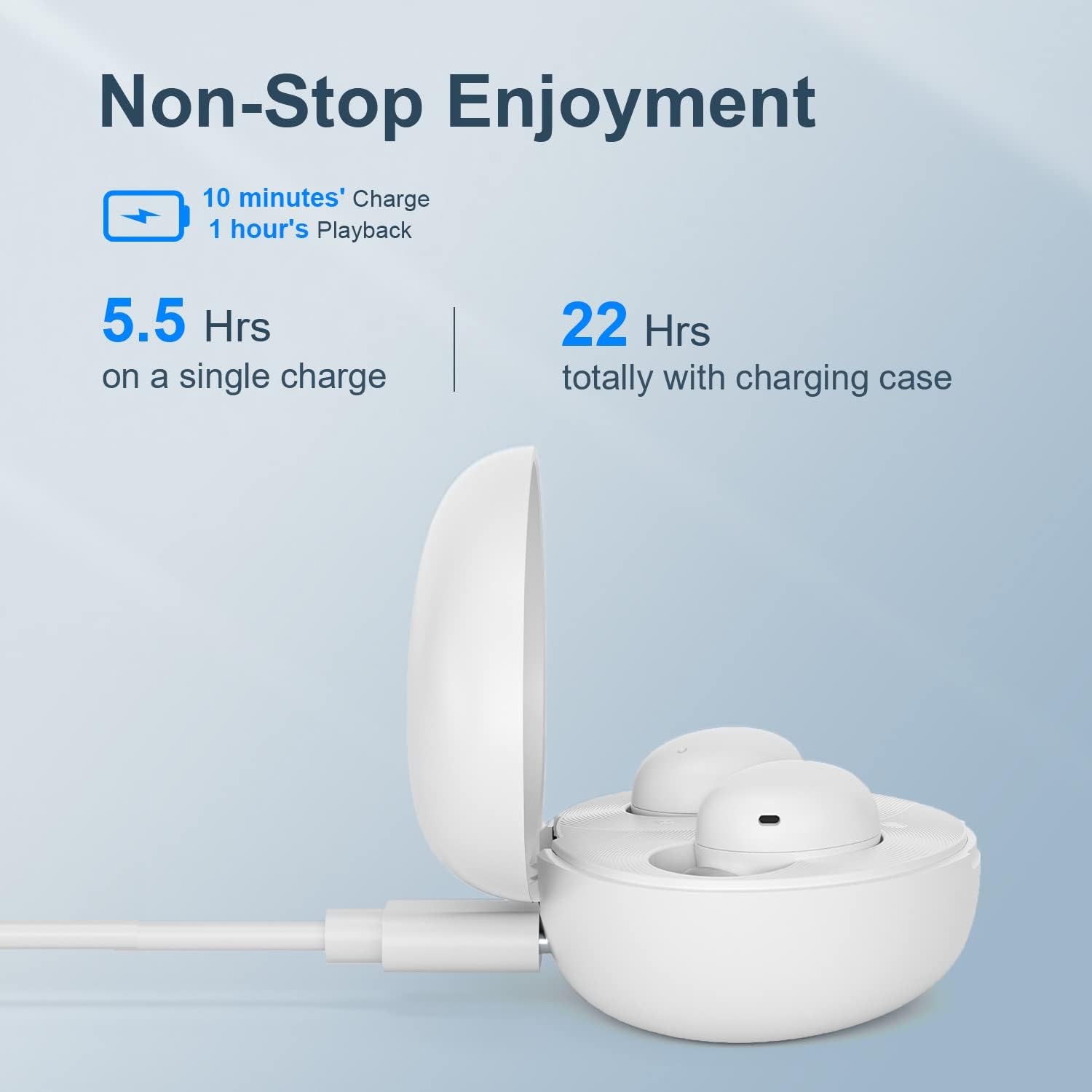
Image: QCY T16 charging case being charged via a USB-C cable.
การทำความสะอาด:
- Regularly clean the earbuds and charging contacts with a soft, dry cloth to ensure optimal performance and charging.
- ถอดจุกหูฟังออกและทำความสะอาดด้วยน้ำและสบู่เหลวหากจำเป็น ตรวจสอบให้แน่ใจว่าแห้งสนิทก่อนใส่กลับเข้าไปใหม่
5 การแก้ไขปัญหา
Master-Slave Switch:
- If one earbud is placed back into the charging case and the lid is closed, the other earbud will continue to function independently.
- To re-pair the inside earbud with the other, open the lid of the charging case. The LED will blink green and then turn off.
Disconnecting & Reconnecting:
- วางหูฟังทั้งสองข้างลงในกล่องชาร์จและเปิดฝาไว้
- Press and hold the charging case button for 4 seconds or until the LED on the case blinks green to disconnect from the device.
รีเซ็ตเป็นค่าเริ่มต้นจากโรงงาน:
- วางหูฟังทั้งสองข้างลงในกล่องชาร์จและเปิดฝาไว้
- Press and hold the charging case button for 10 seconds or until the LED on the case blinks red 5 times to set to factory settings.
Video: Demonstrates master-slave switch functionality, disconnecting, and factory reset procedures.
6. ข้อมูลจำเพาะ
| คุณสมบัติ | รายละเอียด |
|---|---|
| ยี่ห้อ | คิวซีวาย |
| ชื่อรุ่น | T16 มินิ |
| เทคโนโลยีการเชื่อมต่อ | ไร้สาย |
| เทคโนโลยีการสื่อสารไร้สาย | บลูทูธ 5.2 |
| การวางตำแหน่งหู | ในหู |
| ฟอร์มแฟกเตอร์ | ในหู |
| วัสดุ | พลาสติก, ซิลิโคน |
| น้ำหนักสินค้า | 0.141 ounces (approx. 4 grams per earbud) |
| ระดับความต้านทานต่อน้ำ | กันน้ำ (IPX5) |
| วิธีการควบคุม | รีโมท (ระบบควบคุมแบบสัมผัส) |
| ประเภทไดร์เวอร์เสียง | ไดร์เวอร์แบบไดนามิก |
| ช่วงบลูทูธ | 10 เมตร |
| อายุการใช้งานแบตเตอรี่ (หูฟัง) | 5.5 ชั่วโมง (ชาร์จครั้งเดียว) |
| อายุการใช้งานแบตเตอรี่ทั้งหมด (รวมเคส) | 22 ชั่วโมง |
| คุณสมบัติพิเศษ | Lightweight, Microphone Included, Wireless, AptX Adaptive, EQ |
7. การรับประกันและการสนับสนุน
For warranty information and technical support, please refer to the official QCY webหรือติดต่อผู้ค้าปลีกของคุณ โปรดเก็บหลักฐานการซื้อไว้เพื่อใช้ในกรณีที่ต้องการเคลมประกัน
คุณสามารถเยี่ยมชม ร้าน QCY บน Amazon สำหรับข้อมูลผลิตภัณฑ์เพิ่มเติมและทรัพยากรสนับสนุน