
1. บทนำ
The VEDINDUST HDMI Audio Embedder (Model CHD801) is designed to integrate external audio into an HDMI video signal. This device allows you to replace the original HDMI audio with digital optical (TOSLINK/SPDIF) or analog (3.5mm line) audio sources. It supports high-resolution video up to 4K@60Hz with 18Gbps bandwidth, HDR, CEC, and HDCP2.2/1.4 pass-through. This manual provides detailed instructions for setup, operation, and troubleshooting to ensure optimal performance.
2. คุณสมบัติ
- Digital/Analog Audio to HDMI Embedding: Replaces the original HDMI audio with external digital optical (TOSLINK/SPDIF) or analog (3.5mm line) audio.
- การสนับสนุนความละเอียดสูง: Supports video resolutions up to 4K@60Hz 4:4:4 with 18Gbps bandwidth. Also compatible with 1080p and 720p.
- Advanced Video Features: Supports HDMI2.0, 10-bit High Dynamic Range (HDR), HDCP 2.2/1.4, and CEC pass-through.
- ความเข้ากันได้ของรูปแบบไฟล์เสียง: HDMI port passes through all digital/analog audio formats including PCM, LPCM. Optical audio input supports various digital formats. 3.5mm audio input supports 2-channel stereo PCM audio.
- DVI to HDMI Conversion: Supports combining DVI signals with audio signals into HDMI signals using DVI to HDMI cables.
- ปลั๊กแอนด์เพลย์: No software installation required for operation.
3. เนื้อหาบรรจุภัณฑ์
โปรดตรวจสอบว่ารายการทั้งหมดที่ระบุไว้ด้านล่างมีอยู่ในแพ็คเกจของคุณหรือไม่:
- VEDINDUST HDMI Audio Embedder Unit (Model CHD801)
- สายไฟไมโคร USB
- คู่มือการใช้งาน
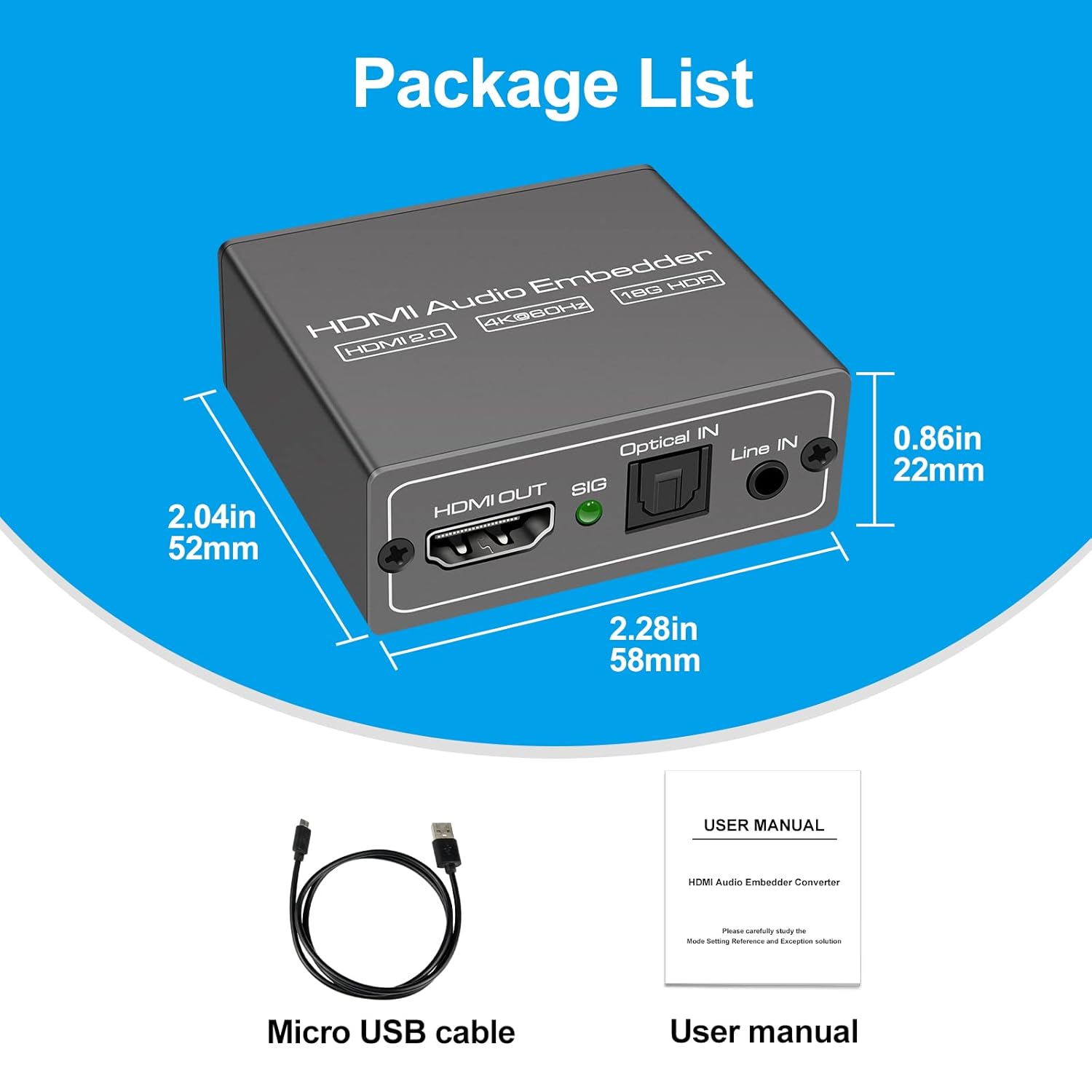
This image displays the items included in the product package: the VEDINDUST HDMI Audio Embedder unit, a Micro USB power cable, and the user manual.
4. สินค้าหมดview และท่าเรือ
Familiarize yourself with the device's ports and controls:

This close-up shows the mode switch on the device, allowing selection between 'Optical' audio input, 'Line' (3.5mm) audio input, or 'Pass' through mode for original HDMI audio.

This image details the audio output and input ports: HDMI OUT, Optical IN (TOSLINK), and 3.5mm Line IN, along with the signal indicator light.
- HDMI ใน: Connect your HDMI video source (e.g., laptop, TV box, game console).
- HDMI ออก: Connect to your display device (e.g., TV, projector).
- อินพุตออปติคอล: Connect your digital optical audio source (TOSLINK/SPDIF).
- Line IN: Connect your analog 3.5mm audio source.
- USB 5V (PW): Connect the Micro USB power cable to a 5V power adapter (not included) or a USB port on your display device.
- สวิตช์โหมด: Selects the desired audio input mode (Pass, Optical, or Line).
- ตัวบ่งชี้ SIG: Lights up when a signal is detected.
5. การตั้งค่า
Follow these steps to set up your HDMI Audio Embedder:
- Connect your HDMI video source (e.g., laptop, TV box, PS4, Blu-Ray DVD player) to the HDMI IN port on the embedder using an HDMI cable.
- Connect your display device (e.g., HD TV, projector) to the เอาต์พุต HDMI port on the embedder using an HDMI cable.
- Connect your external audio source to either the ออฟติคัล IN พอร์ต (สำหรับเสียงดิจิทัล) หรือ ในบรรทัด (3.5mm) port (for analog audio), depending on your desired audio input.
- Connect the provided Micro USB power cable to the USB 5V (PW) port on the embedder and then to a 5V power source.
- Select the appropriate audio input mode using the สวิตช์โหมด on the device (refer to Section 6: Operating Modes).
- Ensure all connections are secure and power on all connected devices.

This diagram shows how to connect various devices to the HDMI Audio Embedder. HDMI sources (laptop, TV box, PS4, Blu-Ray DVD) connect to the HDMI IN. External audio sources (3.5mm or optical) connect to their respective inputs. The HDMI OUT connects to a display device like a projector or HD TV.
6. โหมดการทำงาน
The HDMI Audio Embedder features a mode switch to select how audio is handled:
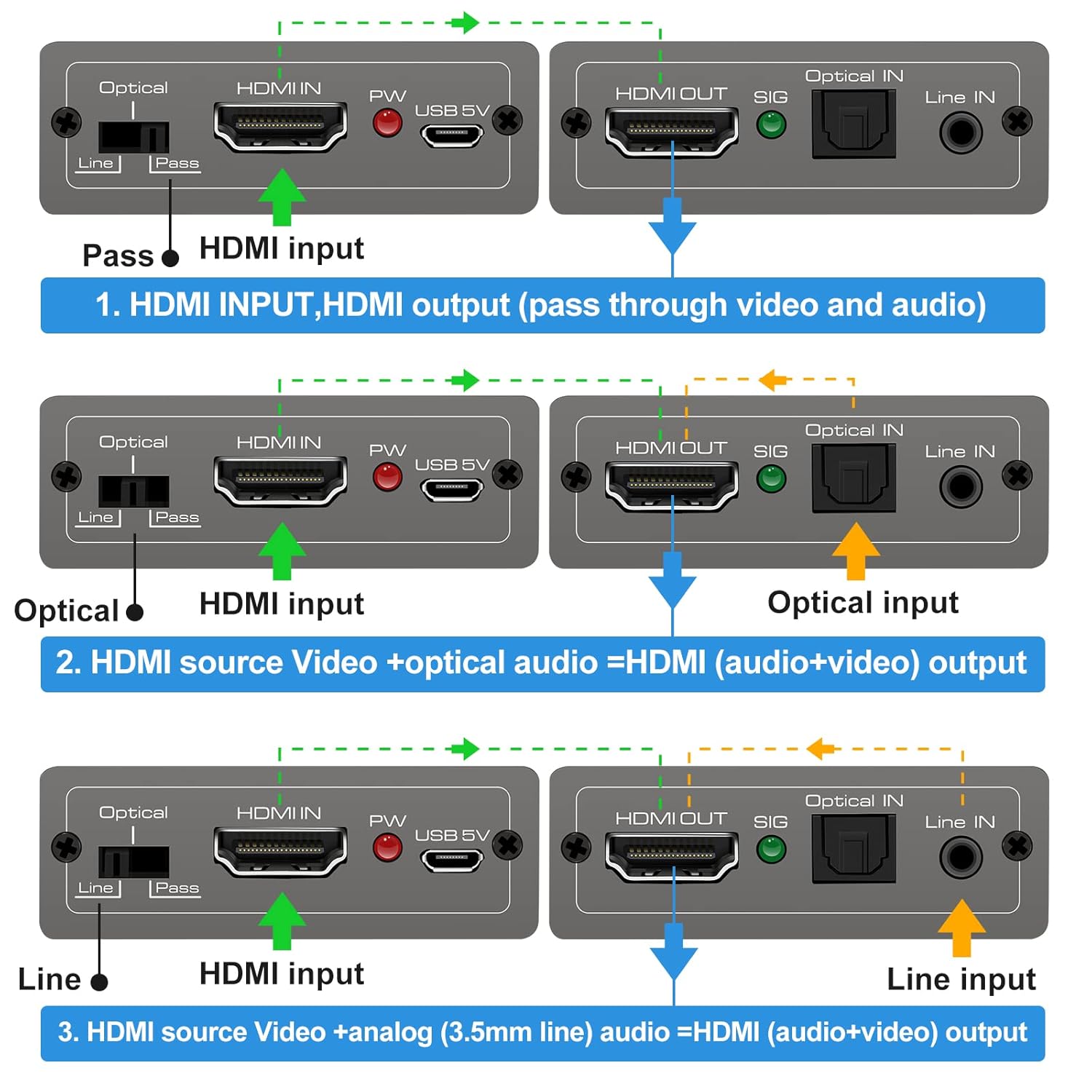
This diagram illustrates the three operational modes: 1. Pass Mode: HDMI input video and audio pass directly to HDMI output. 2. Optical Mode: HDMI input video combines with optical audio input for HDMI output. 3. Line Mode: HDMI input video combines with 3.5mm line audio input for HDMI output.
- โหมดผ่าน: In this mode, the original HDMI audio from your source device is passed through directly to the HDMI output, along with the video signal. No external audio is embedded.
- โหมดออปติคัล: When selected, the HDMI video signal from your source is combined with the audio signal received from the ออฟติคัล IN port. The embedded audio is then sent to the HDMI output.
- โหมด Line: When selected, the HDMI video signal from your source is combined with the audio signal received from the ในบรรทัด (3.5mm) port. The embedded audio is then sent to the HDMI output.
To change modes, simply slide the switch to the desired position. The device will automatically adjust the audio routing.
7. ข้อมูลจำเพาะ
Technical specifications for the VEDINDUST HDMI Audio Embedder:
- แบบอย่าง: 801CHDXNUMX
- เวอร์ชัน HDMI: HDMI2.0 การเชื่อมต่อ
- รุ่น HDCP: เอชดีซีพี 2.2 / 1.4
- ความละเอียดวิดีโอ: Up to 4K@60Hz (YUV 4:4:4)
- แบนด์วิธ: 18Gbps
- รองรับ HDR: 10-bit HDR
- การสนับสนุนซีอีซี: การผ่าน
- Audio Input (Digital): Optical (TOSLINK/SPDIF)
- Audio Input (Analog): 3.5mm Line In (2-channel stereo PCM)
- เอาต์พุตเสียง: HDMI (embedded audio)
- แหล่งจ่ายไฟ: DC 5V (ผ่าน Micro USB)
- ขนาด : 10.16 x 5.18 x 2.18 ซม. (4.0 x 2.04 x 0.86 นิ้ว)
- น้ำหนัก: 110 กรัม (3.88 ออนซ์)
- ผู้ผลิต: ความมั่นใจ
- ยูพีซี: 798610311141

This image highlights the device's capability to support high-resolution video, up to 4K at 60Hz, ensuring clear and detailed visuals.
8 การแก้ไขปัญหา
If you encounter issues with your HDMI Audio Embedder, please refer to the following common troubleshooting steps:
- ไม่มีเอาต์พุตวิดีโอ:
- ตรวจสอบให้แน่ใจว่าสาย HDMI ทั้งหมดเชื่อมต่ออย่างแน่นหนา
- Verify the power adapter is connected and the device is receiving power.
- ลองเชื่อมต่อแหล่งสัญญาณ HDMI เข้ากับจอแสดงผลโดยตรงเพื่อตรวจสอบว่าแหล่งสัญญาณและจอแสดงผลทำงานได้อย่างถูกต้อง
- Check if the display's input source is correctly selected.
- No Audio Output / Incorrect Audio:
- Ensure the correct audio input mode (Pass, Optical, or Line) is selected on the embedder's switch.
- Verify that the external audio source is properly connected and producing sound.
- Check the volume levels on both your audio source and display device.
- If using Optical or 3.5mm input, ensure the cables are fully inserted and not damaged.
- Some audio formats may not be supported by all devices. Try adjusting the audio output format on your source device.
- สัญญาณไม่ต่อเนื่อง:
- Use high-quality HDMI cables, especially for 4K resolutions.
- Ensure the power supply is stable and sufficient (5V).
- Avoid excessive cable lengths.
หากปัญหายังคงมีอยู่หลังจากลองขั้นตอนเหล่านี้แล้ว โปรดติดต่อฝ่ายสนับสนุนลูกค้า
9. การบำรุงรักษา
To ensure the longevity and optimal performance of your HDMI Audio Embedder, follow these maintenance guidelines:
- การทำความสะอาด: ใช้ผ้านุ่มและแห้งเช็ดทำความสะอาดอุปกรณ์ ห้ามใช้น้ำยาทำความสะอาดหรือสเปรย์
- สิ่งแวดล้อม: เก็บอุปกรณ์ไว้ในที่แห้งและเย็น หลีกเลี่ยงแสงแดดโดยตรง แหล่งความร้อน และความชื้น
- การจัดการ: หลีกเลี่ยงการทำอุปกรณ์หล่นหรือกระแทกอย่างรุนแรง
- การระบายอากาศ : Ensure proper airflow around the device to prevent overheating.
- พลัง: Disconnect the power supply when the device is not in use for extended periods.
10. การรับประกันและการสนับสนุน
VEDINDUST products are designed for reliability and performance. For information regarding warranty coverage, technical support, or service, please refer to the warranty card included with your product or visit the official VEDINDUST website. Please have your model number (CHD801) and purchase information ready when contacting support.