
1. บทนำ
This user manual provides essential information for the safe and effective operation, maintenance, and troubleshooting of the Mindray DP-50 Expert Ultrasound System. Please read this manual thoroughly before operating the device to ensure proper usage and to prevent injury or damage.
2. ข้อมูลด้านความปลอดภัย
Adherence to the following safety guidelines is crucial for the safe operation of the Mindray DP-50 Expert Ultrasound System.
- บุคลากรที่ผ่านการรับรอง: Only trained and qualified medical professionals should operate this device.
- แหล่งจ่ายไฟ: Connect the system only to a grounded power outlet with the correct voltage as specified on the device label.
- สภาพแวดล้อม : Operate the system within the specified temperature and humidity ranges to ensure optimal performance and longevity. Avoid direct sunlight and excessive dust.
- การจัดการหัววัด: Handle ultrasound probes with care. Avoid dropping or subjecting them to mechanical shock. Disinfect probes according to manufacturer guidelines.
- การปิดระบบฉุกเฉิน: โปรดทำความคุ้นเคยกับตำแหน่งของปุ่มเปิด/ปิด เพื่อปิดเครื่องทันทีในกรณีฉุกเฉิน
- การซ่อมบำรุง: Do not attempt to service the device yourself. Refer all servicing to authorized Mindray service personnel.
3. การตั้งค่า
Follow these steps for the initial setup of your Mindray DP-50 Expert Ultrasound System.
- การแกะกล่อง: Carefully remove the ultrasound system and all accessories from the packaging. Retain the original packaging for future transport or storage.
- การจัดวาง: Place the system on a stable, flat surface, ensuring adequate ventilation around the unit.
- การเชื่อมต่อไฟฟ้า: Connect the power cable to the system's power inlet and then to a grounded electrical outlet.
- การเชื่อมต่อโพรบ: Connect the desired ultrasound probe(s) to the designated probe ports on the system. Ensure a secure connection.
- อุปกรณ์ต่อพ่วง: Connect any necessary peripherals such as printers or external monitors.
- เปิดเครื่องครั้งแรก: Press the power button to turn on the system. Allow the system to complete its self-test and boot-up sequence.

รูปที่ 3.1 : ด้านหน้า view of the Mindray DP-50 Expert Ultrasound System, showing the main unit with the Mindray logo and integrated handle. This image illustrates the compact design of the device.
4. คู่มือการใช้งาน
This section outlines the basic steps for operating the Mindray DP-50 Expert Ultrasound System for diagnostic imaging.
4.1. หมดระบบview
The DP-50 Expert features an intuitive user interface with a high-resolution display and a user-friendly control panel. The display can be adjusted for optimal viewมุมการเอียง
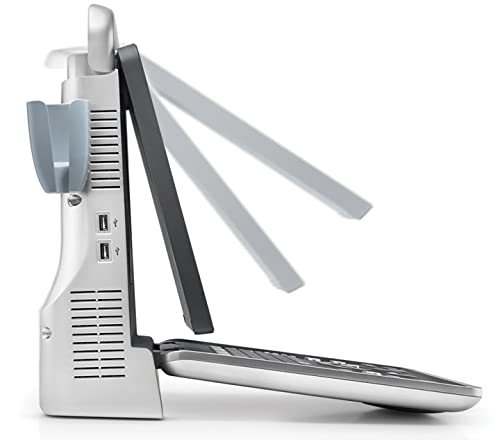
รูปที่ 4.1: ด้านข้าง view of the Mindray DP-50 Expert Ultrasound System, demonstrating the adjustable display screen. The screen can be tilted to various angles for ergonomic use.
4.2. ขั้นตอนการทำงานพื้นฐาน
- Patient Registration: Enter patient information using the on-screen keyboard or integrated patient management system.
- การเลือกโพรบ: Select the appropriate probe for the examination type from the system's menu.
- Application Preset: Choose the relevant application preset (e.g., Abdominal, Cardiac, OB/GYN) to optimize imaging parameters.
- Image Acquisition: Apply ultrasound gel to the patient's skin and position the probe. Adjust gain, depth, and focus as needed using the control panel.
- การจัดเก็บภาพ: Save images or cine loops to the system's internal storage or an external USB drive.
- Measurements and Reports: Utilize the system's measurement tools and generate reports as required.
- ปิดระบบ: After use, properly shut down the system via the software menu before pressing the power button.
5. การบำรุงรักษา
Regular maintenance ensures the longevity and optimal performance of your Mindray DP-50 Expert Ultrasound System.
- การทำความสะอาดรายวัน: Clean the system's exterior, display, and control panel with a soft, damp cloth and a mild, non-abrasive cleaner. Avoid excessive moisture.
- Probe Disinfection: Follow the probe manufacturer's instructions for cleaning and high-level disinfection after each use.
- การทำความสะอาดตัวกรองอากาศ: Periodically check and clean the air filters located on the system's vents to prevent overheating. Refer to the service manual for specific instructions.
- การอัปเดตซอฟต์แวร์: Ensure the system software is kept up-to-date. Contact Mindray service for information on available updates.
- การบริการระดับมืออาชีพ: Schedule regular preventive maintenance checks with authorized Mindray service technicians.
6 การแก้ไขปัญหา
This section provides solutions to common issues you may encounter with the Mindray DP-50 Expert Ultrasound System. For problems not listed here, contact technical support.
| ปัญหา | สาเหตุที่เป็นไปได้ | สารละลาย |
|---|---|---|
| ระบบเปิดไม่ติด | Power cable disconnected; power outlet issue; system fault. | Check power cable connection. Verify power outlet functionality. If problem persists, contact service. |
| ไม่มีภาพปรากฏ | Probe not connected properly; incorrect probe selected; system error. | Ensure probe is securely connected. Verify correct probe selection in software. Restart system. |
| คุณภาพของภาพไม่ดี | Insufficient gel; incorrect settings (gain, depth, focus); damaged probe. | Apply sufficient ultrasound gel. Adjust imaging parameters. Inspect probe for damage. |
| System freezes or crashes. | Software issue; overheating; hardware malfunction. | Restart the system. Ensure adequate ventilation. If frequent, contact service. |
7. ข้อมูลจำเพาะ
Key technical specifications for the Mindray DP-50 Expert Ultrasound System.
- หมายเลขรุ่น: 33992
- ผู้ผลิต: มายด์เรย์
- ขนาดสินค้า : 12.5 x 18 x 7.5 ซม. (ประมาณ 4.9 x 7.1 x 3.0 นิ้ว)
- น้ำหนักสินค้า: 100 กรัม (ประมาณ 0.22 ปอนด์)
- วัสดุ: วัสดุหลากหลาย
- แหล่งพลังงาน: AC power (specific voltage and frequency details typically on device label)
- แสดง: High-resolution LCD (specific size and resolution not provided in input, so keep general)
- การเชื่อมต่อ: USB ports (visible in image), network (assumed for medical devices)
8. การรับประกันและการสนับสนุน
For warranty information and technical support, please refer to the documentation provided with your purchase or contact Mindray customer service directly.
- การรับประกัน: Standard manufacturer's warranty applies. Details are typically found on the warranty card or Mindray's official webเว็บไซต์.
- การสนับสนุนด้านเทคนิค: Contact Mindray authorized service centers or your local distributor for technical assistance, repairs, and spare parts.
- แหล่งข้อมูลออนไลน์: Visit the official Mindray website for additional resources, FAQs, and software downloads.