การแนะนำ
This manual provides detailed instructions for the TAOPON Smartwatch ZL02G. Please read this guide thoroughly to ensure proper setup, operation, and maintenance of your device. This smartwatch is designed to assist with health monitoring, activity tracking, and smart notifications, compatible with both Android and iOS smartphones.
เนื้อหาแพ็คเกจ
เมื่อเปิดบรรจุภัณฑ์ ตรวจสอบว่ามีสิ่งของครบทั้งหมด:
- TAOPON Smartwatch ZL02G
- สายรัดซิลิโคน
- สายชาร์จแม่เหล็ก
- คู่มือการใช้งาน

Image: Package contents of the TAOPON Smartwatch ZL02G.
คู่มือการติดตั้ง
1. การชาร์จครั้งแรก
Before first use, fully charge the smartwatch. Connect the magnetic charging cable to the charging points on the back of the watch and plug the USB end into a standard USB power adapter (not included). A full charge typically takes approximately 2 hours.

Image: Smartwatch displaying charging status and battery life details.
2. การติดตั้งแอพ
Download and install the "Da Fit" application on your smartphone. You can find it on the App Store (for iOS devices) or Google Play Store (for Android devices).
3. การจับคู่อุปกรณ์
- ตรวจสอบให้แน่ใจว่าได้เปิดใช้งาน Bluetooth บนสมาร์ทโฟนของคุณแล้ว
- เปิดแอป "Da Fit"
- Follow the in-app instructions to search for and connect to your TAOPON Smartwatch ZL02G. The effective connection distance is approximately 10 meters.
- ยืนยันคำขอจับคู่บนสมาร์ทโฟนและสมาร์ทวอทช์ของคุณทั้งคู่
ความเข้ากันได้: The smartwatch is compatible with smartphones running iOS 9.0 or later, and Android 5.0 or later.
คำแนะนำการใช้งาน
1. การนำทางพื้นฐาน
The smartwatch features a 1.28-inch IPS color touchscreen. Swipe left, right, up, or down to navigate through menus and functions. Tap to select an option.
2. การปรับแต่งหน้าปัดนาฬิกา
The smartwatch offers multiple watch faces. You can select from 5 main interfaces directly on the watch or choose from over 75 customizable options within the "Da Fit" app. The app also allows you to set personal photos as your watch face.

ภาพ: อดีตampหน้าปัดนาฬิกาที่สามารถปรับแต่งได้

Image: Customizing watch faces using the companion app.
3. การติดตามสุขภาพ
สมาร์ทวอทช์รุ่นนี้มาพร้อมเซ็นเซอร์สำหรับตรวจสอบค่าสุขภาพต่างๆ:
- อัตราการเต้นของหัวใจ: ตรวจสอบอัตราการเต้นของหัวใจของคุณอย่างต่อเนื่อง
- ความดันโลหิต: ให้ค่าความดันโลหิตโดยประมาณ
- ออกซิเจนในเลือด (SpO2): วัดระดับความอิ่มตัวของออกซิเจนในเลือด
- การติดตามการนอนหลับ: Tracks your sleep patterns, including total sleep, light sleep, and restful sleep, to help analyze and improve sleep quality.

Image: Health and sleep monitoring features.

Image: Detailed health data display.
Note: Health monitoring data is for reference only and should not be used for medical diagnosis.
4. การติดตามกิจกรรม
The smartwatch tracks your daily activities and supports multiple sports modes:
- เครื่องนับก้าว: Records the number of steps taken.
- ระยะทาง: Calculates the distance covered.
- แคลอรี่: ประมาณการปริมาณแคลอรีที่เผาผลาญไป
- โหมดกีฬา: Includes modes for walking, running, cycling, skipping, badminton, basketball, football, and swimming.
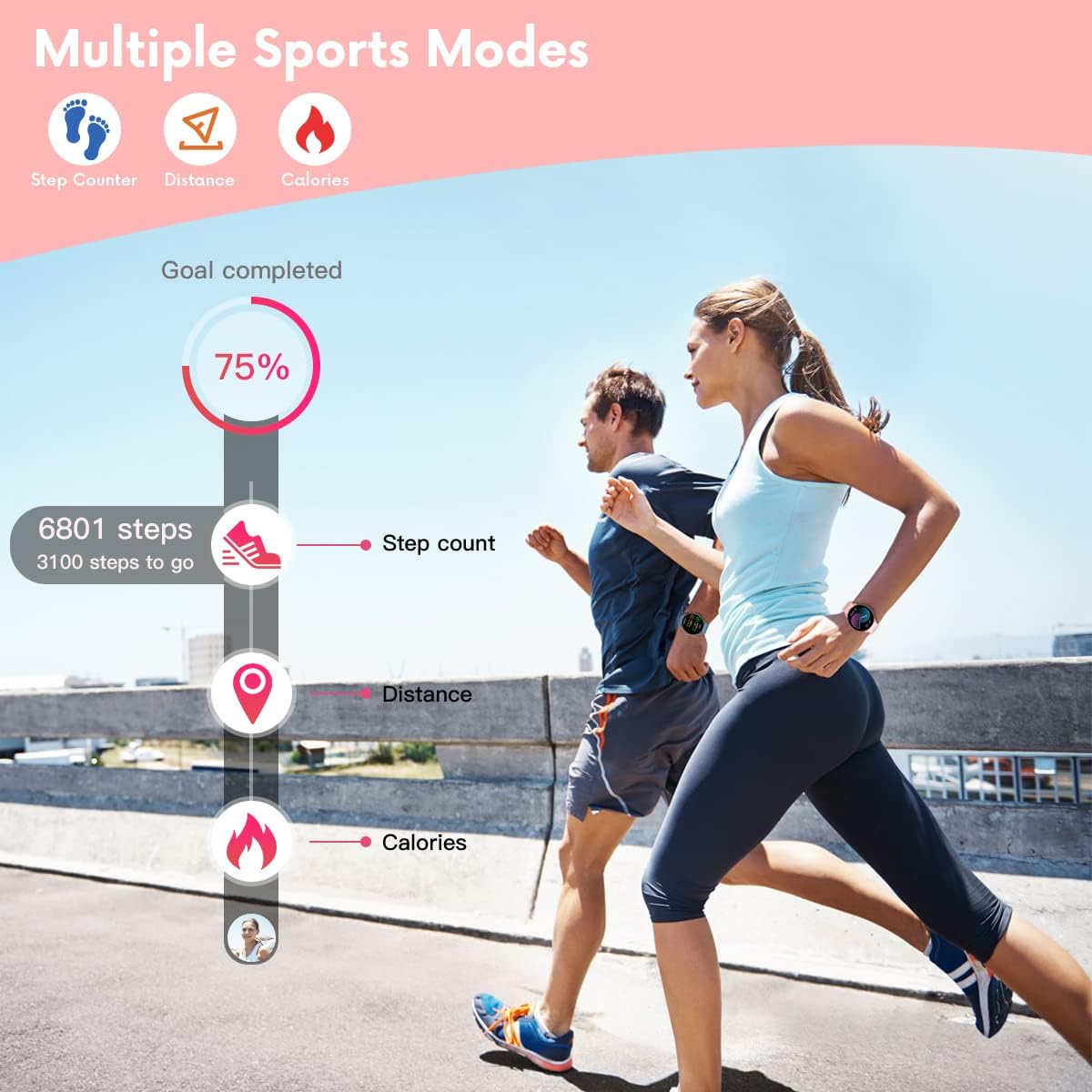
Image: Activity tracking features in action.

Image: Smartwatch supporting 8 different sports modes.
5. การแจ้งเตือนและการเตือน
Once connected to your smartphone via the "Da Fit" app, the smartwatch will display notifications:
- การแจ้งเตือนการโทร: Displays caller ID with options to answer or hang up (on the phone).
- การแจ้งเตือนข้อความ: Shows SMS and SNS messages (e.g., Facebook, WhatsApp, Twitter, Instagram, Messenger, email, Skype).
- The watch will vibrate to alert you to incoming calls and messages.

Image: Smartwatch displaying call and message notifications.
6. ฟังก์ชั่นเพิ่มเติม
The smartwatch includes several other useful features:
- ค้นหาหมายเลขโทรศัพท์: ช่วยค้นหาสมาร์ทโฟนที่เชื่อมต่ออยู่ของคุณ
- นาฬิกาจับเวลา สำหรับการจับเวลาในการทำกิจกรรม
- นาฬิกาปลุก: ตั้งนาฬิกาปลุกได้โดยตรงจากนาฬิกาหรือแอปพลิเคชัน
- การควบคุมเพลง: ควบคุมการเล่นเพลงบนสมาร์ทโฟนของคุณ (เล่น หยุดชั่วคราว ข้ามเพลง)
- เตือนการนั่งเฉยๆ: แจ้งเตือนให้คุณเคลื่อนไหวหลังจากช่วงเวลาที่ไม่ได้ใช้งาน
- การควบคุมกล้องระยะไกล: ใช้สมาร์ทวอทช์เป็นรีโมทชัตเตอร์สำหรับกล้องสมาร์ทโฟนของคุณ
- เกม: The watch may include simple games.

กล้องระยะไกล

การควบคุมเพลง

เกมส์
การซ่อมบำรุง
1. การทำความสะอาด
ทำความสะอาดสมาร์ทวอทช์และสายนาฬิกาเป็นประจำด้วยผ้าแห้งนุ่มๆ หากจำเป็น ให้ใช้ผ้าที่ชื้นเล็กน้อยเช็ดทำความสะอาดamp ใช้ผ้าชุบน้ำสบู่อ่อนๆ เช็ด แล้วเช็ดให้แห้ง หลีกเลี่ยงสารเคมีรุนแรงหรือวัสดุที่มีฤทธิ์กัดกร่อน
2. ความทนทานต่อน้ำ
The TAOPON Smartwatch ZL02G is rated IP67 water-resistant, meaning it is protected against dust and can withstand immersion in water up to 1 meter for up to 30 minutes. It is suitable for daily use, such as washing hands or light rain. However, it is not recommended for swimming, showering with hot water, or diving, as steam and high water pressure can compromise the seal.

Image: Smartwatch demonstrating water resistance during hand washing.
3. การดูแลแบตเตอรี่
To prolong battery life, avoid extreme temperatures. Charge the watch fully when the battery is low. The battery capacity is 200mAh, providing 7-10 days of typical use and up to 30 days of standby time.
การแก้ไขปัญหา
หากคุณพบปัญหาเกี่ยวกับสมาร์ทวอทช์ โปรดดูวิธีแก้ไขปัญหาทั่วไปต่อไปนี้:
- นาฬิกาไม่เปิด: ตรวจสอบให้แน่ใจว่านาฬิกาชาร์จเต็มแล้ว เสียบนาฬิกาเข้ากับเครื่องชาร์จอย่างน้อย 30 นาที
- Cannot connect to smartphone:
- Ensure Bluetooth is enabled on your phone and the watch is within 10 meters.
- Check if the "Da Fit" app is running and has necessary permissions.
- รีสตาร์ททั้งสมาร์ทโฟนและสมาร์ทวอทช์ของคุณ
- Try unpairing and re-pairing the device through the "Da Fit" app.
- ไม่มีการแจ้งเตือน:
- Verify that notifications are enabled in the "Da Fit" app for the specific applications.
- Check your phone's notification settings to ensure the "Da Fit" app has permission to send notifications.
- ตรวจสอบให้แน่ใจว่านาฬิกาเชื่อมต่อผ่านบลูทูธ
- ข้อมูลสุขภาพที่ไม่ถูกต้อง: ตรวจสอบให้แน่ใจว่าสวมนาฬิกาให้กระชับพอดีข้อมือ ไม่แน่นหรือหลวมเกินไป ทำความสะอาดเซ็นเซอร์ที่ด้านหลังนาฬิกา
- Weather function not working: Ensure the "Da Fit" app has location permissions and is connected to the internet to fetch weather data.
- Bracelet detaching: If the strap repeatedly detaches, inspect the spring bars for damage. Contact customer support if the issue persists.
ข้อมูลจำเพาะ
| ยี่ห้อ | เตาปูน |
| หมายเลขรุ่น | ZL02G |
| แสดง | 1.28-inch IPS Color Touchscreen, 240x240 resolution |
| ความจุของแบตเตอรี่ | โพลิเมอร์ 200mAh |
| อายุการใช้งานแบตเตอรี่ | 7-10 วัน (ใช้งานปกติ), 30 วัน (สแตนด์บาย) |
| เวลาในการชาร์จ | ประมาณ 2 ชั่วโมง |
| ความต้านทานต่อน้ำ | IP67 |
| การเชื่อมต่อ | บลูทูธ |
| ความเข้ากันได้ | แอนดรอยด์ 5.0+ / iOS 9.0+ |
| ความยาวสาย | ต่ำสุด: 160 มม. สูงสุด: 228 มม |
| ความหนาของหน้าปัด | 10.8มม. |
การรับประกันและการสนับสนุน
For information regarding warranty coverage, please refer to the warranty card included with your purchase or contact the retailer/manufacturer directly. Keep your proof of purchase for any warranty claims.
If you require further assistance or have questions not covered in this manual, please contact TAOPON customer support through the contact information provided on their official webไซต์หรือแพลตฟอร์มการซื้อของคุณ