
luxceo P100
LUXCEO Handheld Light Wand
Model: P100 User Manual
คู่มือของคุณเพื่อประสิทธิภาพและการดูแลรักษาที่ดีที่สุด
1. บทนำ
Thank you for choosing the LUXCEO Handheld Light Wand P100. This device is a versatile RGB LED video light designed for various photography and video shooting applications. It features a compact design, magnetic adsorption, and multiple lighting modes to enhance your creative work. Please read this manual thoroughly before use to ensure proper operation and maintenance.
2. ข้อมูลด้านความปลอดภัย
- อย่าให้เครื่องโดนน้ำหรือความชื้นมากเกินไป
- หลีกเลี่ยงการทำอุปกรณ์หล่นหรือกระแทกอย่างรุนแรง
- ห้ามถอดประกอบหรือดัดแปลงอุปกรณ์ด้วยตนเอง การซ่อมแซมควรดำเนินการโดยบุคลากรที่ได้รับอนุญาตเท่านั้น
- เก็บให้พ้นจากมือเด็ก
- ใช้สาย USB-C ที่ให้มาเท่านั้นสำหรับการชาร์จ
- ห้ามใช้งานไฟในอุณหภูมิที่สูงหรือต่ำเกินไป
- Avoid direct eye exposure to the light, especially at high brightness settings.
3. เนื้อหาบรรจุภัณฑ์
โปรดตรวจสอบว่าสินค้าทั้งหมดมีอยู่ในแพ็คเกจของคุณ:
- RGB Tube Light (P100) x 1
- สายชาร์จ USB-C x 1
- รีโมทคอนโทรล x 1
- คู่มือการใช้งาน x 1

Image: The LUXCEO Handheld Light Wand P100, displaying its compact form factor and the included remote control. The light wand is shown emitting various colors, demonstrating its RGB capabilities.

Image: A visual representation of the package contents for the LUXCEO P100, including the light wand, remote control, USB-C charging cable, and user manual. Also depicted are badges for a 30-day money-back guarantee and a 1-year warranty.
4. สินค้าหมดview
The LUXCEO P100 features a robust design with intuitive controls and versatile mounting options.
4.1 ส่วนประกอบ
- หลอดไฟ: Emits light in various colors and temperatures.
- Magnetic Ends: Integrated magnets for attaching to metal surfaces.
- 1/4"-20 Thread: Standard tripod mount on both ends for versatile attachment.
- ปุ่มเปิด/ปิด: เปิดหรือปิดอุปกรณ์
- Shift Gear Button (M): Cycles through different lighting modes (CCT, RGB, Scene).
- Add/Subtract Knob: Adjusts brightness, color temperature, or hue depending on the mode.
- พอร์ตชาร์จ USB-C: สำหรับชาร์จแบตเตอรี่ภายใน
- ไฟแสดงสถานะการชาร์จ: ไฟ LED แสดงสถานะการชาร์จ
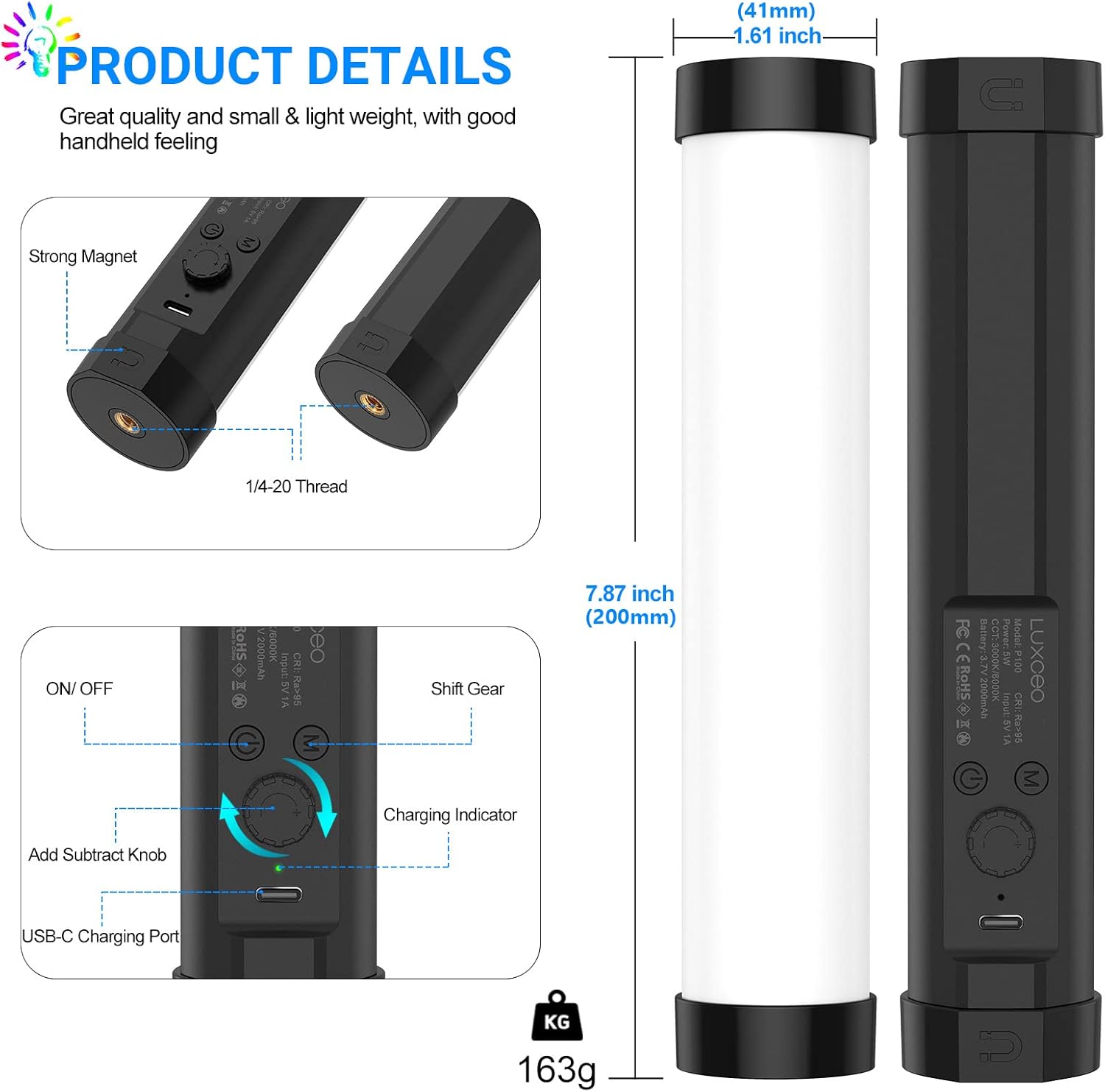
ภาพ: รายละเอียด view of the LUXCEO P100 light wand, highlighting its physical dimensions (7.87 inches length, 1.61 inches width), magnetic ends, 1/4-20 tripod thread, and control layout including the On/Off switch, Shift Gear (M) button, Add/Subtract knob, and USB-C charging port. The weight of 163g is also indicated.
4.2 คุณสมบัติหลัก
- การออกแบบการดูดซับแม่เหล็ก: Equipped with two magnets on both ends, allowing attachment to metal surfaces. The lamp body can rotate 360° when adsorbed for angle adjustment.
- RGB + Bi-color Light: Features 80 high color rendering LED beads with a brightness of up to 400 lumens and CRI >95+. Supports CCT mode (3000K/6000K), brightness, and color adjustment.
- แบตเตอรี่ความจุสูง: Built-in 2000mAh rechargeable battery provides approximately 1.5 hours of continuous use at maximum power and up to 30 hours at minimum power.
- การออกแบบพกพา: Made from hard PC with a soft light mask, weighing only 163g (0.35lb) and measuring 20cm (7.87") in length.
5. การตั้งค่า
5.1 การชาร์จเริ่มต้น
Before first use, fully charge the light wand.
- Connect the provided USB-C cable to the charging port on the back of the light wand.
- เชื่อมต่อปลายอีกด้านหนึ่งของสาย USB-C เข้ากับอะแดปเตอร์ไฟ USB ที่ใช้งานร่วมกันได้ (ไม่รวมอยู่ด้วย) หรือพอร์ต USB ของคอมพิวเตอร์
- ไฟแสดงสถานะการชาร์จจะสว่างขึ้นขณะชาร์จ โดยปกติจะใช้เวลาประมาณ 3 ชั่วโมงในการชาร์จจนเต็ม
- The light wand can be used while charging.
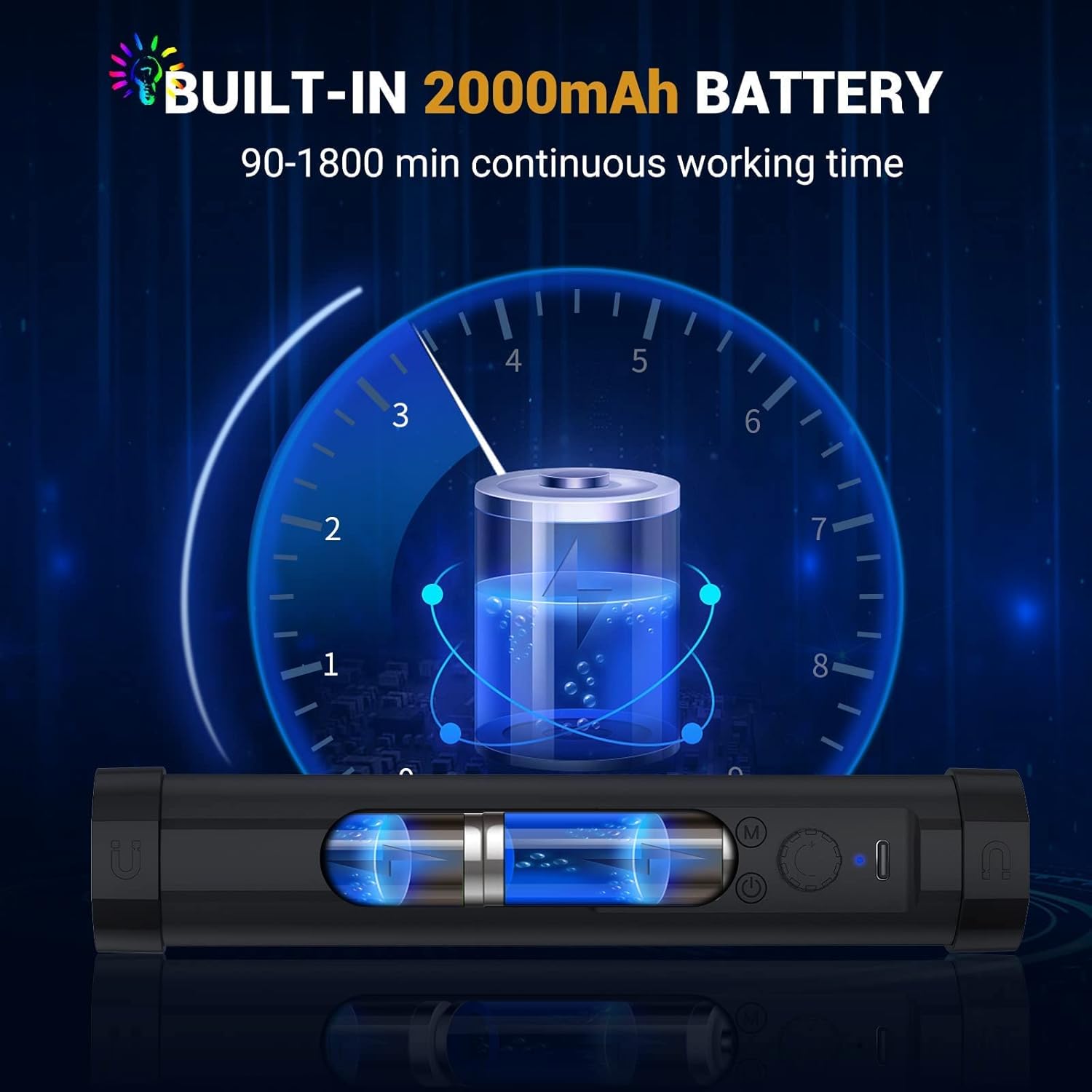
Image: A visual representation of the LUXCEO P100's built-in 2000mAh battery, indicating its continuous working time ranging from 90 minutes (1.5 hours) at maximum brightness to 1800 minutes (30 hours) at minimum brightness.
5.2 ตัวเลือกการติดตั้ง
The light wand offers flexible mounting options:
- แบบถือด้วยมือ: Use it directly by hand for dynamic lighting.
- ขาตั้งกล้อง/ขาตั้งไฟ: Attach to any standard tripod or light stand using the dual 1/4"-20 nut on either end.
- พื้นผิวแม่เหล็ก: Adsorb the light wand to any metal surface using the integrated magnets. The light can be rotated 360 degrees for precise angle adjustment.
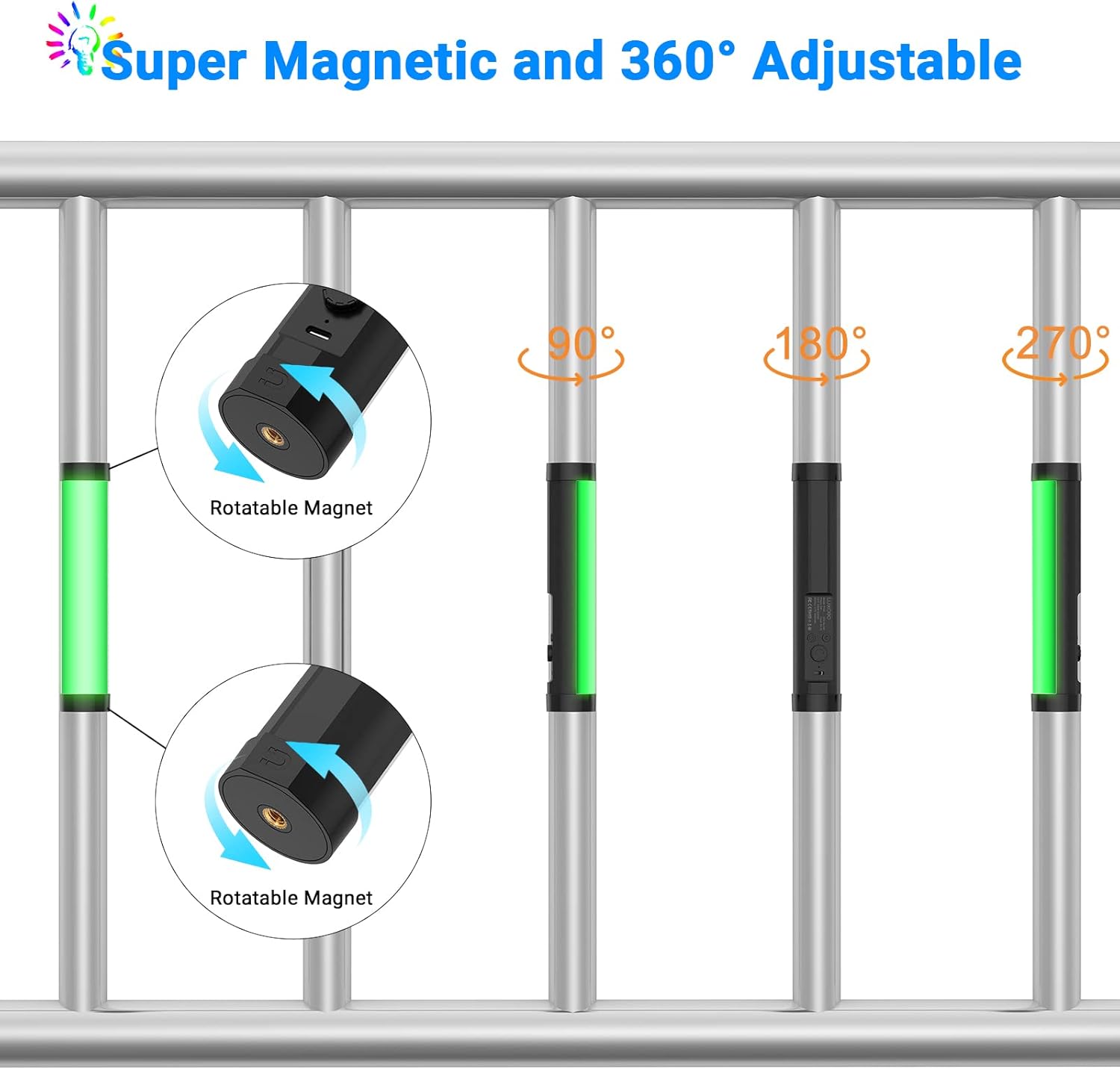
Image: This image demonstrates the super magnetic and 360-degree adjustable capabilities of the LUXCEO P100. It shows the light wand magnetically attached to metal bars, with arrows indicating the rotatable magnets and examples of 90°, 180°, and 270° rotation for flexible lighting angles.

Image: An illustration highlighting the dual 1/4-inch interface on the LUXCEO P100, demonstrating its compatibility and rich expansion possibilities with various photographic equipment such as DSLR cameras, mini tripods, and full-sized light stands.
6. คู่มือการใช้งาน
6.1 เปิด/ปิดเครื่อง
กดปุ่ม เปิด/ปิด ปุ่มสำหรับเปิดหรือปิดแท่งไฟ
6.2 โหมดการสลับ
กดปุ่ม Shift Gear (M) ปุ่มสำหรับสลับโหมดแสงสว่างที่มีให้เลือก:
- โหมด CCT: Adjusts color temperature (3000K to 6000K) and brightness.
- โหมด RGB: Adjusts hue (0-360°) and brightness for full-color lighting.
- โหมดฉาก: Selects from pre-programmed lighting effects.
6.3 การปรับการตั้งค่า
ใช้ Add/Subtract Knob to adjust parameters within each mode:
- In CCT Mode: Rotate the knob to adjust color temperature or brightness.
- In RGB Mode: Rotate the knob to change the color hue or brightness.
- In Scene Mode: Rotate the knob to cycle through the different scene effects.
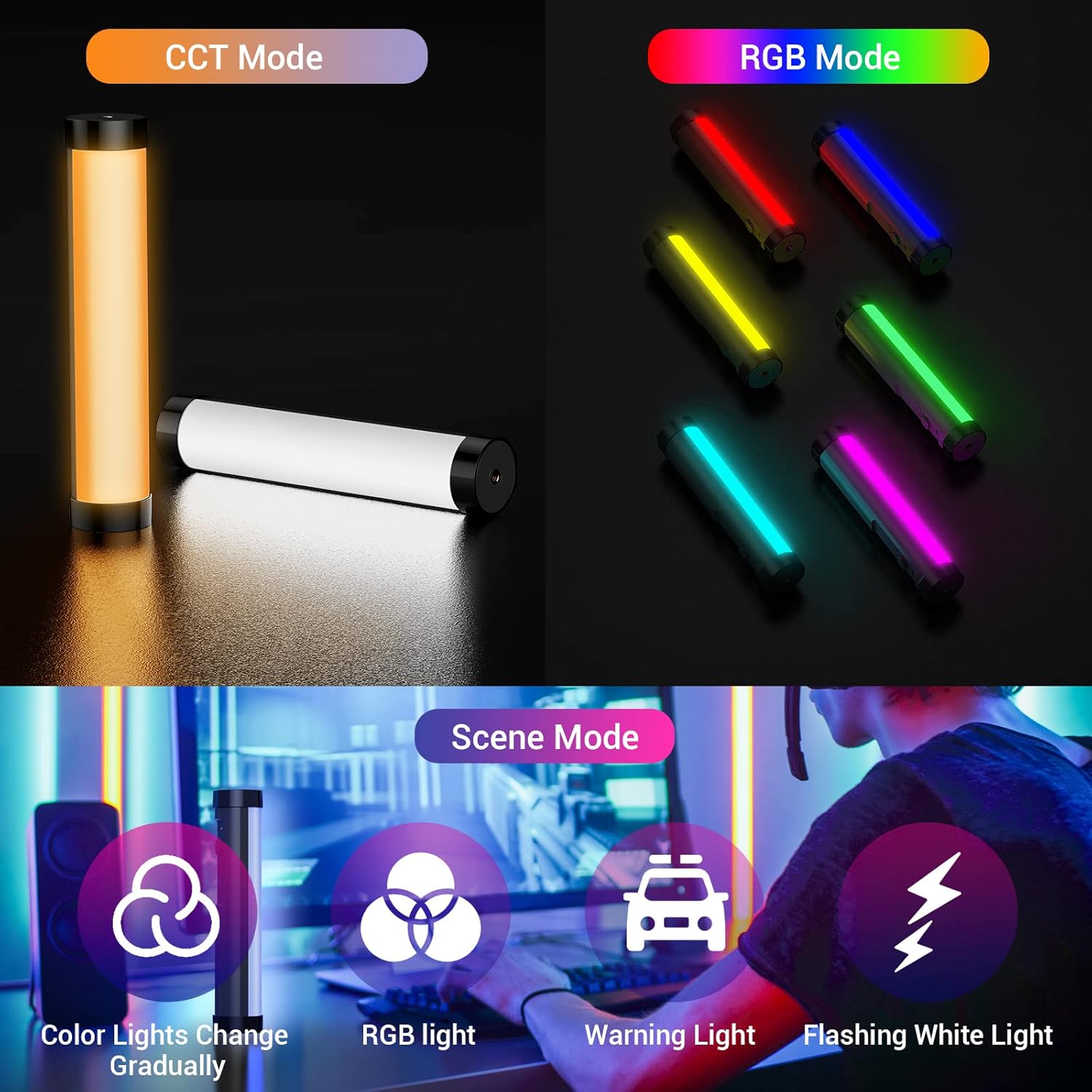
Image: This diagram illustrates the three main operating modes of the LUXCEO P100: CCT Mode (showing warm and cool white light), RGB Mode (displaying various solid colors like red, yellow, green, cyan, magenta, blue), and Scene Mode (depicting four specific effects: Color Lights Change Gradually, RGB light, Warning Light, and Flashing White Light).
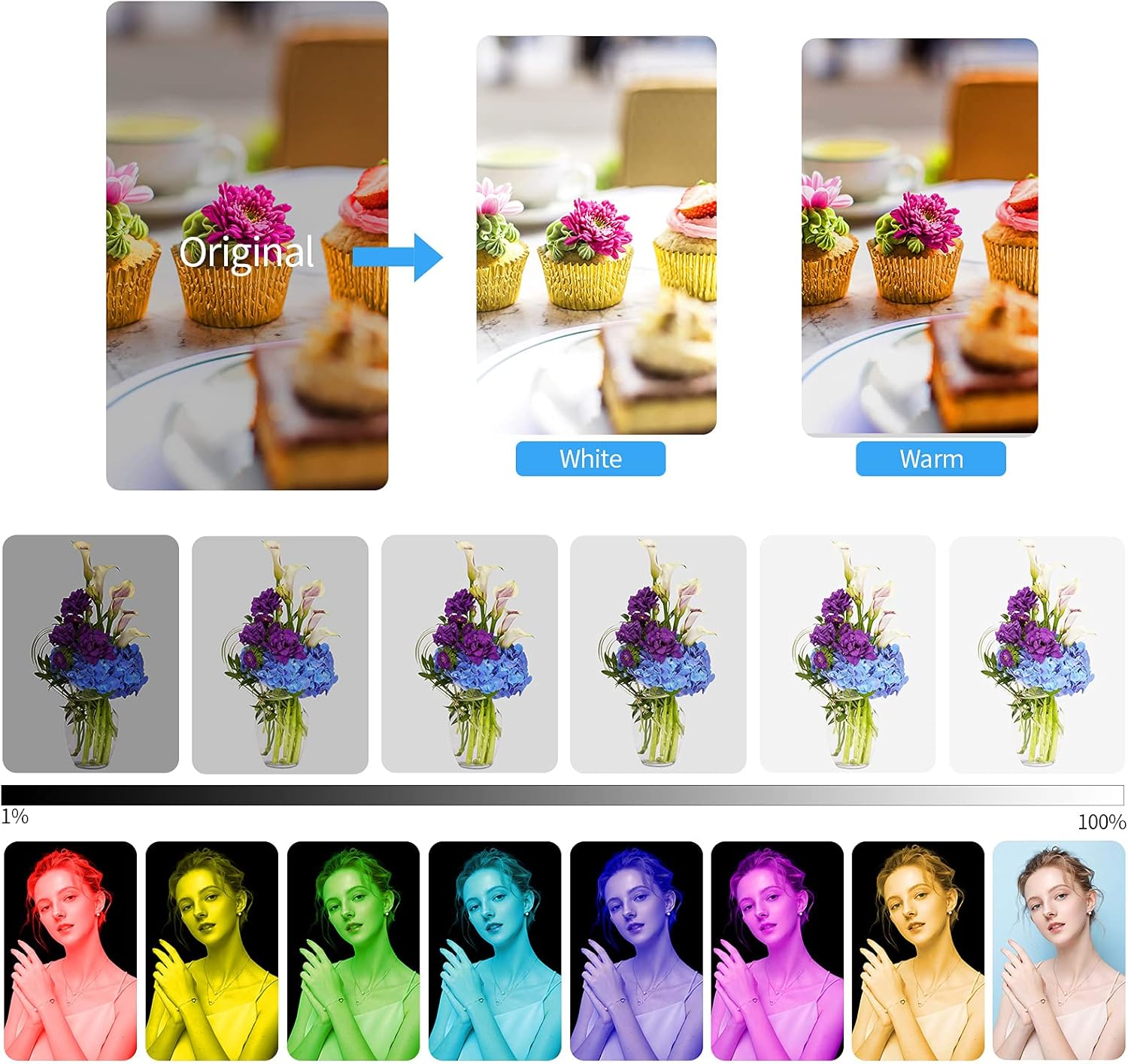
ภาพ: ภาพตัวอย่างamples of the LUXCEO P100's lighting capabilities. It shows how the light can transform an original image with white and warm light, and displays a gradient of brightness from 1% to 100%. Additionally, a spectrum of RGB colors is presented, demonstrating the full range of hues available.
6.4 การทำงานของรีโมทคอนโทรล
The included remote control allows for convenient adjustment of the light wand's settings from a distance. Refer to the remote control's button layout for specific functions (e.g., power, mode selection, brightness adjustment, color selection, flash modes).
6.5 สถานการณ์การสมัคร
The LUXCEO P100 is suitable for a variety of uses:
- การถ่ายทอดสด
- Self-Portraits
- การถ่ายภาพผลิตภัณฑ์
- Wedding Shooting
- กลางแจ้งคampแสง
- Hiking Light
- ภาพวาดด้วยแสง
- Fill Lighting
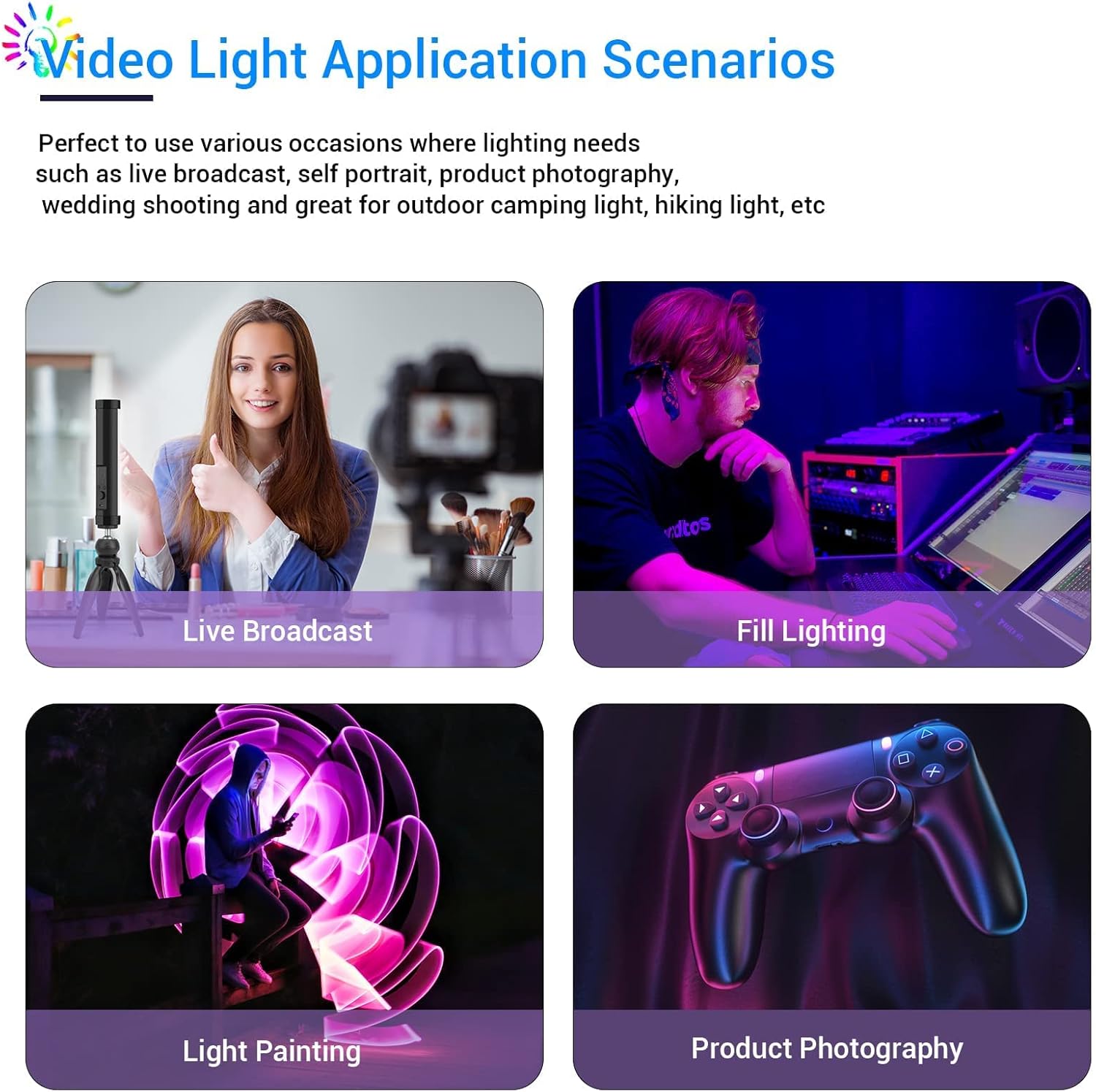
Image: This composite image displays four different application scenarios for the LUXCEO P100 light wand: a person using it for a live broadcast setup, providing fill lighting for a gamer, creating light painting effects, and illuminating products for photography.
7. การบำรุงรักษา
7.1 การทำความสะอาด
Wipe the light wand with a soft, dry cloth. Do not use abrasive cleaners or solvents.
7.2 พื้นที่จัดเก็บ
เก็บอุปกรณ์ไว้ในที่แห้งและเย็น หลีกเลี่ยงแสงแดดโดยตรงและอุณหภูมิที่สูงหรือต่ำเกินไป หากเก็บอุปกรณ์ไว้เป็นเวลานาน โปรดตรวจสอบให้แน่ใจว่าแบตเตอรี่มีประจุไฟเพียงพอ (ประมาณ 50%) เพื่อยืดอายุการใช้งาน
8 การแก้ไขปัญหา
| ปัญหา | สาเหตุที่เป็นไปได้ | สารละลาย |
|---|---|---|
| ไฟไม่เปิด | แบตเตอรี่หมด | Charge the light wand using the USB-C cable. |
| ไฟกระพริบหรือหรี่ลงโดยไม่คาดคิด | แบตเตอรี่อ่อน | ชาร์จอุปกรณ์ใหม่ |
| รีโมทคอนโทรลไม่ทำงาน | แบตเตอรี่รีโมทหมดหรือมีสิ่งกีดขวาง | Ensure line of sight to the light wand. Replace remote battery if necessary. |
| ไม่สามารถเปลี่ยนโหมดหรือสีได้ | Incorrect button press or device malfunction. | Ensure you are pressing the correct mode button (M) and adjusting with the knob. If issue persists, contact customer support. |
9. ข้อมูลจำเพาะ
| คุณสมบัติ | รายละเอียด |
|---|---|
| แบบอย่าง | P100 |
| พลัง | 5W |
| ความสว่าง | 400lm (สูงสุด) |
| อุณหภูมิสี | 3000K / 6000K |
| ซีอาร์ไอ | >95+ |
| ป้อนข้อมูล | กระแสตรง 5V/1A |
| พอร์ตชาร์จ | ยูเอสบี ไทป์ ซี |
| แบตเตอรี่ | 3.7V 2000mAh / 7.4Wh Lithium Ion |
| เวลาทำงาน | ใช้งานได้นาน 1.5 ชั่วโมง (ความสว่างสูงสุด) - 30 ชั่วโมง (ความสว่างต่ำสุด) |
| ขนาด | 7.87 x 1.61 x 1.61 นิ้ว (200 x 41 x 41 มม.) |
| น้ำหนักสินค้า | 7.8 ออนซ์ (163 กรัม) |
| เทคโนโลยีการเชื่อมต่อ | ยูเอสบี |
| วันที่พร้อมใช้งานครั้งแรก | วันที่ 27 กันยายน 2021 |
10. การรับประกันและการสนับสนุน
10.1 ข้อมูลการรับประกัน
The LUXCEO Handheld Light Wand P100 comes with a รับประกัน 1 ปี นับจากวันที่ซื้อ ครอบคลุมถึงข้อบกพร่องจากการผลิต นอกจากนี้ ยังมี รับประกันคืนเงินภายใน 30 วัน เพื่อความพึงพอใจของลูกค้า
10.2 การสนับสนุนลูกค้า
For any questions, technical assistance, or warranty claims, please contact LUXCEO customer service. We are committed to providing responsive support to ensure your satisfaction.
Please refer to the contact information provided on the product packaging or the official LUXCEO webโปรดเยี่ยมชมเว็บไซต์เพื่อดูรายละเอียดการสนับสนุนล่าสุด
Ask a question about this manual
Ask about setup, troubleshooting, compatibility, parts, safety, or missing instructions. Manuals+ will review the question and use this page’s manual context to help answer it.