
Dascert Q38[NEW]
Dascert Q38 Wireless Bluetooth Earbuds User Manual
Model: Q38[NEW]
1. บทนำ
Thank you for choosing the Dascert Q38 Wireless Bluetooth Earbuds. These earbuds are designed to provide a comfortable and immersive audio experience, perfect for sports and daily use. Featuring Bluetooth 5.1 technology, IP7 waterproofing, and a long-lasting battery, the Q38 earbuds offer stable connectivity and high-fidelity stereo sound.
โปรดอ่านคู่มือนี้อย่างละเอียดก่อนใช้ผลิตภัณฑ์เพื่อให้มั่นใจว่าจะทำงานได้อย่างถูกต้องและมีอายุการใช้งานยาวนานที่สุด
2. เนื้อหาบรรจุภัณฑ์
ตรวจสอบให้แน่ใจว่ามีรายการทั้งหมดอยู่ในบรรจุภัณฑ์:
- Dascert Q38 Wireless Earbuds (Left and Right)
- เคสชาร์จไฟ
- สายชาร์จ USB-C
- คู่มือการใช้งาน
- Earhooks (pre-installed or included separately)
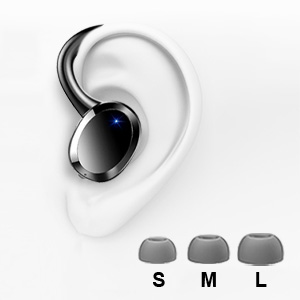
- จุกหูฟังมีหลายขนาด (S, M, L)

3. สินค้าหมดview
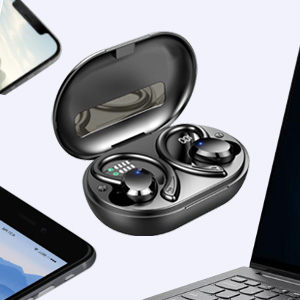
The Dascert Q38 earbuds are designed for comfort and performance, especially during physical activity. Key features include secure earhooks, IP7 waterproofing, and intuitive touch controls.
3.1 ส่วนประกอบของเอียร์บัด

- ที่เกี่ยวหู: Provides a secure and comfortable fit, ideal for sports.
- พื้นที่ควบคุมแบบสัมผัส: สำหรับจัดการการเล่นเพลง การโทร และผู้ช่วยเสียง
- ไฟแสดงสถานะ LED: แสดงสถานะการชาร์จและสถานะการเชื่อมต่อ
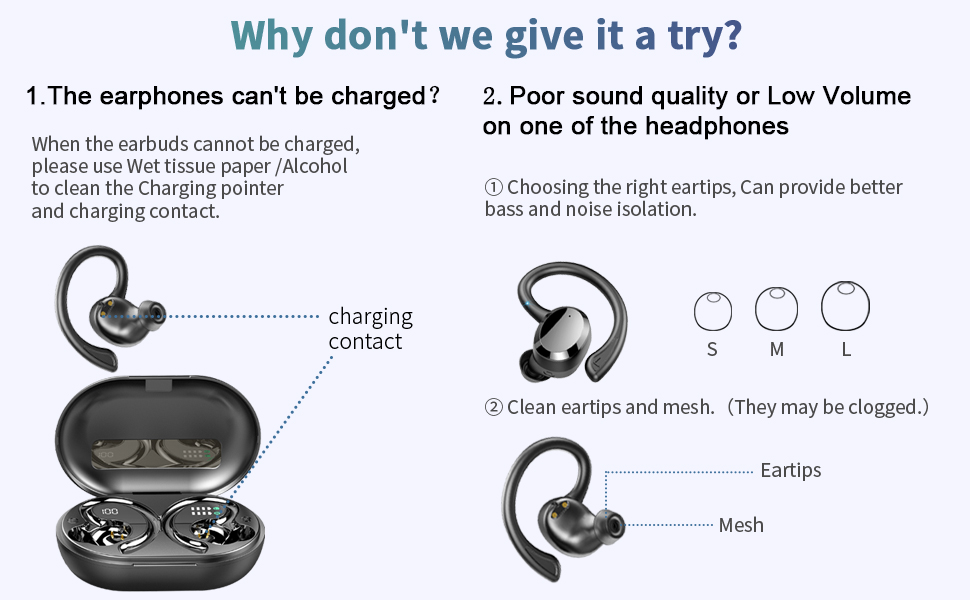
- หน้าสัมผัสการชาร์จ: เชื่อมต่อกับเคสชาร์จเพื่อรับพลังงาน
- ไมโครโฟน: สำหรับการโทรและการสั่งงานด้วยเสียง
3.2 ส่วนประกอบของเคสชาร์จ
- จอแสดงผล LED ดิจิตอล: Shows the charging case battery percentagอี (1%-100%)
- Earbud Charging Indicators: LED bars for Left (L) and Right (R) earbuds, flashing when charging and turning off when fully charged.
- พอร์ตชาร์จ USB-C: For fast charging the case.

4. การตั้งค่า
4.1 ค่าบริการเริ่มต้น
ก่อนใช้งานครั้งแรก ควรชาร์จหูฟังและเคสชาร์จให้เต็ม
- ใส่หูฟังเอียร์บัดทั้งสองข้างลงในกล่องชาร์จ
- เสียบสายชาร์จ USB-C เข้ากับพอร์ตชาร์จบนเคส และเสียบปลายอีกด้านหนึ่งเข้ากับอะแดปเตอร์แปลงไฟ USB (ไม่ได้รวมอยู่ในชุด) หรือพอร์ต USB ของคอมพิวเตอร์
- The LED display on the case will show the battery percentage, and the earbud indicators will flash during charging.
- Charging takes approximately 1 hour for earbuds and 1.5 hours for the case.

4.2 Pairing with a Device (One-Step Pairing)
The earbuds feature one-step pairing for convenience.
- เปิดกล่องชาร์จ หูฟังจะเปิดอัตโนมัติและเข้าสู่โหมดจับคู่
- บนสมาร์ทโฟนหรืออุปกรณ์ที่รองรับ Bluetooth ของคุณ ให้ไปที่การตั้งค่า Bluetooth
- ค้นหา "Q38" in the list of available devices and select it to connect.
- เมื่อเชื่อมต่อแล้ว จะมีเสียงแจ้งเตือนยืนยันการจับคู่สำเร็จ

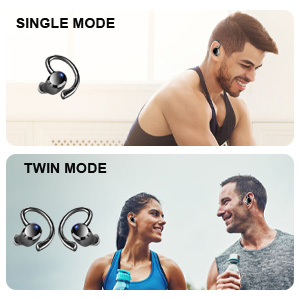
You can use either earbud independently (single mode) or both together (twin mode).
4.3 การเลือกจุกหูฟังที่เหมาะสม
Selecting the correct eartip size is crucial for optimal sound quality and comfort. A proper seal enhances bass and noise isolation.
- Try each size (S, M, L) to find the one that fits snugly and comfortably in your ear canal.
- The earbud should feel secure and create a good seal without causing discomfort.
5. คู่มือการใช้งาน
5.1 เปิด/ปิดเครื่อง
- เปิดเครื่อง: Open the charging case, or long press the touch control area on either earbud for 4 seconds if disconnected.
- หมดแรง: Place the earbuds back into the charging case and close the lid. Alternatively, long press the touch control area on either earbud for 4 seconds if disconnected.
5.2 ระบบควบคุมแบบสัมผัส
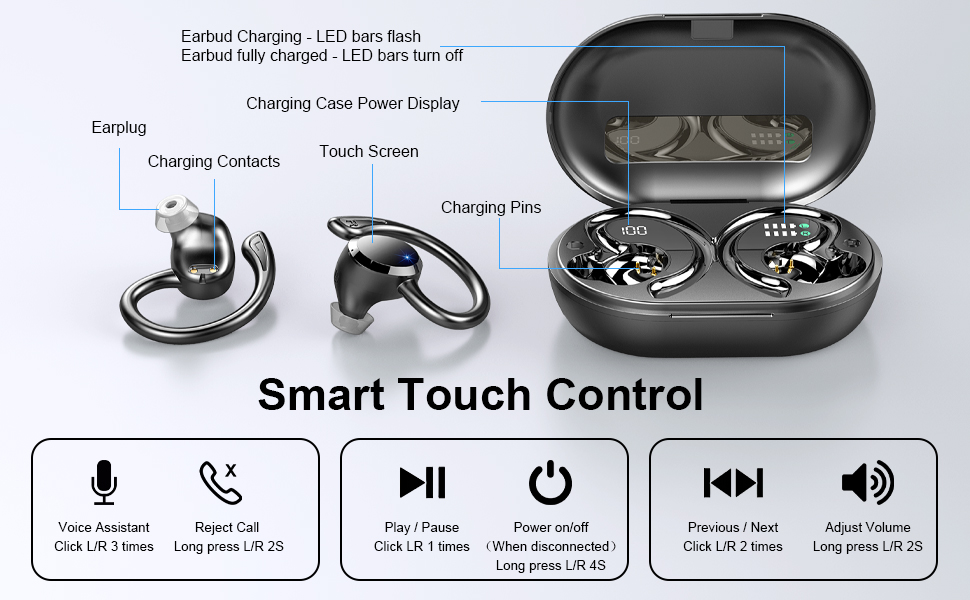
The Dascert Q38 earbuds feature multi-function touch panels for easy control.
| การทำงาน | การกระทำ |
|---|---|
| เล่น/หยุดชั่วคราว | Click L or R once |
| เพลงต่อไป | คลิก R สองครั้ง |
| เพลงก่อนหน้า | คลิก L สองครั้ง |
| เพิ่มระดับเสียง | กด R ค้างไว้ 2 วินาที |
| ลดระดับเสียง | Long press L for 2 seconds |
| รับสาย/วางสาย | Click L or R once |
| ปฏิเสธการรับสาย | Long press L or R for 2 seconds |
| เปิดใช้งานผู้ช่วยเสียง (Siri/Google Assistant) | Click L or R three times |
5.3 การสวมหูฟัง
The ergonomic design with earhooks ensures a secure and comfortable fit.
- ระบุหูฟังด้านซ้าย (L) และด้านขวา (R)
- ค่อยๆ ใส่เอียร์บัดเข้าไปในช่องหูของคุณ
- Adjust the earhook over your ear until it feels secure and comfortable.

6. การบำรุงรักษาและการดูแล
- การทำความสะอาด: Regularly clean the earbuds, especially the eartips and charging contacts, with a soft, dry cloth. For stubborn dirt, a slightly damp cloth or alcohol wipe can be used, ensuring no liquid enters the earbud openings.
- พื้นที่จัดเก็บ: เมื่อไม่ได้ใช้งาน ให้เก็บหูฟังไว้ในกล่องชาร์จเพื่อปกป้องหูฟังและชาร์จไฟให้หูฟังอยู่เสมอ
- ความต้านทานน้ำ: The earbuds are IP7 waterproof, meaning they can withstand sweat, rain, and splashes. However, they are not designed for swimming or submersion for extended periods. Ensure earbuds are dry before placing them back in the charging case.
- หลีกเลี่ยงอุณหภูมิที่สูงหรือต่ำเกินไป: Do not expose the earbuds or charging case to extreme heat or cold, as this can damage the battery and internal components.

7 การแก้ไขปัญหา
If you encounter issues with your Dascert Q38 earbuds, please refer to the following common problems and solutions:
| ปัญหา | สารละลาย |
|---|---|
| หูฟังเอียร์บัดไม่ชาร์จ |
|
| คุณภาพเสียงไม่ดีหรือระดับเสียงเบา |
|
| หูฟังไม่จับคู่หรือเชื่อมต่อ |
|
| เอียร์บัดตัวเดียวเท่านั้นที่ใช้งานได้ |
|
8. ข้อมูลจำเพาะ
| คุณสมบัติ | รายละเอียด |
|---|---|
| ชื่อรุ่น | Q38[NEW] |
| เทคโนโลยีการเชื่อมต่อ | ไร้สาย (บลูทูธ 5.1) |
| ระดับความต้านทานต่อน้ำ | กันน้ำระดับ IP7 |
| เวลาเล่น (เอียร์บัด) | 5-6 ชั่วโมง (ชาร์จครั้งเดียว) |
| เวลาเล่นทั้งหมด (รวมเคสชาร์จ) | นานถึง 48 ชั่วโมง |
| เวลาในการชาร์จ (หูฟัง) | ประมาณ 1 ชั่วโมง |
| ระยะเวลาในการชาร์จ (เคส) | ประมาณ 1.5 ชั่วโมง |
| พอร์ตชาร์จ | ยูเอสบี-ซี |
| ประเภทการควบคุม | สัมผัส, ควบคุมด้วยเสียง |
| การวางตำแหน่งหู | ในหูพร้อมที่เกี่ยวหู |
| การควบคุมเสียงรบกวน | ระบบตัดเสียงรบกวนแบบแอคทีฟ |
| ช่วงความถี่ | 20 เฮิรตซ์ - 20,000 เฮิรตซ์ |
| น้ำหนักสินค้า | 2.54 ออนซ์ |
| ขนาดสินค้า | 3.64 x 2.47 x 1.12 นิ้ว |
9. การรับประกันและการสนับสนุน
Dascert products come with a standard manufacturer's warranty. For detailed warranty information, please refer to the warranty card included in your package or visit the official Dascert webเว็บไซต์.
If you require technical support or have any questions regarding your Dascert Q38 Wireless Bluetooth Earbuds, please contact our customer service team:
- อีเมล: ไม่ได้ให้ไว้
- โทรศัพท์: ไม่ได้ให้ไว้
- การสนับสนุนทางออนไลน์: เยี่ยมชม Dascert Store on Amazon สำหรับคำถามที่พบบ่อยและแหล่งข้อมูลเพิ่มเติม
Please have your model number (Q38[NEW]) and purchase date ready when contacting support.
10. ข้อมูลด้านความปลอดภัย
- Do not disassemble or attempt to repair the earbuds or charging case.
- เก็บให้ห่างจากเด็กและสัตว์เลี้ยง
- หลีกเลี่ยงการสัมผัสกับระดับเสียงสูงเป็นเวลานานเพื่อป้องกันความเสียหายต่อการได้ยิน
- อย่าใช้หูฟังในสถานการณ์ที่การไม่ได้ยินเสียงรอบข้างอาจเป็นอันตราย (เช่น การขับรถ การปั่นจักรยาน การเดินในที่ที่มีการจราจร)
- กำจัดผลิตภัณฑ์ด้วยความรับผิดชอบตามข้อบังคับท้องถิ่น
Ask a question about this manual
Ask about setup, troubleshooting, compatibility, parts, safety, or missing instructions. Manuals+ will review the question and use this page’s manual context to help answer it.