
1. บทนำ
The Cuifati RX888 MKII is a Software Defined Radio (SDR) receiver module designed for exploring a wide range of radio frequencies. This device allows users to tune into various radio signals, from amateur radio to shortwave broadcasts, utilizing its advanced features and robust construction. This manual provides essential information for the proper setup, operation, maintenance, and troubleshooting of your RX888 MKII module.
2. ข้อมูลด้านความปลอดภัย
To ensure safe and optimal operation of your RX888 MKII module, please observe the following precautions:
- อย่าโอเวอร์โหลดอุปกรณ์
- Avoid using the device under excessive pressure.
- Ensure the device is not subjected to overcurrent conditions.
- Always connect the device to a compatible power source and host computer.
3. สินค้าหมดview
The RX888 MKII is a 16-bit Software Defined Radio with a direct sampling receiver architecture. It features an aluminum alloy casing for durability and enhanced heat dissipation.

รูปที่ 3.1 : ด้านหน้า view of the Cuifati RX888 MKII SDR Receiver Module, showcasing its compact design and heat sinks.
คุณสมบัติหลัก:
- ช่วงความถี่กว้าง: Operates from 1kHz to 64Mhz, with a high-frequency range extending from 64Mhz to 1700Mhz.
- Enhanced LPF: Utilizes an enhanced 64M LPF (Low Pass Filter) for improved image suppression.
- Adjustable VGA: Features a Variable Gain Amplifier (VGA) with an adjustment range of -10dB to +33dB, replacing the fixed low noise amplifier of previous models.
- โครงสร้างทนทาน: Encased in an aluminum alloy, coated with anti-corrosion paint for extended service life.
- การใช้งานที่หลากหลาย: Suitable for scientific research, amateur radio, and other specialized applications.

Figure 3.2: The RX888 MKII highlighting the VGA adjustment capability, which offers a gain range of -10dB to +33dB.
4. การตั้งค่า
Setting up your RX888 MKII module involves connecting it to a host computer and installing the necessary software.
4.1 ข้อกำหนดของระบบ
- พอร์ต USB: A USB 3.0 port is recommended for optimal performance and data transfer rates.
- คอมพิวเตอร์: A fast computer is advisable to handle the processing demands of software-defined radio applications.
- ระบบปฏิบัติการ: Compatible with various operating systems, typically Windows, Linux, and macOS (driver availability may vary).
4.2 การเชื่อมต่อฮาร์ดแวร์
- เชื่อมต่อเสาอากาศ: Attach your desired antenna to the appropriate antenna port(s) on the RX888 MKII. The module typically features two antenna ports, labeled 'H' and 'V' for horizontal and vertical polarization, or for different frequency ranges.
- เชื่อมต่อสาย USB: Connect the provided USB cable from the RX888 MKII's USB 3.0 port to a USB 3.0 port on your computer.
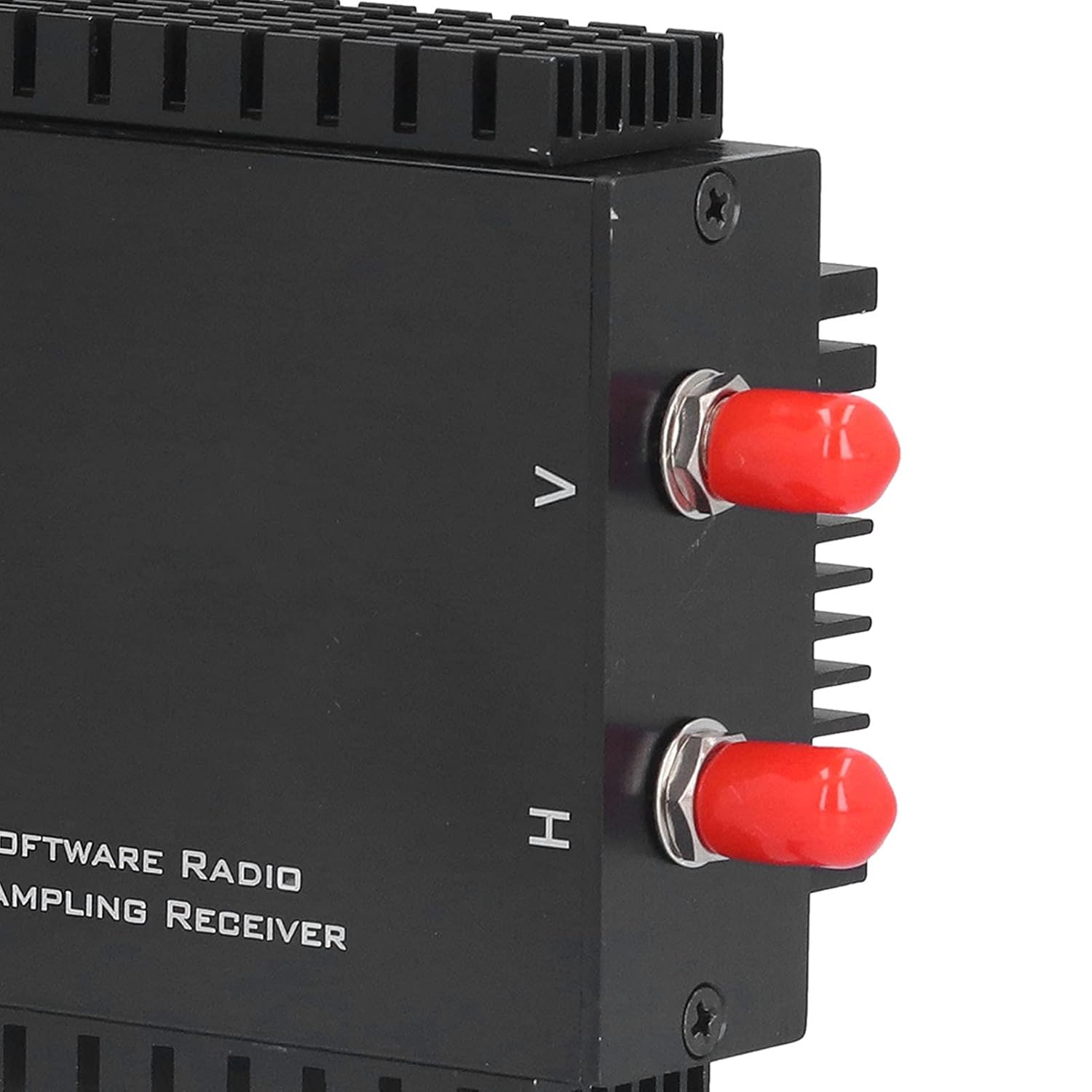
รูปที่ 4.1: ระยะใกล้ view of the antenna input ports, typically labeled H and V.

Figure 4.2: The USB 3.0 port on the side of the RX888 MKII module for data and power connection.
4.3 การติดตั้งซอฟต์แวร์
The RX888 MKII requires specific drivers and SDR software to function. Refer to the manufacturer's website or included documentation for the latest driver downloads and recommended SDR applications (e.g., SDR Console, SDR#). Follow the provided instructions for driver installation. It is crucial to ensure drivers are correctly installed for the device to be recognized by your computer.
5. คู่มือการใช้งาน
Once the hardware is connected and software is installed, you can begin operating your RX888 MKII.
- Launch SDR Software: Open your preferred SDR application (e.g., SDR Console).
- เลือกอุปกรณ์: Within the software, select the RX888 MKII as your input device.
- กำหนดค่าการตั้งค่า: Adjust settings such as sample rate, gain (VGA), and filter bandwidth according to your reception needs. The VGA offers a range of -10dB to +33dB for optimizing signal reception.
- Tune to Frequency: Enter the desired frequency to begin listening.
- Monitor Spectrum: Utilize the spectrum analyzer and waterfall display within the SDR software to visualize radio signals.
6. การบำรุงรักษา
Proper maintenance ensures the longevity and performance of your RX888 MKII module.
- การทำความสะอาด: Use a soft, dry cloth to clean the exterior of the module. Avoid liquid cleaners or abrasive materials.
- พื้นที่จัดเก็บ: เก็บอุปกรณ์ไว้ในที่แห้งและเย็น หลีกเลี่ยงแสงแดดโดยตรงและอุณหภูมิที่สูงหรือต่ำเกินไปเมื่อไม่ได้ใช้งาน
- อัพเดตเฟิร์มแวร์/ซอฟต์แวร์: ตรวจสอบผู้ผลิตเป็นประจำ website for any firmware or driver updates to ensure optimal performance and compatibility.
- การจัดการสายเคเบิล: Ensure USB and antenna cables are not kinked or strained to prevent damage.
7 การแก้ไขปัญหา
If you encounter issues with your RX888 MKII, refer to the following troubleshooting steps:
- ไม่รู้จักอุปกรณ์:
- Ensure the USB cable is securely connected to both the module and a USB 3.0 port on your computer.
- Try plugging and unplugging the device multiple times.
- Verify that the correct drivers are installed. Check Device Manager (Windows) or equivalent for driver status.
- Test with a different USB port or computer if possible.
- สัญญาณอ่อน/ไม่มีสัญญาณ:
- Check antenna connections and ensure the antenna is appropriate for the frequency range you are trying to receive.
- Adjust the VGA gain settings within your SDR software.
- Ensure no local interference sources are affecting reception.
- Verify the frequency entered in the SDR software is correct.
- Software Crashes/Instability:
- Ensure your SDR software is up to date.
- Verify that your computer meets the recommended system requirements, especially regarding processor speed and RAM.
- Reinstall drivers and SDR software if necessary.
8. ข้อมูลจำเพาะ
| คุณสมบัติ | รายละเอียด |
|---|---|
| แบบอย่าง | RX888 MKII |
| วัสดุ | โลหะผสมอลูมิเนียม |
| ช่วงความถี่ | 1kHz - 64Mhz |
| High Frequency Range | 64M - 1700Mhz |
| ATT Adjustment Range | -32dB ถึง 0dB |
| VGA Adjustment Range | -10dB ถึง + 33dB |
| ขนาดแพ็คเกจ | 7.68 x 4.29 x 2.72 นิ้ว |
| น้ำหนัก | 10.58 ออนซ์ |
| จำนวนช่องสัญญาณ | 2 |
9. เนื้อหาบรรจุภัณฑ์
The standard package for the Cuifati RX888 MKII Software Defined Radio Receiver Module includes:
- 1 x Cuifati RX888 MKII Software Defined Radio Receiver Module
- 1 x Connection Line (USB cable)
- 1 x คู่มือผู้ใช้ (เอกสารนี้)
10. การรับประกันและการสนับสนุน
For warranty information, technical support, or service inquiries, please contact the seller or manufacturer directly. Keep your purchase receipt as proof of purchase for any warranty claims.