
1. บทนำ
Thank you for choosing the Living Needs Wireless HD Video Doorbell. This manual provides detailed instructions for the installation, operation, and maintenance of your new video doorbell. Please read this manual thoroughly before use to ensure proper functionality and safety.
2. สินค้าหมดview
2.1 เนื้อหาบรรจุภัณฑ์
โดยทั่วไปแพ็คเกจจะประกอบด้วย:
- Living Needs Wireless HD Video Doorbell
- Indoor Chime (if included in specific package)
- ตัวยึดและสกรู
- USB Charging Cable (for battery charging)
- คู่มือการใช้งาน
2.2 คุณสมบัติหลัก
- HD Video Resolution (720p)
- Wireless Wi-Fi Connectivity
- Motion Detection with Push Notifications
- การสื่อสารด้วยเสียงสองทาง
- ความสามารถในการมองเห็นตอนกลางคืน
- ใช้พลังงานจากแบตเตอรี่ (ชาร์จใหม่ได้)
- Free Cloud Service
- Compatible with Android & iOS App
- Supports SD Card for local storage
- การติดตั้งแบบติดผนัง
2.3 ส่วนประกอบผลิตภัณฑ์
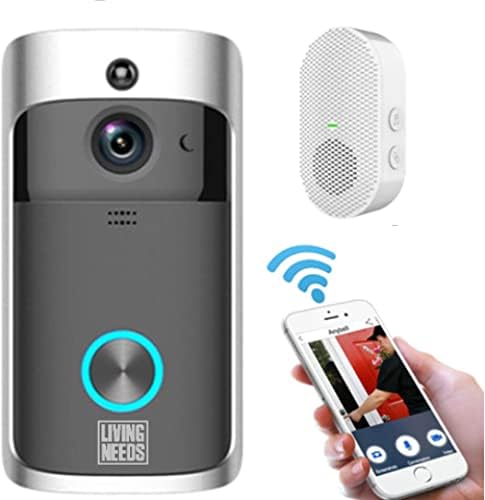
ภาพที่ 2.3.1: The Living Needs Wireless HD Video Doorbell unit, an accompanying wireless chime, and a smartphone displaying the doorbell's live view and control options. This image illustrates the complete system setup.

ภาพที่ 2.3.2: A close-up of the doorbell unit and a smartphone screen showing a live feed from the doorbell camera. The text overlay indicates the ability to monitor your home at all times.

ภาพที่ 2.3.3: This image highlights the doorbell's features like Wi-Fi, HD, app control, sensor, live viewing, SD card support, 166-degree angle, 2-way audio, standby, and night vision. It also shows three blue batteries and a crucial instruction: "Remove green stickers from batteries" before use.
3. การตั้งค่าและการติดตั้ง
3.1 การชาร์จแบตเตอรี่
- Open the battery compartment of the doorbell unit.
- Insert the provided rechargeable batteries. Ensure to remove any protective stickers (e.g., green stickers) from the battery terminals before insertion.
- Connect the doorbell to a power source using the USB charging cable. A full charge is recommended before initial use.
- The doorbell can also be charged via a transformer for wired power connection.
3.2 การติดตั้งแอปและการจับคู่อุปกรณ์
- Download the official Living Needs app from the App Store (iOS) or Google Play Store (Android).
- ลงทะเบียนบัญชีใหม่หรือเข้าสู่ระบบหากคุณมีบัญชีอยู่แล้ว
- Follow the in-app instructions to add your new video doorbell. This typically involves scanning a QR code on the device or manually entering its ID.
- โปรดตรวจสอบให้แน่ใจว่าสมาร์ทโฟนของคุณเชื่อมต่อกับเครือข่าย Wi-Fi 2.4GHz ในระหว่างขั้นตอนการจับคู่
- Pair the indoor chime with the doorbell according to its specific instructions (usually a button press sequence).
3.3 การติดตั้งกริ่งประตู

ภาพที่ 3.3.1: An illustration showing the video doorbell mounted next to a front door on a house, with Wi-Fi signals indicating connectivity. This image emphasizes the doorbell's function in monitoring visitors and providing security.
- Choose a suitable location next to your front door, ensuring a clear view and good Wi-Fi signal strength.
- Use the provided mounting bracket as a template to mark drill holes on the wall.
- เจาะรูและติดตั้งพุกยึดผนังหากจำเป็น
- Secure the mounting bracket to the wall with the screws.
- Attach the doorbell unit to the mounting bracket, ensuring it clicks securely into place.
4. คู่มือการใช้งาน
4.1 สด View และเสียงสองทาง
- Open the Living Needs app on your smartphone or tablet.
- Select your doorbell from the device list to access the live video feed.
- To speak with a visitor, tap the microphone icon in the app. To hear them, ensure the speaker icon is enabled.
4.2 การตรวจจับการเคลื่อนไหวและการแจ้งเตือน
- The doorbell is equipped with a motion sensor. When motion is detected, you will receive a push notification on your paired device.
- Adjust motion detection sensitivity and zones within the app settings to minimize false alerts.
- Recorded motion events are stored in the cloud or on the SD card (if installed).
4.3 การมองเห็นตอนกลางคืน
- The doorbell automatically switches to night vision mode in low-light conditions, providing clear black-and-white video.
- Infrared LEDs enable visibility up to a certain distance in the dark.
4.4 การเข้าถึงของผู้ใช้หลายราย
- You can share access to your doorbell's live feed and features with family members or trusted individuals through the app.
- Refer to the app's sharing settings for detailed instructions.

ภาพที่ 4.4.1: This image demonstrates the global usability of the Living Needs video doorbell, showing individuals monitoring their front door via smartphone while on vacation, at work, on a business trip, or in a restaurant. It highlights the remote access feature and push notifications.
5. การบำรุงรักษา
- การทำความสะอาด: ค่อยๆ เช็ดเลนส์กล้องและพื้นผิวของกริ่งประตูด้วยผ้าเนื้อนุ่มและแห้งamp ผ้า. หลีกเลี่ยงน้ำยาทำความสะอาดที่มีฤทธิ์กัดกร่อน
- อายุการใช้งานแบตเตอรี่: Monitor battery levels via the app. Recharge the batteries when prompted to ensure continuous operation.
- อัพเดตเฟิร์มแวร์: ตรวจสอบแอปเป็นประจำเพื่อดูว่ามีเฟิร์มแวร์เวอร์ชั่นใหม่หรือไม่ เพื่อให้มั่นใจได้ถึงประสิทธิภาพและความปลอดภัยสูงสุด
- การเชื่อมต่อ Wi-Fi: Ensure a stable Wi-Fi connection for uninterrupted service.
6 การแก้ไขปัญหา
6.1 ปัญหาทั่วไปและแนวทางแก้ไข
- กริ่งประตูไม่เชื่อมต่อกับ Wi-Fi:
- ตรวจสอบให้แน่ใจว่าเครือข่าย Wi-Fi ของคุณเป็น 2.4GHz
- ตรวจสอบความแรงของสัญญาณ Wi-Fi บริเวณที่ติดตั้งกริ่งประตู
- รีสตาร์ทเราเตอร์และกริ่งประตู
- Re-attempt the pairing process in the app.
- No push notifications:
- Verify app notification settings on your smartphone.
- Check motion detection settings in the doorbell app.
- Ensure the doorbell has a stable internet connection.
- คุณภาพวิดีโอไม่ดี:
- ทำความสะอาดเลนส์กล้อง
- Ensure adequate Wi-Fi signal strength.
- Check app settings for video quality options.
- อายุการใช้งานแบตเตอรี่สั้น:
- Reduce motion detection sensitivity or frequency of recordings.
- ตรวจสอบให้แน่ใจว่ากริ่งประตูมีประจุไฟเต็มแล้ว
- Consider a wired power connection if frequent recharging is inconvenient.
- เสียงระฆังไม่ดัง:
- Ensure the chime is powered on and within range of the doorbell.
- Re-pair the chime with the doorbell.
7. ข้อมูลจำเพาะ
| คุณสมบัติ | รายละเอียด |
|---|---|
| ยี่ห้อ | ความต้องการในการดำรงชีวิต |
| แบบอย่าง | B09FR19KTY |
| เทคโนโลยีการเชื่อมต่อ | Wireless (Wi-Fi), Wired (for power) |
| เทคโนโลยีการสื่อสารไร้สาย | ไวไฟ |
| แหล่งพลังงาน | Battery Powered (rechargeable), Transformer compatible |
| รวมแบตเตอรี่ | ใช่ |
| ความละเอียดในการบันทึกวิดีโอ | 720p |
| คุณสมบัติพิเศษ | Motion Sensor, Night Vision (Infrared) |
| อุปกรณ์ที่รองรับ | Smartphone, Tablet (Android & iOS) |
| ประเภทการติดตั้ง | ติดผนัง |
| วัสดุ | พลาสติก |
| สี | สีเทา |
| การใช้ที่แนะนำ | Motion Detection, Home Security |
8. การรับประกันและการสนับสนุน
For warranty information and technical support, please refer to the documentation included with your product or visit the official Living Needs website. If you encounter any issues not covered in this manual, please contact Living Needs customer service for assistance.
นโยบายการคืนสินค้า: The product typically comes with a 31-day return/replacement policy. Please check your purchase details for specific terms.