
การแนะนำ
Thank you for choosing the Nikai 43-inch 4K UHD LED TV, Model UHD43SLED1. This television combines stunning 4K Ultra High Definition resolution with the versatility of Android 9.0, offering a superior viewing experience and access to a wide range of smart features, including Netflix. This manual provides detailed instructions to help you set up, operate, and maintain your new television.
ข้อมูลด้านความปลอดภัยที่สำคัญ
โปรดอ่านคำแนะนำด้านความปลอดภัยทั้งหมดอย่างละเอียดก่อนใช้งานโทรทัศน์ เก็บคู่มือนี้ไว้เพื่อใช้อ้างอิงในอนาคต
- แหล่งพลังงาน: ตรวจสอบแหล่งจ่ายไฟ voltage ตรงกับฉลากเรตติ้งบนทีวี
- การระบายอากาศ : อย่าปิดกั้นช่องระบายอากาศ ควรเว้นพื้นที่รอบทีวีให้เพียงพอเพื่อให้อากาศถ่ายเทได้สะดวก
- น้ำและความชื้น: อย่าให้ทีวีโดนฝนหรือความชื้น อย่าวางสิ่งของที่บรรจุของเหลว เช่น แจกัน บนทีวี
- การทำความสะอาด: ถอดปลั๊กทีวีก่อนทำความสะอาด ใช้ผ้านุ่มและแห้ง ห้ามใช้น้ำยาทำความสะอาดชนิดน้ำหรือสเปรย์ทำความสะอาด
- การจัดวาง: วางทีวีบนพื้นผิวที่มั่นคงและเรียบ หลีกเลี่ยงการวางทีวีไว้กลางแดดหรือใกล้แหล่งความร้อน
- ฟ้าผ่า: During lightning storms or when unused for long periods, unplug the TV from the wall outlet.
- การบริการ: อย่าพยายามให้บริการผลิตภัณฑ์นี้ด้วยตนเอง ส่งต่อการบริการทั้งหมดไปยังช่างบริการที่ผ่านการรับรอง
เนื้อหาแพ็คเกจ
ตรวจสอบว่ามีรายการทั้งหมดอยู่ในแพ็คเกจ:
- Nikai 43-inch 4K UHD LED TV (Model: UHD43SLED1)
- ชั้นวางทีวี (2 ชิ้น)
- รีโมทคอนโทรล
- AAA Batteries for Remote Control (2x)
- สายไฟ
- คู่มือการใช้งาน (เอกสารนี้)
- สกรูสำหรับชุดขาตั้ง
คำแนะนำการตั้งค่า
1. การแกะกล่องและการจัดวาง
Carefully remove the TV from its packaging. It is recommended to have two people for this process. Place the TV face down on a soft, flat surface (e.g., a blanket or foam) to protect the screen during stand installation.
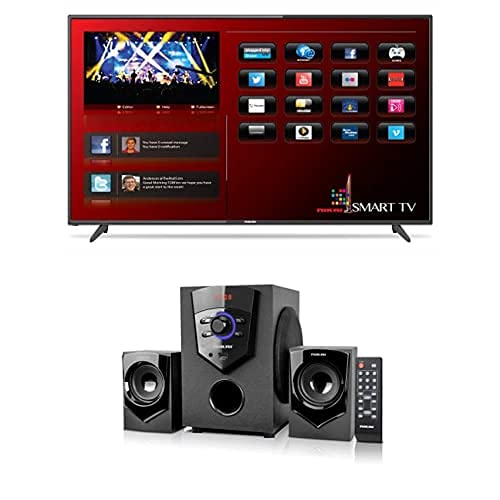
ภาพ: ด้านหน้า view of the Nikai 43-inch 4K UHD LED TV, Model UHD43SLED1, showing its slim bezel design.
2. การติดตั้งขาตั้งทีวี
- ระบุชิ้นส่วนขาตั้งด้านซ้ายและด้านขวา
- จัดวางขาตั้งแต่ละชิ้นให้ตรงกับช่องที่ตรงกันที่ด้านล่างของทีวี
- Secure the stand pieces using the provided screws. Ensure they are tightened firmly to prevent wobbling.
- ค่อยๆ ยกทีวีขึ้นตั้งตรงและวางลงบนพื้นผิวที่มั่นคงและเรียบเสมอกัน
3. การเชื่อมต่ออุปกรณ์ภายนอก
Connect your external devices (e.g., cable box, Blu-ray player, gaming console) to the appropriate ports on the back or side of the TV. Common connection types include HDMI, USB, and Antenna/Cable input.
- ช่องต่อ HDMI: For high-definition video and audio. Use HDMI ports for best quality.
- ยูเอสบี: สำหรับเชื่อมต่ออุปกรณ์จัดเก็บข้อมูล USB เพื่อเล่นสื่อ files.
- เสาอากาศ/สายเคเบิล: เชื่อมต่อเสาอากาศหรือสายเคเบิลทีวีเพื่อรับชมช่องรายการออกอากาศ
4. การเชื่อมต่อไฟฟ้า
เสียบสายไฟเข้ากับช่องจ่ายไฟของทีวี จากนั้นเสียบปลายอีกด้านเข้ากับเต้ารับไฟฟ้าที่ผนัง ทีวีจะเข้าสู่โหมดสแตนด์บาย
5. ตัวช่วยการตั้งค่าเริ่มต้น
เมื่อเปิดเครื่องครั้งแรก ทีวีจะนำคุณเข้าสู่ขั้นตอนการตั้งค่าเริ่มต้น โปรดทำตามคำแนะนำบนหน้าจอเพื่อกำหนดค่า:
- การเลือกภาษา
- การเชื่อมต่อเครือข่าย (Wi-Fi หรืออีเทอร์เน็ต)
- Google account sign-in (for Android TV features)
- Channel scan (for antenna/cable TV)
- เขตเวลาและการตั้งค่าพื้นฐานอื่นๆ
คำแนะนำการใช้งาน
1. การควบคุมระยะไกลview
The remote control allows you to access all TV functions. Insert the provided AAA batteries into the remote control, ensuring correct polarity.
- ปุ่มเปิด/ปิด: เปิดหรือปิดทีวี (โหมดสแตนด์บาย)
- อินพุต/แหล่งที่มา: เลือกแหล่งสัญญาณเข้า (HDMI, AV, TV)
- ปุ่มนำทาง (ขึ้น/ลง/ซ้าย/ขวา/ตกลง): นำทางเมนูและยืนยันการเลือก
- เพิ่ม/ลดระดับเสียง: ปรับระดับเสียง
- ช่องขึ้น/ลง: เปลี่ยนช่องทีวี
- บ้าน: เข้าถึงหน้าจอหลักของ Android TV
- กลับ: กลับไปที่หน้าจอหรือเมนูก่อนหน้า
- ปุ่ม Netflix: เข้าถึงแอปพลิเคชั่น Netflix ได้โดยตรง
- เมนู/การตั้งค่า: เปิดเมนูการตั้งค่าทีวี
2. ฟังก์ชั่นพื้นฐานของทีวี
- เปิด/ปิดเครื่อง: กดปุ่มเปิด/ปิดบนรีโมทคอนโทรล
- การเลือกแหล่งที่มาของข้อมูล: Press the "Input" or "Source" button on the remote and use the navigation buttons to select your desired input (e.g., HDMI 1, TV, USB).
- การปรับระดับเสียง: ใช้ปุ่มเพิ่มระดับเสียง (+) และลดระดับเสียง (-)
- การเปลี่ยนช่อง: Use the Channel Up (CH+) and Channel Down (CH-) buttons for broadcast TV.
3. คุณสมบัติของสมาร์ททีวี (Android 9.0)
Your Nikai TV runs on Android 9.0, providing access to a world of entertainment and applications.
- หน้าจอหลัก: Press the "Home" button to access the Android TV home screen, where you can find installed apps, recommended content, and settings.
- เน็ตฟลิกซ์ : Use the dedicated Netflix button on your remote or select the Netflix app from the home screen to stream movies and TV shows. An active Netflix subscription is required.
- ร้านค้า Google Play: Download and install additional applications, games, and streaming services from the Google Play Store.
- ผู้ช่วย Google: Use voice commands (if your remote supports it) to search for content, control smart home devices, and get information.
- การคัดเลือกนักแสดง: Cast content from your smartphone or tablet to the TV using built-in Chromecast functionality.
4. ฟังก์ชั่นวิทยุ FM
Your TV includes an FM Radio function. To access it, navigate to the Apps section on the home screen and select the "FM Radio" application. Ensure an antenna is connected to the TV for optimal reception.
การบำรุงรักษาและการดูแล
การดูแลรักษาอย่างถูกวิธีจะช่วยให้ทีวีของคุณมีอายุการใช้งานยาวนานและทำงานได้อย่างมีประสิทธิภาพสูงสุด
- การทำความสะอาดหน้าจอ:
- ปิดทีวีและถอดปลั๊กไฟออก
- เช็ดหน้าจอเบาๆ ด้วยผ้าที่ไม่เป็นขุยและนุ่ม (เช่น ผ้าไมโครไฟเบอร์)
- สำหรับรอยฝังแน่น ให้เช็ดเบาๆampเทน้ำหรือน้ำยาทำความสะอาดหน้าจอชนิดพิเศษลงบนผ้า (อย่าฉีดลงบนหน้าจอโดยตรง)
- ห้ามใช้สารทำความสะอาดที่มีฤทธิ์กัดกร่อน แอลกอฮอล์ เบนซีน หรือทินเนอร์ เพราะสารเหล่านี้อาจทำให้หน้าจอเสียหายได้
- ทำความสะอาดตู้: เช็ดตู้ทีวีด้วยผ้าแห้งนุ่ม
- การระบายอากาศ : รักษาช่องระบายอากาศให้สะอาดปราศจากฝุ่นและเศษขยะ
- สายไฟ: ตรวจสอบสายไฟเป็นประจำว่ามีรอยชำรุดหรือไม่ หากพบรอยชำรุด โปรดติดต่อฝ่ายบริการลูกค้าเพื่อขอเปลี่ยนสินค้า
การแก้ไขปัญหา
Before contacting customer support, try these common solutions for minor issues:
| ปัญหา | วิธีแก้ปัญหาที่เป็นไปได้ |
|---|---|
| ไม่มีไฟฟ้า | Ensure the power cord is securely plugged into both the TV and the wall outlet. Check if the wall outlet is working by plugging in another device. |
| ไม่มีภาพแต่มีเสียง | Check the input source. Ensure the correct HDMI, AV, or TV input is selected. Check cable connections. |
| ไม่มีเสียงแต่มีภาพ | Check the volume level. Ensure the TV is not muted. Check audio cable connections if using external speakers. |
| รีโมตคอนโทรลไม่ทำงาน | เปลี่ยนแบตเตอรี่ ตรวจสอบให้แน่ใจว่าไม่มีสิ่งกีดขวางระหว่างรีโมทและเซ็นเซอร์อินฟราเรดของทีวี |
| ไม่สามารถเชื่อมต่อ Wi-Fi ได้ | ตรวจสอบให้แน่ใจว่าเราเตอร์ Wi-Fi ของคุณเปิดอยู่และใช้งานได้ ป้อนรหัสผ่าน Wi-Fi อีกครั้ง ลองรีสตาร์ททั้งทีวีและเราเตอร์ |
| ภาพบิดเบี้ยวหรือเบลอ | Check the resolution settings of the connected device. For broadcast TV, check antenna connection and signal strength. |
ข้อมูลจำเพาะผลิตภัณฑ์
| ยี่ห้อ | นิไค |
| ชื่อรุ่น | UHD43SLED1 |
| ขนาดหน้าจอ | 43 นิ้ว |
| เทคโนโลยีการแสดงผล | นำ |
| ปณิธาน | 3840 x 2160 (4K UHD) |
| ระบบปฏิบัติการ | แอนดรอยด์ 9.0 |
| บริการอินเทอร์เน็ตที่รองรับ | เน็ตฟลิกซ์ |
| ระบบเสียง | 2.1 Channel System with Amplifier and 2 Satellite Speakers |
| คุณสมบัติพิเศษ | กว้าง viewing angle, FM Radio function |
| ส่วนประกอบที่รวมอยู่ | โทรทัศน์, ขาตั้ง |
| ประเภทการติดตั้ง | โต๊ะวางของ |
| ASIN | B09FQ799DR |
ข้อมูลการรับประกัน
Nikai products are manufactured to the highest quality standards. This product is covered by a limited warranty from the date of purchase. Please refer to the warranty card included in your product packaging for specific terms, conditions, and duration of the warranty. Keep your purchase receipt as proof of purchase for warranty claims.
การสนับสนุนลูกค้า
If you encounter any issues that cannot be resolved using the troubleshooting guide, or if you require further assistance, please contact Nikai customer support. Contact details can typically be found on the official Nikai webตรวจสอบได้จากเว็บไซต์หรือในเอกสารการรับประกันที่ให้มาพร้อมกับผลิตภัณฑ์ของคุณ
When contacting support, please have your TV model number (UHD43SLED1) and purchase information readily available.