
การแนะนำ
This manual provides instructions for the ALLIMITY GB346WJSA replacement remote control, designed for use with specific Sharp Smart TV models including 4T-C60BK2UD and 4T-C70BK2UD. This remote offers standard television control functions and includes a voice control feature. Please read these instructions carefully to ensure proper setup and operation.
การตั้งค่า
1. การติดตั้งแบตเตอรี่
The remote control requires two (2) AAA alkaline batteries (not included). Follow these steps to install them:
- ค้นหาช่องใส่แบตเตอรี่ที่ด้านหลังของรีโมทคอนโทรล
- กดแถบลงแล้วเลื่อนฝาครอบแบตเตอรี่ลงด้านล่างเพื่อเปิดออก
- ใส่แบตเตอรี่ AAA สองก้อน โดยตรวจสอบให้แน่ใจว่าขั้วบวก (+) และขั้วลบ (-) ตรงกับเครื่องหมายภายในช่อง
- เลื่อนฝาครอบแบตเตอรี่กลับเข้าที่จนกระทั่งคลิกเข้าที่

ภาพ: ด้านหลัง view of the remote control with the battery compartment open, illustrating where to insert AAA batteries.
2. การตั้งค่าและการจับคู่เบื้องต้น
For basic functions (e.g., power, volume, channel), no programming is required. Simply insert new batteries, and the remote should operate your compatible Sharp Smart TV directly.
สำหรับ ฟังก์ชั่นเสียง, pairing with your Sharp Smart TV is required. The specific pairing process may vary slightly depending on your TV model. Generally, you will need to access your TV's settings menu to initiate the remote control pairing process. Refer to your Sharp Smart TV's user manual for detailed instructions on how to pair a Bluetooth remote control or activate voice control functionality.
คำแนะนำการใช้งาน
This remote control provides access to various functions of your Sharp Smart TV. Below are some common button functions:
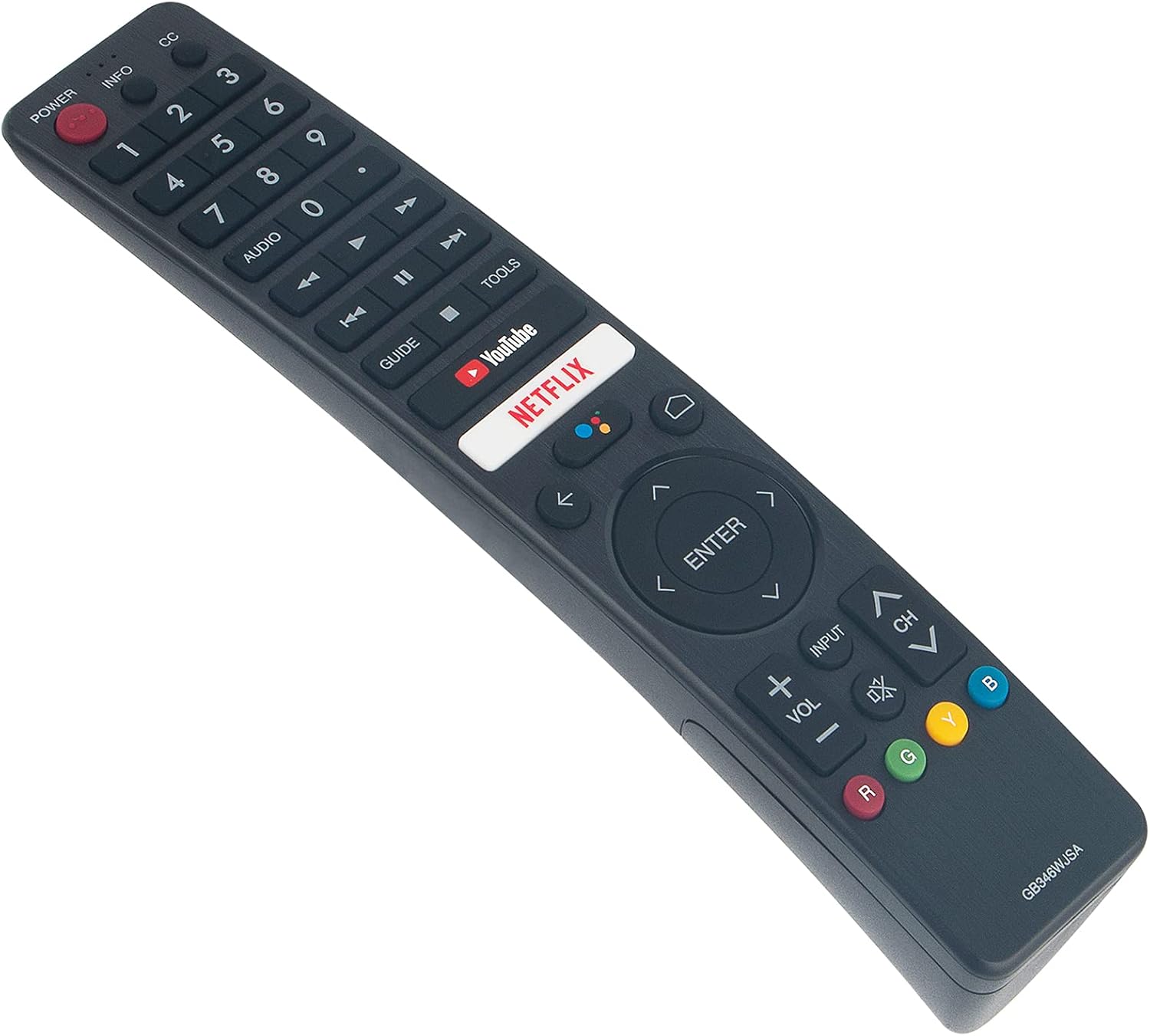
ภาพ: ด้านหน้า view of the ALLIMITY GB346WJSA remote control, displaying its layout and button labels.
- พลัง:เปิดหรือปิดทีวี
- INFO / CC: Displays information or activates Closed Captions.
- ปุ่มตัวเลข (0-9): เลือกช่องโดยตรง
- เสียง: Adjusts audio settings or tracks.
- แนะนำ: เข้าถึงคู่มือรายการอิเล็กทรอนิกส์
- YouTube / NETFLIX: Direct access buttons for these streaming services.
- แผงนำทาง (ขึ้น, ลง, ซ้าย, ขวา, ENTER): นำทางเมนูและยืนยันการเลือก
- BACK / HOME: Returns to the previous screen or accesses the TV's home menu.
- ป้อนข้อมูล: เลือกแหล่งสัญญาณเข้า (HDMI, AV เป็นต้น)
- ฉบับ +/-: ปรับระดับเสียง
- ช +/-: เปลี่ยนช่อง
- MUTE: ปิดหรือเปิดเสียงทีวี
- ปุ่มสี (R, G, Y, B): Functionality varies by application or TV menu.
การใช้การสั่งการด้วยเสียง
Once the remote is successfully paired with your Sharp Smart TV for voice functionality, press the dedicated voice button (often indicated by a microphone icon) and speak clearly into the remote. Ensure you are within a reasonable distance from the remote and that there are no obstructions between you and the remote's microphone.
การซ่อมบำรุง
การเปลี่ยนแบตเตอรี่
Replace batteries when the remote's response becomes sluggish or stops working. Always replace both batteries at the same time with new AAA alkaline batteries. Do not mix old and new batteries, or different types of batteries.
การทำความสะอาด
ในการทำความสะอาดรีโมทคอนโทรล ให้เช็ดเบาๆ ด้วยผ้านุ่มและแห้ง ห้ามใช้น้ำยาทำความสะอาด สเปรย์ หรือวัสดุที่มีฤทธิ์กัดกร่อน เพราะอาจทำให้พื้นผิวหรือส่วนประกอบภายในของรีโมทคอนโทรลเสียหายได้
การแก้ไขปัญหา
รีโมตไม่ตอบสนอง
- ตรวจสอบแบตเตอรี่: Ensure batteries are correctly inserted and are not depleted. Replace with fresh AAA alkaline batteries if necessary.
- เส้นสายตา: Ensure there are no obstructions between the remote control and the TV's infrared receiver.
- ความเข้ากันได้ของทีวี: Verify that your TV model is listed as compatible with the ALLIMITY GB346WJSA remote control.
Voice Function Not Working
- สถานะการจับคู่: Confirm that the remote control has been successfully paired with your Sharp Smart TV for voice functionality. This is a separate step from basic remote operation.
- การตั้งค่าทีวี: Access your TV's settings menu to check if voice control is enabled and if the remote is properly connected. Refer to your TV's specific instructions for voice remote pairing.
- Microphone Obstruction: Ensure the microphone on the remote is not covered or obstructed.
- ระยะทาง: Speak clearly and within a reasonable distance to the remote.
ข้อมูลจำเพาะ
| ยี่ห้อ | ความเสมอภาค |
| หมายเลขรุ่น | GB346WJSA |
| อุปกรณ์ที่รองรับ | Sharp Smart TV (4T-C60BK2UD, 4T-C70BK2UD) |
| เทคโนโลยีการเชื่อมต่อ | บลูทูธ |
| คุณสมบัติพิเศษ | Voice Function, No Programming Required (for basic functions) |
| แหล่งพลังงาน | 2 x แบตเตอรี่ AAA (ไม่รวม) |
| ระยะสูงสุด | 10 เมตร |
| น้ำหนักสินค้า | 2 ออนซ์ |
| ขนาดรายการ (ยาว x กว้าง x สูง) | ยาว 6 นิ้ว x กว้าง 2 นิ้ว x สูง 0.5 นิ้ว |
การรับประกันและการสนับสนุน
This product comes with a 30-day refund policy and a 60-day warranty from the date of purchase. For any issues or support inquiries, please contact the seller or refer to the product listing for customer service contact information.