
การแนะนำ
This manual provides comprehensive instructions for the setup, operation, and maintenance of your Nady DW-11-LT-HM Digital Wireless Lapel & Headset Microphone System. This system delivers superior digital audio quality with ultra-low latency and reliable performance in the UHF 900MHz band. Please read this manual thoroughly before using the system to ensure optimal performance and longevity.
ข้อมูลด้านความปลอดภัย
- อย่าให้เครื่องโดนฝนหรือความชื้น
- อย่าเปิดcasinง. ส่งต่อการบริการทั้งหมดให้กับบุคลากรที่มีคุณสมบัติ
- โปรดใช้อะแดปเตอร์แปลงไฟที่ระบุไว้สำหรับเครื่องรับสัญญาณเท่านั้น
- Ensure proper battery polarity when installing batteries in the transmitter.
- เก็บระบบให้ห่างจากแหล่งความร้อนและแสงแดดโดยตรง
- หลีกเลี่ยงการทำตกหรือให้ส่วนประกอบได้รับแรงกระแทกรุนแรง
เนื้อหาแพ็คเกจ
ตรวจสอบว่ารายการทั้งหมดที่ระบุไว้ด้านล่างนี้รวมอยู่ในแพ็คเกจของคุณ:
- DW-11 Digital Wireless Receiver
- LT-HM Digital Wireless Bodypack Transmitter
- ไมโครโฟนปก
- ไมโครโฟนแบบหูฟัง
- อะแดปเตอร์แปลงไฟสำหรับเครื่องรับสัญญาณ
- แบตเตอรี่ AA 2 ก้อน (สำหรับเครื่องส่งสัญญาณ)
- คู่มือการใช้งาน (เอกสารนี้)
สินค้าเกินview
DW-11 Digital Wireless Receiver
The receiver unit processes the digital audio signal from the transmitter and outputs it to your audio system. It features a front panel display and controls, along with rear panel audio outputs and power input.
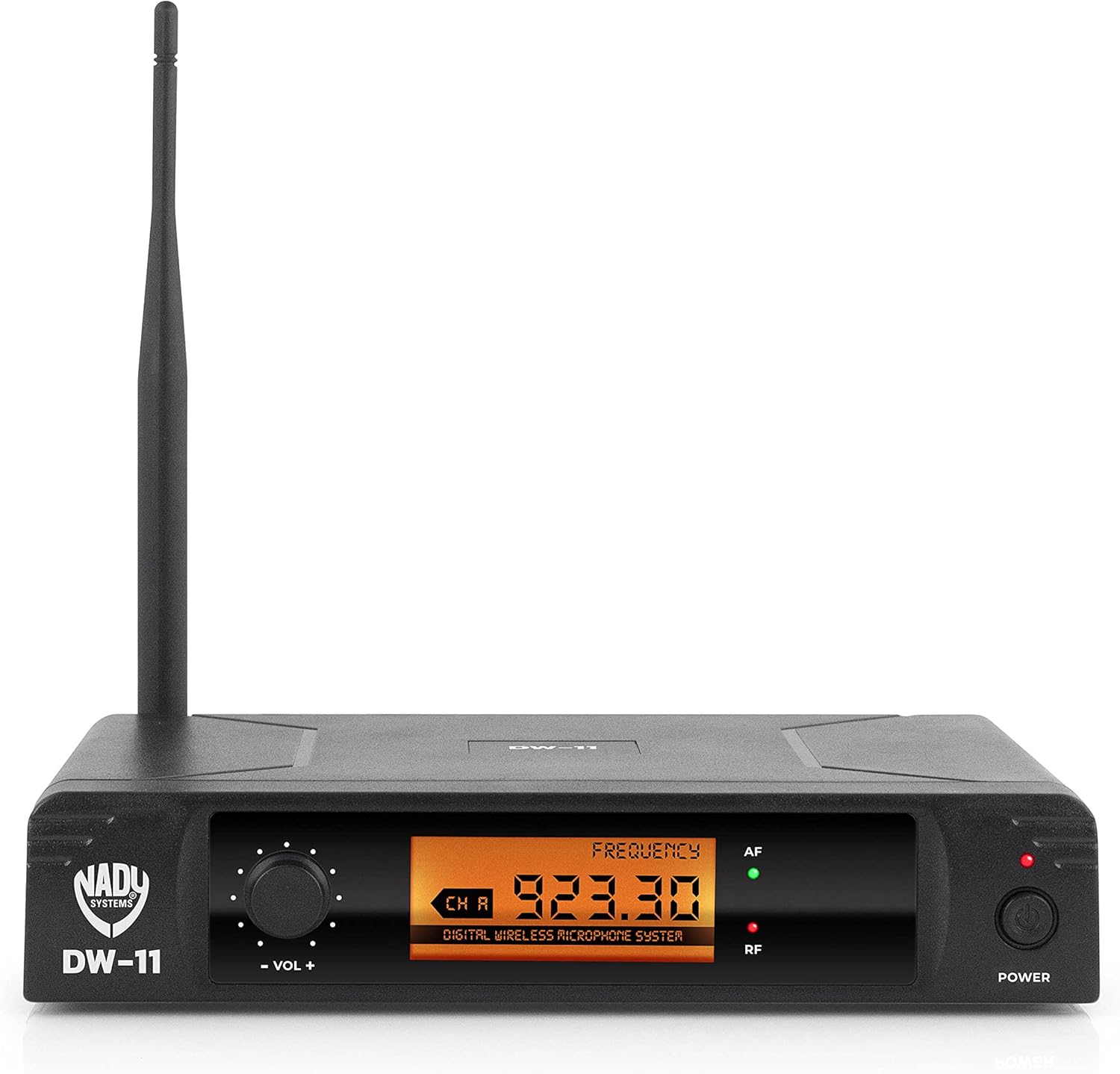
รูปที่ 1: Front Panel of DW-11 Receiver. This image displays the front of the Nady DW-11 receiver, highlighting its digital display, volume control knob, and power button. Indicators for AF (Audio Frequency) and RF (Radio Frequency) are also visible.

รูปที่ 2: Rear Panel of DW-11 Receiver. This image shows the rear connections of the Nady DW-11 receiver, including the balanced XLR output, unbalanced 1/4" output, and the DC 12-15V power input.
LT-HM Digital Wireless Bodypack Transmitter
The bodypack transmitter is lightweight and designed for discreet wear. It connects to either the included lapel or headset microphone and transmits the audio signal wirelessly to the DW-11 receiver. It operates on two AA batteries.
- Lapel Microphone: A small, clip-on microphone suitable for interviews, presentations, and general speech.
- ไมโครโฟนชุดหูฟัง: Worn on the head, providing a secure fit and consistent microphone placement for active performers or presenters.
คำแนะนำการตั้งค่า
- แกะส่วนประกอบ: นำส่วนประกอบทั้งหมดออกจากบรรจุภัณฑ์อย่างระมัดระวัง
- ตำแหน่งเครื่องรับ: Place the DW-11 receiver on a stable surface, away from other wireless devices or large metal objects that could interfere with the signal. Ensure the antenna is upright and unobstructed.
- เชื่อมต่อสายไฟของเครื่องรับสัญญาณ: Connect the provided power adapter to the DC 12-15V input on the rear of the DW-11 receiver and plug it into an AC outlet. Do not power on the receiver yet.
- ติดตั้งแบตเตอรี่เครื่องส่งสัญญาณ: Open the battery compartment on the LT-HM bodypack transmitter. Insert two fresh AA batteries, observing the correct polarity (+/-). Close the compartment securely.
- เชื่อมต่อไมโครโฟนเข้ากับตัวส่งสัญญาณ: Plug either the lapel or headset microphone into the input jack on the LT-HM bodypack transmitter. Ensure the connection is firm.
- เชื่อมต่อเครื่องรับสัญญาณเข้ากับระบบเสียง:
- For balanced connections, use an XLR cable to connect the "BAL MIC OUT" on the receiver to an XLR input on your mixer or audio interface.
- For unbalanced connections, use a 1/4" TS cable to connect the "UNBAL LINE SUM OUT" on the receiver to a 1/4" input on your mixer or ampชีวิต.
คำแนะนำการใช้งาน
- เปิดเครื่องรับ: Press the "POWER" button on the front panel of the DW-11 receiver. The display should illuminate.
- เปิดใช้งานตัวส่งสัญญาณ: Press and hold the power button on the LT-HM bodypack transmitter until its indicator light illuminates.
- การซิงโครไนซ์ความถี่: The Nady DW-11 system operates on a fixed frequency (902-951MHz band). The receiver and transmitter are pre-set to communicate on a specific channel. Ensure both units are powered on and within range. The "RF" (Radio Frequency) indicator on the receiver should light up, indicating a successful connection.
- ปรับระดับเสียง: Use the "VOL +" and "VOL -" knob on the front of the DW-11 receiver to adjust the output level. Start with a low volume and gradually increase it to a comfortable listening level on your connected audio system. The "AF" (Audio Frequency) indicator will light up when audio is being received.
- การใช้งานไมโครโฟน:
- Lapel Mic: Clip the lapel microphone approximately 6-8 inches below your chin, centered on your clothing.
- ไมโครโฟนหูฟัง: วางตำแหน่งไมโครโฟนของชุดหูฟังให้ห่างจากมุมปากประมาณ 1-2 นิ้ว
- พิสัย: The system offers an extended wireless range of up to 300 feet (line of sight). Performance may vary depending on environmental conditions and obstructions.
- หมดแรง: To turn off the system, first power off the transmitter, then the receiver.
การซ่อมบำรุง
- การทำความสะอาด: ใช้ผ้าแห้งนุ่มเช็ดทำความสะอาดภายนอกของเครื่องรับและเครื่องส่งสัญญาณ ห้ามใช้น้ำยาทำความสะอาดหรือสารละลายใดๆ
- การเปลี่ยนแบตเตอรี่: Replace the AA batteries in the transmitter when the battery indicator shows low power or when audio quality degrades. Always use fresh, high-quality batteries.
- พื้นที่จัดเก็บ: When not in use for extended periods, remove batteries from the transmitter and store the system in a cool, dry place, away from extreme temperatures and humidity.
การแก้ไขปัญหา
| ปัญหา | สาเหตุที่เป็นไปได้ | สารละลาย |
|---|---|---|
| ไม่มีเสียงออก |
|
|
| เสียงขาดๆ หายๆ หรือเสียงรบกวน |
|
|
| Weak audio signal |
|
|
ข้อมูลจำเพาะ
- แบบอย่าง: DW-11-LT-HM
- การตอบสนองความถี่: 20เฮิรตซ์-20กิโลเฮิรตซ์
- ระยะสัญญาณไร้สาย: สูงถึง 300 ฟุต (ระยะสายตา)
- อายุการใช้งานแบตเตอรี่ของเครื่องส่งสัญญาณ: ใช้งานได้นานสูงสุด 11 ชั่วโมง (ด้วยแบตเตอรี่ AA 2 ก้อน)
- เอาท์พุตตัวรับ: 1/4" แบบไม่สมดุล, XLR แบบสมดุล
- ความถี่ในการใช้งาน : 902-951MHz UHF band
- การปรับเปลี่ยน: ดิจิทัลคิวพีเอสเค
- การแปลงเสียงดิจิตอล: 48 kHz / 24 บิต
- น้ำหนักสินค้า: 1.94 ปอนด์
- ขนาดสินค้า : 14 x 14 x 3 นิ้ว
การรับประกันและการสนับสนุน
For warranty information or technical support, please refer to the official Nady webหรือติดต่อฝ่ายบริการลูกค้า โปรดเก็บใบเสร็จรับเงินไว้เป็นหลักฐานการซื้อสำหรับการเรียกร้องการรับประกันใดๆ
นาดี้ Webเว็บไซต์: www.nady.com