
การแนะนำ
The SJCAM C100 is a compact and versatile action camera designed for capturing high-quality video and photos in various environments. Its small size, waterproof capabilities, and wireless connectivity make it suitable for sports, travel, and daily vlogging. This manual provides essential information for setting up, operating, and maintaining your C100 camera.

Image: The SJCAM C100 Action Camera, a compact device for capturing video and photos.
การตั้งค่า
1. การใส่การ์ด Micro SD
The SJCAM C100 requires a Micro SD card (not included) for storing recordings. Ensure the camera is powered off before inserting or removing the card.
- หาช่องเสียบการ์ด Micro SD ที่ด้านข้างของกล้อง
- ค่อยๆ ใส่การ์ด Micro SD ลงในช่องจนกระทั่งคลิกเข้าที่
- ในการถอด ให้กดการ์ดเข้าไปด้านในจนกว่าการ์ดจะเด้งออกมา
Video: Demonstrates how to insert the Micro SD card into the SJCAM C100 camera.
2. การชาร์จกล้อง
The C100 camera has a built-in battery. Connect the camera to a power source using the provided USB cable. The camera can record while charging.
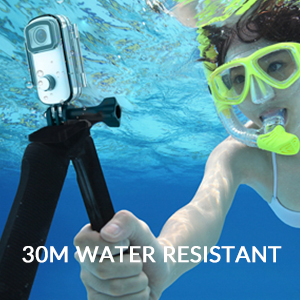
Image: The SJCAM C100 camera connected to a power bank, illustrating its ability to operate while charging. This extends recording time for longer sessions.
การใช้งานกล้อง
1. เปิด/ปิดเครื่อง
- To power on: Press and hold the main button for 5 seconds. The camera will vibrate once, and a blue light will illuminate, indicating it is on.
- To power off: Press and hold the main button for 2 seconds. The blue light will turn off.
2. เริ่ม/หยุดการบันทึก
- To start recording: With the camera powered on, click the main button once. The blue light will flash, indicating recording has started.
- To stop recording: Click the main button again. The blue light will stop flashing, and the recording will be saved.
3. Connecting to the Mobile App (SJCAM Zone)
The SJCAM C100 can be controlled and managed via the "SJCAM Zone" app on your smartphone (Android or iOS).
- Download the "SJCAM Zone" app from the แอปสโตร์ (iOS) or Android download link.
- On the camera, double-click the main button to activate Wi-Fi. A green light will flash.
- On your mobile phone, go to Wi-Fi settings and connect to the network named "C100+_XXXXXX" (where XXXXXX is a unique identifier). The default password is 12345678.
- Once connected, open the "SJCAM Zone" app and click "Connect Camera" to establish a connection.

Image: Instructions for connecting the SJCAM C100 to the SJCAM Zone mobile application, including QR codes for app download.
4. Advanced Functions via App
Through the SJCAM Zone app, you can access and adjust various settings and modes:
- การบันทึกแบบวนซ้ำ: Continuously records, overwriting older footagเช่นเมื่อการ์ดหน่วยความจำเต็ม
- Slow-Motion Photography: Captures video at a higher frame rate for slow-motion playback.
- โหมดการขับขี่: Automatically starts recording when the vehicle starts and stops when it turns off.
- การพลิกภาพ: Adjusts image orientation.
- โหมด Time-Lapse: Captures a sequence of images at set intervals to create a time-lapse video.
- การปรับค่าแสง: Controls the brightness of your recordings.
- การปรับสมดุลสีขาว: Corrects color temperature for accurate color representation.

ภาพ: อดีตample of a time-lapse video captured with an action camera, demonstrating the creative possibilities of this mode.
คุณสมบัติหลัก
- การออกแบบกันน้ำ: The C100 comes with an IPX65 waterproof case, allowing for underwater use up to 30 meters.
- EIS Anti-Shaking: Advanced Electronic Image Stabilization (EIS) helps produce stable and clear videos, even during fast movements.
- เลนส์มุมกว้าง 115°: จับภาพพื้นที่กว้างของ view, ideal for immersive action shots.
- Magnetic Body: The camera body features integrated magnets, allowing for easy attachment to metallic surfaces without additional accessories.
- Wearable Accessories: Includes a back clip for attaching the camera to clothing or gear, enhancing portability and hands-free recording.
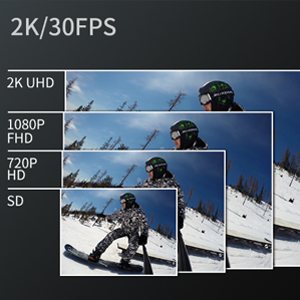
Image: The SJCAM C100 camera enclosed in its waterproof case, submerged in water, highlighting its water-resistant capability.
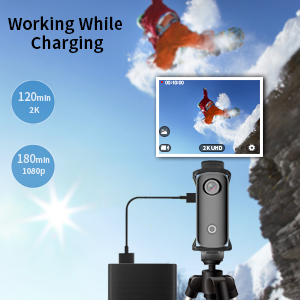
Image: A visual representation of the 115-degree wide-angle view captured by the SJCAM C100, showing a panoramic landscape.
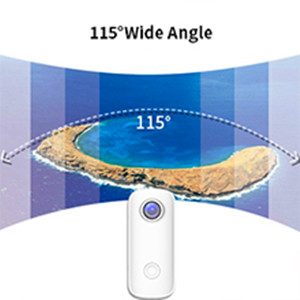
Image: The SJCAM C100 camera magnetically attached to a surface, demonstrating its versatile mounting options.

Image: A person wearing the SJCAM C100 camera attached to a backpack strap using the included wearable back clip.
ข้อมูลจำเพาะ
| ยี่ห้อ | กล้อง SJ |
| ชื่อรุ่น | ซี100 |
| หมายเลขรุ่น | ซี100+ |
| ความละเอียดของภาพนิ่งที่มีประสิทธิภาพ | 15 MP |
| ความละเอียดในการจับภาพวิดีโอ | 1080P (1920*1080) 30FPS |
| ระดับความต้านทานต่อน้ำ | กันน้ำ (เมื่อใช้ร่วมกับเคส) |
| ระบบป้องกันภาพสั่นไหว | ดิจิทัล (EIS) |
| ประเภทสื่อ | ไมโคร SD |
| การเชื่อมต่อ | ไวไฟ |
| อายุการใช้งานแบตเตอรี่โดยเฉลี่ย | 2 hours (1080P recording) |
| น้ำหนักสินค้า | 1.4 ออนซ์ |
การซ่อมบำรุง
- การทำความสะอาด: ใช้ผ้านุ่มและแห้งเช็ดทำความสะอาดตัวกล้อง สำหรับเลนส์ ให้ใช้ผ้าเช็ดเลนส์และน้ำยาทำความสะอาดเฉพาะ
- พื้นที่จัดเก็บ: เก็บกล้องไว้ในที่แห้งและเย็น หลีกเลี่ยงแสงแดดโดยตรงและอุณหภูมิที่สูงหรือต่ำเกินไป
- การดูแลแบตเตอรี่ เพื่อให้แบตเตอรี่ใช้งานได้นานที่สุด ควรหลีกเลี่ยงการปล่อยให้แบตเตอรี่หมดจนเกลี้ยงบ่อยๆ ชาร์จกล้องเป็นประจำ แม้ว่าจะไม่ได้ใช้งาน เพื่อป้องกันการคายประจุจนหมดเกลี้ยง
- เคสกันน้ำ: After using the waterproof case in saltwater, rinse it with fresh water and allow it to air dry. Inspect the O-ring seal for any debris or damage before each use.
การแก้ไขปัญหา
- กล้องไม่เปิด: Ensure the battery is charged. If the camera does not respond, connect it to a power source and try again. Verify a Micro SD card is inserted, as the camera may not operate without one.
- Recording stops randomly: This can often be caused by an incompatible or slow Micro SD card. Use a high-speed (U3 or higher) Micro SD card from a reputable brand. Format the card regularly.
- ปัญหาการเชื่อมต่อ Wi-Fi: Ensure the camera's Wi-Fi is enabled (green light flashing). Check that you are connecting to the correct Wi-Fi network name and entering the correct password (12345678). Restart both the camera and your mobile device if issues persist.
- ระบบกันสั่นของภาพไม่ดี: While the camera features EIS, extreme vibrations or rapid movements may still result in some blur. Ensure the camera is securely mounted.
การรับประกันและการสนับสนุน
สำหรับข้อมูลการรับประกันและการสนับสนุนทางเทคนิค โปรดดูที่เว็บไซต์อย่างเป็นทางการของ SJCAM webหรือติดต่อผู้ค้าปลีกของคุณ เก็บหลักฐานการซื้อไว้เพื่อใช้ในการเรียกร้องการรับประกัน