
1. บทนำ
Thank you for choosing the A4tech FG1112 Fstyler Wireless Keyboard and Mouse Set. This compact and efficient combo provides a reliable 2.4GHz wireless connection, offering convenience and comfort for your daily computing needs. The keyboard features a Q Turkish layout with FN multimedia keys, while the mouse offers precise 1200 DPI optical tracking. This manual will guide you through the setup, operation, and maintenance of your new device.
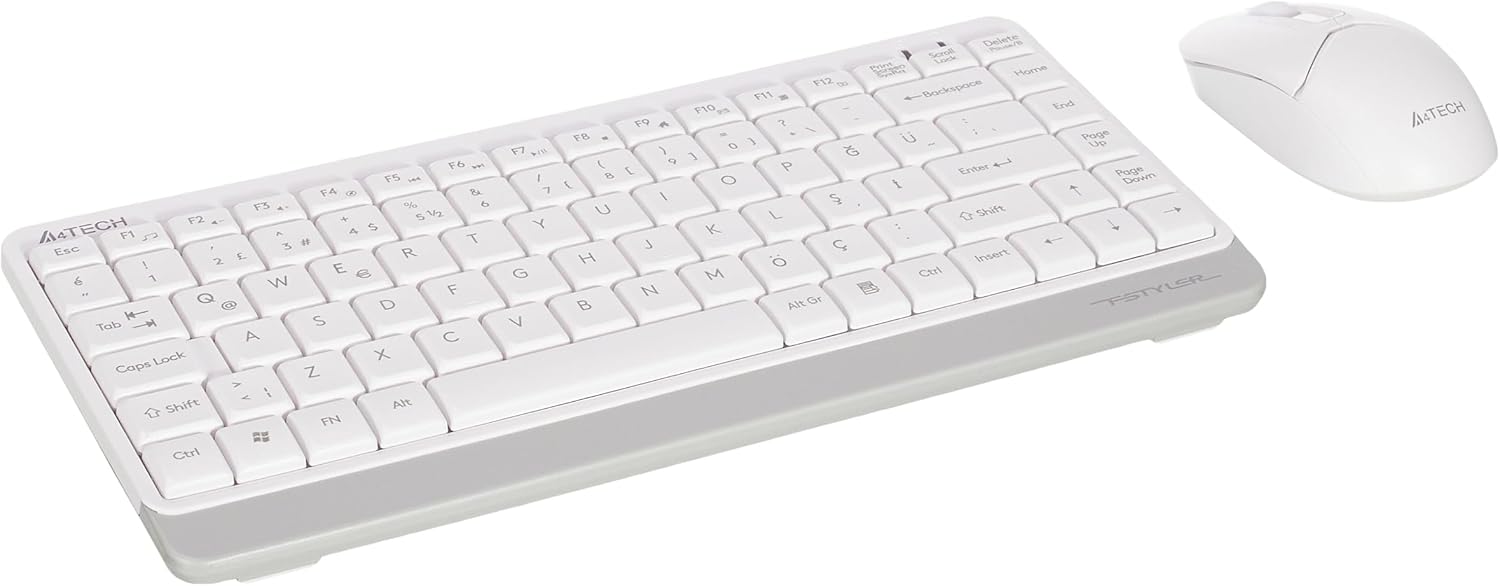
Image 1.1: A4tech FG1112 Fstyler Wireless Keyboard and Mouse Set (White)
2. เนื้อหาบรรจุภัณฑ์
กรุณาตรวจสอบเนื้อหาในแพ็คเกจเพื่อให้แน่ใจว่ามีสินค้าครบทั้งหมด:
- 1 x A4tech FG1112 Wireless Keyboard
- 1 x A4tech Fstyler Wireless Mouse
- 1 x USB Nano ตัวรับ
- แบตเตอรี่ AAA 2 ก้อน (สำหรับคีย์บอร์ด)
- 1 x AA Battery (for mouse, typically included)
- 1 x คู่มือผู้ใช้ (เอกสารนี้)
3. คำแนะนำในการตั้งค่า
- ใส่แบตเตอรี่:
- For the keyboard: Open the battery compartment cover on the underside of the keyboard. Insert two AAA batteries, ensuring correct polarity (+/-). Close the cover.
- For the mouse: Open the battery compartment cover on the underside of the mouse. Insert one AA battery, ensuring correct polarity (+/-). Close the cover.

Image 3.1: Mouse bottom view showing battery compartment and power switch.
- เชื่อมต่อตัวรับสัญญาณ USB Nano: Locate the USB Nano Receiver, typically stored inside the mouse's battery compartment or packaged separately. Plug the receiver into an available USB port on your computer.
- เปิดเครื่อง:
- For the keyboard: Ensure the keyboard is powered on. There might be a power switch on the top right or underside.
- For the mouse: Slide the power switch on the underside of the mouse to the "ON" position.
- การเชื่อมต่ออัตโนมัติ: Your computer should automatically detect and install the necessary drivers for the keyboard and mouse. This process may take a few moments. Once complete, your devices are ready for use.
Video 3.1: A short demonstration of the A4tech Fstyler Wireless Keyboard and Mouse Set, showing its compact design and wireless connectivity. This video illustrates the product's features and ease of use.
4. คู่มือการใช้งาน
4.1 การใช้งานแป้นพิมพ์
The A4tech FG1112 keyboard features a compact design with a Q Turkish layout. It is designed for comfortable and quiet typing.

ภาพที่ 4.1: ด้านบน view of the A4tech FG1112 Wireless Keyboard, highlighting its Q Turkish layout.
ปุ่มมัลติมีเดียและปุ่มฟังก์ชัน:
The keyboard includes 12 multimedia and internet function keys integrated into the F1-F12 keys. To activate these functions, press the FN กดคีย์พร้อมกับปุ่ม F ที่ต้องการ
- เอฟเอ็น + เอฟ1: มีเดียเพลเยอร์
- เอฟเอ็น + เอฟ2: ลดเสียงลง
- เอฟเอ็น + เอฟ3: ปรับระดับเสียงขึ้น
- เอฟเอ็น + เอฟ4: ปิดเสียง
- เอฟเอ็น + เอฟ5: แทร็คก่อนหน้า
- เอฟเอ็น + เอฟ6: แทร็คถัดไป
- เอฟเอ็น + เอฟ7: เล่น/หยุดชั่วคราว
- เอฟเอ็น + เอฟ8: หยุด
- เอฟเอ็น + เอฟ9: Home Page
- เอฟเอ็น + เอฟ10: อีเมล์
- เอฟเอ็น + เอฟ11: คอมพิวเตอร์ของฉัน
- เอฟเอ็น + เอฟ12: เครื่องคิดเลข

Image 4.2: Illustration of FN key functionality for multimedia controls.
4.2 การใช้งานเมาส์
The A4tech Fstyler mouse provides precise 1200 DPI optical tracking for smooth and accurate cursor movement.

ภาพที่ 4.3: ด้านบน view of the A4tech Fstyler Wireless Mouse.
ฟังก์ชั่นพื้นฐาน:
- คลิกซ้าย: Primary function, used for selecting items, opening fileส ฯลฯ
- คลิกขวา: ฟังก์ชันรอง โดยทั่วไปจะใช้เปิดเมนูบริบท
- ล้อเลื่อน: Used for scrolling documents and web pages vertically. Can also function as a middle click button.
5. การบำรุงรักษา
- การทำความสะอาด: ใช้ผ้านุ่มและแห้งเช็ดทำความสะอาดคีย์บอร์ดและเมาส์ สำหรับคราบสกปรกฝังแน่น ให้เช็ดเบาๆamp สามารถใช้ผ้าเช็ดทำความสะอาดได้ แต่ต้องระวังอย่าให้ของเหลวเข้าไปในอุปกรณ์
- การเปลี่ยนแบตเตอรี่: When the keyboard or mouse becomes unresponsive or exhibits delayed input, it's time to replace the batteries. Follow the "Insert Batteries" steps in the Setup section.
- พื้นที่จัดเก็บ: When not in use for extended periods, turn off the mouse to conserve battery life. Store the devices in a cool, dry place.
6 การแก้ไขปัญหา
| ปัญหา | วิธีแก้ปัญหาที่เป็นไปได้ |
|---|---|
| คีย์บอร์ด/เมาส์ไม่ตอบสนอง |
|
| Delayed or intermittent response |
|
| ปุ่มมัลติมีเดียไม่ทำงาน |
|
7. ข้อมูลจำเพาะ
| คุณสมบัติ | รายละเอียด |
|---|---|
| ยี่ห้อ | เอ4เทค |
| แบบอย่าง | เอฟจี 1112 |
| เทคโนโลยีการเชื่อมต่อ | 2.4GHz ไร้สาย |
| เค้าโครงแป้นพิมพ์ | Q Turkish |
| ประเภทแป้นพิมพ์ | Multimedia Membrane |
| DPI ของเมาส์ | ความละเอียดออปติคอล 1200 DPI |
| แหล่งจ่ายไฟคีย์บอร์ด | แบตเตอรี่ AAA 2 ก้อน |
| แหล่งจ่ายไฟเมาส์ | 1 x AA Battery (typical) |
| คุณสมบัติพิเศษ | Wireless, Mini, Multimedia Keys, Optical Mouse, Laser Printed Keys, Water-resistant design (with drainage channels) |
| น้ำหนักผลิตภัณฑ์ | 0.62 Kilograms (Set) |
| ขนาด (คีย์บอร์ด) | Approx. 315mm (Width) x 146mm (Depth) x 25mm (Height) |
| ขนาด (เมาส์) | Approx. 64mm (Width) x 108mm (Depth) x 35mm (Height) |

Image 7.1: Dimensions of the A4tech FG1112 Keyboard and Mouse.
8. การรับประกันและการสนับสนุน
This A4tech FG1112 Fstyler Wireless Keyboard and Mouse Set comes with a รับประกัน 2 ปี นับจากวันที่ซื้อ โปรดเก็บหลักฐานการซื้อไว้เพื่อใช้ในการเคลมประกัน
For technical support, troubleshooting assistance, or warranty inquiries, please contact A4tech customer service through their official webเว็บไซต์หรือตัวแทนจำหน่ายในพื้นที่ของคุณ
คุณสามารถค้นหาข้อมูลเพิ่มเติมและทรัพยากรสนับสนุนได้ที่ A4tech Store on Amazon.