
UNITOPSCI A2878
UNITOPSCI A2878 Double Din Car Stereo User Manual
รุ่น : A2878
1. บทนำ
This manual provides instructions for the installation, operation, and maintenance of your UNITOPSCI A2878 Double Din Car Stereo. This unit features a 7-inch touchscreen, Apple CarPlay, Android Auto, Bluetooth connectivity, FM radio, support for a backup camera, mirror link functionality, and dual USB ports.
โปรดอ่านคู่มือนี้อย่างละเอียดก่อนใช้งานผลิตภัณฑ์ เพื่อให้มั่นใจได้ว่าผลิตภัณฑ์ใช้งานได้อย่างถูกต้องและป้องกันความเสียหาย
2. เนื้อหาบรรจุภัณฑ์
ตรวจสอบว่ารายการทั้งหมดที่ระบุไว้ด้านล่างนี้รวมอยู่ในแพ็คเกจของคุณ:
- หัวหน้าหน่วยหลัก
- กล้องสำรอง
- ไมโครโฟนภายนอก
- Dual USB Adapter
- สายไฟ
- คู่มือการใช้งาน
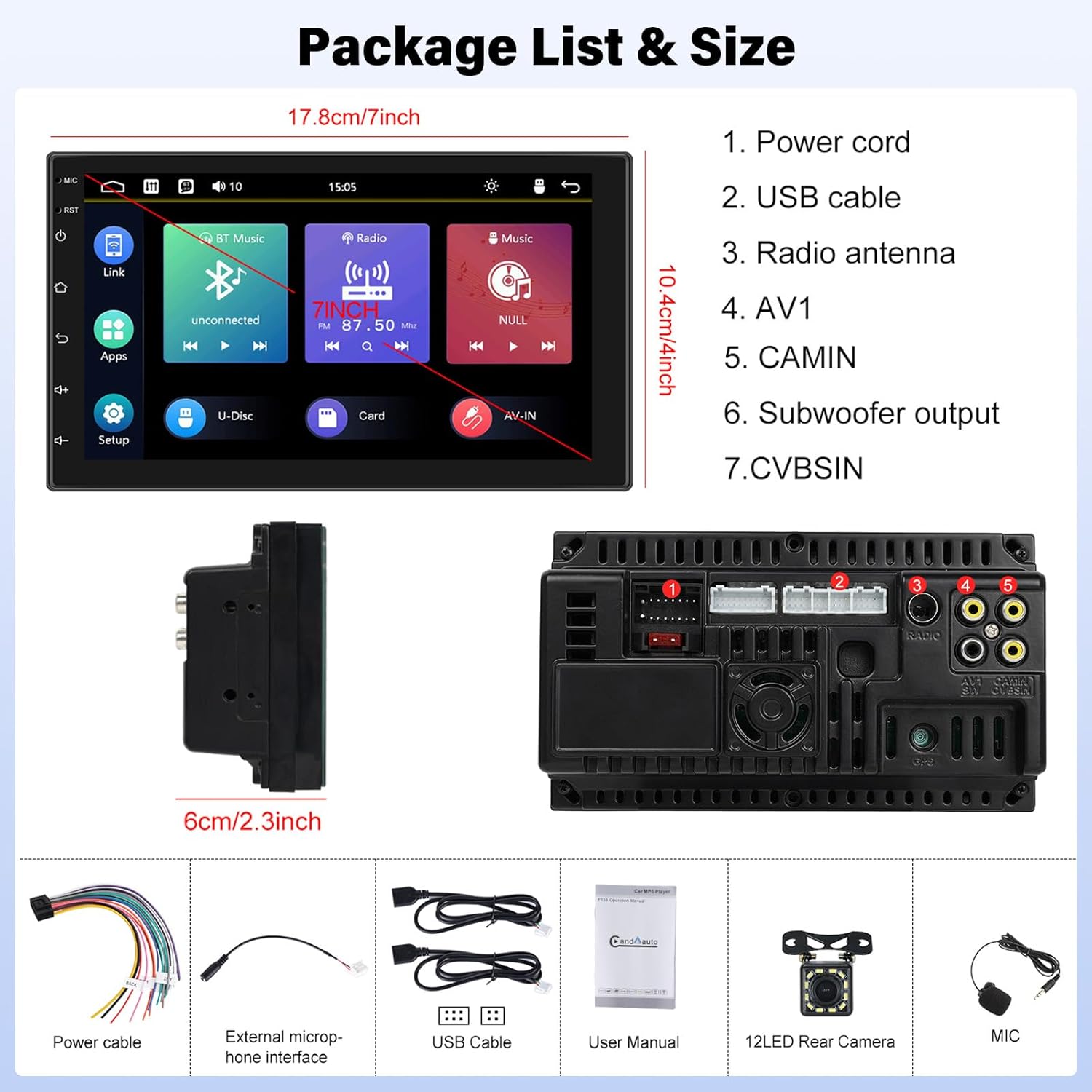
Image: Contents of the UNITOPSCI A2878 package, showing the main unit, wiring, and accessories.
3. สินค้าหมดview
The UNITOPSCI A2878 is a double din car stereo featuring a 7-inch high-definition touchscreen. The front panel includes essential controls and the display for various functions. The rear panel provides all necessary connection ports for power, speakers, USB devices, and external accessories like the backup camera.

ภาพ: ด้านหน้า view of the UNITOPSCI A2878 car stereo with its 7-inch touchscreen interface.

Image: Rear panel connections of the UNITOPSCI A2878 head unit, indicating ports for power, USB, radio antenna, AV, camera, subwoofer, and CVBS.
4. การตั้งค่าและการติดตั้ง
Proper installation is crucial for the performance and safety of your car stereo. It is recommended that installation be performed by a qualified professional.
4.1 การเชื่อมต่อสายไฟ
โปรดดูแผนผังการเดินสายไฟที่ให้มาพร้อมกับอุปกรณ์ของคุณสำหรับรายละเอียดการเชื่อมต่อที่ถูกต้อง การเชื่อมต่อที่สำคัญได้แก่:
- สายไฟ: เชื่อมต่อกับแหล่งจ่ายไฟของรถยนต์ (ไฟคงที่ 12V, ไฟเสริม 12V และกราวด์)
- สาย USB: Connect the provided USB cables for CarPlay/Android Auto and media playback.
- เสาอากาศวิทยุ: เชื่อมต่อเสาอากาศ FM/AM ของรถของคุณ
- CAMIN (Camera Input): Connect the backup camera video signal.
- เอาต์พุตซับวูฟเฟอร์: สำหรับเชื่อมต่อซับวูฟเฟอร์ภายนอก
- ไมโครโฟนภายนอก: เชื่อมต่อไมโครโฟนภายนอกเพื่อคุณภาพการโทรที่ดีขึ้น
4.2 การติดตั้งกล้องสำรอง
Install the backup camera at the rear of your vehicle. Connect its video output to the CAMIN port on the head unit and its power to the vehicle's reverse light circuit so it activates automatically when reversing.
5. คู่มือการใช้งาน
5.1 CarPlay และ Android Auto
Connect your smartphone to the stereo via a USB cable to activate Apple CarPlay or Android Auto. This allows access to your phone's navigation, music, calls, and other compatible apps directly on the stereo's screen, controlled by voice or touch.

Image: Wired connection setup for CarPlay and Android Auto.

Image: CarPlay and Android Auto interfaces displayed on the stereo screen.
5.2 การเชื่อมโยงมิเรอร์
The mirror link function allows you to project your smartphone's screen (both iOS and Android) onto the stereo display via a USB cable. This enables viewing videos, navigation maps, and images from your phone on the larger screen.

Image: Mirror Link functionality with a smartphone connected to the stereo.
5.3 Bluetooth Hands-free & FM Radio
บลูทูธ: Pair your smartphone with the stereo via Bluetooth for hands-free calling and wireless audio streaming. The built-in microphone facilitates clear communication. You can access your phone book and dial directly from the stereo.
วิทยุ FM: The unit includes an FM tuner with 18 preset stations. Tune into your favorite radio programs, music, and traffic updates.

Image: FM Radio interface and Bluetooth hands-free call screen.
5.4 อินพุตกล้องสำรอง
When the vehicle is shifted into reverse, the stereo automatically displays the clear image from the connected backup camera, assisting with safe parking maneuvers.
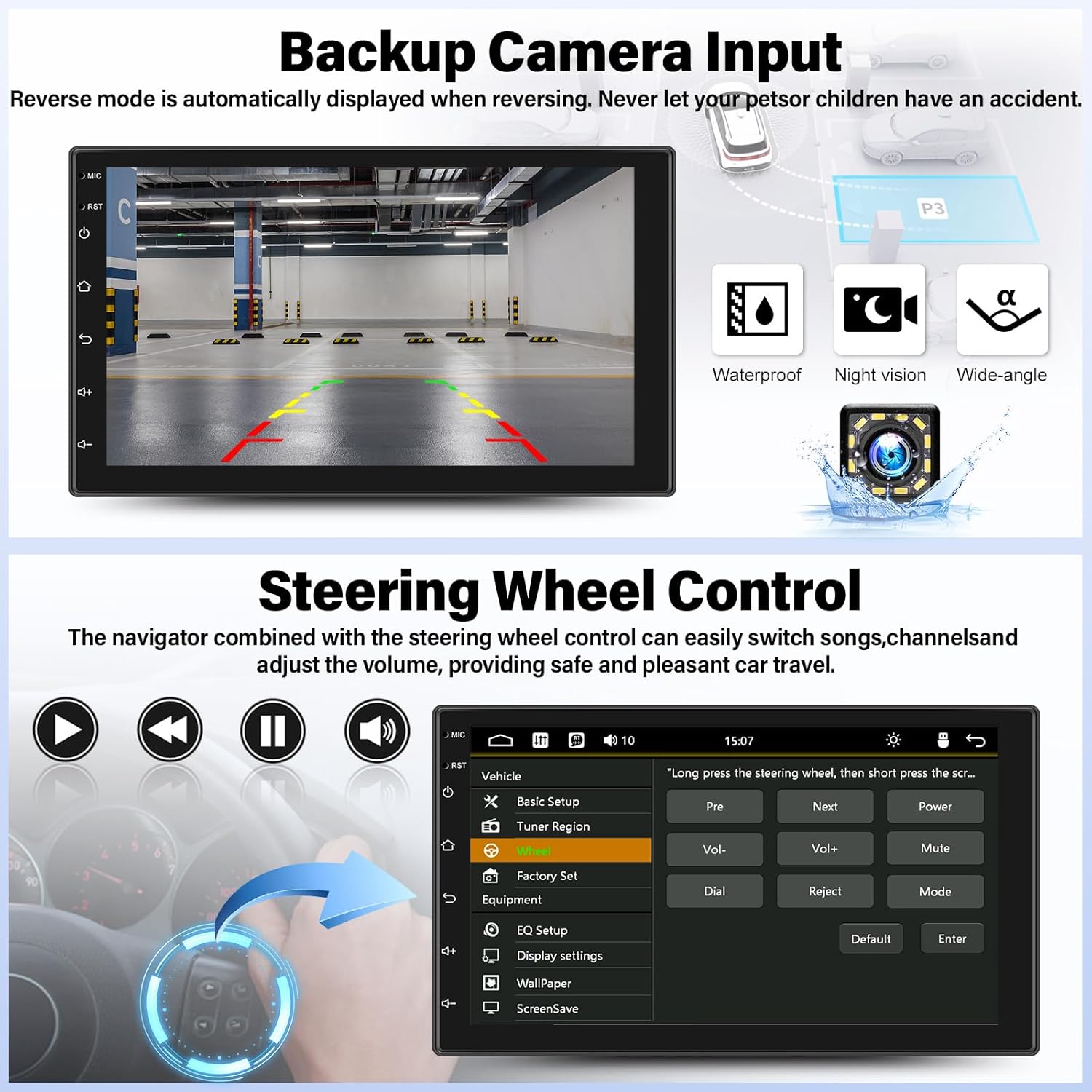
Image: Backup camera display on the stereo screen.
5.5 ระบบควบคุมพวงมาลัย (SWC)
The unit supports steering wheel control, allowing you to manage functions such as volume adjustment, track skipping, and mode switching directly from your vehicle's steering wheel buttons (if compatible and wired correctly). This enhances convenience and safety while driving.
5.6 การเล่นและการชาร์จผ่าน USB
The two USB adapter ports allow for media playback from a USB drive (audio/video files) and charging of compatible devices.

Image: USB media playback and charging capabilities.
5.7 อีควอไลเซอร์เสียง (EQ)
Adjust the audio output using the built-in equalizer. You can select from various preset audio styles (e.g., Classic, Pop, Rock, Jazz) or customize settings to match your preferences and vehicle acoustics. The unit also supports subwoofer output for enhanced bass.

Image: Audio Equalizer interface for sound customization.
6. การบำรุงรักษา
เพื่อให้เครื่องเสียงในรถยนต์ของคุณมีอายุการใช้งานยาวนานและมีประสิทธิภาพเหมาะสมที่สุด โปรดปฏิบัติตามคำแนะนำในการบำรุงรักษาดังต่อไปนี้:
- การทำความสะอาด: ใช้ผ้าแห้งเนื้อนุ่มเช็ดทำความสะอาดหน้าจอสัมผัสและภายนอกตัวเครื่อง หลีกเลี่ยงการใช้สารทำความสะอาดที่มีฤทธิ์กัดกร่อนหรือตัวทำละลาย
- อุณหภูมิ: หลีกเลี่ยงการวางเครื่องไว้ในอุณหภูมิที่สูงหรือต่ำเกินไป แสงแดดโดยตรงเป็นเวลานาน หรือความชื้นสูง
- การเชื่อมต่อ: ตรวจสอบการเชื่อมต่อสายไฟทั้งหมดเป็นระยะ เพื่อให้แน่ใจว่าแน่นหนาดีแล้ว
7 การแก้ไขปัญหา
If you encounter issues with your UNITOPSCI A2878 car stereo, refer to the following common problems and solutions:
- ไม่มีไฟฟ้า: Check the power cable connections (constant 12V, accessory 12V, ground). Ensure the vehicle's fuse for the stereo is not blown.
- ไม่มีเสียง: Verify speaker connections. Check volume levels and audio settings (EQ). Ensure the mute function is not activated.
- CarPlay/Android Auto ไม่เชื่อมต่อ: Ensure your phone is connected via a compatible USB cable. Try a different USB port or cable. Check phone settings for CarPlay/Android Auto permissions.
- ปัญหาการจับคู่บลูทูธ: Ensure Bluetooth is enabled on both the stereo and your phone. Delete previous pairings and try pairing again.
- กล้องสำรองไม่แสดง: Check the camera's power and video signal connections. Ensure the camera is properly installed and wired to the reverse light trigger.
- หน้าจอสัมผัสไม่ตอบสนอง: Try resetting the unit using the reset button (if available, typically a small pinhole).
หากปัญหายังคงมีอยู่ โปรดติดต่อฝ่ายสนับสนุนลูกค้าเพื่อขอความช่วยเหลือ
8. ข้อมูลจำเพาะ
| คุณสมบัติ | ข้อมูลจำเพาะ |
|---|---|
| หมายเลขรุ่น | เอ2878 |
| ขนาดจอแสดงผล | 7 นิ้ว |
| ความละเอียดการแสดงผล | ขนาด 1024x600 |
| ขนาดสินค้า | 7.01 x 1.77 x 4.02 นิ้ว |
| น้ำหนักสินค้า | 2.4 ปอนด์ (1.09 กิโลกรัม) |
| เทคโนโลยีการเชื่อมต่อ | บลูทูธ, USB, RCA |
| ประเภทตัวควบคุม | Android, iOS (via CarPlay/Android Auto) |
| โหมดเอาต์พุตเสียง | สเตอริโอ |
| การกำหนดค่าช่องเสียงรอบทิศทาง | 2.0 |
| การรองรับการเข้ารหัสวิดีโอ | เอช.264, เอช.263 |
9. การรับประกันและการสนับสนุน
UNITOPSCI provides comprehensive customer support for its products:
- การทดแทน: Available within 24 months of purchase.
- การสนับสนุนด้านเทคนิค: Lifetime after-sales consultation and technical support.
- การส่งคืน: นโยบายการคืนสินค้าภายใน 60 วัน
For any inquiries or support, please contact UNITOPSCI customer service at: UNITOPSCI@126.com
Ask a question about this manual
Ask about setup, troubleshooting, compatibility, parts, safety, or missing instructions. Manuals+ will review the question and use this page’s manual context to help answer it.