
1. บทนำ
Thank you for choosing the Greadio MD-T26 Portable AM/FM/SW Radio. This manual provides detailed instructions for the proper setup, operation, and maintenance of your radio. Please read this manual thoroughly before use to ensure optimal performance and longevity of your device.
The Greadio MD-T26 is a versatile portable radio featuring AM, FM, and Shortwave (SW) bands, an LCD display for clear frequency and time viewing, and dual power options for both indoor and outdoor use. It is designed for ease of use with large, accessible controls and a built-in speaker for clear audio.

รูปที่ 1 : ด้านหน้า view of the Greadio MD-T26 Portable AM/FM/SW Radio.
2. คุณสมบัติของผลิตภัณฑ์
- การรับสัญญาณหลายย่านความถี่: Receives AM, FM, and Shortwave (SW) frequencies.
- จอแสดงผล LCD: Clear digital display for frequency and time settings.
- ตัวเลือกพลังงานคู่: Operates via AC power or 4 x D cell batteries (not included).
- ลำโพงคุณภาพสูง: Integrated 2W speaker for clear sound output.
- การควบคุมเสียง: Adjustable tone settings (Low/High) for personalized audio.
- แจ็คหูฟัง: 3.5mm stereo earphone jack for private listening.
- การออกแบบพกพา: Equipped with a sturdy handle for easy transport.
3. การตั้งค่า
3.1 การจ่ายไฟให้วิทยุ
The Greadio MD-T26 radio offers two methods for power supply:
- แหล่งจ่ายไฟ AC: For indoor use, connect the included AC power cable to the radio's AC input jack and then plug it into a standard wall outlet.
- แหล่งจ่ายไฟแบตเตอรี่: For portable use, insert four (4) D cell batteries (not included) into the battery compartment located on the back of the radio. Ensure correct polarity (+/-) as indicated inside the compartment.
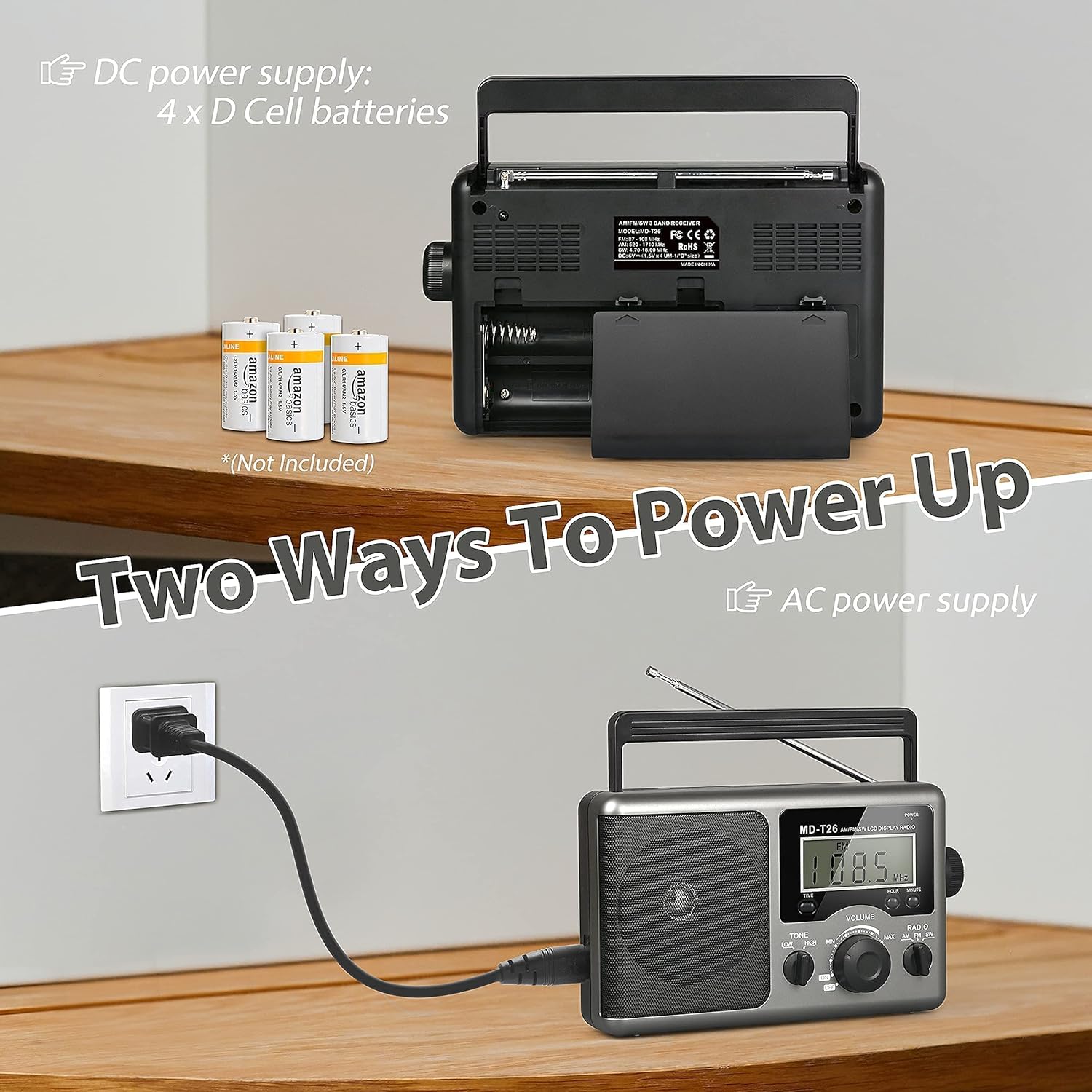
Figure 2: Illustration of AC power connection and battery compartment for D cell batteries.
3.2 การปรับเสาอากาศ
For optimal reception, adjust the antenna as follows:
- FM/SW Reception: Extend the telescopic antenna fully and adjust its angle for the clearest signal.
- แผนกต้อนรับ AM: The radio uses a built-in ferrite rod antenna for AM. Rotate the entire radio unit to find the strongest signal.
4. คู่มือการใช้งาน
4.1 การควบคุมมากกว่าview

รูปที่ 3: รายละเอียด view of the radio's control panel.
- ปุ่มเพาเวอร์: Located on the top right, press to turn the radio ON/OFF.
- ปุ่มปรับจูน: Located on the right side, rotate to select radio stations.
- ปุ่มปรับระดับเสียง: Located on the front panel, rotate to adjust the sound level.
- RADIO Band Selector: สลับระหว่างคลื่นความถี่ AM, FM และ SW
- สวิตช์ปรับเสียง: Select between LOW and HIGH tone settings.
- TIME/HOUR/MINUTE Buttons: Used for setting the time on the LCD display.
4.2 Turning On and Selecting a Band
- กดปุ่ม พลัง button to turn on the radio. The LCD display will illuminate.
- ใช้ วิทยุ band selector switch to choose your desired band: AM, FM, or SW.
4.3 การปรับจูนไปยังสถานี
Once a band is selected, slowly rotate the การปรับแต่ง knob on the right side of the radio. Observe the frequency displayed on the LCD screen. Stop rotating when you hear your desired station clearly.
4.4 การปรับระดับเสียงและโทน
- ปริมาณ: หมุน ปริมาณ หมุนปุ่มที่แผงด้านหน้าตามเข็มนาฬิกาเพื่อเพิ่มระดับเสียง และหมุนทวนเข็มนาฬิกาเพื่อลดระดับเสียง
- โทนสี : ใช้ โทนเสียง switch to select between 'LOW' for a warmer sound or 'HIGH' for a brighter sound, according to your preference.
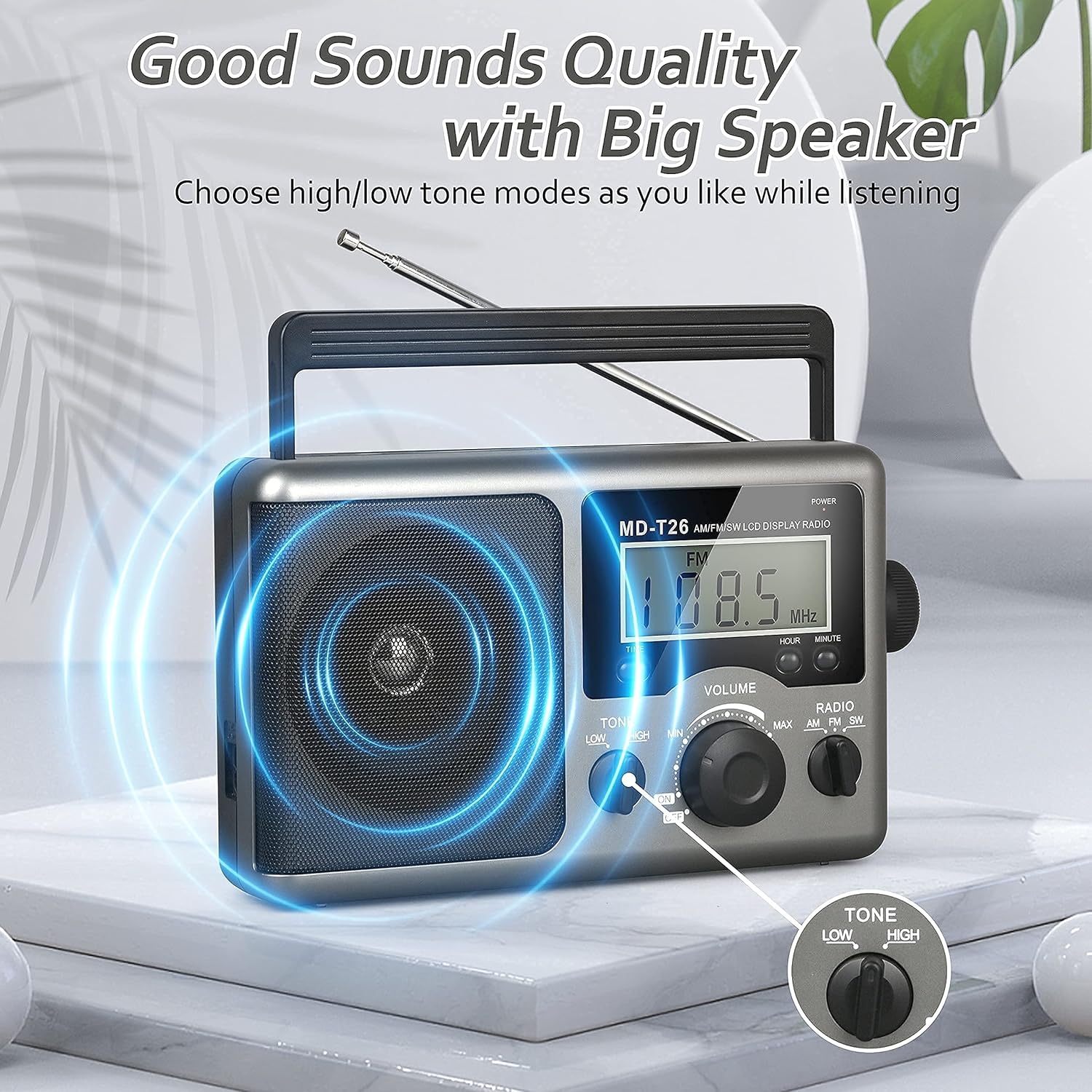
Figure 4: Speaker and Tone control detail.
4.5 การตั้งเวลา
The LCD display can also show the current time. To set the time:
- กดปุ่ม เวลา button once to enter time setting mode.
- ใช้ ชั่วโมง ปุ่มเพื่อปรับชั่วโมง
- ใช้ นาที ปุ่มเพื่อปรับนาที
- The time system is 24-hour format.
4.6 การใช้งานแจ็คเสียบหูฟัง
For private listening, plug any standard 3.5mm stereo earphones (not included) into the แจ็คหูฟัง located on the side of the radio. The internal speaker will automatically mute when earphones are connected.
5. การบำรุงรักษา
- การทำความสะอาด: เช็ดทำความสะอาดภายนอกวิทยุด้วยผ้าแห้งเนื้อนุ่ม ห้ามใช้สารทำความสะอาดที่มีฤทธิ์กัดกร่อนหรือตัวทำละลาย
- การดูแลแบตเตอรี่ If the radio will not be used for an extended period, remove the D cell batteries to prevent leakage and damage.
- พื้นที่จัดเก็บ: เก็บวิทยุไว้ในที่แห้งและเย็น หลีกเลี่ยงแสงแดดโดยตรงและอุณหภูมิที่สูงหรือต่ำเกินไป
- ความต้านทานน้ำ: วิทยุนี้เป็น ไม่กันน้ำ. Avoid exposure to rain, moisture, or splashing water.
6 การแก้ไขปัญหา
| ปัญหา | สาเหตุที่เป็นไปได้ | สารละลาย |
|---|---|---|
| ไม่มีไฟฟ้า | AC cable not connected, batteries depleted or incorrectly inserted. | Check AC cable connection. Replace batteries or ensure correct polarity. |
| สัญญาณไม่ดี / เสียงรบกวน | Antenna not extended/adjusted, weak signal area, interference. | Extend and adjust telescopic antenna (FM/SW). Rotate radio for AM. Move to an area with better signal. Avoid sources of electronic interference. |
| ไม่มีเสียงออกจากลำโพง | ระดับเสียงเบาเกินไป ทั้งๆ ที่เสียบหูฟังอยู่ | Increase volume. Disconnect earphones if not intended for private listening. |
| จอ LCD ไม่ทำงาน | ปัญหาเกี่ยวกับระบบไฟ ความผิดพลาดภายใน | ตรวจสอบแหล่งจ่ายไฟ หากปัญหายังคงอยู่ โปรดติดต่อฝ่ายบริการลูกค้า |
7. ข้อมูลจำเพาะ
| คุณสมบัติ | รายละเอียด |
|---|---|
| ยี่ห้อ | Gredio |
| หมายเลขรุ่น | เอ็มดี-T26 |
| เทคโนโลยีการเชื่อมต่อ | ช่องเสียบเสริม (สำหรับหูฟัง) |
| เทคโนโลยีจูนเนอร์ | AM, FM, SW |
| แหล่งพลังงาน | AC Power, 4 x D Cell Batteries |
| อุปกรณ์ที่รองรับ | หูฟัง |
| ประเภทจอภาพ | จอแอลซีดี |
| ฮาร์ดแวร์อินเตอร์เฟซ | แจ็ค Audio 3.5mm |
| ระดับความต้านทานต่อน้ำ | ไม่ทนน้ำ |
8. การรับประกันและการสนับสนุน
8.1 ข้อมูลการรับประกัน
Greadio provides a รับประกัน 12 เดือน สำหรับผลิตภัณฑ์นี้ ครอบคลุมถึงข้อบกพร่องจากการผลิตนับจากวันที่ซื้อ นอกจากนี้ ยังมีการรับประกันเพิ่มเติมอีกด้วย รับประกันคืนเงินภายใน 30 วัน มีให้บริการ
การรับประกันนี้ไม่ครอบคลุมความเสียหายที่เกิดจากการใช้งานผิดวิธี อุบัติเหตุ การดัดแปลงโดยไม่ได้รับอนุญาต หรือการสึกหรอตามปกติ
8.2 การสนับสนุนลูกค้า
For any questions, technical assistance, or warranty claims, please contact Greadio customer service. We offer บริการลูกค้าตลอด 24 ชม. เพื่อช่วยเหลือคุณ
โปรดดูรายละเอียดจากบรรจุภัณฑ์ของผลิตภัณฑ์หรือคำแนะนำจากผู้ค้าปลีก webเว็บไซต์สำหรับข้อมูลการติดต่อล่าสุด