
FLINQ Motion Lights 4-pack
คู่มือผู้ใช้ไฟตรวจจับความเคลื่อนไหว FLINQ
Model: Motion Lights 4-pack (ASIN: B09CDRQ3VW)
การแนะนำ
Thank you for choosing the FLINQ Motion Lights. This 4-pack of LED motion sensor lights is designed to provide convenient and efficient lighting for various indoor spaces such as cabinets, wardrobes, bookshelves, and drawers. With their rechargeable battery and versatile installation options, these lights offer a practical solution for illuminating dark areas.
Please read this manual carefully before using the product to ensure proper operation and longevity.
สินค้าเกินview
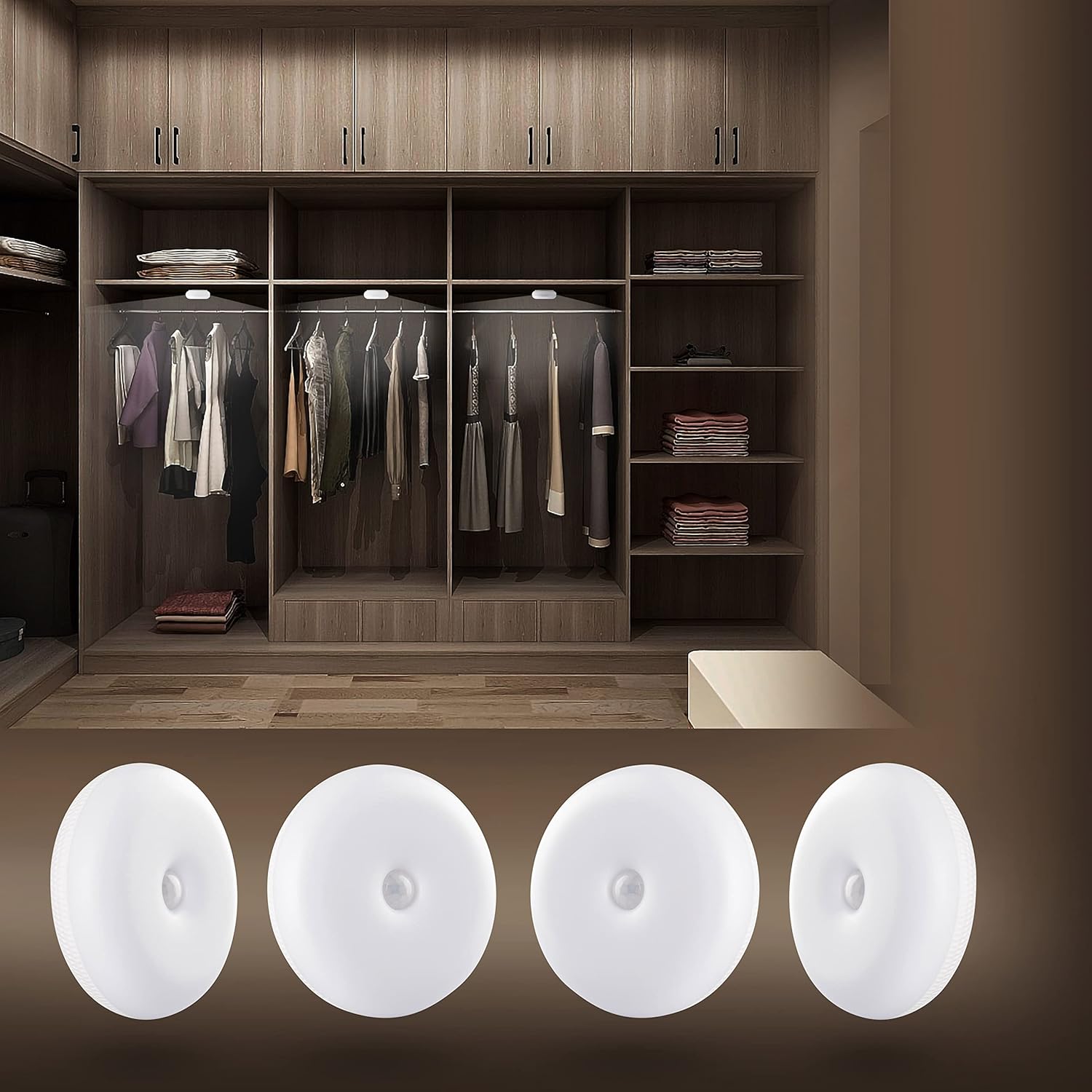
The FLINQ Motion Lights provide bright, warm white illumination, perfect for enhancing visibility inside closets and other dark spaces. This image shows the lights discreetly installed within a wardrobe, highlighting their practical application.

This image displays the complete contents of the FLINQ Motion Lights 4-pack, including the four motion sensor lights, four USB charging cables, and adhesive mounting options. Everything needed for setup is provided.
การติดตั้งและการตั้งค่า
การชาร์จไฟ
Before first use, ensure the lights are fully charged. Each light is equipped with a rechargeable battery.
- Locate the micro-USB charging port on the side of the light.
- Connect the provided USB charging cable to the light and a compatible USB power source (e.g., computer USB port, USB wall adapter).
- ไฟแสดงสถานะจะแสดงสถานะการชาร์จ (เช่น สีแดงเมื่อกำลังชาร์จ สีเขียว/ดับเมื่อชาร์จเต็มแล้ว)
- โดยทั่วไปการชาร์จเต็มจะใช้เวลาไม่กี่ชั่วโมง

รายละเอียด view of the back of a FLINQ Motion Light, highlighting the micro-USB charging port and the ON/OFF/AUTO switch for mode selection.
ตัวเลือกการติดตั้ง
The FLINQ Motion Lights offer three versatile installation methods:
- เทปกาว:
Peel off the protective film from the 3M adhesive tape located on the back of the light. Press the light firmly onto a clean, dry, and smooth surface where you wish to install it. This method is ideal for permanent placement.
- แผ่นแม่เหล็ก:
Attach the provided magnetic plate to the desired surface using its adhesive backing. The light can then be magnetically attached to this plate, allowing for easy removal for charging or repositioning.

The back of the FLINQ Motion Light, illustrating the integrated magnetic plate for easy attachment to metallic surfaces or the included adhesive magnetic disc.
- hooks:
The lights can also be hung using small hooks if your installation area allows for it. This provides a flexible mounting solution.
Choose the method that best suits your needs and the surface where the light will be placed. Ensure the surface is clean and dry for optimal adhesion.
คำแนะนำการใช้งาน
การเลือกโหมด
Each FLINQ Motion Light has a switch on the back to select its operating mode:
- บน: The light will stay continuously on, regardless of motion or ambient light.
- ปิด: ไฟจะยังคงดับอยู่
- อัตโนมัติ (โหมดเซ็นเซอร์ตรวจจับความเคลื่อนไหว): This is the primary mode for motion detection.
ฟังก์ชันเซ็นเซอร์ตรวจจับความเคลื่อนไหว (โหมดอัตโนมัติ)
In AUTO mode, the light will activate based on motion and ambient light conditions:
- The light is equipped with a sensitive motion sensor that detects movement within a range of 3-5 meters.
- It also features a day/night sensor, meaning it will only activate in dark conditions when motion is detected.
- Once motion is detected, the light will turn on automatically.
- If no further motion is detected for approximately 25 seconds, the light will automatically turn off to conserve battery life.

The FLINQ Motion Light providing illumination inside a closet, demonstrating its motion-activated functionality in a practical setting.

A FLINQ Motion Light mounted on a wall, serving as a subtle night light or accent light in a bedroom environment.
การซ่อมบำรุง
การทำความสะอาด
To maintain the appearance and functionality of your FLINQ Motion Lights, follow these cleaning guidelines:
- Ensure the light is turned OFF before cleaning.
- เช็ดพื้นผิวด้วยผ้านุ่ม แห้ง หรือผ้านุ่มๆ เล็กน้อยamp ผ้า.
- Do not use abrasive cleaners, solvents, or harsh chemicals, as these may damage the plastic material or electronic components.
- Avoid getting water directly into the charging port or sensor area.
การดูแลแบตเตอรี่
To maximize the lifespan of the built-in rechargeable battery:
- Recharge the lights when the brightness noticeably diminishes.
- หลีกเลี่ยงการระบายแบตเตอรี่จนหมดบ่อยครั้ง
- If storing the lights for an extended period, charge them to about 50% and recharge every few months to prevent deep discharge.
- Do not expose the lights to extreme temperatures (hot or cold) as this can affect battery performance.
การแก้ไขปัญหา
If you encounter issues with your FLINQ Motion Lights, please refer to the following common solutions:
| ปัญหา | สาเหตุที่เป็นไปได้ / วิธีแก้ไข |
|---|---|
| ไฟไม่เปิด |
|
| แสงไม่ตรวจจับการเคลื่อนไหว |
|
| ไฟดับเร็วเกินไปหรือติดนานเกินไป |
|
| แสงสว่างสลัวๆ |
|
ข้อมูลจำเพาะ
| คุณสมบัติ | รายละเอียด |
|---|---|
| ยี่ห้อ | ฟลินค์ |
| ชื่อรุ่น | Motion Lights 4-pack |
| ขนาด (กว้าง x ยาว x สูง) | 8 x 8 x 2.8 ซม. |
| น้ำหนักต่อหน่วย | 100 กรัม |
| จำนวนรายการ | 4 |
| วัสดุ | พลาสติก |
| สีอ่อน | สีขาวอุ่น |
| เอาท์พุตของลูเมน | 50 ลูเมน |
| คุณสมบัติพิเศษ | Wireless, Motion Sensor, Rechargeable |
| แหล่งพลังงาน | Battery Powered (Built-in Li-Polymer) |
| ความจุของแบตเตอรี่ | 3.7V 600mAh |
| ประเภทหลอดไฟ | LED (5 HQ SMD LED) |
| ช่วงการตรวจจับการเคลื่อนไหว | 3-5 เมตร |
| เวลาปิดอัตโนมัติ | 25 วินาที (หลังจากไม่มีการเคลื่อนไหว) |
| อายุการใช้งาน | ประมาณ 30,000 ชั่วโมง |
| การรับรอง | CE |
การรับประกันและการสนับสนุน
ข้อมูลการรับประกัน
Specific warranty details for your FLINQ Motion Lights may vary by region and retailer. Please refer to your purchase receipt or contact your point of sale for precise warranty terms and conditions.
การสนับสนุนลูกค้า
For further assistance, technical support, or inquiries regarding your FLINQ product, please contact FLINQ customer service:
- อีเมล: info@flinqproducts.nl
- Webเว็บไซต์: For more information and product updates, visit the official FLINQ webเว็บไซต์.
- You can also scan the QR code on the product packaging for additional information: https://qrco.de/bc0PUg
Ask a question about this manual
Ask about setup, troubleshooting, compatibility, parts, safety, or missing instructions. Manuals+ will review the question and use this page’s manual context to help answer it.