
1. บทนำ
The Rakstore ZB2L3 Battery Capacity Tester is a versatile device designed to measure the capacity of various battery types, including 18650 Lithium batteries and Lead-Acid batteries. It functions as a discharge tester, allowing users to determine the actual capacity by discharging the battery through a load and measuring the discharged energy. This manual provides detailed instructions for the safe and effective use of the ZB2L3 tester.
2. ข้อมูลด้านความปลอดภัย
- Always ensure correct polarity when connecting batteries to avoid damage to the tester and battery.
- Use appropriate discharge loads. Overloading the tester or using incorrect loads can cause overheating and damage.
- อย่าลัดวงจรขั้วแบตเตอรี่
- Operate the device in a well-ventilated area, especially when discharging batteries, as they can generate heat.
- ควรเก็บอุปกรณ์ให้ห่างจากความชื้นและอุณหภูมิที่สูงหรือต่ำเกินไป
- อุปกรณ์นี้ไม่ใช่ของเล่น เก็บให้พ้นมือเด็ก
3. คุณสมบัติของผลิตภัณฑ์
- แหล่งจ่ายไฟ: DC4.5-6V via micro USB interface.
- กระแสไฟฟ้าทำงาน: Less than 70mA.
- ปล่อย Voltagอี ช่วง: 1-15V with 0.01V resolution.
- สิ้นสุดฉบับtagอี ช่วง: 0.5-11.0โวลต์
- Supported Discharge Current: Up to 3.000A with 0.001A resolution.
- เล่มที่tage ข้อผิดพลาดในการวัด: Less than 1% + 0.02V.
- ข้อผิดพลาดในการวัดปัจจุบัน: Less than 1.2% ± 0.002A.
- ช่วงความจุแบตเตอรี่: Up to 9999Ah (1Ah=1000mAh). Display adjusts decimal point for large values (e.g., X.XXX Ah, XX.XX Ah).
- ขนาดกระทัดรัด: Circuit board 50mm x 37mm, finished product 50mm x 37mm x 17mm (L x W x H, including copper foot height).
4. เนื้อหาบรรจุภัณฑ์
- 1 x Rakstore ZB2L3 Battery Capacity Tester Unit
- (Note: Discharge resistors and battery holders are typically sold separately and are required for operation.)
5. การตั้งค่า
Before operating the ZB2L3 tester, ensure all connections are made correctly.

Figure 1: ZB2L3 Battery Capacity Tester showing the micro USB power input, battery terminals, and load terminals.
- การเชื่อมต่อแหล่งจ่ายไฟ: Connect a DC 4.5-6V power source to the micro USB port on the tester. A standard phone charger or power bank can be used. The display should light up.
- การเชื่อมต่อแบตเตอรี่: Connect the battery to be tested to the "BAT+" and "BAT-" terminals. Ensure correct polarity. The tester will display the current battery voltage.
- Discharge Load Connection: Connect an appropriate discharge resistor (load) to the "LOAD+" and "LOAD-" terminals. The resistance value of the load will determine the discharge current. Ensure the load can handle the expected power dissipation.
สำคัญ: The discharge current should not exceed 3.000A. Calculate the required resistance using Ohm's Law (R = V/I) and Power Law (P = V*I or P = I²*R) to ensure the resistor can handle the power. For example, if testing a 3.7V battery at 1A, you need a 3.7 Ohm resistor capable of dissipating at least 3.7W.
6. คู่มือการใช้งาน
Follow these steps to perform a battery capacity test:
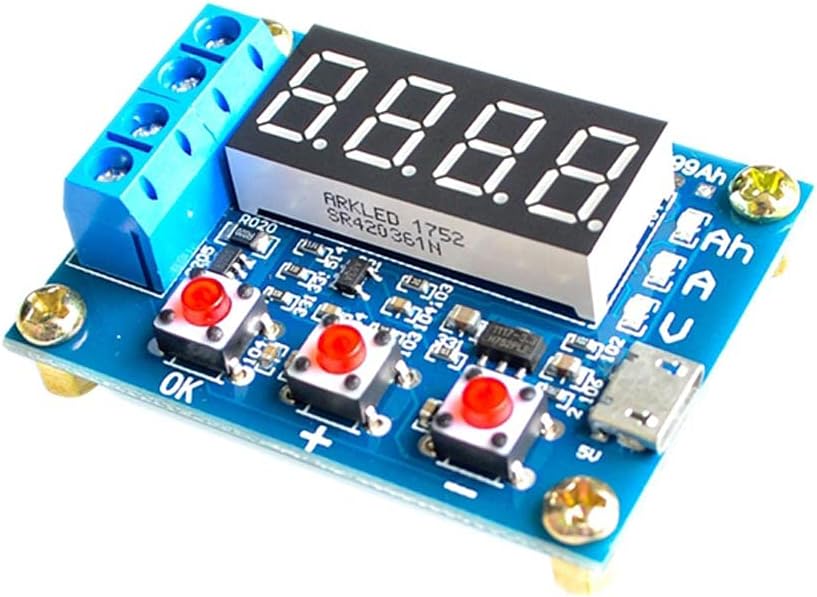
Figure 2: ZB2L3 Battery Capacity Tester showing the 'OK', '+', and '-' buttons for operation.
- การแสดงผลเริ่มต้น: After connecting the power and battery, the tester will display the battery's current voltage.
- ตั้งค่าการสิ้นสุด Voltage:
- Press the "OK" button once. The display will show the current termination voltage (e.g., "U 3.00").
- Use the "+" and "-" buttons to adjust the termination voltage. This is the voltage at which the discharge test will stop. For 18650 Lithium batteries, a common termination voltage is 3.0V. For Lead-Acid batteries, consult the battery's specifications.
- Press "OK" again to confirm the setting and return to the main display.
- Start Discharge Test:
- With the battery and load connected, and the termination voltage set, press and hold the "OK" button for approximately 3 seconds.
- The tester will begin discharging the battery through the connected load. The display will cycle through current voltage (V), discharge current (A), and accumulated capacity (Ah).
- Monitor Test Progress: Observe the display. The voltage will gradually decrease, and the accumulated capacity will increase.
- การทดสอบเสร็จสิ้น: The test will automatically stop when the battery voltage reaches the set termination voltage. The display will then show the final accumulated capacity (Ah) and flash.
- View ผลลัพธ์: After the test stops, you can press the "OK" button to cycle through the final voltage, current, and capacity readings.
- Reset for New Test: To start a new test, disconnect the battery and load, then reconnect them, or simply press and hold the "OK" button again to clear the previous results and start a new cycle.
7. การบำรุงรักษา
- การทำความสะอาด: ใช้ผ้านุ่มและแห้งเช็ดทำความสะอาดอุปกรณ์ ห้ามใช้น้ำยาทำความสะอาดหรือตัวทำละลาย
- พื้นที่จัดเก็บ: เก็บเครื่องทดสอบไว้ในที่แห้งและเย็น หลีกเลี่ยงแสงแดดโดยตรงและอุณหภูมิที่สูงหรือต่ำเกินไป
- การตรวจสอบ: Periodically check the terminals and connections for any signs of wear or damage.
8 การแก้ไขปัญหา
| ปัญหา | สาเหตุที่เป็นไปได้ | สารละลาย |
|---|---|---|
| จอแสดงผลไม่สว่างขึ้น | No power or incorrect power supply. | Ensure micro USB power supply is connected and providing DC 4.5-6V. Check cable and adapter. |
| Test does not start. | Battery not connected, load not connected, or "OK" button not held long enough. | Verify battery and load connections. Hold "OK" button for 3 seconds to initiate. |
| Incorrect capacity reading. | Incorrect termination voltage set, or load resistance is too high/low. | ตรวจสอบระดับเสียงสิ้นสุดtage setting. Ensure the discharge load is appropriate for the desired current. |
| Tester gets hot during operation. | High discharge current or insufficient ventilation. | Ensure the discharge current does not exceed 3.000A. Operate in a well-ventilated area. The discharge load resistor will also generate heat; ensure it is rated for the power. |
9. ข้อมูลจำเพาะ
| พารามิเตอร์ | ค่า |
|---|---|
| พาวเวอร์ซัพพลายฉบับที่tage | DC 4.5-6V (Micro USB) |
| กระแสไฟฟ้าทำงาน | < 70มิลลิแอมป์ |
| ปล่อย Voltagอี เรนจ์ | 1-15V (0.01V resolution) |
| สิ้นสุดฉบับtagอี เรนจ์ | 0.5-11.0โวลต์ |
| Supported Discharge Current | ≤ 3.000A (0.001A resolution) |
| เล่มที่tage ข้อผิดพลาดในการวัด | < 1% + 0.02 โวลต์ |
| Current Measurement Error | < 1.2% ± 0.002A |
| ช่วงความจุของแบตเตอรี่ | 0-9999Ah (1Ah=1000mAh) |
| ขนาดแผงวงจร | 50มม. x 37มม. |
| ขนาดผลิตภัณฑ์สำเร็จรูป | 50mm x 37mm x 17mm (L x W x H, including copper foot height) |
10. การรับประกันและการสนับสนุน
This product is manufactured by Rakstore. For any technical support or warranty inquiries, please refer to the retailer where the product was purchased or visit the official Rakstore webเว็บไซต์สำหรับข้อมูลการติดต่อ
โปรดเก็บหลักฐานการซื้อของคุณไว้เพื่อเรียกร้องการรับประกัน