
การแนะนำ
The FreedConn T-COMVB Bluetooth Helmet Headset is designed to provide wireless communication for motorcyclists. This system allows for hands-free phone calls, music listening, FM radio, GPS voice prompts, and intercom communication between riders. It features Bluetooth 5.0 technology, noise cancellation, and a waterproof design for various riding conditions.
มีอะไรอยู่ในกล่อง
ตรวจสอบว่ามีส่วนประกอบทั้งหมดอยู่ในแพ็คเกจของคุณ:
- FreedConn T-COMVB Bluetooth Headset Unit (x2 for 2-pack)
- ลำโพงสเตอริโอ
- Boom Microphone (for open-face/modular helmets)
- Soft-Wire Microphone (for full-face helmets)
- Helmet Mount Bracket (clip-on and adhesive options)
- สายชาร์จ USB
- คู่มือการใช้งาน
- แผ่นตีนตุ๊กแกสำหรับลำโพงและไมโครโฟน
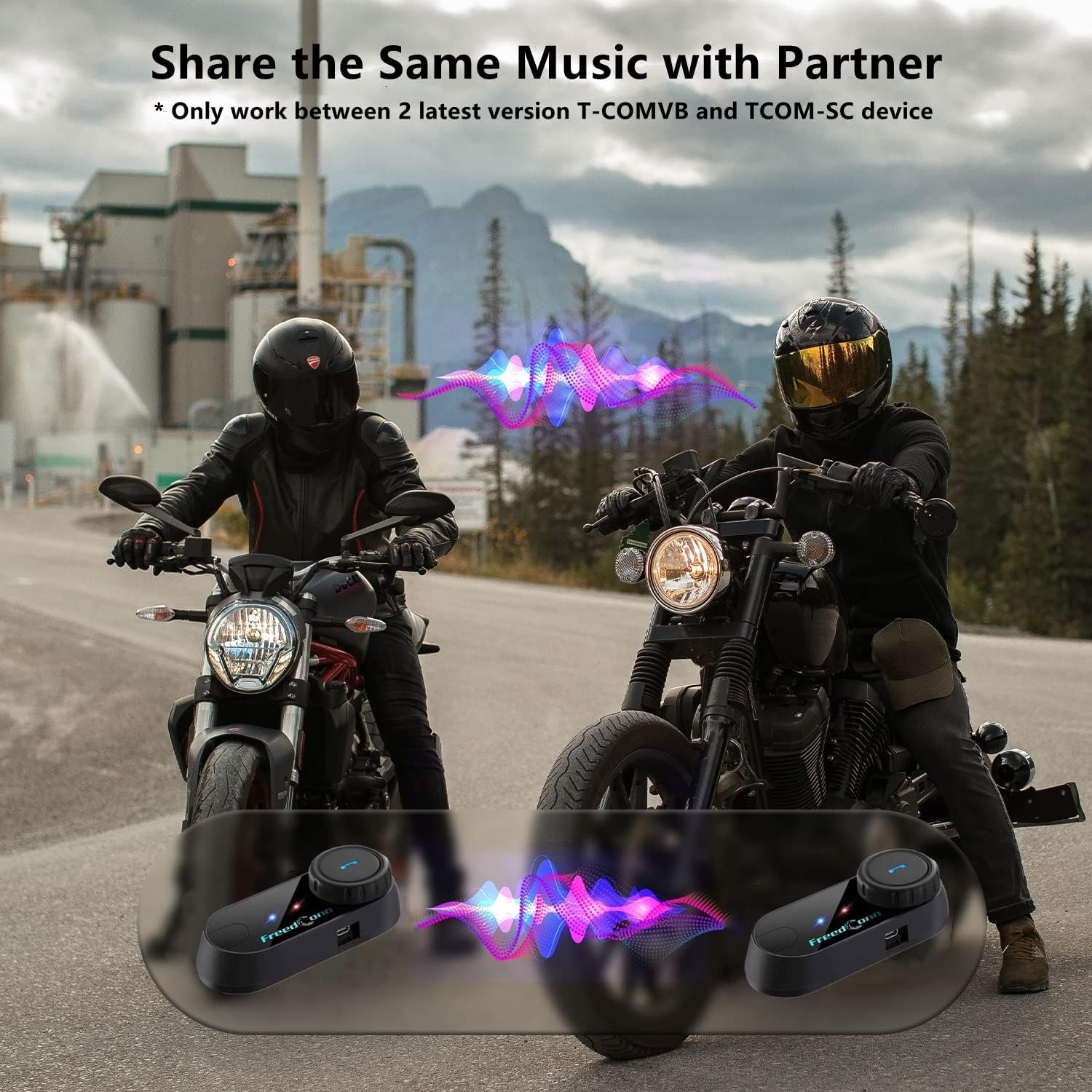
Image: Package contents for the FreedConn T-COMVB Bluetooth Helmet Headset 2-pack, showing all included accessories.
การตั้งค่า
1. การชาร์จอุปกรณ์
Before first use, fully charge the T-COMVB unit. Connect the USB charging cable to the headset's charging port and a USB power source. The indicator light will show charging status.
- เวลาในการชาร์จ: ประมาณ 3-4 ชั่วโมง
- อายุการใช้งานแบตเตอรี่: Up to 7-8 hours of intercom, 10 hours of phone calls/music, 300 hours standby.

Image: Visual representation of the 400mAh battery capacity and estimated usage times for intercom, phone calls, and standby.
2. Microphone Selection
เลือกไมโครโฟนที่เหมาะสมกับประเภทหมวกกันน็อคของคุณ:
- ไมโครโฟนแบบบูม: Recommended for open-face, half, and modular flip-up helmets.
- Soft-Wire Microphone: Recommended for full-face and off-road helmets.
Connect the chosen microphone and speakers to the corresponding ports on the headset unit.
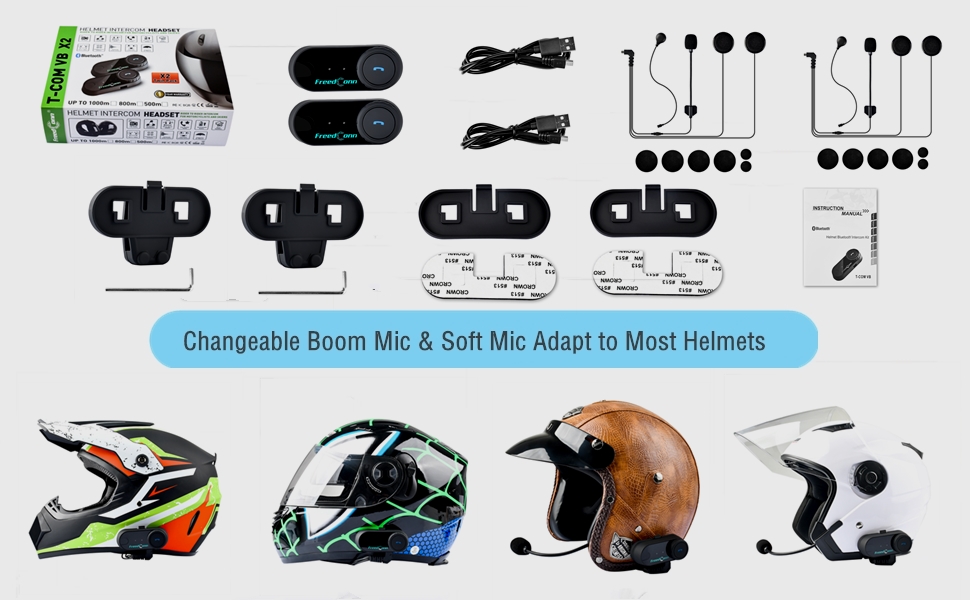
Image: Illustration demonstrating the compatibility of boom and soft-wire microphones with various helmet styles.
3. การสวมหมวกนิรภัย
Mount the T-COMVB unit to the side of your helmet using either the clip-on bracket or the adhesive bracket. Ensure the unit is securely attached and the speakers are positioned correctly inside the helmet for optimal audio.

Image: A FreedConn T-COMVB unit securely installed on the exterior of a motorcycle helmet.
คำแนะนำการใช้งาน
1. เปิด/ปิดเครื่อง
- เปิดเครื่อง: กดปุ่มเปิด/ปิดค้างไว้จนกว่าไฟแสดงสถานะจะกะพริบ
- หมดแรง: กดปุ่มเปิด/ปิดค้างไว้จนกว่าไฟแสดงสถานะจะดับ
2. การจับคู่บลูทูธ (กับโทรศัพท์/GPS)
To connect your T-COMVB to a Bluetooth-enabled device (phone, GPS):
- Ensure the T-COMVB is off.
- กดปุ่มเปิด/ปิดค้างไว้ประมาณ 5-7 วินาที จนกว่าไฟแสดงสถานะจะกะพริบสลับกันระหว่างสีแดงและสีน้ำเงิน ซึ่งแสดงว่าเข้าสู่โหมดจับคู่แล้ว
- บนโทรศัพท์หรืออุปกรณ์นำทาง GPS ของคุณ ให้เปิดใช้งานบลูทูธ แล้วค้นหาอุปกรณ์ที่ใช้งานได้
- Select "FreedConn T-COMVB" from the list. If prompted, enter "0000" as the PIN.
- เมื่อจับคู่เสร็จแล้ว ไฟแสดงสถานะจะกะพริบเป็นสีน้ำเงินช้าๆ

Image: The T-COMVB headset demonstrating its Bluetooth 5.0 and universal connectivity with different devices and helmet types.
3. Intercom Communication (Rider to Rider)
The T-COMVB supports intercom communication with other T-COMVB or TCOM-SC units.
- Ensure both units are powered on and not connected to other Bluetooth devices.
- On one unit, press and hold the Intercom button until the indicator light flashes red and blue alternately.
- สำหรับเครื่องที่สอง ให้กดปุ่ม Intercom หนึ่งครั้ง
- อุปกรณ์จะค้นหาและจับคู่กันโดยอัตโนมัติ เมื่อเชื่อมต่อแล้ว ไฟแสดงสถานะจะกะพริบเป็นสีน้ำเงินช้าๆ
- To initiate intercom, press the Intercom button once. To end, press it again.
4. การเล่นและการแชร์เพลง
Once paired with your phone, you can play music. Music sharing is supported between two latest version T-COMVB and TCOM-SC devices.
- เล่น/หยุดชั่วคราว: กดปุ่มมัลติฟังก์ชั่นหนึ่งครั้ง
- เพลงถัดไป: Rotate the Multi-function button clockwise.
- แทร็กก่อนหน้า: Rotate the Multi-function button counter-clockwise.
- การแบ่งปันเพลง: While music is playing, press and hold the Intercom button on both units to initiate music sharing.

Image: Two riders sharing music through their FreedConn T-COMVB headsets, highlighting the music sharing feature.
5. วิทยุ FM
To activate the built-in FM radio:
- Turn On FM: กดปุ่ม FM หนึ่งครั้ง
- สแกนช่อง: Rotate the Multi-function button to scan for stations.
- Turn Off FM: Press the FM button again.
6. โทรศัพท์
When paired with your phone, the T-COMVB allows for hands-free calls.
- รับสาย: กดปุ่มมัลติฟังก์ชั่นหนึ่งครั้ง
- วางสาย: กดปุ่มมัลติฟังก์ชันหนึ่งครั้งในระหว่างการโทร
- ปฏิเสธสาย: กดปุ่มมัลติฟังก์ชั่นค้างไว้ 2 วินาที
- โทรซ้ำหมายเลขล่าสุด: กดปุ่มมัลติฟังก์ชั่นสองครั้ง
- Voice Assistant (Siri/Google Voice): Press the Voice Assistant button to activate your phone's voice assistant.

Image: Icons representing voice assistant activation (Siri, Google Voice) for hands-free calling functionality.
การซ่อมบำรุง
- การทำความสะอาด: ใช้แบบนุ่มๆamp cloth to clean the unit. Do not use harsh chemicals or solvents.
- ความต้านทานน้ำ: The unit is waterproof, but avoid submerging it in water. Ensure all ports are securely closed when exposed to rain.
- การดูแลแบตเตอรี่ If the device is not used for an extended period, charge it at least once a month to preserve battery life.

Image: The FreedConn T-COMVB headset on a helmet, illustrating its waterproof feature in rainy conditions.
การแก้ไขปัญหา
- ไม่มีไฟฟ้า: Ensure the unit is fully charged. Connect to a power source and check the charging indicator.
- ไม่สามารถจับคู่บลูทูธได้: Ensure the unit is in pairing mode (red and blue flashing light). Make sure other Bluetooth devices are disconnected. Try restarting both the headset and your phone/GPS.
- ไม่มีเสียงจากลำโพง: Check that the speakers are securely plugged into the headset unit. Ensure volume is not set to minimum.
- ระบบอินเตอร์คอมเชื่อมต่อไม่ได้: Ensure both units are T-COMVB or TCOM-SC models and are in intercom pairing mode. Keep units within range (up to 800 meters).
- คุณภาพเสียง/เสียงรบกวนต่ำ: Ensure the microphone is positioned correctly, close to your mouth. The T-COMVB features advanced noise cancellation technology.

Image: A visual representation of the advanced noise cancellation technology, demonstrating its effect on sound quality.
ข้อมูลจำเพาะ
| แบบอย่าง | ที-คอมวีบี |
| เวอร์ชันบลูทูธ | 5.0 + EDR |
| ช่วงอินเตอร์คอม | ระยะทางไม่เกิน 800 เมตร (ผู้ขี่ 2-3 คน) |
| ความจุของแบตเตอรี่ | 400mAh |
| เวลาในการชาร์จ | 3-4 ชั่วโมง |
| เวลาอินเตอร์คอม | 7-8 ชั่วโมง |
| Phone Call/Music Time | 10 ชั่วโมง |
| เวลาสแตนด์บาย | 300 ชั่วโมง |
| ความต้านทานต่อน้ำ | กันน้ำ |
| วิธีการควบคุม | Voice, Manual Buttons |
| คุณสมบัติพิเศษ | Microphone Included, Noise Cancellation, FM Radio |
| วัสดุ | โพลิเมอร์ |
| น้ำหนักสินค้า | Approximately 1.15 pounds (for 2 units) |
การรับประกันและการสนับสนุน
For warranty information, technical support, or service inquiries, please refer to the contact details provided with your purchase or visit the official FreedConn webไซต์นี้ โปรดเก็บหลักฐานการซื้อไว้เพื่อใช้ยืนยันการรับประกัน