
1. บทนำ
The DATOUBOSS 2000W Pure Sine Wave Inverter is a high-performance device designed to convert direct current (DC) power from sources like batteries or solar panels into alternating current (AC) power, suitable for operating various household appliances, precision instruments, and electronic devices. This inverter provides a pure sine wave output, ensuring compatibility with sensitive electronics and reducing harmonic distortion. It is equipped with advanced features such as an LCD display for real-time monitoring and a remote control for convenient operation.

Figure 1.1: DATOUBOSS 2000W Pure Sine Wave Inverter, showing the main unit, remote control, and connection cables.
2. ข้อมูลด้านความปลอดภัย
Please read all safety instructions carefully before installing or operating the inverter. Failure to follow these instructions may result in electric shock, fire, or serious injury.
- การระบายอากาศ : ตรวจสอบให้แน่ใจว่ามีการระบายอากาศที่เพียงพอรอบๆ อินเวอร์เตอร์ อย่าปิดกั้นช่องระบายอากาศ
- สิ่งแวดล้อม: ติดตั้งอินเวอร์เตอร์ในที่แห้ง เย็น และมีอากาศถ่ายเทสะดวก ห่างจากแสงแดดโดยตรง แหล่งความร้อน และวัสดุที่ติดไฟได้ง่าย
- การเชื่อมต่อ: All connections must be tight and secure to prevent loose connections that can cause overheating or arcing.
- การต่อลงดิน: ต้องต่อสายดินอินเวอร์เตอร์อย่างถูกต้อง
- เล่มที่tagความเข้ากันได้: ตรวจสอบให้แน่ใจว่าอินพุต DC voltage matches the inverter's specifications (48V DC for this model).
- ความจุในการรับน้ำหนัก: Do not exceed the inverter's rated output power (2000W continuous, 4000W peak).
- การซ่อมบำรุง: อย่าพยายามถอดประกอบหรือซ่อมแซมอินเวอร์เตอร์ด้วยตนเอง โปรดติดต่อช่างผู้ชำนาญการ
3. คุณสมบัติของผลิตภัณฑ์
This inverter incorporates several advanced features for optimal performance and safety:
- เอาท์พุตคลื่นไซน์บริสุทธิ์: Provides clean and stable AC power, suitable for sensitive electronics.
- ประสิทธิภาพสูง: Delivers 2000W continuous power with a 4000W peak surge capability.
- Multi-functional LCD Display: แสดงปริมาณอินพุตtage, ปริมาณการส่งออกtage, temperature, battery power, frequency, and overload status.
- รีโมทคอนโทรล: Allows convenient power ON/OFF operation from up to 10 meters away.
- Multiple Protection Circuits: Includes protection against low input voltage, ปริมาณเกินtage, overload, over-temperature, and short circuit.
- Quiet Operation & Durable Design: Features dual cooling fans for efficient heat dissipation and a robust casing for extended lifespan.


รูปที่ 3.1: รายละเอียด view of the multi-functional LCD display and the remote control unit.


Figure 3.2: Illustration of the efficient cooling system and the multi-layer protection features.
4. เนื้อหาบรรจุภัณฑ์
กรุณาตรวจสอบเนื้อหาในแพ็คเกจเมื่อได้รับเพื่อให้แน่ใจว่าสินค้าทั้งหมดอยู่ในที่เดิมและไม่ได้รับความเสียหาย:
- DATOUBOSS 2000W Pure Sine Wave Inverter (48V DC to 100V/110V AC)
- หน่วยควบคุมระยะไกล
- DC Input Cables (Red and Black)
- คู่มือการใช้งาน (เอกสารนี้)

Figure 4.1: Included high-quality red and black DC input cables.
5. การตั้งค่าและการติดตั้ง
โปรดทำตามขั้นตอนเหล่านี้เพื่อการตั้งค่าและการติดตั้งที่ถูกต้อง:
- เลือกตำแหน่ง: Select a cool, dry, and well-ventilated area for the inverter. Ensure it is away from direct sunlight, heat sources, and any flammable materials.
- การติดตั้ง: Securely mount the inverter on a stable surface using appropriate fasteners. Ensure there is sufficient space around the unit for airflow.
- เชื่อมต่อสายเคเบิลอินพุต DC:
- Connect the red (+) cable to the positive terminal of the inverter and the positive terminal of your 48V DC power source (battery/solar array).
- Connect the black (-) cable to the negative terminal of the inverter and the negative terminal of your 48V DC power source.
- ตรวจสอบให้แน่ใจว่าการเชื่อมต่อทั้งหมดแน่นหนาและปลอดภัย
- การต่อลงดิน: Connect the inverter's grounding terminal to a reliable earth ground.
- Connect AC Output Devices: Plug your AC appliances into the inverter's AC output sockets. Ensure the total power consumption of your devices does not exceed 2000W.
- Remote Control Pairing (if needed): If the remote control is not automatically paired, press and hold the power button on the inverter while simultaneously pressing the ON/OFF button on the remote control until the remote indicator light flashes, indicating successful pairing.

Figure 5.1: Connection diagram illustrating DC input from battery or solar panel and AC output to various devices like lights, phones, computers, and refrigerators.
6. คู่มือการใช้งาน
Once the inverter is properly installed, follow these steps to operate it:
- เปิดเครื่อง: Press the power button on the inverter or the "ON" button on the remote control. The LCD display will light up, showing various parameters.
- จอภาพแสดงผล: หน้าจอ LCD แสดงข้อมูลแบบเรียลไทม์:
- อินพุต Voltagอี (DC): แสดง voltage from your battery or solar panel.
- ปริมาณการส่งออกtagอี (AC): แสดงค่าแรงดันไฟฟ้ากระแสสลับที่แปลงแล้วtagอี (100V/110V).
- กำลังขับ (วัตต์): บ่งชี้การใช้พลังงานปัจจุบันของอุปกรณ์ที่เชื่อมต่อ
- ความถี่ (Hz): Shows the output frequency (50Hz/60Hz).
- อุณหภูมิ: ตรวจสอบอุณหภูมิภายในของอินเวอร์เตอร์
- ระดับแบตเตอรี่: Provides an estimated battery charge level.
- Overload/Error Indicators: Alerts you to potential issues.
- เชื่อมต่อเครื่องใช้ไฟฟ้า: Plug your desired AC appliances into the inverter's output sockets.
- หมดแรง: To turn off the inverter, press the power button on the inverter or the "OFF" button on the remote control. Disconnect appliances before prolonged shutdown.
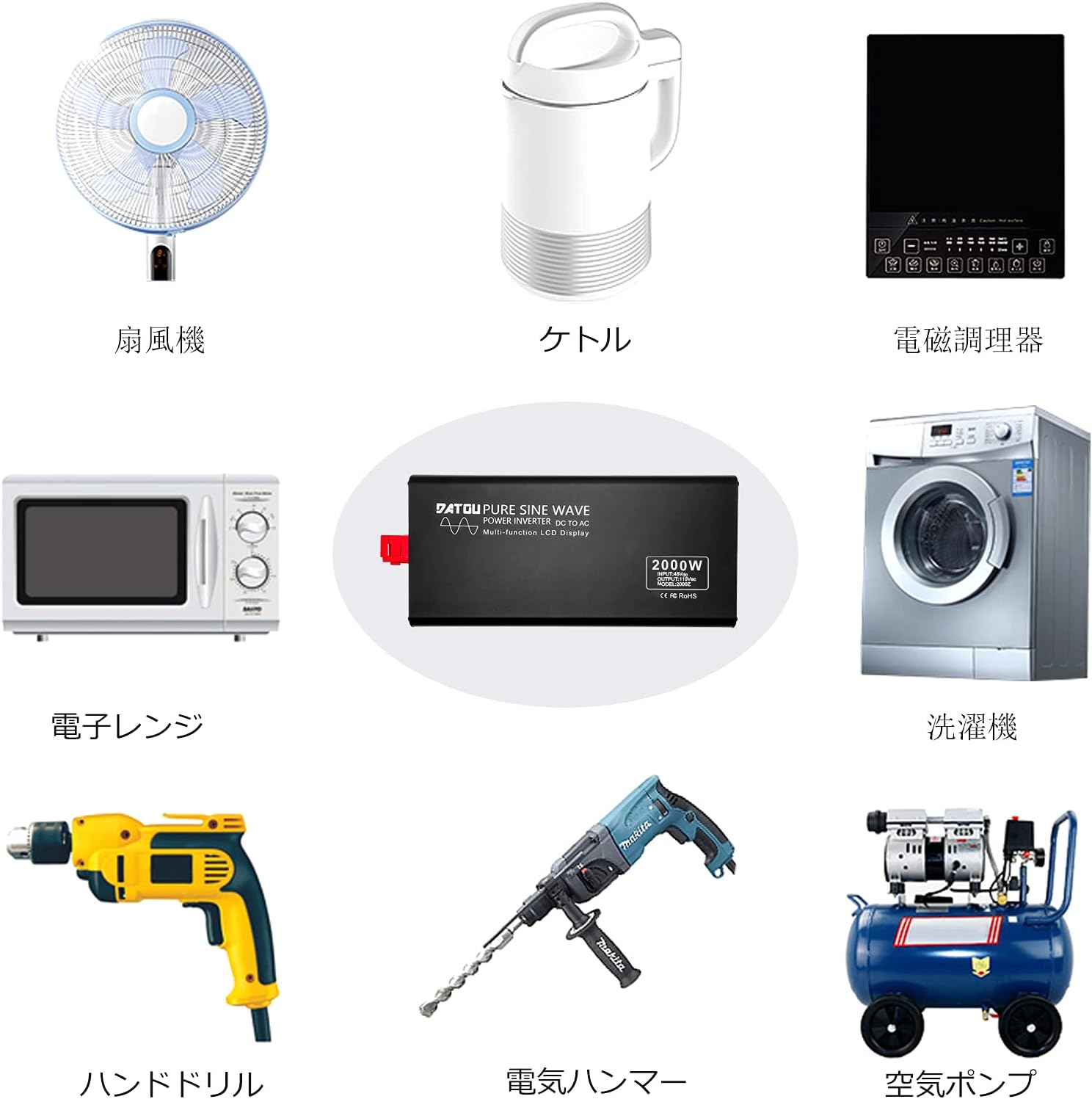
Figure 6.1: The inverter can power a wide range of appliances including fans, kettles, induction cookers, microwave ovens, hand drills, electric hammers, air pumps, air conditioners, washing machines, and refrigerators.
7. การบำรุงรักษา
การบำรุงรักษาอย่างสม่ำเสมอจะช่วยให้เครื่องแปลงกระแสไฟฟ้าของคุณมีอายุการใช้งานยาวนานและทำงานได้อย่างมีประสิทธิภาพสูงสุด:
- การทำความสะอาด: ควรเช็ดทำความสะอาดภายนอกของอินเวอร์เตอร์เป็นระยะด้วยผ้าแห้งเนื้อนุ่ม ห้ามใช้น้ำยาทำความสะอาดหรือสารละลายใดๆ
- การระบายอากาศ : Ensure the cooling fans and ventilation openings are free from dust and debris. Clean them gently with compressed air if necessary.
- การเชื่อมต่อ: Regularly check all electrical connections (DC input and AC output) for tightness. Loose connections can cause overheating.
- พื้นที่จัดเก็บ: หากต้องเก็บรักษาอินเวอร์เตอร์เป็นเวลานาน ควรตัดการเชื่อมต่อจากแหล่งจ่ายไฟทั้งหมดและเก็บไว้ในที่แห้งและเย็น
8 การแก้ไขปัญหา
โปรดดูส่วนนี้เพื่อดูปัญหาทั่วไปและวิธีแก้ไข:
| ปัญหา | สาเหตุที่เป็นไปได้ | สารละลาย |
|---|---|---|
| เครื่องแปลงไฟไม่ทำงาน | ไม่มีไฟ DC เข้า; การเชื่อมต่อหลวม; ฟิวส์ขาด; แรงดันแบตเตอรี่ต่ำtage. | Check battery connections and charge level; Verify all cables are securely connected; Check and replace fuses if necessary. |
| ไม่มีเอาต์พุต AC | Overload protection activated; Over-temperature protection; Short circuit. | Reduce connected load; Allow inverter to cool down; Check for short circuits in connected appliances. |
| หน้าจอ LCD แสดงข้อผิดพลาด | Specific error code (e.g., "OV" for over-voltage, "LV" for low voltage, "OL" for overload, "OT" for over-temperature). | Refer to the specific error code on the display and consult the corresponding protection feature in Section 3. Address the underlying issue (e.g., adjust input voltage, reduce load, allow cooling). |
| รีโมทคอนโทรลไม่ทำงาน | Not paired; Out of range; Battery low in remote. | Re-pair the remote control (see Section 5); Ensure remote is within 10m range; Replace remote control battery. |
| เสียงพัดลมดังมาก | High load; High ambient temperature. | This is normal operation as fans activate to cool the unit under load. Ensure proper ventilation. |
9. ข้อมูลจำเพาะ
| พารามิเตอร์ | ค่า |
|---|---|
| แบบอย่าง | 2000W 48V เพียวไซน์เวฟอินเวอร์เตอร์ |
| พลังงานต่อเนื่อง | 2000วัตต์ |
| พลังสูงสุด | 4000วัตต์ |
| กระแสตรงอินพุตVoltage | กระแสตรง 48 โวลต์ |
| กระแสไฟขาออกVoltage | แรงดันไฟฟ้า 100V / 110V |
| ความถี่เอาต์พุต | 50Hz / 60Hz (selectable/fixed based on model variant) |
| รูปคลื่น | Pure Sine Wave (THD ≤ 3%) |
| ระยะควบคุมด้วยรีโมทคอนโทรล | สูงสุด 10 เมตร |
| ขนาดสินค้า | 36 x 17.3 x 7.9 ซม. |
| น้ำหนักผลิตภัณฑ์ | 4 กก. |
10. การรับประกันและการสนับสนุน
DATOUBOSS products are designed for reliability and performance. For warranty information, technical support, or service inquiries, please contact DATOUBOSS customer service through the retailer where you purchased the product or visit the official DATOUBOSS store on Amazon:
DATOUBOSS Official Store on Amazon.co.jp
โปรดเตรียมรุ่นผลิตภัณฑ์และวันที่ซื้อให้พร้อมเมื่อติดต่อฝ่ายสนับสนุน