
1. บทนำ
บ็อกASING G4 is a powerful and versatile portable Bluetooth speaker designed to deliver high-quality audio with enhanced bass. Featuring a robust 50W output and advanced DSP technology, it ensures clear and balanced sound reproduction. Its durable, IPX7 waterproof design makes it ideal for various indoor and outdoor environments. With Bluetooth 5.3 and multiple playback modes, the G4 offers seamless connectivity and an immersive listening experience.
For an even more expansive sound, two G4 speakers can be paired together using the Wireless Stereo Function, creating a true surround sound experience with double the volume.

Image: The BOGASING G4 Bluetooth Speaker, a compact black rectangular device with a metal grille and gold accents, showcasing การออกแบบที่แข็งแกร่ง
2. เนื้อหาบรรจุภัณฑ์
กรุณาทำเครื่องหมายในช่องสำหรับรายการต่อไปนี้:
- 1x BOGASING G4 Speaker Unit
- สายสัญญาณเสียง 1x 3.5mm
- สายชาร์จ USB-C 1x
- 1x คู่มือเริ่มต้นใช้งานอย่างย่อ
3. คุณสมบัติของผลิตภัณฑ์
- High-Quality 50W Audio: Equipped with two drivers and passive radiators, the G4 delivers powerful sound with a maximum output of 50W. It is tuned for balanced sound across all frequencies, from crisp highs to deep lows.
- การประมวลผลสัญญาณดิจิตอล (DSP): Integrated DSP algorithm ensures clear music reproduction that stays true to the original sound, minimizing distortion.
- Three Sound Effect Modes: Customize your listening experience with BOGASING's unique sound effect modes: 3D Stereo, Clear Vocal, and Enhanced Bass.
- IPX7 Waterproof & Durable Design: The G4 features an IPX7 waterproof rating, making it suitable for use near water, such as pools or during outdoor activities. Its exterior is covered with soft rubber material, enhancing shock resistance.
- ขยายเวลาการเล่น: Enjoy up to approximately 24 hours of continuous music playback at moderate volume, ensuring your music lasts all day.
- Wireless Stereo Function (TWS): Pair two G4 speakers wirelessly to create a massive stereo soundstage with double the volume, providing an immersive surround sound experience.
- Multi-functional Playback Modes: Supports Bluetooth 5.3 for stable and efficient wireless connection. For non-Bluetooth devices, audio can be played via SD card, USB-C, or AUX IN cable.

ภาพ: ภายใน view of the BOGASING G4 speaker, highlighting its dual drivers and passive radiators, capable of delivering 50W of audio output.

ภาพ: ภาพตัดขวาง view of the BOGASING G4 speaker, illustrating the internal circuitry and emphasizing the integrated DSP technology for enhanced sound quality.
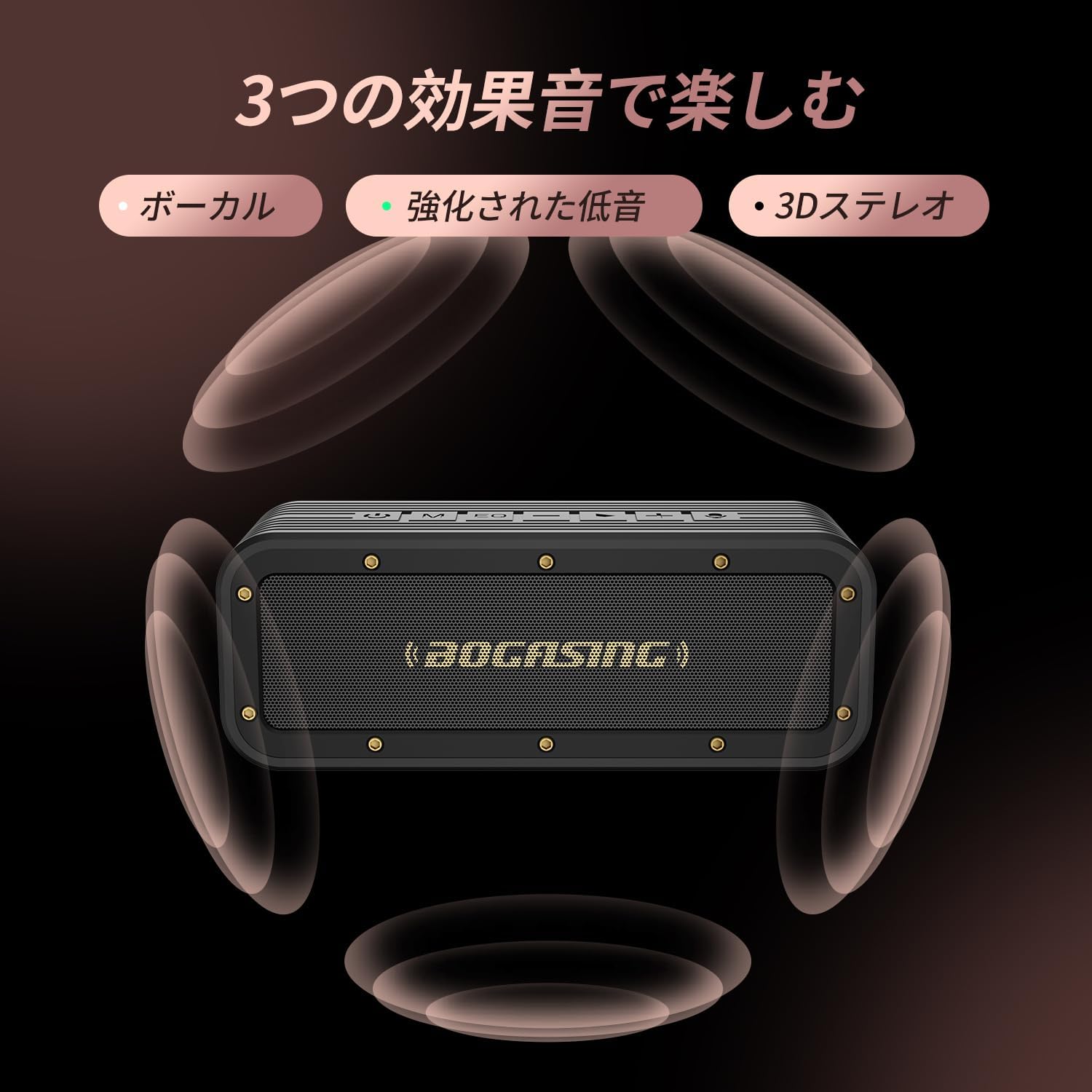
Image: The BOGASING G4 speaker surrounded by visual representations of sound waves, indicating its three distinct sound effect modes: Vocal, Enhanced Bass, and 3D Stereo.

Image: The BOGASING G4 speaker being splashed with water, visually demonstrating its IPX7 waterproof protection, suitable for various wet environments.
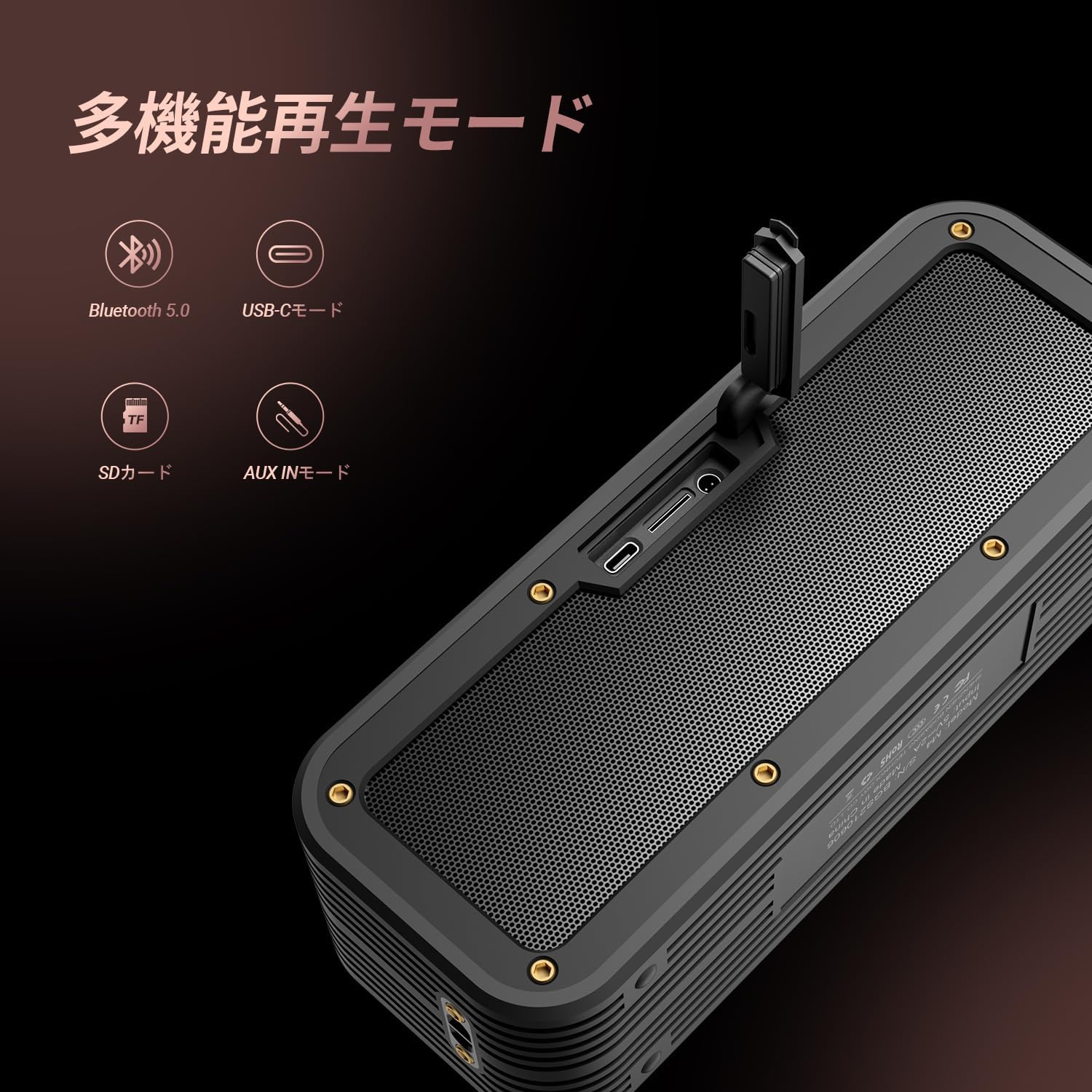
Image: The BOGASING G4 speaker with icons representing its various playback modes: Bluetooth 5.0, USB-C, SD Card, and AUX IN, highlighting its versatile connectivity.
4. การตั้งค่า
4.1 การชาร์จลำโพง
- เชื่อมต่อสายชาร์จ USB-C ที่ให้มากับพอร์ต USB-C ของลำโพง
- เชื่อมต่อปลายสายอีกด้านหนึ่งเข้ากับอะแดปเตอร์ไฟ USB ที่ใช้งานร่วมกันได้ (ไม่รวมอยู่ด้วย) หรือพอร์ต USB ของคอมพิวเตอร์
- The charging indicator light will illuminate. Once fully charged, the light will change or turn off (refer to the Quick Start Guide for specific indicator behavior).
4.2 การเปิด/ปิดเครื่อง
- การเปิดเครื่อง: กดปุ่มเปิดปิดค้างไว้ (⏻) รอประมาณ 2-3 วินาที จนกว่าคุณจะได้ยินเสียงแจ้งเตือนและไฟแสดงสถานะสว่างขึ้น
- วิธีปิดเครื่อง: กดปุ่มเปิดปิดค้างไว้ (⏻กดค้างไว้ประมาณ 2-3 วินาที จนกว่าจะได้ยินเสียงแจ้งเตือนและไฟแสดงสถานะดับลง
4.3 การจับคู่บลูทูธ
- ตรวจสอบให้แน่ใจว่าลำโพงเปิดอยู่และอยู่ในโหมดจับคู่บลูทูธ (โดยปกติไฟแสดงสถานะบลูทูธจะกะพริบ)
- บนอุปกรณ์ของคุณ (สมาร์ทโฟน แท็บเล็ต คอมพิวเตอร์) เปิดใช้งาน Bluetooth และค้นหาอุปกรณ์ที่มีอยู่
- Select "BOGASING G4" from the list of found devices.
- Once successfully paired, you will hear a confirmation sound, and the Bluetooth indicator light will become solid.
4.4 Wireless Stereo (TWS) Pairing
To pair two BOGASING G4 speakers for a stereo experience:
- Ensure both G4 speakers are powered on and not connected to any Bluetooth device.
- On one of the speakers (this will be the primary speaker), press the Power button twice quickly. You will hear a prompt indicating TWS pairing mode.
- The speakers will automatically search for and connect to each other. Once connected, you will hear a confirmation sound.
- ตอนนี้ ให้เชื่อมต่ออุปกรณ์ของคุณกับลำโพงหลักผ่านบลูทูธตามที่อธิบายไว้ในหัวข้อ 4.3 เสียงจะเล่นผ่านลำโพงทั้งสองตัวในระบบสเตอริโอ
4.5 Connecting via AUX / USB-C / TF Card
- โหมด AUX: Insert a 3.5mm audio cable into the AUX IN port on the speaker and connect the other end to your audio source's headphone jack. The speaker will automatically switch to AUX mode.
- USB-C Mode: Connect a USB-C cable to the speaker's USB-C port and to a compatible audio source (e.g., computer). The speaker may automatically switch to USB-C audio input.
- โหมดการ์ด TF: ใส่การ์ด TF (microSD) พร้อมเสียง fileเสียบการ์ด TF ลงในช่องเสียบการ์ด ลำโพงจะตรวจจับการ์ดโดยอัตโนมัติและเริ่มเล่นเพลง
5. คู่มือการใช้งาน
5.1 ฟังก์ชันปุ่ม
บ็อกASING G4 features intuitive controls located on the top panel:
- ปุ่มเปิด/ปิด (⏻): Press and hold to power on/off. Double press for TWS pairing.
- ปุ่มโหมด (M): Press to switch between Bluetooth, AUX, USB-C, and TF Card playback modes.
- EQ Button (EQ): Press to cycle through the three sound effect modes (3D Stereo, Clear Vocal, Enhanced Bass).
- ลดเสียงลง (-): กดเพื่อลดระดับเสียง กดค้างไว้เพื่อไปยังแทร็กก่อนหน้า
- Play/Pause Button (>): Press to play or pause music. Press to answer/end calls. Press and hold to reject calls.
- เพิ่มระดับเสียง (+): กดเพื่อเพิ่มระดับเสียง กดค้างไว้เพื่อไปยังเพลงถัดไป
- ไอคอนไมโครโฟน: Indicates the built-in microphone for hands-free calling.
5.2 การควบคุมระดับเสียง
กดปุ่ม + ปุ่มเพิ่มระดับเสียงและ - ปุ่มเพื่อลดระดับเสียง
5.3 Track Control
กดปุ่มค้างไว้ + button for the next track. Press and hold the - ปุ่มสำหรับเพลงก่อนหน้า
5.4 การจัดการการโทร
เมื่อมีสายเรียกเข้าขณะเชื่อมต่อผ่านบลูทูธ:
- กดปุ่ม เล่น/หยุดชั่วคราว ปุ่มสำหรับรับสายเรียกเข้า
- กดปุ่ม เล่น/หยุดชั่วคราว อีกครั้งเพื่อวางสาย
- กดปุ่มค้างไว้ เล่น/หยุดชั่วคราว ปุ่มเพื่อปฏิเสธสายเรียกเข้า
6. การบำรุงรักษา
- การทำความสะอาด: Use a soft, dry cloth to clean the speaker's surface. Do not use abrasive cleaners, alcohol, or other chemical solvents, as they may damage the finish.
- พื้นที่จัดเก็บ: เก็บลำโพงไว้ในที่แห้งและเย็น หลีกเลี่ยงแสงแดดโดยตรงและอุณหภูมิที่สูงหรือต่ำเกินไป
- การดูแลแบตเตอรี่ เพื่อยืดอายุการใช้งานแบตเตอรี่ ควรชาร์จลำโพงให้เต็มก่อนใช้งานครั้งแรก และอย่างน้อยทุกๆ สามเดือนหากไม่ได้ใช้งานเป็นประจำ หลีกเลี่ยงการปล่อยให้แบตเตอรี่หมดเกลี้ยงบ่อยๆ
- ความต้านทานน้ำ: While the speaker is IPX7 waterproof, ensure the charging port and AUX port covers are securely closed before exposing it to water. Do not submerge the speaker for extended periods or expose it to saltwater or other chemicals. After exposure to water, wipe the speaker dry before charging.
7 การแก้ไขปัญหา
If you encounter issues with your BOGASING G4 speaker, please refer to the following common problems and solutions:
| ปัญหา | สาเหตุที่เป็นไปได้ | สารละลาย |
|---|---|---|
| ลำโพงไม่เปิดเครื่อง | แบตเตอรี่อ่อน; กดปุ่มเปิด/ปิดไม่ถูกต้อง | ชาร์จลำโพงให้เต็ม กดปุ่มเปิด/ปิดค้างไว้ 2-3 วินาที |
| ไม่มีเสียงหรือเสียงเพี้ยน | Volume too low; Incorrect mode selected; Device not connected properly; Audio file ปัญหา. | Increase speaker and device volume. Ensure correct playback mode (Bluetooth, AUX, TF Card). Re-pair Bluetooth device. Try a different audio file. |
| การจับคู่บลูทูธล้มเหลว | ลำโพงไม่ได้อยู่ในโหมดจับคู่ อุปกรณ์ Bluetooth ปิดอยู่ อยู่ไกลจากลำโพงเกินไป มีสัญญาณรบกวน | Ensure speaker is in pairing mode (flashing light). Turn device Bluetooth off/on. Move device closer to speaker. Avoid strong electromagnetic interference. |
| การจับคู่ TWS ล้มเหลว | ลำโพงเชื่อมต่อกับอุปกรณ์อื่นอยู่แล้ว; ขั้นตอนการจับคู่ไม่ถูกต้อง | ตรวจสอบให้แน่ใจว่าลำโพงทั้งสองตัวไม่ได้เชื่อมต่อกับอุปกรณ์อื่น ๆ แล้ว ทำตามขั้นตอนการจับคู่ TWS อย่างละเอียด (หัวข้อ 4.4) |
| ลำโพงไม่ชาร์จ | สายเคเบิลหรืออะแดปเตอร์ชำรุด ปัญหาพอร์ตชาร์จ | ลองใช้สาย USB-C และอะแดปเตอร์แปลงไฟตัวอื่นดู ตรวจสอบให้แน่ใจว่าพอร์ตชาร์จสะอาดและปราศจากสิ่งสกปรก หากปัญหายังคงอยู่ โปรดติดต่อฝ่ายบริการลูกค้า |
8. ข้อมูลจำเพาะ
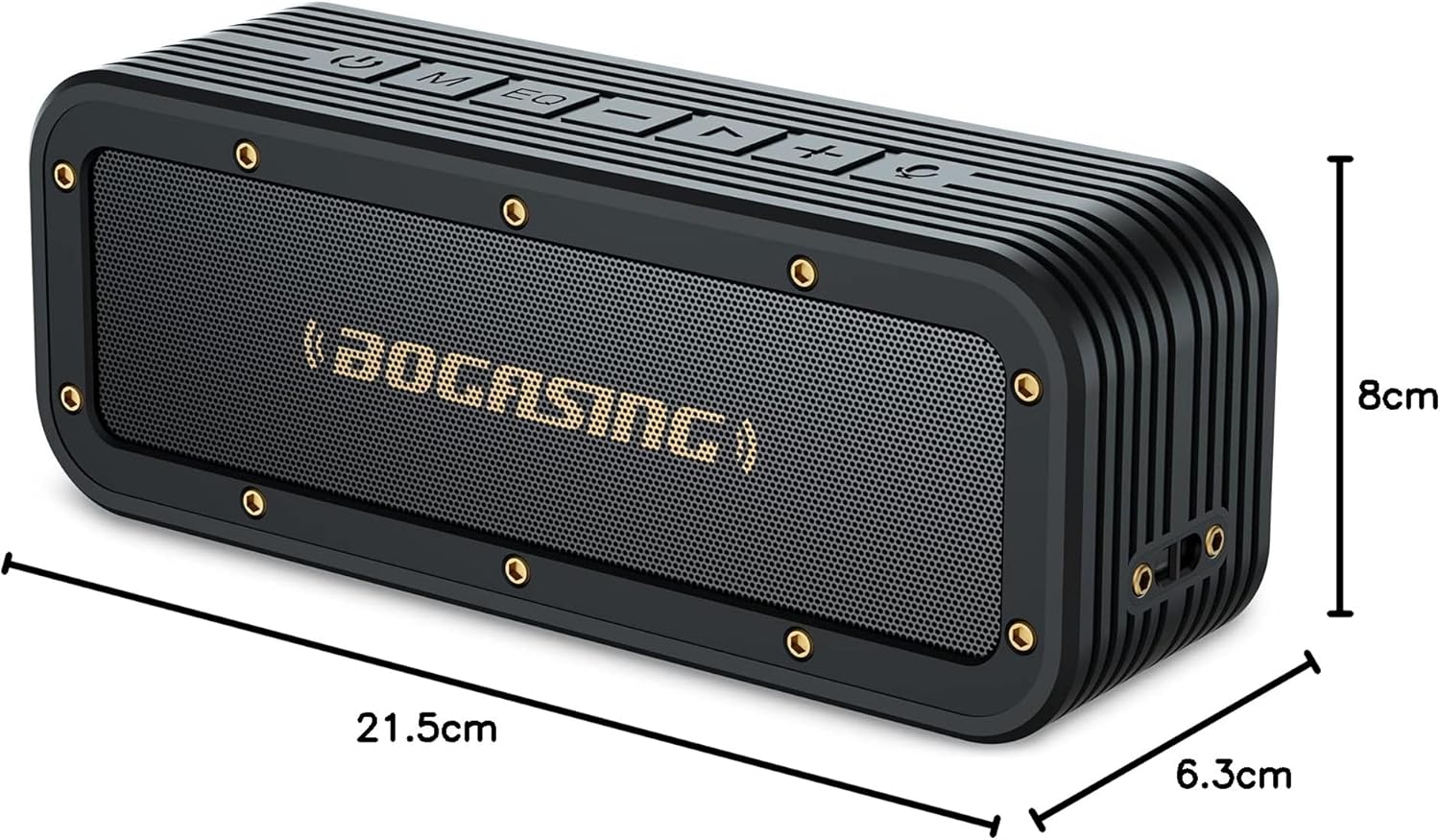
Image: The BOGASING G4 speaker with its dimensions clearly marked: 21.5cm length, 8cm height, and 6.3cm depth.
| คุณสมบัติ | รายละเอียด |
|---|---|
| ยี่ห้อ | บอคASING |
| ชื่อรุ่น | G4 |
| หมายเลขรุ่นผลิตภัณฑ์ | M4 |
| ประเภทลำโพง | ลำโพงแบบพกพา |
| Speaker Format | คล่องแคล่ว |
| เอาต์พุตสูงสุดของลำโพง | 50 Watts (Note: Some product descriptions may state 40W, but the feature bullet indicates 50W max output) |
| วัดtage | 40 วัตต์ |
| เทคโนโลยีการเชื่อมต่อ | บลูทูธ, AUX |
| เทคโนโลยีการสื่อสารไร้สาย | บลูทูธ |
| เวอร์ชันบลูทูธ | 5.3 |
| แหล่งพลังงาน | แบตเตอรี่ |
| ประเภทแบตเตอรี่ | ลิเธียมไออน (รวมแบตเตอรี่ 1 ก้อน) |
| ระดับการกันน้ำ | IPX7 |
| ขนาดสินค้า | 22.8 x 8.6 x 6.4 ซม. (ยาว x กว้าง x สูง) |
| น้ำหนักผลิตภัณฑ์ | 0.88 กิโลกรัม |
| วัสดุ | พลาสติก |
| สี | สีดำ |
| เส้นผ่านศูนย์กลางซับวูฟเฟอร์ | 50.8 มิลลิเมตร |
| การตอบสนองความถี่ | ความถี่ 20 กิโลเฮิรตซ์ |
| ข้อแนะนำการใช้ | Gaming, TV |
| อุปกรณ์ที่รองรับ | Computer, iPhone, MacBook, Laptop |
| ประเภทการติดตั้ง | ที่วางบนโต๊ะ |
| จำนวนรายการ | 1 |
| โหมดเอาต์พุตเสียง | สเตอริโอ |
| วันที่พร้อมใช้งานครั้งแรก | 26 กรกฎาคม 2021 |
9. การรับประกันและการสนับสนุน
9.1 การรับประกันสินค้า
บ็อกASING G4 Bluetooth Speaker comes with a รับประกัน 12 เดือน นับจากวันที่ซื้อ การรับประกันนี้ครอบคลุมข้อบกพร่องจากการผลิตและปัญหาต่างๆ ที่เกิดขึ้นจากการใช้งานตามปกติ โปรดเก็บหลักฐานการซื้อไว้เพื่อขอรับสิทธิ์การรับประกัน
9.2 การสนับสนุนลูกค้า
For any questions, technical assistance, or warranty claims, please contact BOGASING customer support through the retailer's platform where you purchased the product or visit the official BOGASING brand store online. Please have your product model number (M4) and purchase details ready when contacting support.
บอคASING Official Store: Visit BOGASING Store on Amazon.co.jp