1. บทนำ
Welcome to the Hubble Connected Touch Twin 5-inch Smart Baby Monitor. This device is designed to provide reliable monitoring of your child with advanced features including a 5-inch interactive touchscreen viewer, two portable camera units, Wi-Fi connectivity for smartphone access, remote pan, tilt, and zoom, two-way talk, room temperature display, infrared night vision, and preloaded lullabies. This manual will guide you through the setup, operation, and maintenance of your new baby monitor system.
2. ข้อมูลด้านความปลอดภัยที่สำคัญ
- อันตรายจากการรัดคอ: Keep all cords out of reach of children. Never place camera or cords within 3 feet (1 meter) of the crib or playpen. Secure cords to a wall or floor using cable clips.
- อันตรายจากการสำลัก: ผลิตภัณฑ์นี้มีชิ้นส่วนขนาดเล็ก เก็บให้พ้นมือเด็ก
- ความร้อนสูงเกินไป: Do not cover the monitor or camera with blankets or towels. Ensure proper ventilation.
- น้ำและความชื้น: Do not expose the product to water or moisture. Use only in dry indoor environments.
- แหล่งพลังงาน: โปรดใช้เฉพาะอะแดปเตอร์แปลงไฟที่ให้มาเท่านั้น การใช้อะแดปเตอร์ที่ไม่ได้รับอนุญาตอาจทำให้ผลิตภัณฑ์เสียหายและทำให้การรับประกันเป็นโมฆะ
- การรบกวน: Keep the monitor away from other electronic devices that may cause interference.
- การดูแลผู้ใหญ่: This product is intended to assist in monitoring your child and should not be used as a substitute for responsible adult supervision.
3. เนื้อหาบรรจุภัณฑ์
Your Hubble Connect Touch Twin 5-inch Smart Baby Monitor package includes:
- 2 x Baby Camera Units
- 1 x Parent Monitor (5-inch Interactive Touchscreen Viewเอ้อ)
- 2 x อะแดปเตอร์ไฟฟ้า
- คู่มือเริ่มต้นอย่างรวดเร็ว 1 ชุด
- 2 x Hubble Grip flexible mounts

4. การตั้งค่า
4.1 Charging the Parent Unit and Camera Units
Before initial use, fully charge the Parent Monitor and both Camera Units using the provided power adapters. A full charge ensures optimal performance and portability.
4.2 การจัดวางกล้อง
Position the camera units in locations that provide a clear view of your child. Ensure the camera is at least 3 feet (1 meter) away from the crib or playpen to prevent strangulation hazards from the power cord. The flexible Hubble Grip mounts allow for versatile placement on crib rails or other surfaces.

The camera features remote pan, tilt, and zoom capabilities, allowing you to adjust the viewing angle from the parent unit or smartphone app.
4.3 Pairing the Camera Units (if not pre-paired)
Your camera units should be pre-paired with the parent unit. If re-pairing is needed, consult the Quick Start Guide for specific instructions. Generally, this involves accessing the pairing menu on the parent unit and pressing a pairing button on the camera unit.
4.4 Connecting to Wi-Fi and Smartphone App
For advanced features and remote viewing, download the HubbleClub app on your smartphone or tablet. Follow the in-app instructions to connect your monitor system to your home Wi-Fi network.

5. การใช้งานจอภาพของคุณ
5.1 พื้นฐาน Viewing and Navigation
Turn on the Parent Monitor. The screen will display the live video feed from one of your camera units. Use the directional buttons on the parent unit to pan and tilt the camera remotely. Pinch-to-zoom functionality may be available on the touchscreen for closer views.

5.2 การสนทนาสองทาง
กดปุ่มไมโครโฟนบนเครื่องรับสัญญาณของผู้ปกครองค้างไว้เพื่อพูดคุยกับลูกผ่านลำโพงของกล้อง ปล่อยปุ่มเพื่อฟังเสียง
5.3 การมองเห็นตอนกลางคืน
The camera automatically switches to infrared night vision in low-light conditions, providing a clear black-and-white image of your child.

5.4 Lullabies and Soothing Sounds
Access the menu on the parent unit to select and play preloaded lullabies, audiobooks, or soothing sounds to help your child relax.
5.5 การตรวจสอบอุณหภูมิห้อง
The parent unit displays the room temperature detected by the camera unit, allowing you to ensure a comfortable environment for your child.
5.6 โหมดความเป็นส่วนตัว
For enhanced privacy, manually close the camera lens cover. This physically blocks the camera's view.

5.7 Hubble Baby Mode
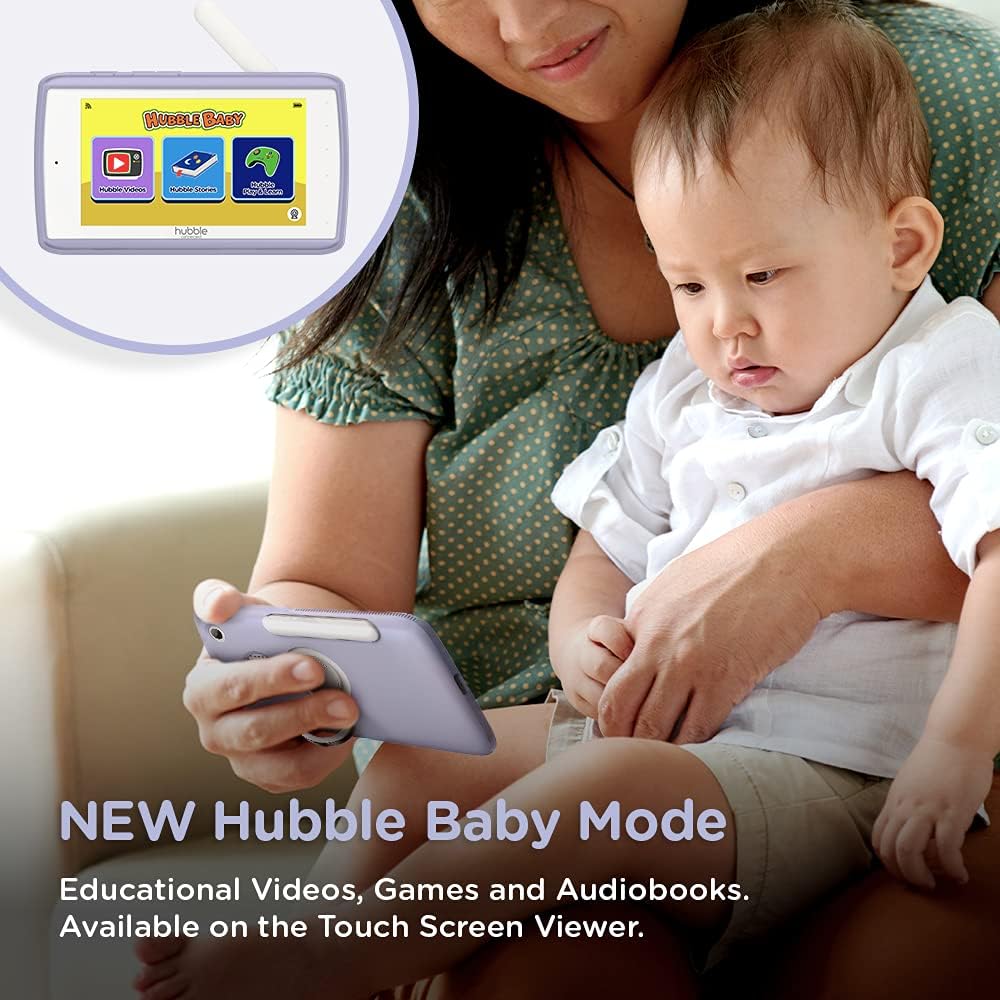
The 5-inch interactive touchscreen viewer can switch to "Hubble Baby Mode," offering educational videos, games, and audiobooks for your child's entertainment and learning as they grow.
6. การบำรุงรักษา
- การทำความสะอาด: ใช้ผ้าแห้งเนื้อนุ่มเช็ดทำความสะอาดจอภาพและชุดกล้อง ห้ามใช้สารทำความสะอาดที่มีฤทธิ์กัดกร่อนหรือตัวทำละลาย
- การดูแลแบตเตอรี่ เพื่อยืดอายุการใช้งานแบตเตอรี่ ควรหลีกเลี่ยงอุณหภูมิที่สูงหรือต่ำเกินไป และควรชาร์จแบตเตอรี่จนหมดและชาร์จใหม่เป็นระยะๆ
- พื้นที่จัดเก็บ: If storing the product for an extended period, ensure it is fully charged and stored in a cool, dry place.
7 การแก้ไขปัญหา
| ปัญหา | สารละลาย |
|---|---|
| No video/audio on parent unit. | Ensure both parent unit and camera are powered on and charged. Check if they are within range. Re-pair the units if necessary (refer to Quick Start Guide). |
| Poor video quality or interference. | Move the camera or parent unit closer. Ensure no large metal objects or other electronic devices are causing interference. Check Wi-Fi signal strength if using the app. |
| แบตเตอรี่ของเครื่องรับสัญญาณหลักหมดเร็วมาก | Reduce screen brightness. Enable ECO mode (if available). Ensure the unit is fully charged before use. Battery life can vary with usage. |
| Cannot connect to HubbleClub app. | Ensure your home Wi-Fi is active and the camera is within range. Restart the camera and your router. Verify correct Wi-Fi password in the app. |
| Camera not responding to pan/tilt/zoom. | Check connection between parent unit/app and camera. Restart both devices. Ensure no physical obstructions are blocking camera movement. |
8. ข้อมูลจำเพาะ
| คุณสมบัติ | รายละเอียด |
|---|---|
| ขนาดหน้าจอ | 5 นิ้ว |
| ความละเอียดในการจับภาพวิดีโอ | 720p |
| เทคโนโลยีการเชื่อมต่อ | ไร้สาย, Wi-Fi |
| แหล่งพลังงาน | ใช้พลังงานจากแบตเตอรี่ |
| คุณสมบัติพิเศษ | การมองเห็นตอนกลางคืน |
| การใช้งานภายใน/ภายนอกอาคาร | ในร่ม |
| ส่วนประกอบที่รวมอยู่ | 2 x Baby Camera Units, Parent Monitor, 2 x Power Adapters, Quick Start Guide |
| น้ำหนักสินค้า | 3.25 ปอนด์ |
| ขนาดสินค้า | 13 x 13 x 13 นิ้ว |
| แบตเตอรี่ | ต้องใช้แบตเตอรี่ลิเธียมไอออน 3 ก้อน (รวมอยู่ด้วย) |
9. การรับประกันและการสนับสนุน
For warranty information and technical support, please refer to the official Hubble Connected webหรือติดต่อฝ่ายบริการลูกค้าโดยตรง โปรดเก็บหลักฐานการซื้อไว้เพื่อใช้ในการเคลมประกัน
เยี่ยมชม HUBBLE CONNECTED Store สำหรับข้อมูลและผลิตภัณฑ์เพิ่มเติม