
DATOUBOSS 12V 2000W EU
DATOUBOSS 2000W Pure Sine Wave Inverter คู่มือผู้ใช้
Model: 12V 2000W EU
แบรนด์: DATOUBOSS
1. บทนำ
This manual provides essential information for the safe and efficient operation of your DATOUBOSS 2000W Pure Sine Wave Inverter. This inverter converts 12V DC power from batteries into stable 220V-240V AC 50Hz power, suitable for a wide range of electronic devices and household appliances. Please read this manual thoroughly before use and keep it for future reference.
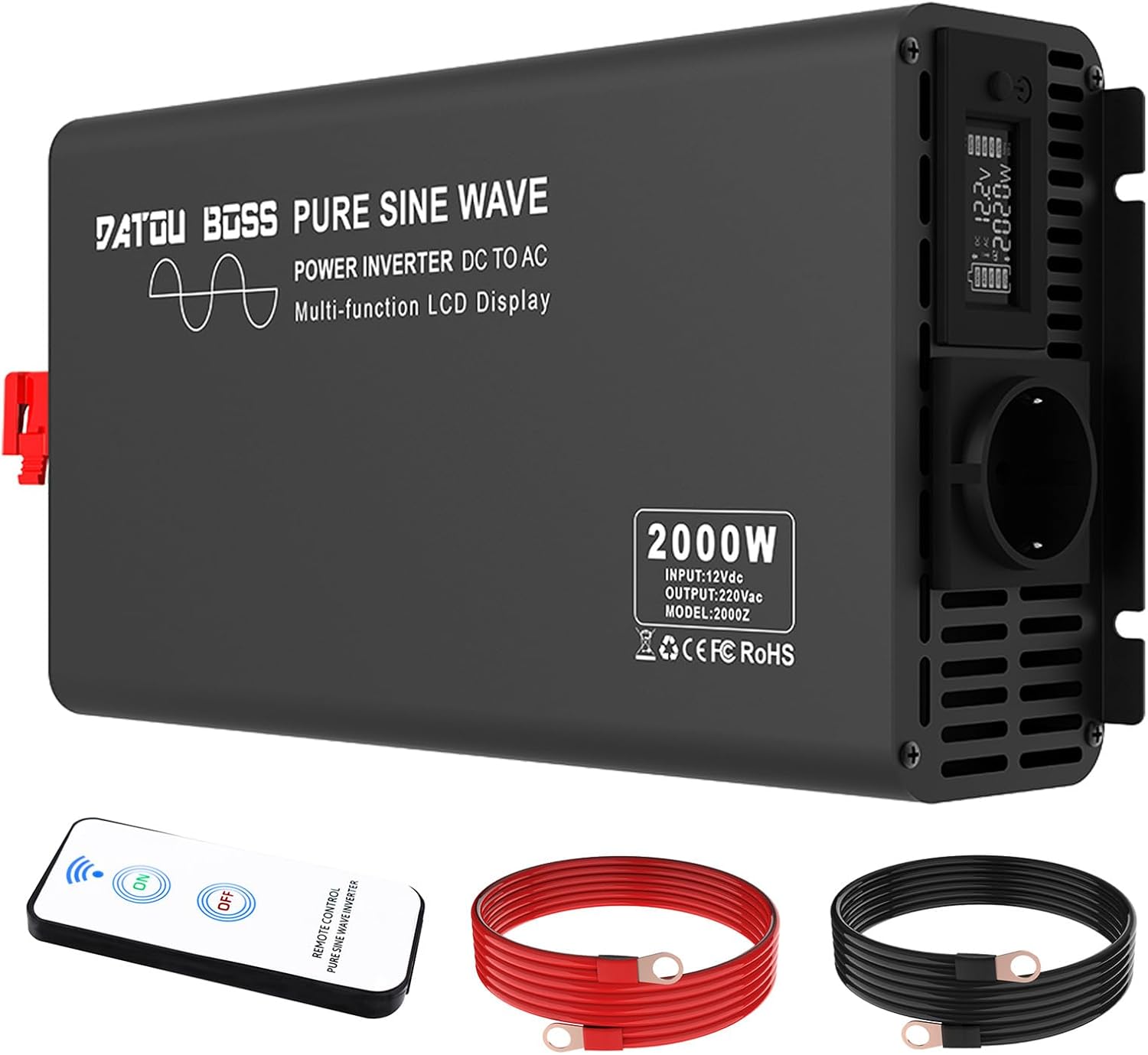
Image: The DATOUBOSS 2000W Pure Sine Wave Inverter, shown with its included remote control and power cables.
2. ข้อมูลด้านความปลอดภัยที่สำคัญ
คำเตือน: This product must be used with a 12V DC battery. Ensure that the positive and negative poles are connected correctly during the initial setup. If the device does not start, please check if the starting current of the connected device exceeds the rated power of the inverter. If you receive the product with damaged packaging, scratches, or functional problems, please contact us immediately. We will address your concerns as quickly as possible.
- Always connect the inverter to a 12V DC power source.
- Ensure correct polarity when connecting battery cables.
- Do not exceed the inverter's rated power (2000W continuous, 4000W peak).
- Avoid short circuits and reverse polarity connections.
- ตรวจสอบให้แน่ใจว่ามีการระบายอากาศเพียงพอเพื่อป้องกันความร้อนสูงเกินไป
- ควรเก็บอินเวอร์เตอร์ให้ห่างจากน้ำ ความชื้น และวัสดุที่ติดไฟได้ง่าย
- ห้ามถอดประกอบหรือดัดแปลงอินเวอร์เตอร์

Image: Icons representing the inverter's safety features, including energy efficiency, rapid heat dissipation, undervoltage การป้องกัน overvoltage protection, overload protection, short circuit protection, overheating protection, and reverse polarity protection.
3. คุณสมบัติของผลิตภัณฑ์
- เอาท์พุตคลื่นไซน์บริสุทธิ์: Provides clean and stable power, comparable to grid electricity, making it safe for sensitive electronic devices such as laptops, smartphones, and other household appliances.
- ประสิทธิภาพสูง: Conversion efficiency of over 95% ensures minimal power loss during long-term use.
- จอแสดงผล LCD: Automatically detects and displays input and output voltage, power, frequency, and battery level in real-time, providing clear operational status.
- การป้องกันขั้นสูง: Features Soft Start Technology and isolated input/output design. Includes comprehensive safety protections against undervoltage, ล้นเกินtage, overheating, overload, short circuit, and reverse polarity.
- โครงสร้างทนทาน: Robust aluminum casing provides advanced protection and promotes efficient heat dissipation, extending the inverter's lifespan.
- Integrated Cooling Fans: Built-in fans effectively circulate air within the inverter for optimal cooling.

Image: An illustration demonstrating the smooth, stable pure sine wave output of the inverter, highlighting its efficient and stable power delivery.

ภาพ: ระเบิด view of the inverter showing the internal cooling fans, illustrating how they provide effective air circulation.
4. การตั้งค่าและการติดตั้ง
4.1 เนื้อหาบรรจุภัณฑ์
ก่อนการติดตั้งโปรดตรวจสอบว่ามีรายการทั้งหมดอยู่ในบรรจุภัณฑ์:
- คู่มือการใช้งาน
- 2 x 20-Inch Cables (Red and Black)
- อินเวอร์เตอร์ Pure Sine Wave 2000W
- 1 x รีโมทคอนโทรล
4.2 การเชื่อมต่ออินเวอร์เตอร์
- เตรียมแบตเตอรี่: Ensure your 12V DC battery is fully charged and in good condition.
- เชื่อมต่อสายเคเบิล:
- Connect the red (positive) cable to the positive (+) terminal of the inverter and then to the positive (+) terminal of the battery.
- Connect the black (negative) cable to the negative (-) terminal of the inverter and then to the negative (-) terminal of the battery.
สำคัญ: Always ensure correct polarity. Incorrect connection can damage the inverter and battery.
- การเชื่อมต่อที่ปลอดภัย: Tighten all connections firmly to prevent loose contacts and ensure optimal power transfer.
- การจัดวาง: Place the inverter in a well-ventilated area, away from direct sunlight, heat sources, and moisture. Ensure there is enough space around the unit for proper airflow.

ภาพ: รายละเอียด view of the inverter's connection points, including the fan, pure copper terminals, power switch, and AC outlets, illustrating proper connection setup.
5. การดำเนินการ
5.1 การเปิด/ปิดเครื่อง
- การเปิดเครื่อง: After connecting the inverter to the battery, press the power button on the inverter. The LCD display will illuminate, showing real-time data.
- วิธีปิดเครื่อง: Press the power button again. The LCD display will turn off.
5.2 Wireless Remote Control Pairing
If your model includes a remote control, follow these steps to pair it:
- Press and hold the power button on the inverter until a blinking red dot appears on the display.
- Point the remote control towards the inverter and press the power button on the remote control.
- The pairing process between the inverter and the remote control is now complete.
5.3 การเชื่อมต่อเครื่องใช้ไฟฟ้า
Once the inverter is powered on, you can connect your AC appliances to the EU outlets on the inverter. Ensure the total wattage of connected appliances does not exceed the inverter's continuous power rating (2000W).

Image: The inverter shown powering various household and electronic devices, including an iPad, mobile phones, microwave, laptop, camera, water kettle, hairdryer, chainsaw, and refrigerator, demonstrating its versatility.

Image: Icons illustrating common applications for the inverter, such as powering laptops, TVs, microwaves, coffee machines, hairdryers, and air conditioners.

Image: Icons illustrating the inverter's capability to power various tools, including electric chainsaws, electric drills, cutting machines, and circular saws.
6. การบำรุงรักษา
การบำรุงรักษาอย่างสม่ำเสมอจะช่วยให้เครื่องแปลงกระแสไฟฟ้าของคุณมีอายุการใช้งานยาวนานและทำงานได้อย่างมีประสิทธิภาพสูงสุด
- การทำความสะอาด: ควรเช็ดทำความสะอาดภายนอกของอินเวอร์เตอร์เป็นระยะด้วยผ้าแห้งเนื้อนุ่ม ห้ามใช้น้ำยาทำความสะอาดหรือสารละลายใดๆ
- การระบายอากาศ : Ensure the cooling vents are free from dust and obstructions. Blocked vents can lead to overheating.
- การเชื่อมต่อ: Regularly check all cable connections to ensure they are secure and free from corrosion. Loose connections can cause power loss or overheating.
- พื้นที่จัดเก็บ: เมื่อไม่ได้ใช้งานเป็นเวลานาน ควรเก็บอินเวอร์เตอร์ไว้ในที่แห้งและเย็น หลีกเลี่ยงแสงแดดโดยตรงและอุณหภูมิที่สูงหรือต่ำเกินไป
7 การแก้ไขปัญหา
หากคุณพบปัญหาเกี่ยวกับอินเวอร์เตอร์ โปรดดูปัญหาและวิธีแก้ไขทั่วไปต่อไปนี้:
| ปัญหา | สาเหตุที่เป็นไปได้ | สารละลาย |
|---|---|---|
| เครื่องแปลงไฟไม่ทำงาน |
|
|
| ไม่มีเอาต์พุต AC |
|
|
| หน้าจอ LCD แสดงรหัสข้อผิดพลาด | Specific protection activated (e.g., undervoltage, ล้นเกินtagเช่น การโอเวอร์โหลด) | Refer to the LCD display for the specific error and consult the relevant section in this manual or contact customer support. |
| Fan runs constantly or is very loud. | อุณหภูมิภายในสูงเนื่องจากบรรทุกของหนักหรือการระบายอากาศไม่ดี | Reduce the load or improve ventilation around the inverter. |
If the problem persists after attempting these solutions, please contact DATOUBOSS customer support.
8. ข้อมูลจำเพาะ
| คุณสมบัติ | รายละเอียด |
|---|---|
| หมายเลขรุ่น | 12V 2000W EU |
| กำลังไฟที่กำหนด | 2000 วัตต์ |
| พลังสูงสุด | 4000 วัตต์ |
| อินพุต Voltage | กระแสตรง 12 โวลต์ |
| ปริมาณการส่งออกtage | กระแสสลับ 220V-240V |
| ความถี่เอาต์พุต | 50เฮิรตซ์ |
| รูปคลื่นเอาท์พุต | เพียวไซน์เวฟ |
| ประสิทธิภาพการแปลง | มากกว่า 95% |
| ขนาดสินค้า | 41 x 0.01 x 17.5 ซม. |
| น้ำหนัก | 4.5 กิโลกรัม |
| แหล่งพลังงาน | ใช้พลังงานจากแบตเตอรี่ |
| แอปพลิเคชั่นที่แนะนำ | Vehicle, Office, Home |
| ประเทศต้นกำเนิด | จีน |
9. การรับประกันและการสนับสนุน
DATOUBOSS is committed to providing high-quality products and excellent customer service. Your inverter comes with a manufacturer's warranty.
- ระยะเวลารับประกัน: สินค้ามีการรับประกัน 24 เดือน
- นโยบายการคืนสินค้า: Enjoy a 30-day unconditional return guarantee.
- การสนับสนุนลูกค้า: DATOUBOSS offers 24/7 customer support. If you have any questions, concerns, or require assistance, please contact us. We are recognized by over 100,000 customers in more than 100 countries worldwide.


Image: A customer service representative ready to assist, alongside icons indicating 24-hour support, a 30-day return guarantee, and a 24-month warranty.
10. การใช้งานผลิตภัณฑ์
The DATOUBOSS Pure Sine Wave Inverter is an excellent choice for various applications, providing reliable power wherever you need it.
- การใช้งานบนมือถือ: Perfect for RVs, trucks, cars, and boats, allowing you to power devices on the go.
- กิจกรรมกลางแจ้ง: เหมาะสำหรับ camping, road trips, and outdoor events, providing power for lights, small appliances, and charging devices.
- Home and Office: Can be used as a backup power source for essential electronics during outages or for powering devices in remote areas.
- สถานที่ปฏิบัติงาน: Suitable for powering various tools and equipment in field work or construction.

Image: A family enjoying an outdoor meal near their camper van, with the inverter providing power, illustrating its use in campสถานการณ์ต่างๆ

Image: A couple relaxing outdoors with a camper van in the background, using the inverter to power their devices, showcasing its utility in remote settings.

Image: People gathered around a barbecue, with the inverter visible, suggesting its use for outdoor gatherings and events.

Image: A couple enjoying a camping trip by a lake, with the inverter providing power for their setup.

Image: A couple camping and playing guitar, with the inverter nearby, highlighting its use for leisure activities.

Image: A collage of images showing the inverter being used in various situations: camping, outdoor office, emergency, field work, recreation, and during a power outage, emphasizing its versatility for converting power anytime, anywhere.

Image: A camper van parked by the sea with a solar panel, illustrating the inverter's use in mobile and off-grid setups.
Ask a question about this manual
Ask about setup, troubleshooting, compatibility, parts, safety, or missing instructions. Manuals+ will review the question and use this page’s manual context to help answer it.