การแนะนำ
Thank you for choosing the Remax RB-T32 Wireless Bluetooth Earphone. This manual provides detailed instructions on how to set up, operate, and maintain your new earphone. Please read this manual carefully before use to ensure optimal performance and longevity of your device.
เนื้อหาแพ็คเกจ
กรุณาตรวจสอบแพ็คเกจสำหรับรายการต่อไปนี้:
- Remax RB-T32 Wireless Bluetooth Earphone
- สายชาร์จ
- แผ่นรองหูฟัง (หลายขนาด)
- คู่มือการใช้งาน
สินค้าเกินview
Familiarize yourself with the components of your Remax RB-T32 earphone.
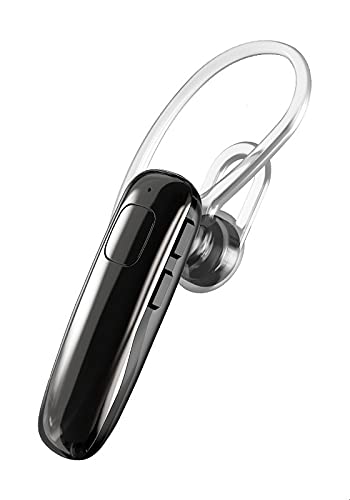
Image: The Remax RB-T32 Wireless Bluetooth Earphone, showcasing its compact design and in-ear form factor. This image provides a general view ของผลิตภัณฑ์
The earphone features a compact in-ear design with integrated touch controls for easy operation. It includes a charging port, an LED indicator, and a built-in microphone for calls.
การตั้งค่า
1. การชาร์จหูฟัง
- เสียบสายชาร์จเข้ากับพอร์ตชาร์จของหูฟัง
- เชื่อมต่อปลายอีกด้านของสายเคเบิลเข้ากับแหล่งจ่ายไฟ USB (เช่น คอมพิวเตอร์ อะแดปเตอร์ติดผนัง)
- ไฟ LED จะแสดงสถานะการชาร์จ โดยปกติการชาร์จเต็มจะใช้เวลาประมาณ 1-2 ชั่วโมง
- Once fully charged, the LED indicator will change or turn off. Disconnect the earphone from the charger.
2. การจับคู่กับอุปกรณ์บลูทูธ
- Ensure the earphone is charged and turned off.
- Press and hold the multi-function button (or touch area) on the earphone until the LED indicator flashes red and blue alternately, indicating pairing mode.
- บนอุปกรณ์ของคุณ (สมาร์ทโฟน แท็บเล็ต ฯลฯ) เปิดใช้งานบลูทูธและค้นหาอุปกรณ์ที่มีอยู่
- เลือก "RB-T32" จากรายการอุปกรณ์ที่พบ
- Once successfully paired, the LED indicator will flash blue slowly or turn off, and you will hear a confirmation tone.
- The earphone will automatically connect to the last paired device when turned on, if Bluetooth is enabled on the device.
คำแนะนำการใช้งาน
เปิด/ปิดเครื่อง
- เปิดเครื่อง: Press and hold the touch area for approximately 3 seconds until the LED indicator flashes blue and you hear a power-on prompt.
- หมดแรง: Press and hold the touch area for approximately 5 seconds until the LED indicator flashes red and you hear a power-off prompt.
การเล่นเพลง
- เล่น/หยุดชั่วคราว: แตะบริเวณที่สัมผัสหนึ่งครั้ง
- เพลงถัดไป: แตะสองครั้งบริเวณระบบสัมผัสบนหูฟังด้านขวา
- แทร็กก่อนหน้า: แตะสองครั้งบนพื้นที่สัมผัสบนหูฟังด้านซ้าย
การจัดการการโทร
- รับ/วางสาย: Tap the touch area once during an incoming call or an active call.
- ปฏิเสธสาย: Press and hold the touch area for 2 seconds during an incoming call.
การควบคุมระดับเสียง
- เพิ่มปริมาณ: Triple-tap the touch area on the right earphone.
- ลดระดับเสียง: Triple-tap the touch area on the left earphone.
ผู้ช่วยเสียง
- เปิดใช้งาน Voice Assistant: Press and hold the touch area for 2 seconds (when not on a call) to activate your device's voice assistant (e.g., Siri, Google Assistant).
การซ่อมบำรุง
- การทำความสะอาด: ใช้ผ้าแห้งนุ่มเช็ดทำความสะอาดหูฟัง ห้ามใช้สารเคมีรุนแรงหรือวัสดุที่มีฤทธิ์กัดกร่อน
- พื้นที่จัดเก็บ: เก็บหูฟังไว้ในที่แห้งและเย็น หลีกเลี่ยงแสงแดดโดยตรงและอุณหภูมิที่สูงหรือต่ำเกินไป
- การดูแลแบตเตอรี่ To preserve battery life, charge the earphone regularly, even if not in use for extended periods. Avoid fully discharging the battery frequently.
- ความต้านทานน้ำ: หูฟังรุ่นนี้ไม่กันน้ำ โปรดหลีกเลี่ยงการสัมผัสกับน้ำหรือความชื้นมากเกินไป
การแก้ไขปัญหา
| ปัญหา | สารละลาย |
|---|---|
| หูฟังไม่เปิดใช้งาน | ตรวจสอบให้แน่ใจว่าหูฟังชาร์จเต็มแล้ว |
| ไม่สามารถจับคู่กับอุปกรณ์ได้ |
|
| ไม่มีเสียงหรือเสียงเบา |
|
| การเชื่อมต่อไม่ต่อเนื่อง |
|
ข้อมูลจำเพาะ
| คุณสมบัติ | รายละเอียด |
|---|---|
| ยี่ห้อ | รีแม็กซ์ |
| ชื่อรุ่น | อาร์บี-ที32 |
| เทคโนโลยีการเชื่อมต่อ | ไร้สาย (Bluetooth) |
| ปัจจัยรูปแบบหูฟัง | ในหู |
| ประเภทการควบคุม | การควบคุมระดับเสียง (ระบบสัมผัส) |
| อุปกรณ์ที่รองรับ | Multi-device compatible |
| ส่วนประกอบที่รวมอยู่ | แผ่นรองหูฟัง |
| ช่วงอายุ คำอธิบาย | ผู้ใหญ่ |
| สี | สีดำ |
การรับประกันและการสนับสนุน
The Remax RB-T32 Wireless Bluetooth Earphone comes with a standard manufacturer's warranty. Please refer to the warranty card included in your package for specific terms and conditions, including the warranty period and coverage details.
For technical support, troubleshooting assistance, or warranty claims, please contact your local Remax distributor or the retailer where you purchased the product. Keep your proof of purchase for warranty validation.