
PowMr ML2440
คู่มือผู้ใช้ตัวควบคุมการชาร์จพลังงานแสงอาทิตย์ MPPT PowMr 40A
รุ่น : ML2440
1. บทนำ
This manual provides essential information for the safe and efficient operation of your PowMr 40A MPPT Solar Charge Controller, model ML2440. Please read this manual thoroughly before installation and use to ensure optimal performance and longevity of the product.
2. คำแนะนำด้านความปลอดภัย
- ตรวจสอบให้แน่ใจว่าสายไฟทั้งหมดเชื่อมต่ออย่างถูกต้องและแน่นหนาเพื่อป้องกันไฟฟ้าลัดวงจรหรือความเสียหาย
- ควรต่อแบตเตอรี่เข้ากับตัวควบคุมการชาร์จก่อนเสมอ จากนั้นจึงต่อกับแผงโซลาร์เซลล์ และสุดท้ายจึงต่อกับอุปกรณ์ที่ชาร์จ และเมื่อต้องการถอดออก ก็ควรทำในลำดับย้อนกลับ
- อย่าพยายามซ่อมแซมหรือดัดแปลงตัวควบคุมด้วยตนเอง โปรดติดต่อช่างผู้ชำนาญการเพื่อขอรับบริการ
- ติดตั้งตัวควบคุมในบริเวณที่มีอากาศถ่ายเทสะดวก ห่างจากวัสดุไวไฟและแสงแดดโดยตรง
- ควรสวมอุปกรณ์ป้องกันส่วนบุคคล (PPE) ที่เหมาะสมเมื่อทำงานกับระบบไฟฟ้า
- ตรวจสอบให้แน่ใจว่าระบบมีปริมาตรtage matches the controller's specifications (12V/24V auto-detection).
3. สินค้าหมดview
The PowMr 40A MPPT Solar Charge Controller is designed to efficiently manage power from your solar panels to charge various battery types, including Lithium, Sealed, Gel, and Flooded batteries. It features Maximum Power Point Tracking (MPPT) technology for optimized solar energy harvesting, automatic 12V/24V system voltage detection, and a clear LCD display for monitoring system status.
รูปที่ 3.1: ด้านหน้า view ของตัวควบคุมการชาร์จพลังงานแสงอาทิตย์ MPPT รุ่น PowMr 40A
This image shows the main unit of the PowMr 40A MPPT Solar Charge Controller, highlighting its compact design and integrated LCD screen.
The controller supports a maximum solar input voltage of 100V and a maximum input power of 1100W for a 24V system (550W for 12V). It also includes temperature compensation for accurate charging across varying environmental conditions.

รูปที่ 3.2: Temperature compensation feature.
This image illustrates the temperature compensation capability of the controller, ensuring optimal battery charging performance in both hot and cold environments.
4. การติดตั้งและเดินสายไฟ
การติดตั้งอย่างถูกต้องมีความสำคัญอย่างยิ่งต่อการทำงานที่ปลอดภัยและมีประสิทธิภาพของตัวควบคุมการชาร์จพลังงานแสงอาทิตย์ของคุณ โปรดปฏิบัติตามขั้นตอนเหล่านี้อย่างระมัดระวัง
4.1 แผนผังการเดินสายไฟ

รูปที่ 4.1: Wiring diagram for the PowMr MPPT Solar Charge Controller.
This diagram illustrates the correct connection order for the battery, solar panels, DC load, and optional inverter. A temperature sensor is also shown.
4.2 ขั้นตอนการเชื่อมต่อ
- เชื่อมต่อแบตเตอรี่ก่อน: Connect the battery to the charge controller's battery terminals. Ensure correct polarity. The controller will auto-detect 12V or 24V system voltage.
- เชื่อมต่อแผงโซล่าเซลล์: Connect the solar panels to the PV input terminals. Ensure correct polarity. The controller will begin charging if sufficient sunlight is available.
- เชื่อมต่อโหลด DC (ไม่จำเป็น): If using a DC load directly from the controller, connect it to the load terminals.
- เชื่อมต่ออินเวอร์เตอร์ (ไม่จำเป็น): If using an inverter, connect it to the battery terminals (not directly to the load terminals of the controller).
- เชื่อมต่อเซ็นเซอร์วัดอุณหภูมิ: For accurate temperature compensation, connect the provided temperature sensor to the designated port on the controller and place the sensor near the battery.
คำสั่งตัดการเชื่อมต่อ: To disconnect the system, always follow the reverse order: Disconnect load, then solar panels, then battery.
5. คู่มือการใช้งาน
This section details how to monitor and configure your charge controller using its integrated LCD display and the optional Bluetooth mobile application.
5.1 จอแสดงผล LCD เกินview

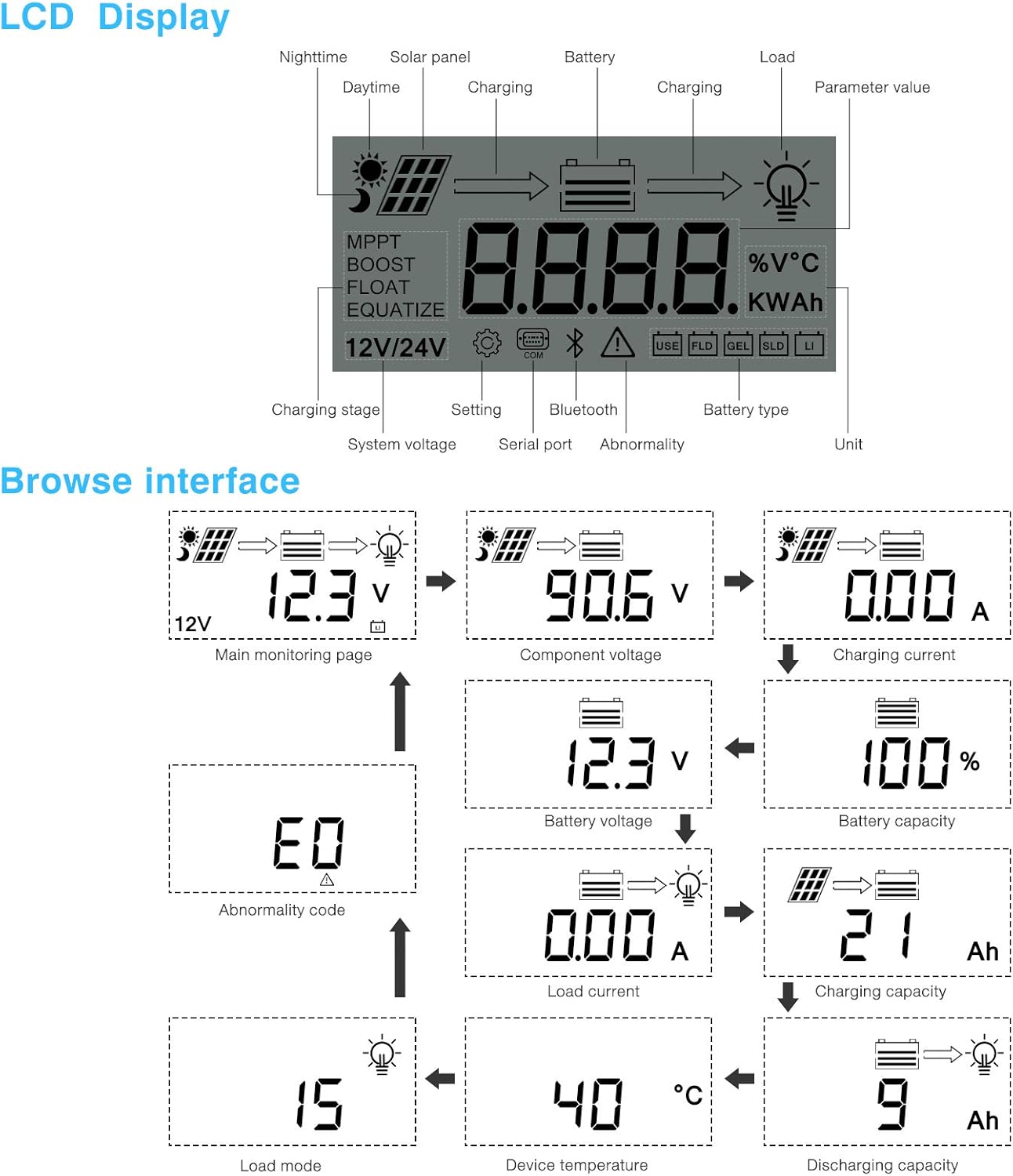
รูปที่ 5.1: LCD Display and Browse Interface.
This image shows the various icons and parameters displayed on the LCD screen, along with the navigation flow through different monitoring pages.
The LCD provides real-time information about your solar system. Key indicators include:
- การชาร์จ Stage: MPPT, Boost, Float, Equalize.
- เล่มระบบtage: 12V/24V auto-detected.
- ประเภทแบตเตอรี่: Icons for Lithium (Li), Sealed (SLD), Gel (GEL), Flooded (FLD).
- ตัวบ่งชี้สถานะ: Solar panel activity, battery charging, load status, abnormality.
- ค่าพารามิเตอร์: แสดง voltage, current, capacity, temperature, etc.
Use the buttons below the LCD to navigate through different screens to view parameters such as main monitoring page, component voltage, กระแสไฟชาร์จ, ปริมาณแบตเตอรี่tage, battery capacity, load current, charging capacity, device temperature, discharging capacity, abnormality codes, and load mode.
5.2 Bluetooth Mobile Application
The controller supports an optional Bluetooth module (BT-1) for remote monitoring and parameter adjustment via a mobile application (available for Apple iOS and Android devices). The Bluetooth module connects to the RS232 port on the controller.

รูปที่ 5.2: Controller with optional Bluetooth module.
This image displays the PowMr MPPT Solar Charge Controller alongside its optional BT-1 Bluetooth communication module and connecting cable.

รูปที่ 5.3: BT-1 Bluetooth module.
รายละเอียด view of the BT-1 Bluetooth module, which enables wireless communication with the solar charge controller for remote monitoring and settings adjustments.

รูปที่ 5.4: Bluetooth Mobile Interface Display.
This image shows various screens from the mobile application, including real-time monitoring, data records, energy records, and parameter settings.
แอปพลิเคชันบนมือถือช่วยให้คุณสามารถ:
- Monitor real-time system data (voltage, current, power, temperature).
- View historical data and energy records.
- Adjust various charging parameters and battery settings.
- คืนค่าการตั้งค่าเริ่มต้นจากโรงงาน
6. การบำรุงรักษา
การบำรุงรักษาอย่างสม่ำเสมอจะช่วยให้ตัวควบคุมการชาร์จของคุณมีอายุการใช้งานยาวนานและทำงานได้อย่างมีประสิทธิภาพสูงสุด
- การทำความสะอาด: Periodically clean the controller's exterior with a dry cloth to remove dust and debris. Ensure ventilation openings are clear.
- การเชื่อมต่อ: ควรตรวจสอบความแน่นหนาและการกัดกร่อนของจุดเชื่อมต่อสายไฟทั้งหมดเป็นประจำทุกปี การเชื่อมต่อที่หลวมอาจทำให้เกิดความร้อนสูงเกินไปและประสิทธิภาพการทำงานลดลง
- สิ่งแวดล้อม: Ensure the installation environment remains within the specified operating temperature range and is free from excessive moisture or dust.
7 การแก้ไขปัญหา
This section provides guidance for common issues. Refer to the LCD display for abnormality codes.
- ไม่มีจอแสดงผล/ไม่มีพลังงาน:
- ตรวจสอบการเชื่อมต่อแบตเตอรี่และตรวจสอบปริมาณแบตเตอรี่tage อยู่ในช่วงการทำงาน
- ตรวจสอบว่าฟิวส์แบตเตอรี่ (ถ้ามี) ยังอยู่ในสภาพสมบูรณ์
- ไม่มีการชาร์จ:
- ตรวจสอบให้แน่ใจว่าแผงโซลาร์เซลล์เชื่อมต่ออย่างถูกต้องและได้รับแสงแดดเพียงพอ
- ตรวจสอบแผงโซลาร์เซลล์ voltagอีและปัจจุบัน
- Verify that the battery is not fully charged or in a protection state.
- โหลดไม่ทำงาน:
- Check load connections and ensure the load current does not exceed the controller's rating.
- ตรวจสอบว่าแบตเตอรี่มีปริมาณtage อยู่เหนือระดับต่ำtagการตั้งค่าการตัดการเชื่อมต่อ (LVD)
- Check for any abnormality codes on the LCD related to load output.
- Abnormality Codes (e.g., "E0"):
- Refer to the specific abnormality code displayed on the LCD. Consult the full product manual or manufacturer's support for detailed explanations and solutions for each code.
8. ข้อมูลจำเพาะ
Technical specifications for the PowMr 40A MPPT Solar Charge Controller (Model ML2440).

รูปที่ 8.1: Product Specifications Table.
This table provides detailed technical parameters for the ML2420, ML2430, and ML2440 models. The ML2440 column is relevant for this 40A controller.
| พารามิเตอร์ | Value (ML2440) |
|---|---|
| แบบอย่าง | ML2440 |
| ปริมาตรของระบบtage | อัตโนมัติ 12V / 24V |
| ไม่มีการสูญเสียโหลด | 0.7 วัตต์ ถึง 1.2 วัตต์ |
| ปริมาณแบตเตอรี่tage | 9 ถึง 35V |
| แม็กซ์ ปริมาณอินพุตพลังงานแสงอาทิตย์tage | 100V (25°C), 90V (-25°C) |
| แม็กซ์ จุดไฟ voltagช่วงอี | ปริมาณแบตเตอรี่tag+2V ถึง 75V |
| จัดอันดับการชาร์จในปัจจุบัน | 40เอ |
| กระแสโหลดที่กำหนด | 20เอ |
| แม็กซ์ ความจุโหลด capacitive | 10000 ยูเอฟ |
| แม็กซ์ กำลังไฟฟ้าเข้าของระบบไฟฟ้าโซลาร์เซลล์ | 550W/ 12V, 1100W/ 24V |
| ประสิทธิภาพการแปลง | ≤ 98% |
| ประสิทธิภาพการติดตาม MPPT | > 99% |
| ปัจจัยชดเชยอุณหภูมิ | -3.0mv/ °C/ 2V (default) |
| อุณหภูมิในการทำงาน | -35°C ถึง +45°C |
| ระดับการป้องกัน | IP32 |
| น้ำหนัก | 2กก. |
| วิธีการสื่อสาร | อาร์เอส232 |
| ระดับความสูง | ≤ 3000ม. |
| ขนาดสินค้า | 238*173*72.5 มม. |
9. การรับประกันและการสนับสนุน
For warranty information, please refer to the documentation included with your product packaging or visit the official PowMr website. If you encounter any issues not covered in this manual or require further assistance, please contact PowMr customer support.
PowMr Official Webเว็บไซต์: เยี่ยมชมร้านค้า PowMr บน Amazon
Ask a question about this manual
Ask about setup, troubleshooting, compatibility, parts, safety, or missing instructions. Manuals+ will review the question and use this page’s manual context to help answer it.