
1. สินค้าหมดview
The HeimVision CA01 is a 1080P (2.0MP) wireless IP security camera designed for outdoor surveillance. It features 65ft night vision, an IP66 waterproof rating, and motion alert capabilities, making it suitable for integration with the HeimVision 8CH WiFi Surveillance System. This camera provides clear video monitoring and enhances security for your property.

รูปที่ 1: เกินview of a typical wireless security camera system setup, illustrating how multiple cameras connect wirelessly to a central recording unit (NVR) to cover various areas of a property.
2. การตั้งค่า
2.1 อะไรอยู่ในกล่อง
- HeimVision CA01 Wireless Security Camera
- อะแดปเตอร์แปลงไฟสำหรับกล้อง
- สกรูยึดและปลั๊กผนัง
- คู่มือการใช้งาน (เอกสารนี้)
2.2 การติดตั้ง
- เลือกตำแหน่ง: เลือกสถานที่กลางแจ้งที่ให้บรรยากาศที่ต้องการ viewing angle and is within range of your HeimVision NVR's Wi-Fi signal. Ensure the camera is positioned to avoid direct sunlight into the lens for optimal image quality.
- ติดตั้งกล้อง: Use the provided mounting screws and wall plugs to securely attach the camera to a wall or suitable surface. Ensure the camera is firmly fixed to prevent movement.
- เชื่อมต่อพลังงาน: Connect the camera to the power adapter and plug it into a power outlet. The camera will power on and begin its startup sequence.
- การจับคู่อัตโนมัติ: The CA01 camera is designed for automatic pairing with your HeimVision 8CH WiFi Surveillance System (NVR). Once powered on, it should automatically connect to the NVR if it's within range and the NVR is also powered on. Refer to your NVR's manual for specific pairing instructions if automatic connection does not occur.
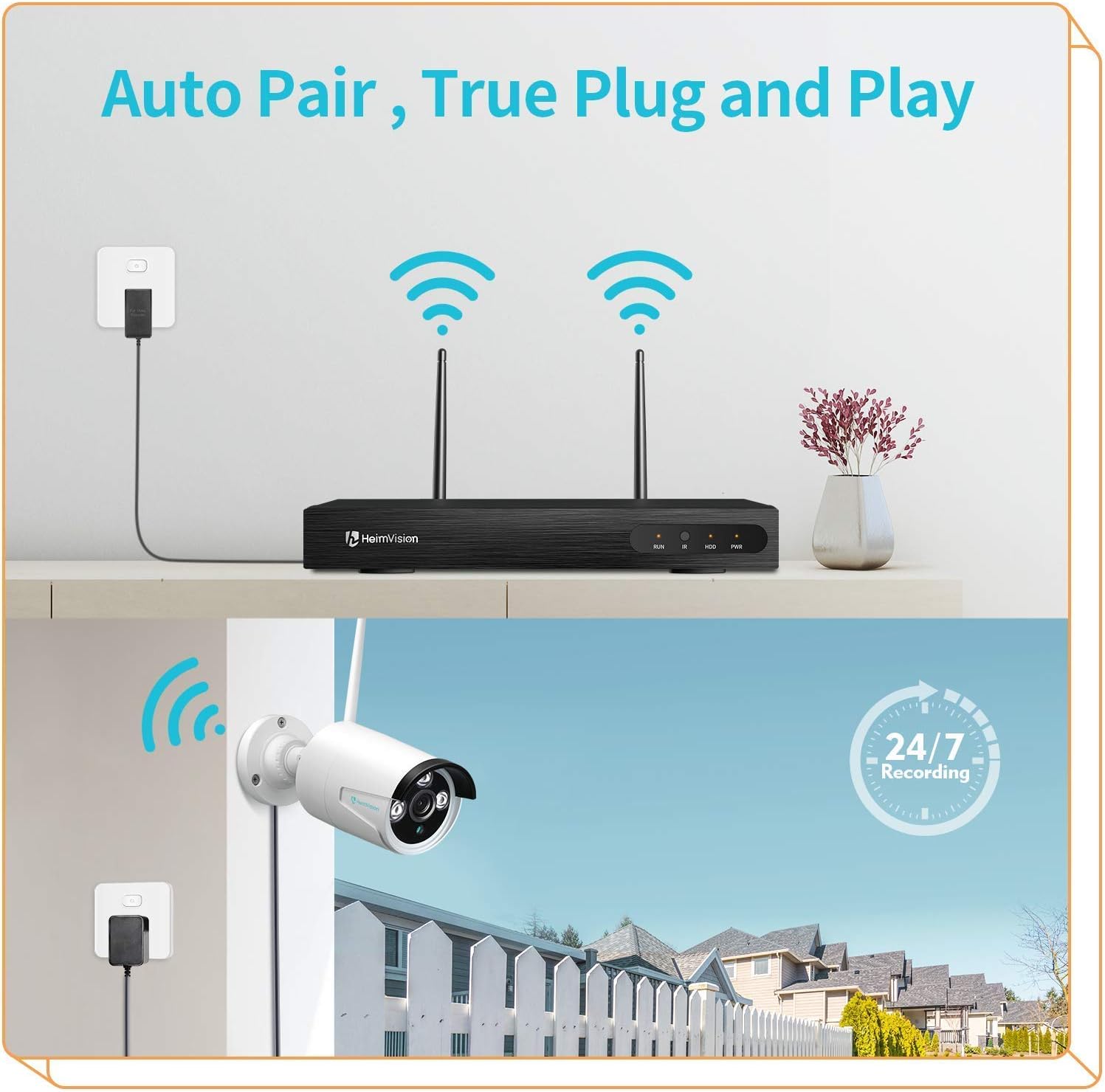
รูปที่ 2: The 'Auto Pair, True Plug and Play' functionality, demonstrating the simple wireless connection between the camera and the NVR.

รูปที่ 3: The camera's IP66 waterproof design, ensuring reliable operation in various outdoor weather conditions.
3. คู่มือการใช้งาน
3.1 Accessing Live View และการบันทึก
Once the camera is successfully paired with your HeimVision NVR, you can access the live video feed and recorded footage through the NVR's interface, a dedicated mobile application, or PC software.
- จอภาพ NVR: Connect a monitor to your NVR to view all camera feeds directly.
- แอปมือถือ: Download the official HeimVision mobile application from your device's app store. Follow the in-app instructions to add your NVR system and view กล้องจากระยะไกล
- ซอฟต์แวร์พีซี: Install the HeimVision client software on your computer. Use the software to manage your NVR and view camera feeds.

รูปที่ 4: ระบบรองรับ viewing on PC and mobile devices, allowing flexible access to your surveillance feeds.
3.2 การตรวจจับการเคลื่อนไหวและการแจ้งเตือน
The CA01 camera features intelligent motion detection. When motion is detected within the camera's field of view, the system can trigger various alerts.
- การบันทึก: The NVR will automatically begin recording footage.
- การแจ้งเตือนทางอีเมล: Configure email notifications in the NVR settings to receive alerts with snapshots when motion is detected.
- การแจ้งเตือนแอป: Receive push notifications on your mobile device through the HeimVision app.
To customize motion detection zones and sensitivity, access the NVR's settings or the mobile application's camera settings.

รูปที่ 5: Motion detection capabilities, showing an alert notification on a smartphone when suspicious activity is detected.
3.3 การมองเห็นตอนกลางคืน
The camera is equipped with infrared (IR) LEDs to provide clear surveillance even in low-light or complete darkness, with a night vision range of up to 65 feet.
- การมองเห็นในเวลากลางวัน: During daylight hours, the camera captures full-color video.
- การมองเห็นตอนกลางคืน: In low light conditions, the camera automatically switches to infrared night vision, providing clear black and white images.

รูปที่ 6: Comparison of colorful day vision and clear night vision, demonstrating the camera's ability to provide surveillance around the clock.
3.4 การบันทึกต่อเนื่อง
The HeimVision system supports 24/7 continuous recording, ensuring that all activity is captured. Storage capacity depends on the hard drive installed in your NVR. The system will typically overwrite the oldest footage once the storage is full.
4. การบำรุงรักษา
- การทำความสะอาดเลนส์: Periodically clean the camera lens with a soft, dry cloth to ensure clear image quality. Avoid using harsh chemicals that could damage the lens coating.
- การเชื่อมต่อไฟฟ้า: Regularly check the power adapter and cable for any signs of damage or wear. Ensure the connection remains secure.
- อัพเดตเฟิร์มแวร์: Check the HeimVision official webเข้าชมเว็บไซต์หรือแอปพลิเคชันบนมือถือเพื่อตรวจสอบการอัปเดตเฟิร์มแวร์ที่มีให้สำหรับ NVR และกล้องของคุณ การอัปเดตระบบอย่างสม่ำเสมอจะช่วยให้มั่นใจได้ถึงประสิทธิภาพและความปลอดภัยสูงสุด
- การตรวจสอบสิ่งแวดล้อม: ตรวจสอบให้แน่ใจว่าไม่มีสิ่งกีดขวางใดๆ บังกล้อง view and that the mounting remains secure, especially after severe weather conditions.
5 การแก้ไขปัญหา
| ปัญหา | สาเหตุที่เป็นไปได้ | สารละลาย |
|---|---|---|
| กล้องไม่เปิดเครื่อง | No power to the adapter or faulty adapter/cable. | Check power outlet, ensure adapter is securely connected, and inspect cable for damage. Try a different power outlet. |
| ไม่มีฟีดวิดีโอจากกล้อง | Camera not paired with NVR, out of Wi-Fi range, or signal interference. | Ensure camera is powered on. Check NVR settings for camera status. Move camera closer to NVR or reduce interference. Re-pair the camera if necessary (refer to NVR manual). |
| คุณภาพของภาพไม่ดี | Dirty lens, low light conditions, or poor Wi-Fi signal. | Clean the camera lens. Ensure adequate lighting for color vision or verify night vision is active. Improve Wi-Fi signal strength. |
| การตรวจจับการเคลื่อนไหวไม่ทำงาน | Motion detection settings incorrect, sensitivity too low, or area not covered. | Check motion detection settings in NVR or app. Adjust sensitivity. Ensure camera covers the desired area. |
6. ข้อมูลจำเพาะ
| คุณสมบัติ | ข้อมูลจำเพาะ |
|---|---|
| แบบอย่าง | CA01 |
| ความละเอียดในการจับภาพวิดีโอ | 1080p (2.0MP) |
| เทคโนโลยีการเชื่อมต่อ | ไร้สาย (Wi-Fi) |
| การใช้งานภายใน/ภายนอกอาคาร | กลางแจ้ง |
| ระดับการกันน้ำ | IP66 |
| การมองเห็นตอนกลางคืน | Up to 65ft, Night Color (IR) |
| คุณสมบัติพิเศษ | เซ็นเซอร์ตรวจจับความเคลื่อนไหว, ระบบมองเห็นในเวลากลางคืน |
| ประเภทการแจ้งเตือน | การเคลื่อนไหวเท่านั้น |
| อุปกรณ์ที่รองรับ | Smartphone (via app), NVR |
| ประเภทการติดตั้ง | ติดผนัง |
| ฟอร์มแฟกเตอร์ | กระสุน |
7. การรับประกันและการสนับสนุน
ผลิตภัณฑ์นี้เป็นสินค้า Amazon Renewed สินค้า Amazon Renewed ผ่านการตรวจสอบและทดสอบอย่างมืออาชีพเพื่อให้ใช้งานได้และมีสภาพเหมือนใหม่ หากคุณไม่พอใจกับสินค้าที่ซื้อไป คุณสามารถเปลี่ยนหรือขอคืนเงินสินค้าได้ภายใต้เงื่อนไขที่กำหนด การรับประกันต่ออายุของ Amazon.
For further technical assistance or support, please refer to the official HeimVision support channels or the Amazon Renewed customer service.