
1. บทนำและเรื่องอื่นๆview
The Walfront TH210 is a versatile 3-in-1 digital multi-scanner engineered to accurately detect studs, metal objects, and live AC wires concealed within walls. Its advanced features include a clear LCD display and an audible warning system, which work in conjunction to pinpoint the exact location of hidden elements. This lightweight and portable device is designed with ergonomics in mind, ensuring a comfortable grip and stable movement for highly accurate scanning results. Crafted from durable, high-quality, and heat-resistant plastic, the TH210 is built for longevity and reliable performance in various environments, including homes, offices, and workshops.
คุณสมบัติที่สำคัญ ได้แก่:
- Exact Location Detection: Large LCD display and audible warning for precise object identification.
- การออกแบบพกพา: Lightweight and convenient for use in various settings.
- ด้ามจับตามหลักสรีรศาสตร์: Designed for comfortable handling and accurate scanning.
- โครงสร้างทนทาน: High-quality plastic shell ensures sturdiness and heat resistance.
- ง่ายต่อการใช้: Simple operation with clear instructions for battery installation and calibration.
2. การตั้งค่า
Before using your Walfront TH210 wall detector, follow these steps to set it up:
- ติดตั้งแบตเตอรี่: Locate the battery compartment on the back of the detector. Open the compartment cover. Insert one 9V (6F22) battery, ensuring correct polarity. Close the battery compartment cover securely.
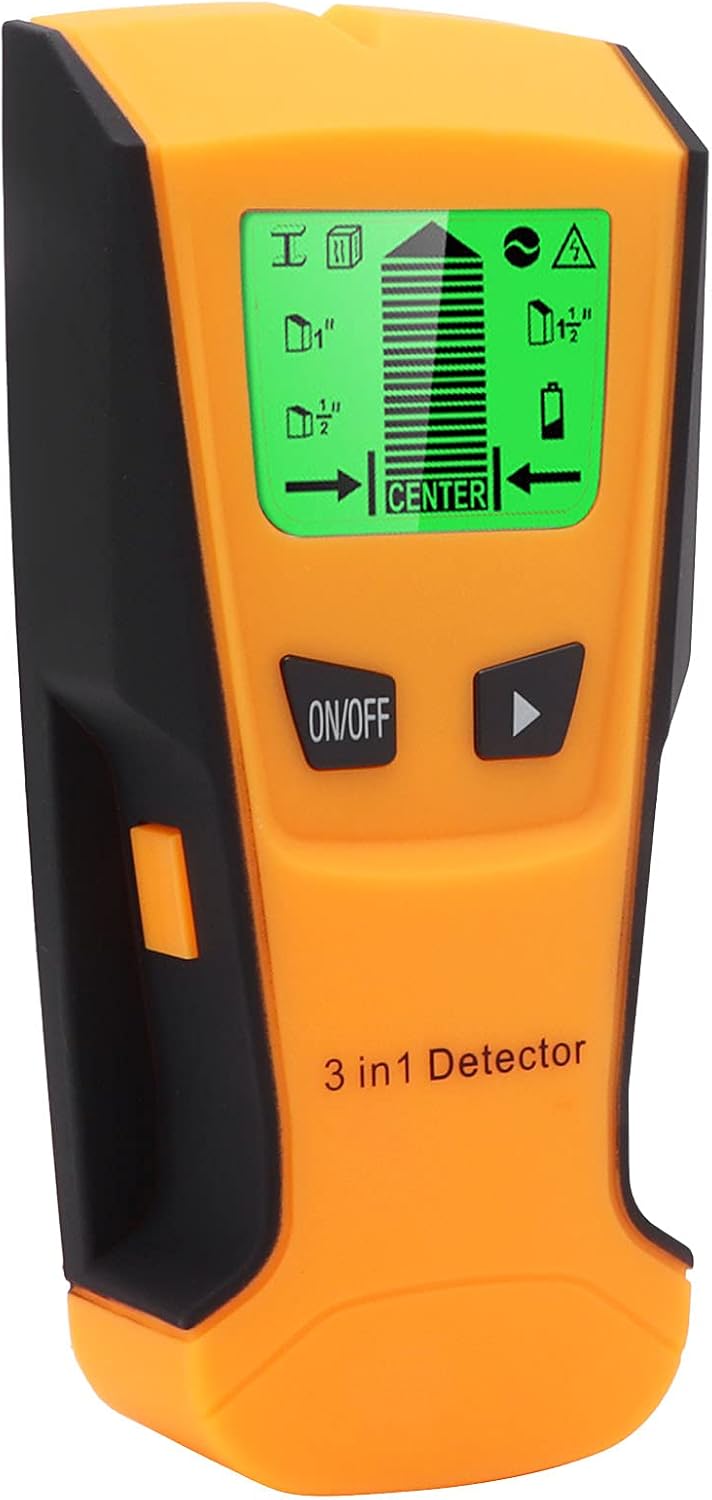
Figure 2.1: Battery compartment for 9V battery installation.
3. คู่มือการใช้งาน
The Walfront TH210 offers three detection modes: stud (wood), metal, and AC live wire. Follow these general operating procedures:
- เปิดเครื่องและการสอบเทียบ: Press the "ON/OFF" key to turn on the device. The device will automatically perform a self-calibration. Ensure the device is held flat against the wall, away from any known objects, during calibration for accurate results.
- เลือกโหมด: Use the mode selection button (often indicated by an arrow or specific icon) to cycle through the different detection modes: Wood mode, Metal mode, and Cable (AC Live Wire) mode. The selected mode will be indicated on the LCD display.
- การสแกน: Place the scanner flat against the wall surface. Slowly slide the device horizontally across the wall. The LCD display will show indicators for detected objects, including depth, center, and edges. An audible warning will sound when an object is detected.
- Interpreting Display: The LCD provides visual cues such as signal strength bars, center indicators, and edge indicators to help you precisely locate the target. A low battery reminder will also be displayed when the battery needs replacement.

รูปที่ 3.1 : ด้านหน้า view of the TH210 with LCD display.

Figure 3.2: Labeled diagram of the TH210's features and indicators.

Figure 3.3: Ergonomic design for comfortable handling.

Figure 3.4: Sensitive sensor for accurate detection.

รูปที่ 3.5: อดีตample of detection capabilities (rebar, cable, wood).

Figure 3.6: HD backlit display for clear visibility.
4. การบำรุงรักษา
To ensure the longevity and optimal performance of your Walfront TH210, follow these maintenance guidelines:
- การทำความสะอาด: Wipe the device with a soft, dry cloth after each use. Do not use abrasive cleaners or solvents, as they may damage the plastic casing หรือหน้าจอ LCD
- พื้นที่จัดเก็บ: Store the detector in a cool, dry place, away from direct sunlight and extreme temperatures. If storing for an extended period, remove the 9V battery to prevent leakage and potential damage to the device.
- การเปลี่ยนแบตเตอรี่: Replace the 9V battery promptly when the low battery indicator appears on the LCD display to ensure accurate readings.
5 การแก้ไขปัญหา
If you encounter issues with your Walfront TH210, consider the following common troubleshooting steps:
- อุปกรณ์ไม่เปิด:
- Check if the 9V battery is installed correctly with the correct polarity.
- เปลี่ยนแบตเตอรี่ใหม่
- ผลการอ่านค่าไม่ถูกต้องหรือไม่ตรวจพบ:
- Ensure the device is properly calibrated before scanning. Perform calibration by pressing the ON/OFF button while holding the device flat against the wall in an area free of known objects.
- Verify that the correct detection mode (wood, metal, or AC live wire) is selected for the material you are trying to locate.
- Scan slowly and consistently across the surface. Rapid movement can lead to missed detections.
- Check for any obstructions on the wall surface that might interfere with the scan.
- Audible Warning Not Functioning:
- Ensure the device is detecting an object. The audible warning only activates upon detection.
- Check battery level; low battery can affect all functions.
6. ข้อมูลจำเพาะ
| คุณสมบัติ | คำอธิบาย |
|---|---|
| แบบอย่าง | TH210 Wall Metal Detector |
| ประเภทสินค้า | เครื่องตรวจจับผนัง |
| วัสดุ | พลาสติก |
| ขอบเขตการใช้งาน | Metal detection, voltage cable detection, stud/joist/drywall detection |
| อุณหภูมิในการทำงาน | -7°C to 40°C (<70% humidity) |
| อุณหภูมิในการจัดเก็บ | -20°C to 50°C (<85% humidity) |
| แบตเตอรี่ที่สามารถใช้งานได้ | แบตเตอรี่ 6F22 9V จำนวน 1 ก้อน (ไม่รวมอยู่ในชุด) |
| เวลาปิดเครื่องอัตโนมัติ | 3 นาที |
| น้ำหนักสินค้า | 183 กรัม (ประมาณ 6.5 ออนซ์) |
| ขนาดสินค้า | ประมาณ 0.39 x 0.39 x 0.39 นิ้ว (10 x 10 x 10 มม.) |
| ประเภทจอภาพ | จอแอลซีดี |
| การให้คะแนนการคุ้มครองระหว่างประเทศ | IP66 |
7. การรับประกันและการสนับสนุน
For information regarding product warranty, returns, or technical support, please refer to the documentation provided at the time of purchase or contact the seller/manufacturer directly. Specific warranty terms and conditions may vary.
You may also visit the Walfront store on Amazon for additional product information and support resources: Walfront Amazon Store