
PTHTECHUS GPSS1202-BLUE
PTHTECHUS Waterproof Kids Smart Watch User Manual
Model: GPSS1202-BLUE
การแนะนำ
Thank you for choosing the PTHTECHUS Waterproof Kids Smart Watch. This device is designed to provide communication, safety, and entertainment for children, while offering peace of mind for parents through features like GPS tracking, two-way calling, and SOS alerts. Please read this manual carefully to ensure proper use and maintenance of the watch.

Image: The PTHTECHUS Kids Smart Watch in blue and green, showcasing its design and vibrant colors.
คุณสมบัติหลัก

Image: An infographic illustrating the main functionalities of the smart watch, such as camera, two-way calling, GPS, and SOS.
- Two-Way Calling: Make and receive calls from pre-set contacts.
- สายด่วนฉุกเฉิน SOS: Press and hold the SOS button for three seconds to dial emergency numbers in a loop until answered.
- ติดตาม GPS: Real-time location tracking and historical route playback.
- กันน้ำ IP67: Designed to withstand splashes, hand washing, and light rain.
- กล้อง: Built-in camera for capturing photos.
- นาฬิกาปลุก: Set alarms for daily routines.
- โหมดคลาส: Disable certain functions during school hours to prevent distractions.
- Math Games: Simple educational games.
- ไฟฉาย: ไฟส่องสว่างในตัวเพื่อความสะดวกสบาย
- การตรวจสอบระยะไกล: Listen to the watch's surroundings (requires app setup).
คู่มือการติดตั้ง
1. การชาร์จนาฬิกา
Before first use, fully charge the watch. Connect the magnetic charging cable to the charging port on the back of the watch and plug the USB end into a standard USB power adapter (not included). A full charge typically takes about 2 hours.
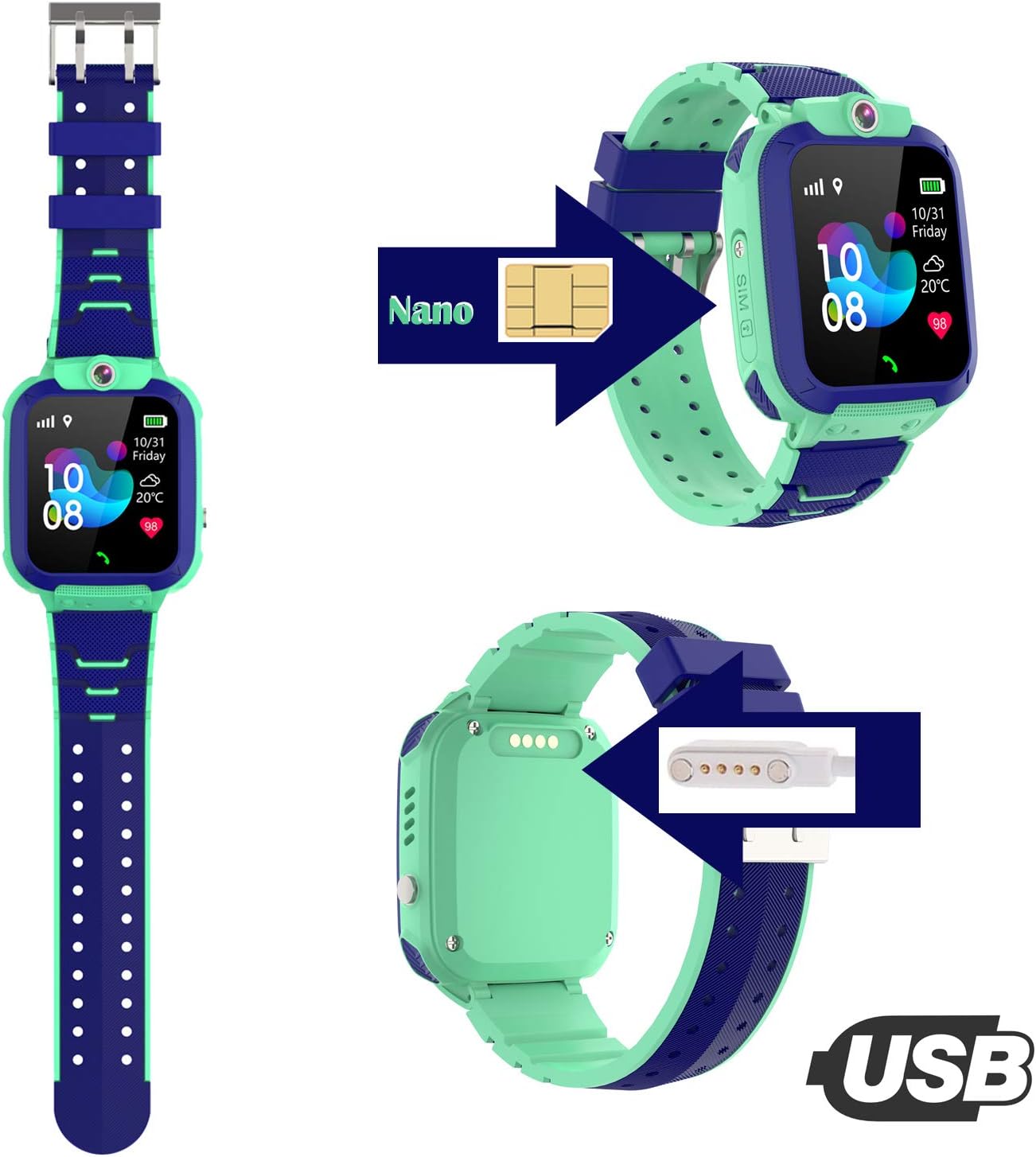
Image: Illustration of the SIM card insertion point and the magnetic USB charging connection on the watch.
2. การติดตั้งซิมการ์ด
The watch requires a Nano SIM card (not included) with 2G network support for calling and GPS functions. Ensure the SIM card has call, SMS, and data plans enabled.
- ปิดนาฬิกาให้สนิท
- หาช่องใส่ซิมการ์ดที่ด้านข้างของนาฬิกา
- Carefully insert the Nano SIM card into the slot with the chip facing up and the cut corner oriented correctly. Push it in until it clicks into place.
- Power on the watch. The network signal icon should appear on the screen once the SIM card is recognized.
3. App Setup (SeTracker2 Recommended)
To manage the watch's features, such as contacts, GPS tracking, and SOS numbers, download the "SeTracker2" app on your smartphone (available for iOS and Android).
- Scan the QR code provided in the watch's packaging or search for "SeTracker2" in your app store.
- Register a new account using your email address and set a password.
- Bind the watch to your account by scanning the QR code on the watch's back or entering the 15-digit REG code found in the watch's settings menu.
- Configure family numbers, SOS numbers, safety zones, and other settings within the app.
คำแนะนำการใช้งาน
1. Two-Way Calling
Once contacts are set up in the app, your child can make and receive calls from these numbers.
- การโทร: Swipe on the watch screen to find the "Contacts" or "Phone" icon. Tap to select a contact and initiate a call.
- รับสาย: When a call comes in, tap the green answer button on the screen.

Image: Visual representation of the two-way calling feature, showing parents and children communicating.
2. ฟังก์ชันฉุกเฉิน SOS
In an emergency, the child can press and hold the SOS button (usually a dedicated button on the side) for 3 seconds. The watch will automatically dial the pre-set SOS numbers in a loop until one is answered.
- Ensure SOS numbers are correctly configured in the SeTracker2 app.
3. การติดตาม GPS
The watch uses GPS and LBS (Location Based Service) for positioning. You can view the real-time location of the watch and its historical movement tracks through the SeTracker2 app.
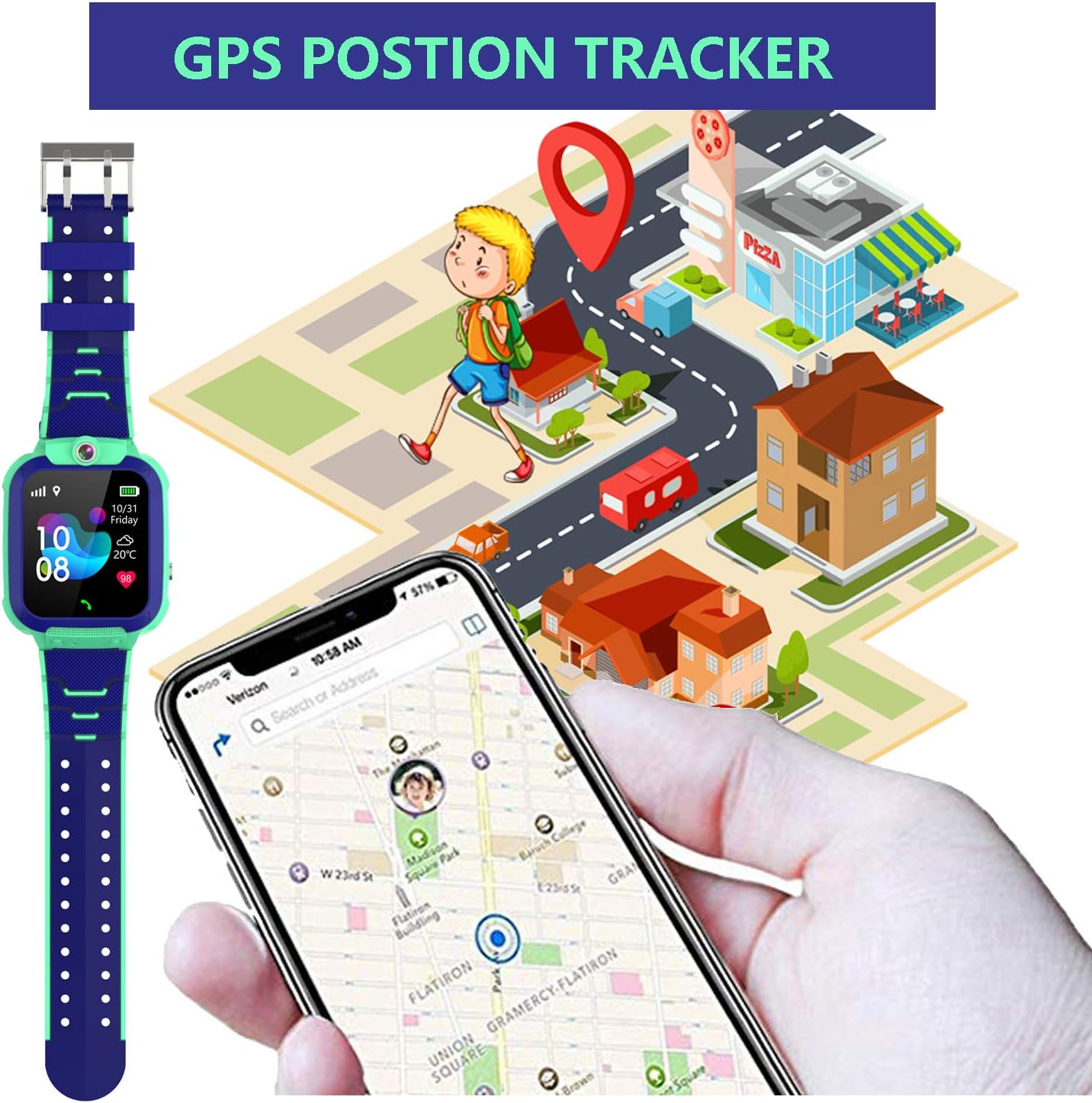
Image: Depiction of the GPS positioning tracker, showing the watch's location on a map via a smartphone app.
4. กล้องและอัลบั้มรูป
The watch has a built-in camera. Swipe to find the "Camera" icon, tap to open, and tap again to take a photo. Photos are saved in the "Album" and can be viewed on the watch or uploaded to the app.
5. Alarm Clock and Class Mode
- นาฬิกาปลุก: Set multiple alarms via the SeTracker2 app for reminders like waking up, homework, or bedtime.
- Class Mode (Do Not Disturb): Configure specific time periods in the app during which the watch will block incoming calls and disable games to prevent distractions during school hours. Only SOS calls will function.

Image: A collage demonstrating various uses of the watch, including alarm clock function, class mode, and taking photos.
การบำรุงรักษาและการดูแล
กันน้ำ (IP67)
The watch is IP67 waterproof, meaning it is resistant to splashes, hand washing, and light rain. It is not suitable for swimming, bathing, or prolonged submersion in water deeper than 1 meter.
- Do NOT press any buttons underwater. This can compromise the waterproof seal and damage the watch.
- ควรหลีกเลี่ยงการนำนาฬิกาไปสัมผัสกับน้ำร้อน ไอน้ำ หรือน้ำแรงดันสูง
- If the watch gets wet, wipe it dry with a soft cloth.

ภาพ: ภาพตัวอย่างamples of the watch's IP67 waterproof rating, showing it can withstand hand washing, water games, and rain.
การดูแลทั่วไป
- ทำความสะอาดนาฬิกาเป็นประจำด้วยผ้าแห้งนุ่ม
- ควรหลีกเลี่ยงการทำนาฬิกาตกหรือการกระแทกอย่างรุนแรง
- ควรเก็บนาฬิกาให้ห่างจากอุณหภูมิที่สูงจัดและแสงแดดโดยตรงเป็นเวลานาน
- ห้ามถอดประกอบหรือซ่อมนาฬิกาด้วยตนเอง
การแก้ไขปัญหา
| ปัญหา | สาเหตุที่เป็นไปได้ | สารละลาย |
|---|---|---|
| Watch cannot power on | Low battery; damaged battery/charger | Charge the watch for at least 2 hours. Ensure the charging cable is properly connected. Try a different USB power source. |
| No network signal / Cannot make calls | SIM card not inserted correctly; SIM card not activated; no 2G network coverage; incorrect APN settings | Ensure SIM card is fully inserted. Check with your carrier if the SIM is active and has a 2G plan. Check network coverage in your area. Configure APN settings via SMS command (refer to app instructions). |
| GPS location inaccurate | Poor GPS signal (indoors/dense areas); LBS positioning only | Move to an open outdoor area for better GPS signal. LBS (base station positioning) is less accurate than GPS. Ensure data is enabled on SIM. |
| Cannot bind watch to app | Incorrect REG code; watch not connected to network; server region mismatch | Double-check the REG code. Ensure the watch has a network signal. Select the correct server region in the SeTracker2 app (e.g., Europe/Africa). |
| หน้าจอนาฬิกาค้าง | ข้อผิดพลาดของซอฟต์แวร์ | Press and hold the power button for 10-15 seconds to force restart the watch. |
ข้อมูลจำเพาะ

ภาพ: รายละเอียดต่างๆ อย่างละเอียดview of the watch's functional parameters and technical specifications.
| คุณสมบัติ | รายละเอียด |
|---|---|
| ยี่ห้อ | พีทีเอชเทคทัส |
| หมายเลขรุ่น | GPSS1202-BLUE |
| สี | GPSS1202-BLUE |
| ระบบปฏิบัติการ | iOS, Android (App Support) |
| ขนาดหน้าจอ | 1.44 นิ้ว |
| การเชื่อมต่อ | GPS Cellular (2G network required for calls/data) |
| คุณสมบัติพิเศษ | Phone Call, Camera, Distance Tracker, GPS, Notification, Alarm Clock |
| อุปกรณ์ที่รองรับ | สมาร์ทโฟน (สำหรับควบคุมผ่านแอปพลิเคชัน) |
| องค์ประกอบของแบตเตอรี่ | ลิเธียมไอออน / ลิเธียมโพลิเมอร์ |
| ความจุของแบตเตอรี่ | 400mAh |
| เวลาในการชาร์จ | ประมาณ 2 ชั่วโมง |
| เวลาสแตนด์บาย | ประมาณ 70 ชั่วโมง |
| ความละเอียดการแสดงผล | 128*128 |
| กล้อง | 8w (likely 0.08 MP) |
| แรม | 32 เมกะไบต์ |
| รอม | 32 เมกะไบต์ |
| ช่วงอายุ | อายุ 3-12 ปี |
| ระดับการกันน้ำ | IP67 |
การรับประกันและการสนับสนุน
Information regarding specific warranty terms and conditions is not provided in this manual. Please refer to the product packaging or the retailer's webเว็บไซต์สำหรับรายละเอียดการรับประกัน
For technical support or further assistance, please contact PTHTECHUS customer service through the contact information provided with your purchase or on the official brand webเว็บไซต์.