
1. สินค้าหมดview
The Yahboom RC Servo Tester is an 8-channel servo motor controller designed for testing and adjusting RC servos. It features independent servo interfaces and high-precision potentiometers, offering both manual and centering control modes. Integrated over-current protection ensures safe operation with compatible 5V-8.4V servos.

Figure 1: Yahboom 8-Channel Servo Tester. This image displays the compact design of the servo tester with its 8 potentiometers and servo connection pins.
2. คุณสมบัติหลัก
- 8-Channel Independent Control: Features 8 independent servo interfaces and 8 high-precision potentiometers for precise control of multiple servos.
- โหมดการควบคุมแบบคู่: Supports manual mode for fine adjustment and centering mode for quick servo positioning, switchable via function keys.
- การป้องกันมากกว่าปัจจุบัน: Equipped with a terminal block (5-8.4V) power supply port and built-in over-current protection to safeguard connected servos.
- High Control Accuracy: Achieves a control accuracy of 0.09 degrees (PWM limit small change value 1us).
- ช่วงการใช้งานที่กว้าง: Compatible with any 5V-8.4V servos and can be controlled without complex coding, using buttons or adjustable knobs.
3. คำแนะนำในการตั้งค่า
3.1 การเชื่อมต่อสายไฟ
The servo tester can be powered via the terminal block or a USB-C port. Ensure the power supply voltage is within the 5V-8.4V range to prevent damage.
- เทอร์มินัลบล็อก: Connect your 5V-8.4V power source to the blue terminal block. Observe polarity: '+' for positive, '-' for negative.
- พอร์ต USB-C: Alternatively, connect a 5V USB-C power source to the designated port.
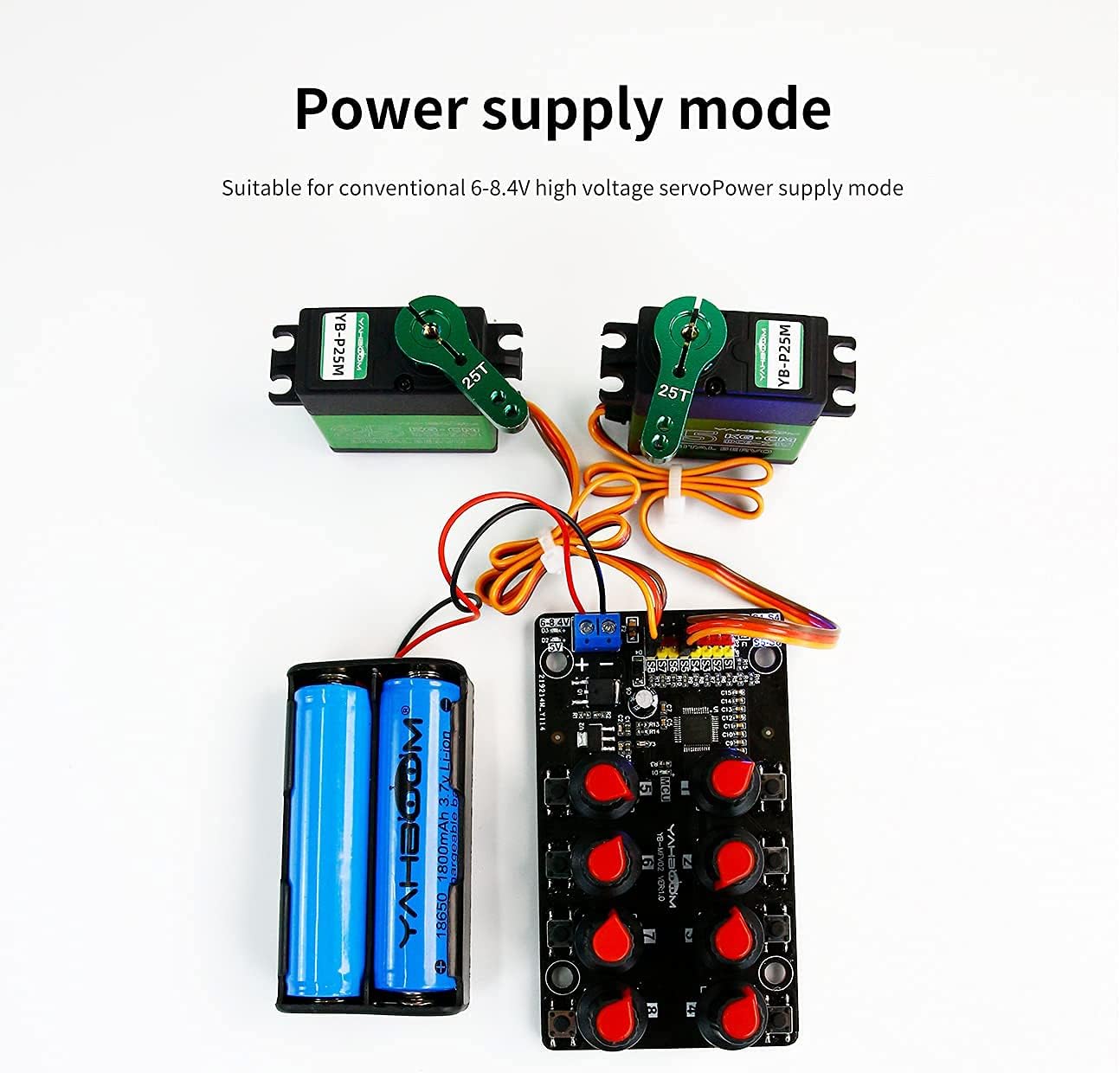
Figure 2: Power Supply Mode. This image illustrates connecting a battery pack to the terminal block for power, suitable for conventional 6-8.4V high voltagอีเซอร์โว
3.2 การเชื่อมต่อเซอร์โว
Connect your servos to the 8-channel independent servo interfaces. Each interface supports a 3-pin servo connector. Ensure correct orientation: the brown wire (ground) typically aligns with the '-' pin, red (power) with '+', and orange/yellow (signal) with 'S'.

Figure 3: Servo Connection Diagram. This image shows how to connect multiple servos to the 8-channel servo tester, highlighting the 3-pin connections.
4. คู่มือการใช้งาน
The Yahboom RC Servo Tester offers two primary control modes: Manual Adjustment and Centering Mode. These modes can be switched using the onboard function keys.
4.1 Manual Adjustment Mode
In this mode, each of the 8 potentiometers directly controls the position of its corresponding servo. Rotate the knob to precisely adjust the servo's angle.
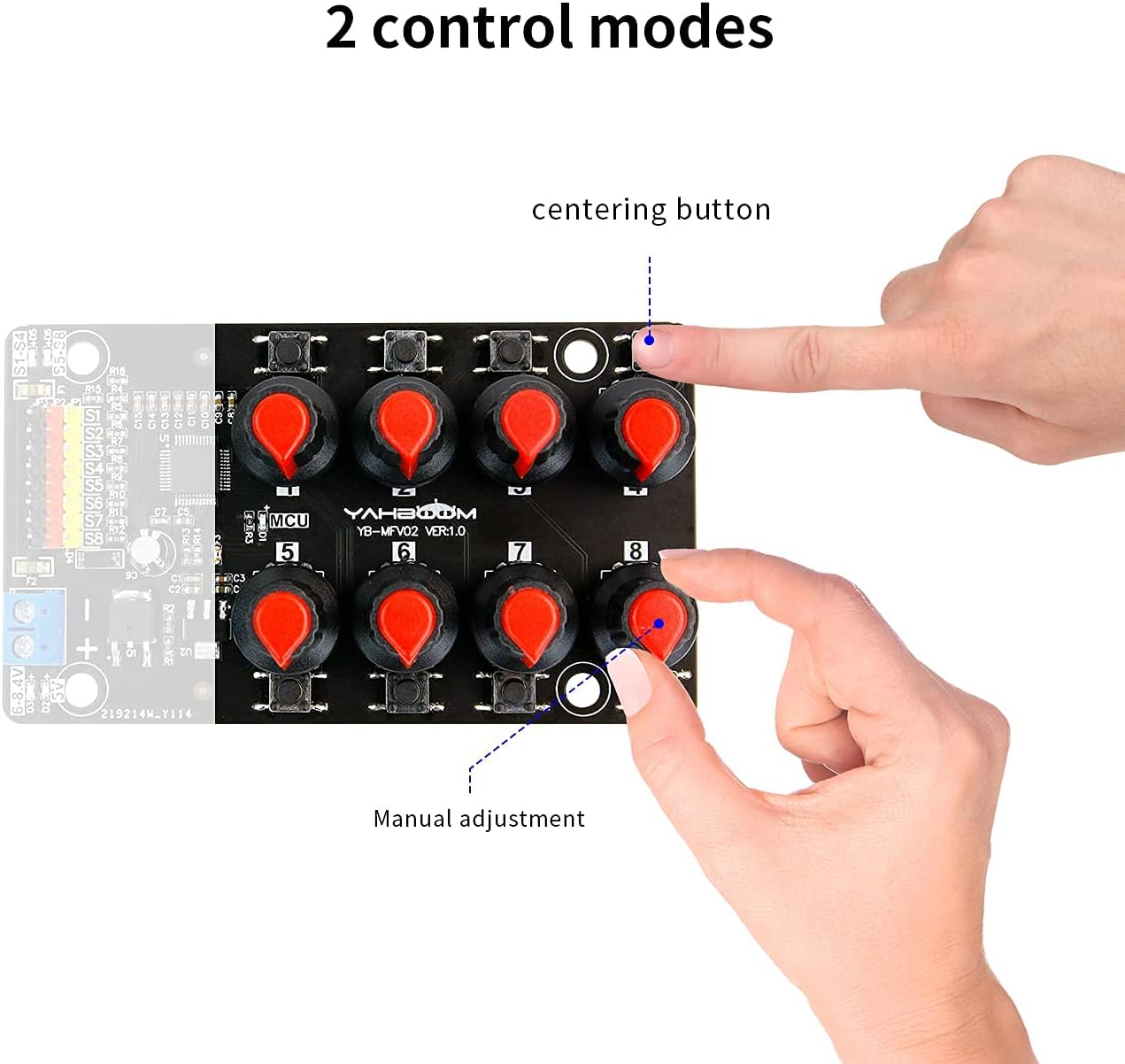
Figure 4: Manual Adjustment. This image demonstrates a user manually adjusting a servo's position using one of the potentiometers on the tester.
4.2 Centering Mode
Press the dedicated centering button to automatically move all connected servos to their neutral (center) position. This is useful for initial setup or quick recalibration.
4.3 Over-Current Test
The device includes an over-current protection scheme. If an over-current condition is detected (two sets over 2A for S1-S4 and S5-S6), the protection will activate to prevent damage.
4.4 ใบสมัครเช่นampเลส

Figure 5: Robotic Arm Application. The servo tester can be used to control and test individual joints of a robotic arm, as shown in this image.
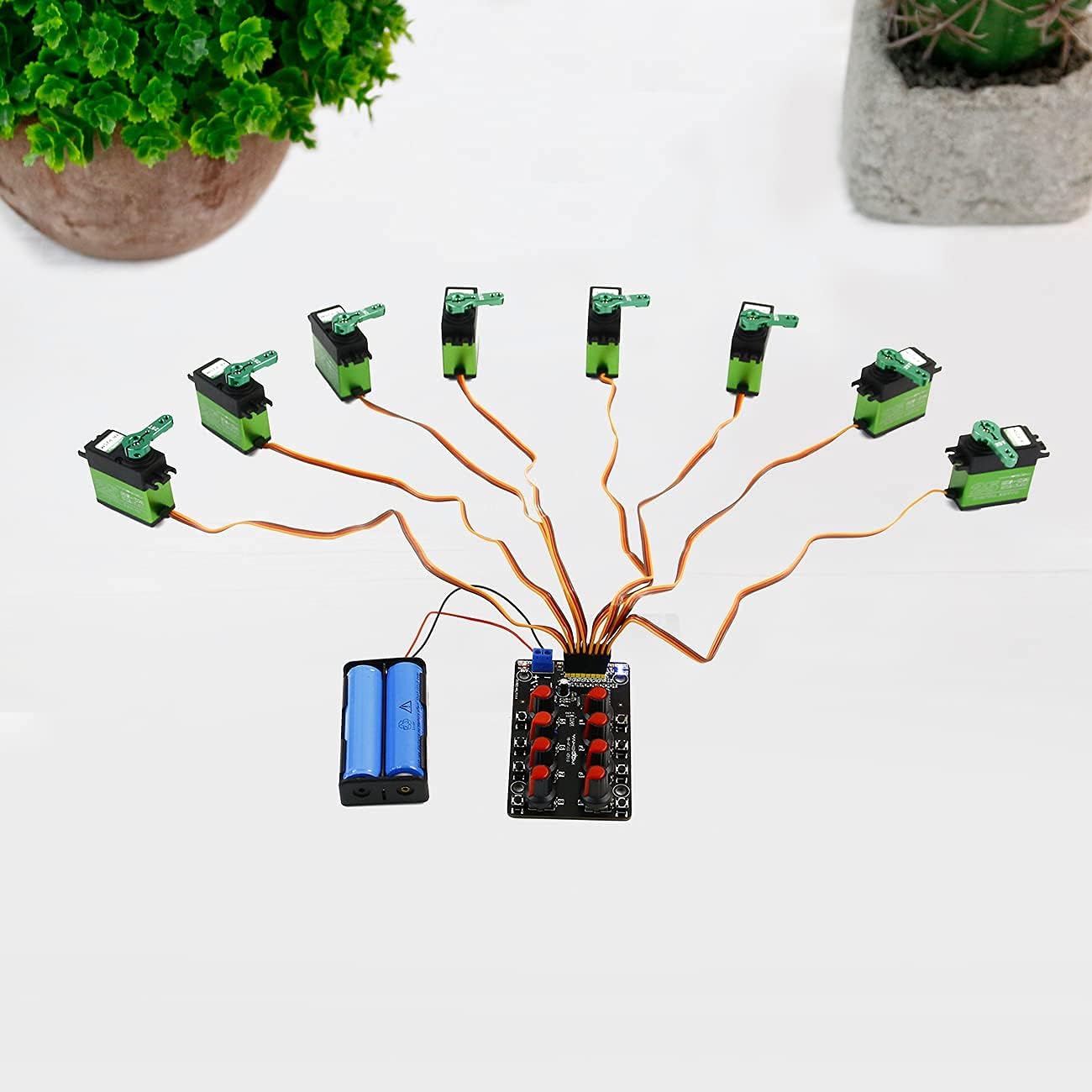
Figure 6: Multiple Servo Testing. This image illustrates the tester connected to multiple servos, demonstrating its capability to control up to 8 channels simultaneously.
4.5 Operational Videos
Video 1: Yahboom 8 Channels RC Servo Tester Servo Motors Controller. This video demonstrates the basic functionality and connection of the 8-channel servo tester.
Video 2: Yahboom RC Servo Tester Servo Motors Controller. This video, though for a 1-channel variant, illustrates the general operation of a Yahboom servo tester.
Video 3: How to use the servo tester kit by Barnabas Robotics. This video provides a general guide on how to use a servo tester kit, including power and servo connections.
Video 4: Digital Servo Tester/Controller with Over Current Protection by LewanSoul. This video demonstrates the functionality of a digital servo tester, including its over-current protection feature.
5. ข้อมูลจำเพาะ
| คุณสมบัติ | คำอธิบาย |
|---|---|
| ขนาดสินค้า | 1 x 0.99 x 1 นิ้ว |
| น้ำหนักสินค้า | 2.08 ออนซ์ |
| แหล่งจ่ายไฟ | 5V-8.4V (Terminal Block) / 5V (USB-C) |
| ช่องควบคุม | 8 ช่องอิสระ |
| โหมดการควบคุม | Manual, Centering |
| ความแม่นยำในการควบคุม | 0.09 degrees (PWM limit 1us) |
| การป้องกัน | Over-Current Protection (2 sets over 2A for S1-S4 and S5-S6) |
| ผู้ผลิต | ยาห์บูม |

Figure 7: Product Parameters. This image provides a visual representation of the servo tester's dimensions and weight.
6. การบำรุงรักษา
To ensure the longevity and optimal performance of your Yahboom RC Servo Tester, follow these maintenance guidelines:
- รักษาความสะอาด: Regularly wipe the device with a dry, soft cloth to remove dust and debris. Avoid using harsh chemicals or abrasive materials.
- หลีกเลี่ยงความชื้น: Protect the tester from water, humidity, and extreme temperatures. Store it in a dry environment.
- จัดการด้วยความระมัดระวัง: หลีกเลี่ยงการทำตกหรือให้เครื่องได้รับแรงกระแทกรุนแรง เพราะอาจทำให้ชิ้นส่วนภายในเสียหายได้
- การจัดเก็บที่เหมาะสม: When not in use, store the servo tester in its original packaging or a protective case to prevent physical damage.
7 การแก้ไขปัญหา
If you encounter issues with your Yahboom RC Servo Tester, consider the following troubleshooting steps:
- ไม่มีไฟฟ้า: Check all power connections. Ensure the power source is within the specified 5V-8.4V range and properly connected to either the terminal block or USB-C port. Verify the power indicator light is on.
- มอเตอร์เซอร์โวไม่ตอบสนอง: Confirm that the servo is correctly connected to the tester, observing the correct polarity (ground, power, signal). Ensure the servo itself is functional by testing it with another known working controller if possible.
- การเคลื่อนที่ของเซอร์โวผิดปกติ: If the servo moves erratically or not as expected, check the selected control mode. In manual mode, adjust the corresponding potentiometer. In centering mode, ensure the centering button is pressed correctly.
- Over-Current Protection Triggered: If the over-current protection activates, disconnect the power and all servos. Inspect the servos for any shorts or excessive load. Reconnect one servo at a time to identify the problematic component.
- การทำงานเป็นระยะ: Check for loose connections or damaged wires. Ensure the power supply is stable and providing consistent voltage.
8. การรับประกันและการสนับสนุน
For detailed warranty information, including coverage period and terms, please refer to the manufacturer's official website or the product packaging. For technical support, product inquiries, or assistance with troubleshooting beyond this manual, please contact Yahboom customer service through their official channels.