
1. บทนำ
ขอบคุณสำหรับการซื้อasing the Ledwood Drop 400 Wireless LED Speaker. This manual provides essential information for setting up, operating, and maintaining your speaker. Please read it carefully before use to ensure proper functionality and to maximize your listening experience.
2. ข้อมูลด้านความปลอดภัย
- อย่าให้ลำโพงโดนน้ำ ความชื้น หรืออุณหภูมิที่สูงหรือต่ำเกินไป
- หลีกเลี่ยงการทำตกหรือให้ลำโพงได้รับแรงกระแทกรุนแรง
- อย่าพยายามถอดประกอบหรือซ่อมแซมลำโพงด้วยตนเอง โปรดติดต่อเจ้าหน้าที่บริการที่ผ่านการรับรอง
- ควรวางลำโพงให้ห่างจากแหล่งความร้อนและแสงแดดโดยตรง
- โปรดใช้อะแดปเตอร์แปลงไฟที่ให้มาเท่านั้นในการชาร์จ
- เช็ดทำความสะอาดลำโพงด้วยผ้าแห้งเนื้อนุ่ม ห้ามใช้สารทำความสะอาดที่มีฤทธิ์กัดกร่อน
3. เนื้อหาบรรจุภัณฑ์
กรุณาตรวจสอบว่าสินค้าทั้งหมดมีอยู่ในแพ็คเกจ:
- 1 x Ledwood Drop 400 Wireless LED Speaker
- อะแดปเตอร์ไฟฟ้า 1 ตัว
- 1 x 3.5mm AUX Input Cable
- 1 x รีโมทคอนโทรล
- 1 x ไมโครโฟนแบบมีสาย
- 1 x คู่มือผู้ใช้ (เอกสารนี้)
4. สินค้าหมดview
The Ledwood Drop 400 is a powerful wireless speaker featuring dynamic LED lighting and multiple connectivity options.
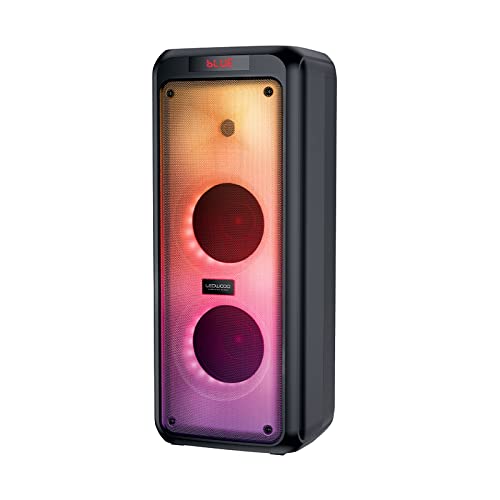
รูปที่ 4.1 : ด้านหน้า view of the Ledwood Drop 400 speaker, showcasing its LED light panel.
แผงควบคุมและพอร์ต

Figure 4.2: Top control panel with input ports and function buttons.
The top panel includes controls for power, volume, mode selection, playback, and inputs for USB, SD card, AUX, and two microphones. A digital display indicates the current mode or status.
5. การตั้งค่า
5.1 การชาร์จลำโพง
- เสียบอะแดปเตอร์แปลงไฟที่ให้มาเข้ากับพอร์ต DC IN บนลำโพง
- เสียบอะแดปเตอร์เข้ากับเต้ารับที่ผนังมาตรฐาน
- The charging indicator will illuminate. The speaker is fully charged when the indicator changes color or turns off (refer to the speaker's display for specific indications).
- การชาร์จเต็มหนึ่งครั้งสามารถใช้งานได้ประมาณ 6 ชั่วโมง
5.2 การเปิด/ปิดเครื่อง
- To power on, press and hold the Power button on the control panel or remote control.
- หากต้องการปิดเครื่อง ให้กดปุ่มเปิด/ปิดค้างไว้อีกครั้ง
6. คู่มือการใช้งาน
6.1 การจับคู่บลูทูธ
- Power on the Ledwood Drop 400 speaker. It will automatically enter Bluetooth pairing mode, indicated by a flashing 'BLUE' on the display and an audible prompt.
- เปิดใช้งานบลูทูธบนสมาร์ทโฟน แท็บเล็ต หรืออุปกรณ์อื่นๆ ที่รองรับบลูทูธ
- ค้นหา available devices and select "Ledwood Drop 400" from the list.
- Once connected, the speaker will provide an audible confirmation, and 'BLUE' on the display will stop flashing.
- ตอนนี้คุณสามารถเล่นเสียงจากอุปกรณ์ของคุณผ่านลำโพงได้
6.2 การเล่นไฟล์ผ่าน USB/การ์ด SD
- Insert a USB flash drive or an SD card (pre-loaded with MP3 audio files) into the respective port on the speaker's control panel.
- The speaker will automatically switch to USB or SD card mode and begin playing the audio files.
- Use the Play/Pause, Next Track, and Previous Track buttons on the speaker or remote control to manage playback.
อินพุต AUX 6.3 ช่อง
- เชื่อมต่อปลายด้านหนึ่งของสาย AUX ขนาด 3.5 มม. ที่ให้มากับพอร์ต AUX IN บนลำโพง
- ต่อปลายอีกด้านหนึ่งเข้ากับช่องเสียบหูฟังหรือช่องสัญญาณเสียงออกของอุปกรณ์เสียงภายนอกของคุณ
- Press the Mode button on the speaker or remote control until 'AUX' is displayed.
- เล่นเสียงจากอุปกรณ์ภายนอกของคุณ สามารถควบคุมระดับเสียงได้ทั้งจากลำโพงและอุปกรณ์ภายนอก
6.4 วิทยุ FM
- Press the Mode button on the speaker or remote control until 'FM' is displayed.
- หากต้องการสแกนหาและบันทึกสถานีวิทยุ FM ที่ใช้งานได้โดยอัตโนมัติ ให้กดปุ่มเล่น/หยุดชั่วคราวค้างไว้ ลำโพงจะสแกนและบันทึกสถานีโดยอัตโนมัติ
- Use the Next Track and Previous Track buttons to navigate through the saved stations.
6.5 การใช้ไมโครโฟน
- Connect the wired microphone (or another compatible microphone) to one of the MIC IN ports on the speaker.
- Adjust the microphone volume using the dedicated MIC VOL knob on the control panel.
- The microphone can be used in any audio mode (Bluetooth, USB, SD, AUX, FM).
6.6 โหมดไฟ LED
The Ledwood Drop 400 features dynamic LED lighting with 4 different modes.
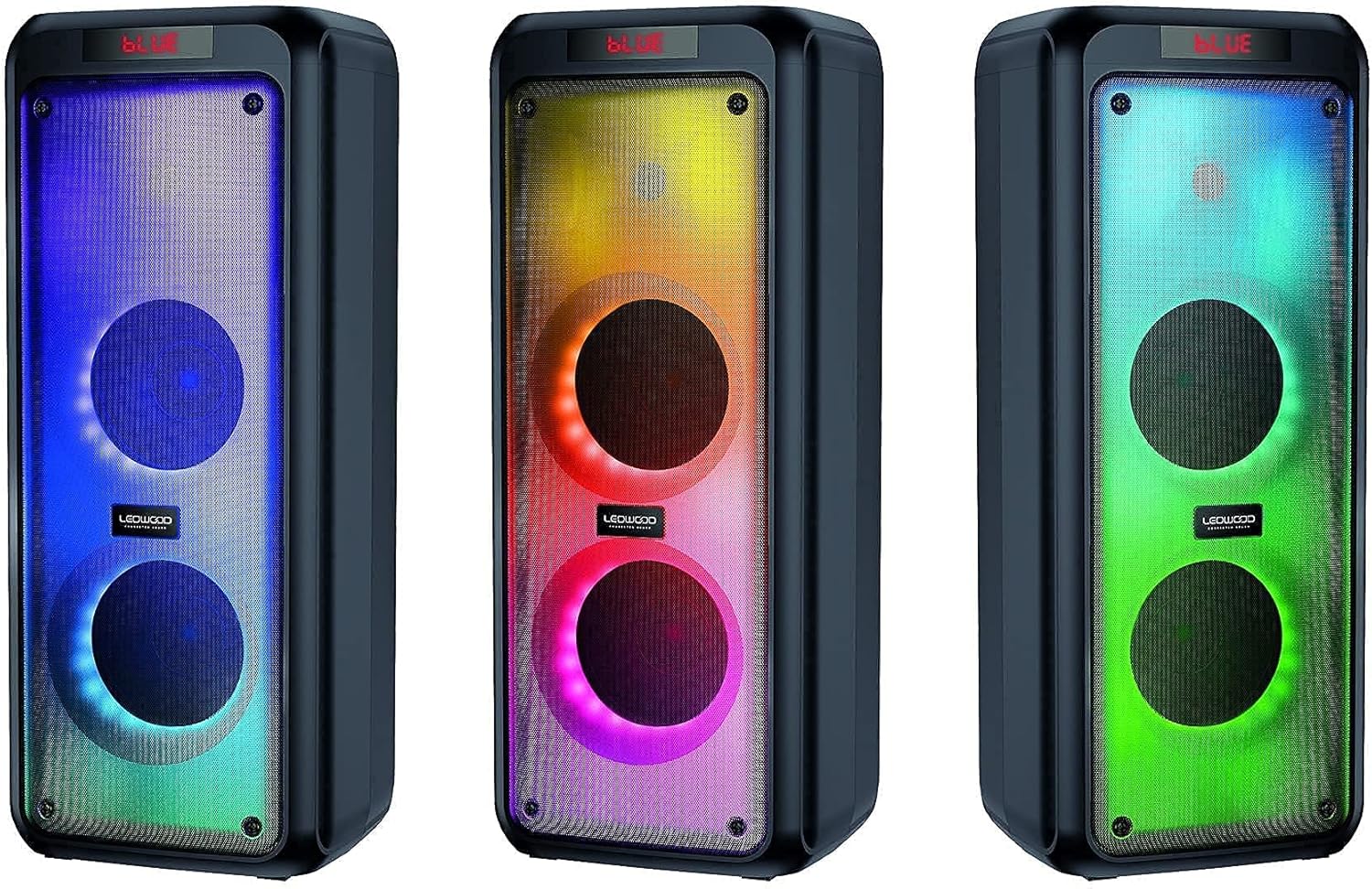
รูปที่ 6.1: อดีตamples of the speaker's LED light modes.
- Press the LED button on the control panel or remote control to cycle through the available light modes.
- Press the LED button again to turn off the lights.
6.7 ฟังก์ชั่น True Wireless Stereo (TWS)
The TWS function allows you to pair two Ledwood Drop 400 speakers together for a stereo sound experience.
- Ensure both Ledwood Drop 400 speakers are powered on and in Bluetooth mode, but not connected to any device.
- On one of the speakers (this will be the primary speaker), press and hold the TWS button (if available) or a designated pairing button (refer to specific button labels on your speaker).
- The primary speaker will search for the secondary speaker. Once connected, both speakers will emit an audible confirmation.
- ตอนนี้ เชื่อมต่ออุปกรณ์บลูทูธของคุณเข้ากับลำโพงหลักตามที่อธิบายไว้ในหัวข้อ 6.1 เสียงจะเล่นในระบบสเตอริโอผ่านลำโพงทั้งสองตัว
7. การบำรุงรักษา
7.1 การทำความสะอาด
- ควรปิดเครื่องและถอดปลั๊กลำโพงก่อนทำความสะอาดทุกครั้ง
- ใช้ผ้าแห้งนุ่มและไม่เป็นขุยเช็ดพื้นผิวภายนอก
- ห้ามใช้น้ำยาทำความสะอาด สเปรย์ หรือตัวทำละลาย
7.2 พื้นที่จัดเก็บ
- เก็บลำโพงไว้ในที่แห้งและเย็น หลีกเลี่ยงแสงแดดโดยตรงและอุณหภูมิที่สูงหรือต่ำเกินไป
- If storing for an extended period, charge the battery periodically (e.g., every 3 months) to maintain battery health.
8 การแก้ไขปัญหา
| ปัญหา | สาเหตุที่เป็นไปได้ | สารละลาย |
|---|---|---|
| ลำโพงไม่เปิดเครื่อง | Battery is depleted. Power adapter not connected. | Charge the speaker using the provided power adapter. Ensure the adapter is securely connected to both the speaker and a working power outlet. |
| ไม่มีเสียงจากลำโพง | Volume too low. Incorrect mode selected. Device not connected. | Increase speaker volume and source device volume. Ensure the correct input mode (Bluetooth, AUX, USB, SD, FM) is selected. Re-pair Bluetooth device or check cable connections. |
| อุปกรณ์บลูทูธไม่สามารถเชื่อมต่อได้ | ลำโพงไม่อยู่ในโหมดจับคู่ อุปกรณ์อยู่ไกลเกินไป มีสัญญาณรบกวน | Ensure speaker is in Bluetooth pairing mode (flashing 'BLUE'). Move device closer to the speaker. Turn off other Bluetooth devices to reduce interference. Try restarting both devices. |
| การรับสัญญาณวิทยุ FM ไม่ดี | Weak signal. Speaker position. | Reposition the speaker to improve reception. Extend any external antenna if available. |
| ไมโครโฟนไม่ทำงาน | Microphone not connected properly. MIC VOL too low. | Ensure microphone is fully inserted into the MIC IN port. Increase the MIC VOL knob. |
9. ข้อมูลจำเพาะ
- ยี่ห้อ: Ledwood
- แบบอย่าง: ดรอป 400
- เทคโนโลยีการเชื่อมต่อ: บลูทูธ, ยูเอสบี
- คุณสมบัติพิเศษ: FM Radio, LED Light Effects
- การใช้ที่แนะนำ: For computer, For smartphone or tablet
- อุปกรณ์ที่รองรับ: แล็ปท็อป สมาร์ทโฟน
- สี: สีดำ
- วิธีการควบคุม: รีโมทคอนโทรล
- แหล่งพลังงาน: สายไฟฟ้า
- อายุการใช้งานแบตเตอรี่โดยเฉลี่ย: 6 ชั่วโมง
- กำลังขับ: 400W (40W rms)
- ขนาด : ขนาด 24 x 25 x 64 ซม. (โดยประมาณ)
- ASIN: B0972SSC4J
10. การรับประกันและการสนับสนุน
For warranty information or technical support, please refer to the warranty card included with your product or contact Ledwood customer service directly. Contact details can typically be found on the official Ledwood webไซต์หรือบนบรรจุภัณฑ์ผลิตภัณฑ์