
cellularline BTHUSHTWSK
Cellularline HUSH Bluetooth In-Ear Earbuds User Manual
Model: BTHUSHTWSK
1. บทนำ
This manual provides detailed instructions for the Cellularline HUSH Bluetooth In-Ear Earbuds. These earbuds feature an interactive touch display, Active Noise Cancelling (ANC), Noise-Free Calls technology, and customizable sound with 5 EQ modes. Please read this manual carefully to ensure proper use and optimal performance of your device.
2. อะไรอยู่ในกล่อง
- Cellularline HUSH Earbuds
- เคสชาร์จไฟ
- คู่มือการใช้งาน
3. สินค้าหมดview
The Cellularline HUSH earbuds are designed for an advanced and personalized audio experience. The compact charging case features an interactive touch display for easy control.

Image 1: Cellularline HUSH Earbuds in their charging case, showcasing the sleek design and in-ear fit.
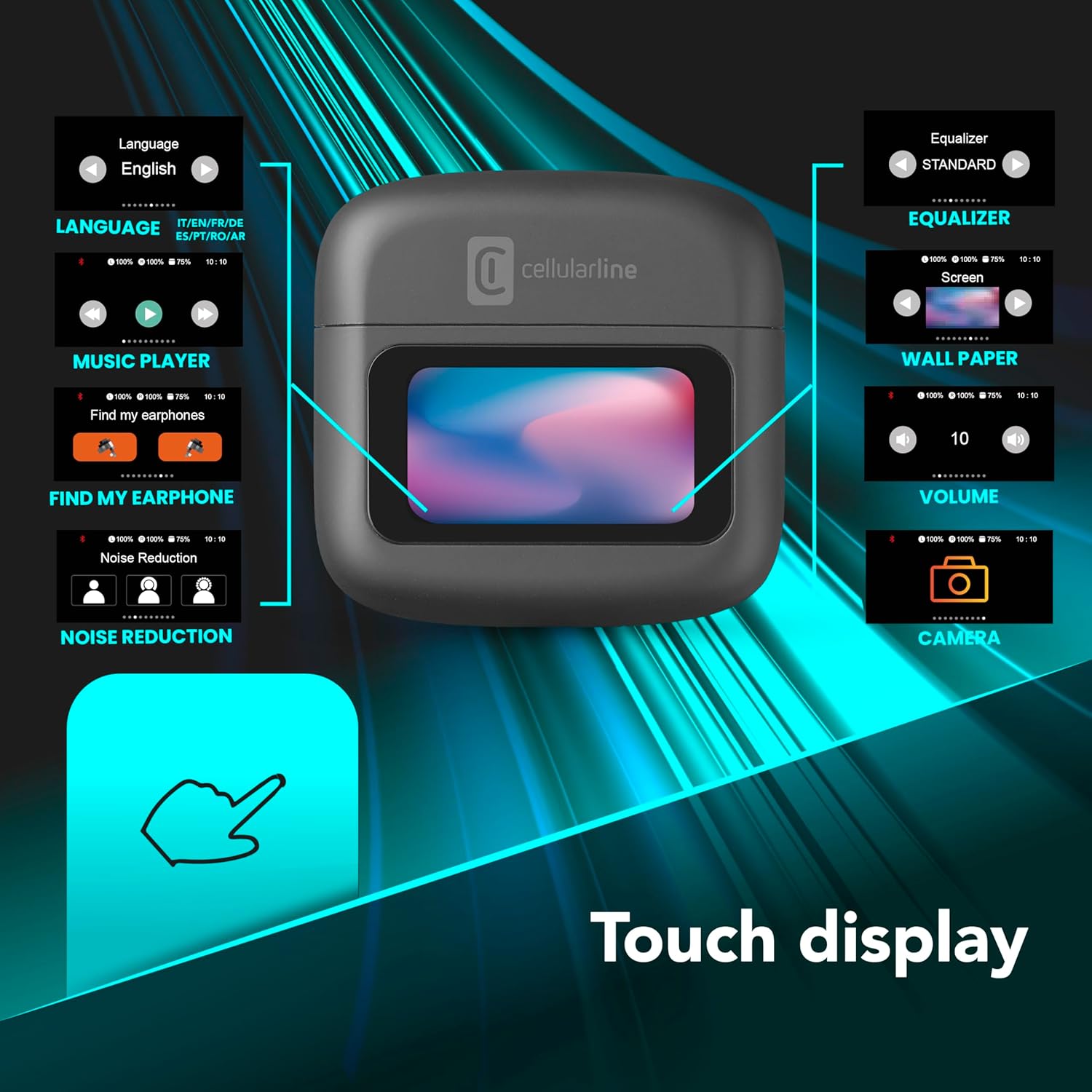
Image 2: An illustration highlighting the various functions accessible via the touch display on the charging case, including language, music player, 'Find My Earphone', noise reduction, equalizer, wallpaper, volume, and camera control.
4. การตั้งค่า
4.1 การชาร์จ
Before first use, fully charge the earbuds and the charging case. Place the earbuds into the charging case. The magnetic closure ensures proper placement for charging. The case and earbuds offer up to 42 hours of total play time.

Image 3: Graphic indicating 42 hours of total play time and 6 hours of charger time for the Cellularline HUSH earbuds.
4.2 การจับคู่
The earbuds feature an Autopairing function. When removed from the charging case, they will automatically enter pairing mode or reconnect to the last paired device. To pair with a new device, ensure Bluetooth is enabled on your device and select 'Cellularline HUSH' from the list of available devices.
5. คู่มือการใช้งาน
5.1 Touch Display Controls
The interactive touch display on the charging case allows for easy management of various functions. You can control music playback, manage calls, adjust noise reduction modes, and select EQ settings directly from the display.
5.2 ระบบตัดเสียงรบกวนแบบแอคทีฟ (ANC)
Activate Active Noise Cancelling to reduce ambient low-frequency noise, providing an immersive listening experience. This feature can be controlled via the touch display.
5.3 Noise-Free Calls
The integrated microphones utilize Noise-Free Calls technology to eliminate background noise, ensuring clear and crisp voice transmission during calls.

Image 4: The charging case display showing an incoming call with options to answer or decline, next to a smartphone displaying a similar call interface.
5.4 โหมดอีควอไลเซอร์ (EQ)
Customize your audio experience by selecting one of the 5 available EQ modes through the touch display. This allows you to tailor the sound profile ตามความชอบของคุณ
5.5 โหมดลดเสียงรบกวน
Switch between different noise reduction modes, including Active Noise Cancelling, Normal Mode, and Transparency Mode, to suit your environment. These modes are accessible via the touch display.

Image 5: The charging case display showing options for Noise Reduction, including Active Noise Cancelling, Normal Mode, and Transparency Mode.
6. การบำรุงรักษา
To ensure the longevity and optimal performance of your Cellularline HUSH earbuds:
- เก็บหูฟังและกล่องชาร์จให้สะอาดและแห้ง
- หลีกเลี่ยงการให้เครื่องสัมผัสกับอุณหภูมิหรือความชื้นที่สูงหรือสูงเกินไป
- Clean the ear tips regularly with a soft, dry cloth.
- ควรเก็บหูฟังไว้ในกล่องชาร์จเมื่อไม่ได้ใช้งาน
7 การแก้ไขปัญหา
If you encounter issues with your Cellularline HUSH earbuds, refer to the following common solutions:
- ไม่มีเสียง:
- ตรวจสอบให้แน่ใจว่าหูฟังมีการชาร์จแล้ว
- ตรวจสอบการเชื่อมต่อบลูทูธกับอุปกรณ์ของคุณ
- ปรับระดับเสียงทั้งบนหูฟังและอุปกรณ์ที่เชื่อมต่อ
- ไม่สามารถจับคู่ได้:
- Ensure earbuds are in pairing mode (usually indicated by a flashing light).
- ปิดและเปิดบลูทูธบนอุปกรณ์ของคุณ
- ลืมอุปกรณ์จากการตั้งค่าบลูทูธของโทรศัพท์ของคุณและลองจับคู่ใหม่อีกครั้ง
- ANC ไม่ทำงาน:
- Ensure ANC is activated via the touch display.
- Check for proper fit of the earbuds in your ears.
- ปัญหาการชาร์จ:
- ตรวจสอบให้แน่ใจว่าได้เชื่อมต่อสายชาร์จอย่างแน่นหนา
- ตรวจสอบว่าเคสชาร์จมีพลังงาน
- ทำความสะอาดหน้าสัมผัสการชาร์จบนหูฟังและเคส
8. ข้อมูลจำเพาะ
| คุณสมบัติ | รายละเอียด |
|---|---|
| ยี่ห้อ | เซลลูลาร์ไลน์ |
| แบบอย่าง | BTHUSHTWSK |
| อุปกรณ์ที่รองรับ | อุปกรณ์บลูทูธ |
| วิธีการควบคุม | สัมผัส |
| คุณสมบัติเพิ่มเติม | Active Noise Cancellation and Noise-Free Calls |
| อายุการใช้งานแบตเตอรี่โดยเฉลี่ย | 42 ชั่วโมง |
| น้ำหนักสินค้า | 126 กรัม |
| สี | นีโร |
| การวางตำแหน่งหู | อินเอียร์ |
| ฟอร์มแฟกเตอร์ | อินเอียร์ |
| การควบคุมเสียงรบกวน | ระบบตัดเสียงรบกวนแบบแอคทีฟ |
| แจ็คหูฟัง | Jack-less |
| เทคโนโลยีการเชื่อมต่อ | ไร้สาย |
| เทคโนโลยีการสื่อสารไร้สาย | บลูทูธ |
9. การรับประกันและการสนับสนุน
For warranty information and customer support, please refer to the documentation included with your product or visit the official Cellularline webไซต์นี้ โปรดเก็บหลักฐานการซื้อไว้เพื่อใช้ยืนยันการรับประกัน
Ask a question about this manual
Ask about setup, troubleshooting, compatibility, parts, safety, or missing instructions. Manuals+ will review the question and use this page’s manual context to help answer it.