
1. บทนำ
Thank you for choosing the Liectroux 1-X009A Robot Vacuum Cleaner. This manual provides essential information for the safe operation, maintenance, and troubleshooting of your device. Please read this manual thoroughly before using the product and retain it for future reference.
คำแนะนำด้านความปลอดภัยที่สำคัญ
- Always operate the robot vacuum on dry surfaces.
- ห้ามให้เด็กใช้งานหุ่นยนต์ดูดฝุ่น
- เก็บผม เสื้อผ้าที่หลวม นิ้ว และส่วนต่างๆ ของร่างกายให้ห่างจากช่องเปิดและชิ้นส่วนที่เคลื่อนไหว
- Do not pick up large objects, liquids, burning or smoking materials.
- ตรวจสอบให้แน่ใจว่าแท่นชาร์จวางชิดผนังบนพื้นผิวเรียบ
- ถอดปลั๊กแท่นชาร์จเมื่อไม่ได้ใช้งานเป็นเวลานาน
- ใช้เฉพาะอะแดปเตอร์ไฟและแท่นชาร์จดั้งเดิมที่ให้มาพร้อมกับอุปกรณ์เท่านั้น
2. สินค้าหมดview
Familiarize yourself with the components of your Liectroux 1-X009A Robot Vacuum Cleaner.
สูงสุด View
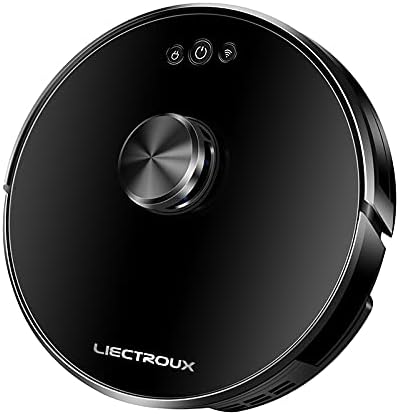
ภาพที่ 2.1: สูงสุด view of the Liectroux 1-X009A Robot Vacuum Cleaner. It features a sleek black circular design with a central metallic knob (likely a navigation sensor) and three touch-sensitive buttons: Power, Start/Pause, and Wi-Fi indicator.
- Central Navigation Module: For intelligent mapping and navigation.
- ปุ่มเปิด/ปิด: กดเพื่อเปิด/ปิด
- ปุ่มเริ่ม/หยุดชั่วคราว: กดเพื่อเริ่มหรือหยุดการทำความสะอาดชั่วคราว
- ตัวบ่งชี้ Wi-Fi: แสดงสถานะการเชื่อมต่อ
ด้านล่าง View

ภาพที่ 2.2: ด้านล่าง view of the Liectroux 1-X009A Robot Vacuum Cleaner, showing the cleaning mechanisms. This includes two rotating side brushes, a central main roller brush, large drive wheels, and a removable mopping pad attachment at the rear.
- Side Brushes (L & R): กวาดเศษซากต่างๆ ไปรวมไว้ในทางเดินหลักของพุ่มไม้
- แปรงลูกกลิ้งหลัก: Collects dirt and dust from the floor.
- ล้อขับเคลื่อน: Allow the robot to move across various surfaces.
- หน้าสัมผัสการชาร์จ: Connects to the charging dock.
- เซ็นเซอร์หน้าผา: Detects drops to prevent falls.
- Mopping Pad Attachment: สำหรับการซักแบบเปียก
ถังเก็บฝุ่นและถังน้ำ

ภาพที่ 2.3: ด้านข้าง view of the Liectroux 1-X009A, illustrating the integrated dustbin and water tank. The transparent blue tank shows volume markings (100ml, 200ml, 300ml) for water, indicating its mopping capability.
- ถังขยะ: Collects dry debris. Capacity: 0.6 Litre.
- ถังเก็บน้ำ: กักเก็บน้ำไว้เพื่อใช้ถูพื้น
- กรอง: Traps fine dust particles.
3. การตั้งค่า
3.1 การแกะกล่องและการเตรียมการเบื้องต้น
- นำส่วนประกอบทั้งหมดออกจากบรรจุภัณฑ์อย่างระมัดระวัง
- Remove any protective films or stickers from the robot and charging dock.
- Attach the side brushes by pressing them onto their respective posts on the bottom of the robot until they click into place.
3.2 การวางแท่นชาร์จ
- วางแท่นชาร์จชิดผนังในพื้นที่โล่ง โดยเว้นระยะห่างอย่างน้อย 0.5 เมตร (1.6 ฟุต) ด้านข้างทั้งสองด้าน และ 1.5 เมตร (5 ฟุต) ด้านหน้า
- เชื่อมต่ออะแดปเตอร์ไฟฟ้าเข้ากับแท่นชาร์จและเสียบเข้ากับเต้ารับที่ผนัง
- ตรวจสอบให้แน่ใจว่าไฟแสดงสถานะพลังงานบนแท่นชาร์จสว่างขึ้น
3.3 การชาร์จเริ่มต้น
Place the robot vacuum onto the charging dock, aligning its charging contacts with those on the dock. The robot will begin charging automatically. For first-time use, allow the robot to charge completely (approximately 4-6 hours) before its initial cleaning cycle.
3.4 Connecting to Wi-Fi (App Control)
To utilize advanced features and remote control, download the Liectroux app from your smartphone's app store. Follow the in-app instructions to connect your robot vacuum to your home Wi-Fi network. This typically involves:
- Creating an account.
- Selecting your robot model.
- Putting the robot into pairing mode (usually by pressing and holding the Wi-Fi button).
- Connecting your phone to the robot's temporary Wi-Fi hotspot, then selecting your home Wi-Fi network.
4. การใช้งานหุ่นยนต์ดูดฝุ่น
4.1 การเริ่มรอบการทำความสะอาด
- เริ่มต้นด้วยตนเอง: Press the Start/Pause button on the robot's top panel. The robot will begin cleaning in Auto mode.
- การเริ่มแอป: Open the Liectroux app and select the desired cleaning mode (Auto, Spot, Edge) or initiate a full cleaning cycle.
4.2 การหยุดชั่วคราวและการดำเนินการต่อ
Press the Start/Pause button on the robot or in the app to pause a cleaning cycle. Press it again to resume.
4.3 การกลับไปยังแท่นชาร์จ
The robot will automatically return to its charging dock when its battery is low or when a cleaning cycle is complete. You can also manually send it back via the app or by pressing and holding the Start/Pause button on the robot (refer to specific model instructions for button functions).
4.4 ฟังก์ชันถูพื้น
การใช้งานฟังก์ชันถูพื้น:
- Remove the combined dustbin/water tank.
- Fill the water tank with clean water (do not use cleaning solutions unless specified by the manufacturer).
- Attach a clean mopping pad to the designated slot on the bottom of the water tank.
- Reinsert the combined unit into the robot.
- เริ่มรอบการทำความสะอาด หุ่นยนต์จะดูดฝุ่นและถูพื้นไปพร้อมกัน
บันทึก: Remove the mopping pad and empty the water tank after each mopping session to prevent mildew and odors.
5. การบำรุงรักษา
การบำรุงรักษาตามปกติจะช่วยให้หุ่นยนต์ดูดฝุ่นของคุณทำงานได้อย่างเหมาะสมที่สุดและยืดอายุการใช้งาน
5.1 การล้างถังขยะ
- Press the dustbin release button (refer to your robot's specific design) and pull out the combined dustbin/water tank.
- เปิดฝาถังขยะและเทสิ่งของภายในลงในถังขยะ
- Tap the dustbin gently to dislodge any stuck debris.
- Reinsert the dustbin/water tank until it clicks into place.
ความถี่: After each cleaning cycle or when full.
5.2 การทำความสะอาดตัวกรอง
- นำถังขยะออก
- Take out the primary filter and HEPA filter.
- Brush off dust from the filters using a cleaning tool or a soft brush. Do not wash HEPA filters with water unless explicitly stated in the product documentation.
- Ensure filters are completely dry before reinserting.
ความถี่: Weekly, or more often if used frequently or in dusty environments. Replace filters every 3-6 months.
5.3 Cleaning the Main Roller Brush
- พลิกหุ่นยนต์
- Remove the brush guard by pressing the release tabs.
- Lift out the main roller brush.
- Use the provided cleaning tool (if available) or scissors to cut and remove any hair or debris tangled around the brush.
- Reinsert the main brush and secure the brush guard.
ความถี่: รายสัปดาห์
5.4 การทำความสะอาดแปรงด้านข้าง
- ค่อยๆ ดึงแปรงด้านข้างขึ้นด้านบนเพื่อถอดออก
- กำจัดเส้นผมที่พันกันหรือสิ่งสกปรกออกให้หมด
- If brushes are bent or damaged, replace them.
- Press the clean brushes back onto their posts.
ความถี่: Bi-weekly. Replace every 3-6 months.
5.5 การทำความสะอาดเซ็นเซอร์และหน้าสัมผัสการชาร์จ
Wipe the cliff sensors (located on the bottom of the robot) and the charging contacts (on both the robot and the charging dock) with a clean, dry cloth. This ensures proper navigation and charging.
ความถี่: รายเดือน
5.6 การดูแลรักษาแผ่นถูพื้น
Remove the mopping pad after each use. Wash it with water and mild detergent, then allow it to air dry completely before storing or reusing.
6 การแก้ไขปัญหา
หากหุ่นยนต์ดูดฝุ่นของคุณประสบปัญหา โปรดดูปัญหาทั่วไปและวิธีแก้ไขต่อไปนี้
| ปัญหา | สาเหตุที่เป็นไปได้ | สารละลาย |
|---|---|---|
| หุ่นยนต์ไม่เปิด | แบตเตอรี่เหลือน้อย; ไม่ได้กดปุ่มเปิด/ปิด | Place robot on charging dock; Press and hold the Power button for 3 seconds. |
| หุ่นยนต์ไม่ชาร์จเงิน | หน้าสัมผัสการชาร์จสกปรก แท่นชาร์จไม่เปิดเครื่อง | Clean charging contacts on robot and dock; Ensure charging dock is plugged in and powered. |
| หุ่นยนต์ติดขัดบ่อยครั้ง | สิ่งกีดขวาง (สายไฟ พรม); เซ็นเซอร์สกปรก | กำจัดสิ่งกีดขวางออกจากเส้นทางการทำความสะอาด; ทำความสะอาดเซ็นเซอร์ตรวจจับขอบหน้าผา |
| ประสิทธิภาพการทำความสะอาดไม่ดี | Dustbin full; Brushes tangled; Filters clogged. | Empty dustbin; Clean main and side brushes; Clean/replace filters. |
| ไม่สามารถเชื่อมต่อ Wi-Fi ได้ | รหัสผ่าน Wi-Fi ไม่ถูกต้อง; ปัญหาเกี่ยวกับเราเตอร์; หุ่นยนต์ไม่ได้อยู่ในโหมดจับคู่ | Verify password; Restart router; Put robot in pairing mode as per app instructions. |
หากปัญหายังคงอยู่ โปรดดูส่วนการรับประกันและการสนับสนุนเพื่อขอความช่วยเหลือเพิ่มเติม
7. ข้อมูลจำเพาะ
| คุณสมบัติ | รายละเอียด |
|---|---|
| แบบอย่าง | 1-X009A |
| ยี่ห้อ | ลิเอกทรูซ์ |
| สี | สีดำ |
| ความจุของถังขยะ | 0.6 ลิตร |
| แหล่งพลังงาน | Rechargeable Battery (Wired Charging Dock) |
| ประเภทการนำทาง | Intelligent Mapping |
| โหมดการทำความสะอาด | Vacuum, Mop, Vacuum & Mop |
| การเชื่อมต่อ | Wi-Fi (for App Control) |
8. การรับประกันและการสนับสนุน
For warranty information, please refer to the warranty card included with your product packaging or visit the official Liectroux website. For technical support, troubleshooting assistance beyond this manual, or to order replacement parts, please contact Liectroux customer service through their official channels.
เก็บใบเสร็จรับเงินของคุณไว้เป็นหลักฐานการซื้อสำหรับการเรียกร้องการรับประกัน