
1. บทนำ
Thank you for choosing the MEDION X64060 Party Speaker. This manual provides essential information for the safe and efficient use of your device. Please read it thoroughly before operating the speaker and keep it for future reference.
The MEDION X64060 is a versatile party speaker designed for various entertainment needs, featuring powerful audio output, integrated DJ and karaoke functions, and dynamic light effects.
2. คำแนะนำด้านความปลอดภัย
- อ่านคำแนะนำทั้งหมดอย่างละเอียดก่อนใช้งาน
- ควรเก็บลำโพงให้ห่างจากน้ำ ความชื้น และอุณหภูมิที่สูงหรือต่ำเกินไป
- อย่าปิดกั้นช่องระบายอากาศ
- Use only the power cord supplied with the device.
- อย่าพยายามซ่อมแซมอุปกรณ์ด้วยตนเอง โปรดส่งต่ออุปกรณ์ดังกล่าวให้ช่างผู้ชำนาญการเป็นผู้ดำเนินการซ่อมแซม
- ตรวจสอบให้แน่ใจว่าได้วางลำโพงบนพื้นผิวที่มั่นคงและเรียบเสมอกัน เพื่อป้องกันการล้ม
- หลีกเลี่ยงการสัมผัสกับระดับเสียงสูงเป็นเวลานานเพื่อป้องกันความเสียหายต่อการได้ยิน
3. เนื้อหาบรรจุภัณฑ์
กรุณาตรวจสอบแพ็คเกจสำหรับรายการต่อไปนี้:
- MEDION X64060 Party Speaker
- ไมโครโฟน 1 ตัว
- สายไฟ
- คู่มือการใช้งาน (เอกสารนี้)
4. สินค้าหมดview
Familiarize yourself with the main components and controls of your MEDION X64060 Party Speaker.

Image: Control Panel Overview
This image displays a close-up of the speaker's top control panel, showing various knobs and buttons for audio adjustments, DJ functions, and input selections.

Image: Speaker Dimensions and Connections
This image illustrates the overall dimensions of the speaker (980mm height, 350mm width, 340mm depth) and highlights the available connection ports: 1x USB, 2x Microphone (6.3 mm), 1x Guitar (6.3 mm), 1x Audio Input (3.5 mm), and 1x Audio Input (RCA).
4.1 แผงด้านหน้า
- วิทยากร: Two main speakers with integrated LED lighting.
- เอฟเฟกต์แสง: ไฟ LED แบบไดนามิกที่ซิงโครไนซ์กับเสียงเพลง
4.2 แผงควบคุมด้านบน
- ปุ่มเปิด/ปิด: เพื่อเปิด/ปิดลำโพง
- การควบคุมระดับเสียง: Main volume, microphone volume (MIC1 VOL, MIC2 VOL), guitar volume (GUITAR VOL), and echo volume (ECHO VOL).
- อีควอไลเซอร์ (EQ): 5-band equalizer for sound adjustment.
- ตัวเลือกอินพุต: Buttons for Bluetooth, USB, AUX.
- DJ Functions: Cross-fader, scratch wheel, drum pads (HI-HAT, SNARE, BASS DRUM, CYMBAL, TOM1, TOM2), and record function.
- พอร์ต USB: สำหรับเล่นไฟล์ผ่าน USB
- อินพุตไมโครโฟน: Two 6.3 mm jack inputs.
- อินพุตกีตาร์: One 6.3 mm jack input.
- อินพุต AUX: 3.5 mm jack input.
4.3 แผงด้านหลัง
- กำลังไฟเข้า: สำหรับเชื่อมต่อสายไฟ
- ช่องต่อสัญญาณเสียง RCA: Additional audio input.
4.4 คุณสมบัติการพกพา

Image: Integrated Wheels for Portability
This image shows the back of the speaker, highlighting the integrated wheels at the bottom, designed for easy transport.
- ล้อแบบรวม: For easy transportation of the speaker.
- ที่จับ: Ergonomic handles for lifting and moving.
5. การตั้งค่า
5.1 การจัดวางเริ่มต้น
วางลำโพงบนพื้นผิวที่มั่นคงและเรียบ ตรวจสอบให้แน่ใจว่ามีการระบายอากาศที่ดีรอบๆ ตัวเครื่อง หลีกเลี่ยงการวางไว้ใกล้แหล่งความร้อนหรือในที่ที่มีแสงแดดส่องโดยตรง
5.2 การเชื่อมต่อสายไฟ
- Connect the supplied power cord to the power input on the rear of the speaker.
- เสียบสายไฟอีกด้านหนึ่งเข้ากับเต้ารับไฟฟ้าที่เหมาะสม
- Press the power button on the top control panel to turn on the speaker. The LED lights will illuminate.
5.3 Connecting a Microphone or Guitar
For karaoke or live instrument performance:
- Plug your microphone(s) into the MIC1 or MIC2 6.3 mm jack inputs on the top panel.
- Plug your guitar into the GUITAR 6.3 mm jack input on the top panel.
- Adjust the respective volume knobs (MIC1 VOL, MIC2 VOL, GUITAR VOL) and ECHO VOL to your preference.
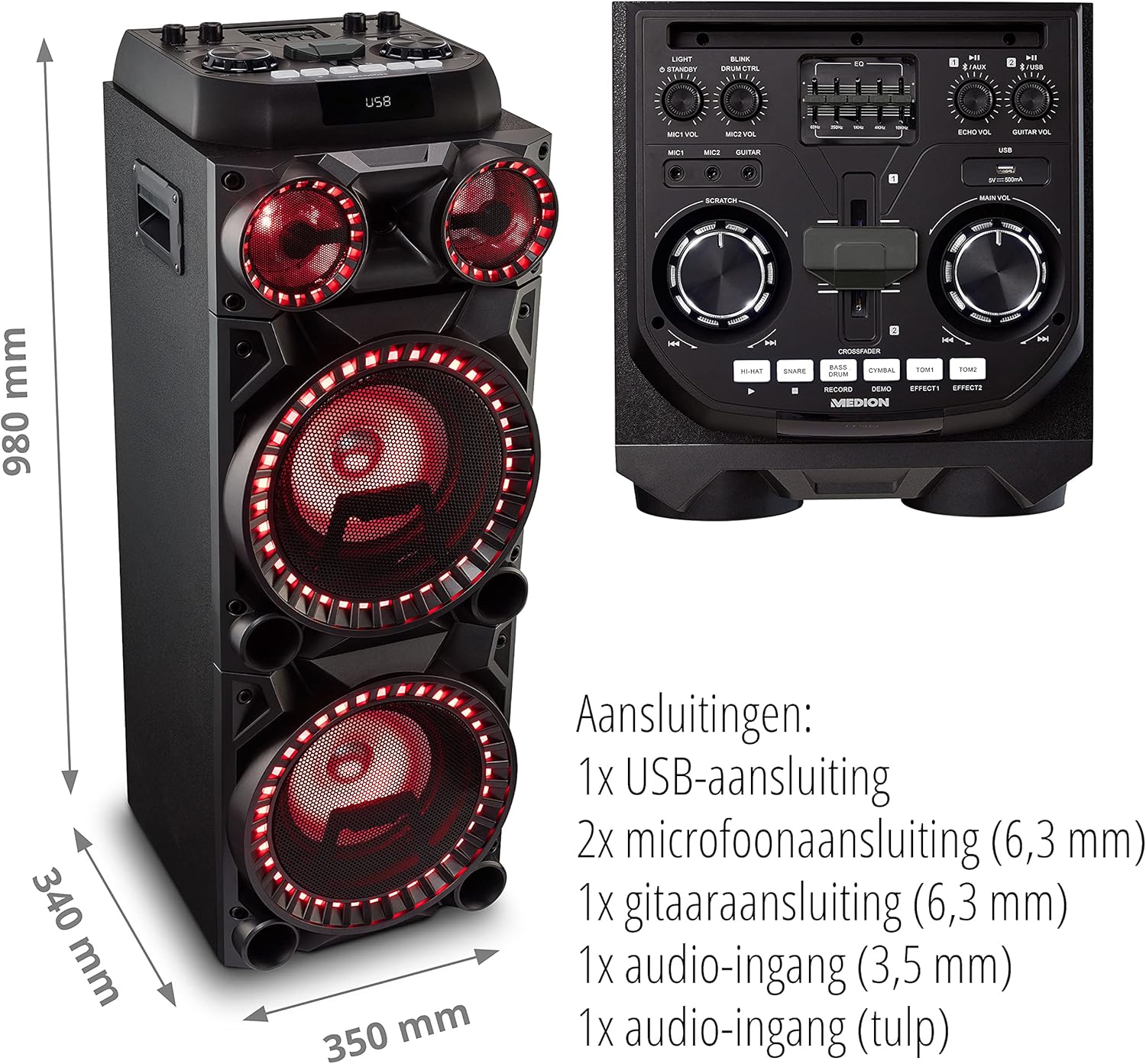
Image: Microphone and Guitar Connection for Karaoke
This image shows individuals enjoying karaoke, demonstrating the use of a microphone connected to the speaker for singing.
6. คู่มือการใช้งาน
6.1 การเชื่อมต่อบลูทูธ
- กดปุ่ม บลูทูธ button on the control panel. The Bluetooth indicator will blink.
- เปิดใช้งานบลูทูธบนสมาร์ทโฟน แท็บเล็ต หรืออุปกรณ์เสียงอื่นๆ ของคุณ
- ค้นหา "MEDION X64060" in your device's Bluetooth settings and select it to pair.
- Once connected, the Bluetooth indicator will stop blinking and remain solid. You can now play music wirelessly.

Image: Bluetooth Music Playback
This image shows a smartphone displaying a music application, indicating a wireless Bluetooth connection to the speaker for audio streaming.
6.2 การเล่น USB
- ใส่แฟลชไดรฟ์ USB ที่มีเสียง files into the USB port on the top panel.
- กดปุ่ม ยูเอสบี ปุ่มเพื่อเลือกโหมด USB
- The speaker will automatically detect and begin playing audio files from the USB drive. Use the playback controls (play/pause, skip track) on the control panel.
อินพุต AUX 6.3 ช่อง
- Connect an external audio device (e.g., MP3 player, laptop) to the 3.5 mm AUX input or the RCA audio input on the rear panel using an appropriate audio cable (not included).
- กดปุ่ม อ๊อกซ์ ปุ่มเพื่อเลือกโหมด AUX
- Play audio from your connected device. The speaker will output the sound.
6.4 ฟังก์ชั่นดีเจ
The MEDION X64060 includes various DJ features for creative sound mixing.

Image: DJ Function Controls
ภาพนี้ให้รายละเอียด view of the DJ control section, including the cross-fader, scratch wheel, and various drum pads.
- Cross-fader: Use the cross-fader to smoothly transition between different audio sources or effects.
- Scratch Wheel: Manipulate the scratch wheel for classic DJ scratch effects.
- แผ่นกลอง: กดปุ่ม ไฮ-ฮัท, สแนร์, เบสกลอง, ฉิ่ง, ทอม1, และ ทอม2 pads to add drum sound effects to your music.
- ฟังก์ชั่นบันทึก: ใช้ บันทึก button to record your drum pad sequences.
6.5 ฟังก์ชั่นคาราโอเกะ
Connect a microphone as described in section 5.3. Play your chosen karaoke track via Bluetooth, USB, or AUX. Adjust the microphone and echo volumes for the desired effect.
6.6 เอฟเฟกต์แสง
The speaker features dynamic LED light effects that respond to the music. These lights automatically activate when the speaker is on. There may be a dedicated button (e.g., "LIGHT" or "BLINK") to control or cycle through different light modes, refer to the control panel for specific options.

Image: Dynamic Blue Light Effects
This image showcases the speaker with its blue LED lights illuminated, demonstrating the atmospheric light effects.

Image: Dynamic Red Light Effects
This image shows the speaker with its red LED lights illuminated, highlighting another color option for the atmospheric light effects.
7. การบำรุงรักษา
7.1 การทำความสะอาด
- ควรดึงปลั๊กของลำโพงออกจากเต้ารับไฟฟ้าทุกครั้งก่อนทำความสะอาด
- ใช้ผ้าแห้งนุ่มเช็ดพื้นผิวภายนอก
- Do not use liquid cleaners, aerosols, or abrasive materials, as these can damage the finish or internal components.
7.2 พื้นที่จัดเก็บ
When not in use for extended periods, store the speaker in a cool, dry place, away from direct sunlight and extreme temperatures. Cover the unit to protect it from dust.
8 การแก้ไขปัญหา
| ปัญหา | สาเหตุที่เป็นไปได้ | สารละลาย |
|---|---|---|
| ไม่มีไฟฟ้า | Power cord not connected properly; Power outlet not working. | Ensure the power cord is securely plugged into both the speaker and a working wall outlet. Test the outlet with another device. |
| ไม่มีเสียง | Volume too low; Incorrect input selected; Device not paired (Bluetooth); Cable not connected (AUX/Guitar/Mic). | Increase the main volume and individual input volumes. Select the correct input source (Bluetooth, USB, AUX). Re-pair Bluetooth device. Check all cable connections. |
| การเชื่อมต่อบลูทูธล้มเหลว | ลำโพงไม่ได้อยู่ในโหมดจับคู่ อุปกรณ์อยู่ไกลเกินไป มีสัญญาณรบกวน | Ensure the speaker is in Bluetooth pairing mode (blinking indicator). Move your device closer to the speaker. Avoid obstacles and other wireless devices. |
| ไมโครโฟน/กีตาร์ใช้งานไม่ได้ | Volume too low; Cable faulty; Incorrect input. | Increase MIC/GUITAR VOL. Check microphone/guitar cable. Ensure the instrument is properly connected. |
9. ข้อมูลจำเพาะ
| ยี่ห้อ | MEDION |
| หมายเลขรุ่น | X64060 | MD44060 |
| กำลังขับ | 2 x 100 W RMS (2 x 1000 W max. music output power) |
| เทคโนโลยีการเชื่อมต่อ | Bluetooth 5.0, USB, AUX (3.5mm, RCA) |
| อินพุตเสียง | 2 x Microphone (6.3 mm), 1 x Guitar (6.3 mm), 1 x AUX (3.5 mm), 1 x RCA |
| อีควอไลเซอร์ | 5 แบนด์ |
| สี | สีดำ |
| วัสดุ | พลาสติก |
| ขนาดสินค้า (กว้าง x ยาว x สูง) | 38.8 x 35 x 101 ซม. |
| น้ำหนักสินค้า | 15 กก. |
| ประเภทการติดตั้ง | ชั้นยืน |
| แหล่งพลังงาน | สายไฟ |
| อุปกรณ์ที่รองรับ | แล็ปท็อป สมาร์ทโฟน |
10. การรับประกันและการสนับสนุน
For warranty information and technical support, please refer to the warranty card included with your product or visit the official MEDION webไซต์ เก็บหลักฐานการซื้อของคุณไว้เพื่อใช้ในกรณีเรียกร้องการรับประกัน
MEDION Customer Service: For assistance, please contact MEDION customer support through their official channels. Contact details can typically be found on the MEDION webเว็บไซต์หรือในบรรจุภัณฑ์ของผลิตภัณฑ์