
1. บทนำ
This manual provides detailed instructions for the installation, operation, and maintenance of your Biostar B560GTQ Racing motherboard. Please read this manual thoroughly before beginning installation to ensure proper setup and to maximize the performance and longevity of your system.
The Biostar B560GTQ Racing motherboard is designed to support 11th and 10th Generation Intel Core Processors, offering robust performance for various computing needs.
2. สินค้าหมดview
The Biostar B560GTQ Racing motherboard features a Micro ATX form factor and is built around the Intel B560 single chip architecture. It supports PCIe 4.0 with 11th Gen Intel Processors and offers high-speed storage and connectivity options.

รูปที่ 2.1: จากบนลงล่าง view of the Biostar B560GTQ Racing motherboard, showcasing the LGA1200 CPU socket, four DDR4 DIMM slots, PCIe slots, and heatsinks.
คุณสมบัติหลัก:
- Supports 11th and 10th Generation Intel Core Processors
- ฟอร์มแฟกเตอร์ Micro ATX
- Intel B560 single chip architecture
- 6 x ตัวเชื่อมต่อ SATA III (6Gb/s)
- รองรับ PCIe M.2 4.0 (64Gb/s)
- Supports PCIe 4.0 (with 11th Gen Intel Processor)
- Supports 4-DIMM DDR4- 2133/ 2400/ 2666/ 2800/ 2933 3200/ 3600(OC)/ 3733(OC)/ 3800(OC)/ 3866(OC)/ 4000+(OC) up to 128 GB Memory
- Supports USB 3.2 Gen2x2 Type C
- Supports WiFi 6 (WiFi 6 card NOT included - Must purchase Key-E Wi-Fi card Separately)
- ระบบปฏิบัติการ: Windows 10
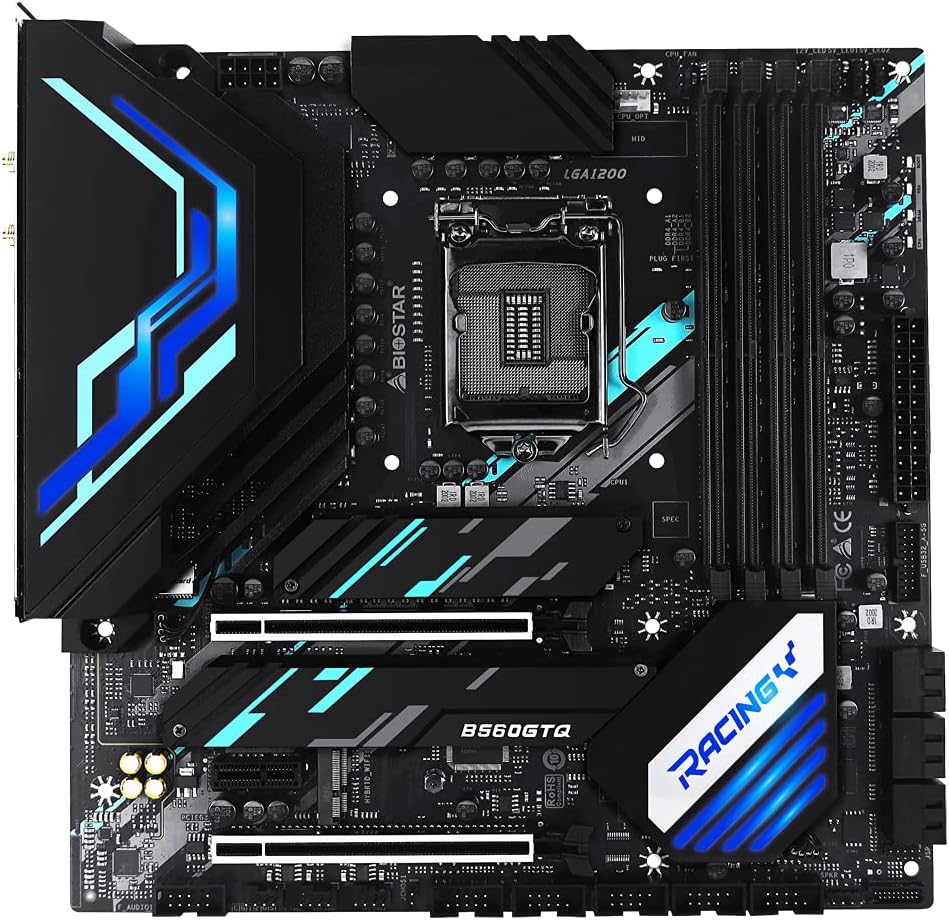
รูปที่ 2.2: มุม view of the Biostar B560GTQ Racing motherboard, highlighting the heatsinks and various expansion slots.
3. การตั้งค่าและการติดตั้ง
3.1 ข้อควรระวังเพื่อความปลอดภัย
- ควรถอดสายไฟออกจากเต้ารับที่ผนังทุกครั้งก่อนสัมผัสชิ้นส่วนใดๆ
- สวมสายรัดข้อมือป้องกันไฟฟ้าสถิตย์เพื่อป้องกันความเสียหายจากการคายประจุไฟฟ้าสถิตย์ (ESD) ต่อส่วนประกอบต่างๆ
- จับชิ้นส่วนโดยจับที่ขอบ หลีกเลี่ยงการสัมผัสกับขาหรือวงจร
3.2 เนื้อหาบรรจุภัณฑ์
ตรวจสอบว่าแพ็คเกจของคุณมีรายการต่อไปนี้:
- Biostar B560GTQ Racing Motherboard
- I / O Shield
- สายข้อมูล SATA
- คู่มือการใช้งาน (เอกสารนี้)
3.3 การติดตั้งส่วนประกอบ
- การติดตั้งซีพียู: Open the LGA 1200 socket lever. Align the triangular mark on the Intel CPU with the mark on the socket. Gently place the CPU into the socket and close the lever to secure it.
- การติดตั้งตัวระบายความร้อน CPU: ติดตั้งพัดลมระบายความร้อน CPU ตามคำแนะนำของผู้ผลิต ตรวจสอบให้แน่ใจว่าได้ทาซิลิโคนระบายความร้อนอย่างถูกต้องและติดตั้งอย่างแน่นหนา
- RAM (Memory) Installation: Open the clips on both ends of the DDR4 DIMM slots. Align the memory module with the slot, ensuring the notch on the module matches the key in the slot. Press down firmly on both ends until the clips snap into place. For dual-channel performance, install modules in matching color slots.
- การติดตั้งอุปกรณ์จัดเก็บข้อมูล:
- M.2 SSD: Locate the M.2 slot(s). Insert the M.2 SSD at an angle into the slot and secure it with the provided screw.
- ไดรฟ์ SATA: Connect SATA data cables from your storage drives (HDDs/SSDs) to the SATA III connectors on the motherboard. Connect power cables from your power supply to the drives.
- การติดตั้งการ์ดเสริม (เช่น การ์ดจอ): Open the retention clip on the desired PCIe slot. Align your expansion card with the slot and press down firmly until it is seated correctly and the clip locks. Secure the card with a screw to the chassis.
- การเชื่อมต่อแหล่งจ่ายไฟ: Connect the 24-pin ATX main power connector and the 8-pin ATX 12V CPU power connector from your power supply to the corresponding ports on the motherboard. Connect power to other components as needed.
- ขั้วต่อแผงด้านหน้า: Connect the power button, reset button, HDD LED, power LED, and front panel USB/audio connectors to their respective headers on the motherboard. Refer to the motherboard layout diagram for exact pin locations.
- Rear I/O Panel Connections: Connect your peripherals (monitor, keyboard, mouse, network cable, etc.) to the appropriate ports on the rear I/O panel.

Figure 3.1: Rear I/O panel of the Biostar B560GTQ Racing motherboard, showing DisplayPort, HDMI, DVI, USB ports, Ethernet, and audio jacks.
4. คู่มือการใช้งาน
4.1 การบูตครั้งแรกและการตั้งค่า BIOS/UEFI
After assembling your system, connect a monitor, keyboard, and mouse. Power on the system. During the Power-On Self-Test (POST), press the เดล or F2 กดปุ่มซ้ำๆ เพื่อเข้าสู่ยูทิลิตี้การตั้งค่า BIOS/UEFI ในยูทิลิตี้นี้ คุณสามารถกำหนดลำดับการบูต เวลาของระบบ และการตั้งค่าขั้นสูงอื่นๆ ได้
4.2 การติดตั้งไดรเวอร์
After installing your operating system (e.g., Windows 10), it is crucial to install the latest drivers for your motherboard components. These typically include:
- ไดรเวอร์ชิปเซ็ต
- ไดรเวอร์ LAN (อีเธอร์เน็ต)
- ไดร์เวอร์เสียง
- ไดรเวอร์การ์ดจอ (สำหรับการ์ดจอออนบอร์ดหรือการ์ดจอแยก)
Drivers can be downloaded from the official Biostar webเว็บไซต์หรือ websites of your component manufacturers.
4.3 การติดตั้งระบบปฏิบัติการ
Insert your Windows 10 installation media (USB drive or DVD). Enter the BIOS/UEFI setup and set the boot order to prioritize your installation media. Save changes and exit. Follow the on-screen prompts to install the operating system.
5. การบำรุงรักษา
5.1 การทำความสะอาด
ทำความสะอาดระบบคอมพิวเตอร์ของคุณเป็นประจำเพื่อป้องกันฝุ่นสะสม ซึ่งอาจทำให้เครื่องร้อนเกินไปและประสิทธิภาพลดลง ใช้ลมเป่าเพื่อกำจัดฝุ่นจากพัดลม แผ่นระบายความร้อน และส่วนประกอบอื่นๆ ตรวจสอบให้แน่ใจว่าได้ปิดเครื่องและถอดปลั๊กออกก่อนทำความสะอาด
อัพเดต BIOS/UEFI 5.2
Biostar may release BIOS/UEFI updates to improve system stability, add support for new hardware, or fix bugs. Check the official Biostar website for the latest firmware versions and follow their instructions carefully for updating. Incorrect BIOS/UEFI updates can damage your motherboard.
5.3 การอัปเดตไดรเวอร์
Keep your system drivers updated to ensure optimal performance and compatibility. Periodically check the Biostar webผู้ผลิตไซต์และส่วนประกอบ webเว็บไซต์สำหรับดาวน์โหลดไดร์เวอร์เวอร์ชั่นล่าสุด
6 การแก้ไขปัญหา
หัวข้อนี้ให้แนวทางแก้ไขปัญหาทั่วไปที่คุณอาจพบเจอ
6.1 ไม่มีไฟฟ้า
- Ensure the power supply is switched on and the power cable is securely connected to both the wall outlet and the power supply.
- Verify that the 24-pin ATX main power connector and the 8-pin ATX 12V CPU power connector are firmly seated on the motherboard.
- ตรวจสอบการเชื่อมต่อปุ่มเปิด/ปิดแผงด้านหน้ากับเมนบอร์ด
6.2 ไม่มีการแสดงผล
- Ensure the monitor is powered on and the video cable is securely connected to both the graphics card (or motherboard's integrated graphics port) and the monitor.
- If using a discrete graphics card, ensure it is properly seated in its PCIe slot and has adequate power connections.
- ลองถอดแล้วเสียบแรมใหม่ดูครับ
6.3 ความไม่เสถียรของระบบหรือความผิดพลาด
- Check CPU and GPU temperatures to ensure components are not overheating.
- Verify that all power connections are secure.
- เรียกใช้เครื่องมือตรวจสอบหน่วยความจำเพื่อตรวจสอบโมดูล RAM ที่มีปัญหา
- ตรวจสอบให้แน่ใจว่าไดร์เวอร์ทั้งหมดได้รับการอัปเดตแล้ว
6.4 POST Codes / Beep Codes
If your system emits a series of beeps or displays a POST code, consult the motherboard's detailed manual (if available) or the Biostar support website for the specific meaning of these codes, which can indicate hardware issues.
7. ข้อมูลจำเพาะ
Below are the detailed specifications for the Biostar B560GTQ Racing Motherboard:
| คุณสมบัติ | ข้อมูลจำเพาะ |
|---|---|
| ยี่ห้อ | ไบโอสตาร์ |
| ชื่อรุ่น | B560GTQ Racing |
| ซ็อคเก็ตซีพียู | แอลจีเอ 1200 |
| โปรเซสเซอร์ที่เข้ากันได้ | โปรเซสเซอร์ Intel Core เจเนอเรชั่นที่ 10 และ 11 |
| ประเภทชิปเซ็ต | อินเทล B560 |
| เทคโนโลยีหน่วยความจำ RAM | DDR4 |
| มีช่องหน่วยความจำให้เลือก | 4 |
| Ram Memory Maximum Size | 128GB |
| ความเร็วสัญญาณนาฬิกาหน่วยความจำ | 2133 MHz (up to 4000+(OC) MHz) |
| อินเทอร์เฟซการ์ดกราฟิก | พีซีไอ เอ็กซ์เพรส |
| Total PCIe Ports | 3 |
| พอร์ต SATA ทั้งหมด | 6 |
| พอร์ต USB รวม | 8 |
| จำนวนพอร์ตอีเธอร์เน็ต | 1 |
| จำนวนพอร์ต HDMI ทั้งหมด | 1 |
| ประเภทขั้วต่อ S/PDIF | ออฟติคอล |
| แพลตฟอร์ม | วินโดวส์ 10 |
| ผู้ผลิต | ไบโอสตาร์ |
| หมายเลขรุ่น | B560GTQ |
| ยูพีซี | 802700508776 |
8. การรับประกันและการสนับสนุน
8.1 ข้อมูลการรับประกัน
The Biostar B560GTQ Racing motherboard comes with a 4-year warranty from the date of purchase. Please retain your proof of purchase for warranty claims. The warranty covers defects in materials and workmanship under normal use.
8.2 การสนับสนุนด้านเทคนิค
For technical assistance, driver downloads, BIOS/UEFI updates, and further product information, please visit the official Biostar website. You can find contact information for customer support and a knowledge base for common issues.