
เอลดี 9858822518316
คู่มือการใช้งานนาฬิกาติดผนัง ELD Aviator
รุ่น : 9858822518316
การแนะนำ
คู่มือนี้ให้คำแนะนำโดยละเอียดเกี่ยวกับการติดตั้ง การใช้งาน และการบำรุงรักษา นาฬิกาติดผนัง ELD Aviator ของคุณ โปรดอ่านคู่มือนี้อย่างละเอียดก่อนใช้งานและเก็บรักษาไว้เพื่อใช้อ้างอิงในอนาคต

ภาพ: ด้านหน้า view ของนาฬิกาติดผนัง ELD Aviator ที่จัดแสดงasinด้วยหน้าปัดที่ได้รับแรงบันดาลใจจากกังหันลมอันเป็นเอกลักษณ์ และเข็มนาฬิกาแบบอนาล็อก
ข้อมูลด้านความปลอดภัย
- ควรเก็บนาฬิกาให้ห่างจากแสงแดดโดยตรงและอุณหภูมิที่สูงหรือต่ำเกินไป เพื่อป้องกันความเสียหาย
- อย่าให้นาฬิกาโดนน้ำหรืออยู่ในสภาพแวดล้อมที่มีความชื้นสูง
- ใช้เฉพาะแบตเตอรี่ชนิดที่ระบุเท่านั้น (แบตเตอรี่ AA 1 ก้อน)
- เก็บแบตเตอรี่ให้พ้นจากมือเด็ก
- อย่าพยายามถอดประกอบหรือซ่อมนาฬิกาด้วยตนเอง โปรดติดต่อช่างผู้ชำนาญการเพื่อขอรับบริการ
- ตรวจสอบให้แน่ใจว่าได้ติดตั้งนาฬิกาอย่างแน่นหนาเพื่อป้องกันไม่ให้นาฬิกาหล่น
เนื้อหาแพ็คเกจ
ตรวจสอบว่ามีรายการทั้งหมดอยู่ในแพ็คเกจ:
- นาฬิกาติดผนัง ELD Aviator 1 เรือน
- 1 x กล่องผลิตภัณฑ์
- (ไม่รวมแบตเตอรี่ AA)
การตั้งค่า
1. การติดตั้งแบตเตอรี่
- ค้นหาช่องใส่แบตเตอรี่ที่ด้านหลังของนาฬิกา
- ใส่แบตเตอรี่ AA หนึ่ง (1) ก้อน โดยตรวจสอบให้แน่ใจว่าขั้วบวก (+) และขั้วลบ (-) ตรงกับเครื่องหมายภายในช่องใส่แบตเตอรี่อย่างถูกต้อง
- ปิดฝาช่องใส่แบตเตอรี่
2. การติดตั้งนาฬิกา
นาฬิกาเรือนนี้ออกแบบมาสำหรับติดตั้งบนผนัง โปรดเลือกตำแหน่งที่เหมาะสมบนผนังที่มั่นคง

ภาพ: ไซด์โปรfile ภาพประกอบแสดงความลึกและลักษณะเมื่อติดตั้งบนผนังของนาฬิกาติดผนัง ELD Aviator
- เลือกจุดที่มั่นคงบนผนังที่คุณต้องการแขวนนาฬิกา
- ใช้ตะปูหรือสกรู (ไม่ได้รวมอยู่ในชุด) ที่เหมาะสมกับประเภทของผนังของคุณ ตรวจสอบให้แน่ใจว่าแข็งแรงพอที่จะรับน้ำหนักของนาฬิกาได้ (ประมาณ 450 กรัม)
- แขวนนาฬิกาให้แน่นโดยใช้ช่องสำหรับแขวนที่ด้านหลัง
การดำเนินงาน
การตั้งเวลา
- หาปุ่มตั้งเวลาที่ด้านหลังของนาฬิกา ซึ่งโดยปกติจะอยู่ใกล้กับช่องใส่แบตเตอรี่
- ค่อยๆ หมุนปุ่มไปทางใดทางหนึ่งจนกระทั่งเข็มชั่วโมงและเข็มนาทีแสดงเวลาที่ถูกต้อง
- กลไกควอตซ์ช่วยให้การบอกเวลาแม่นยำเมื่อตั้งเวลาเรียบร้อยแล้ว
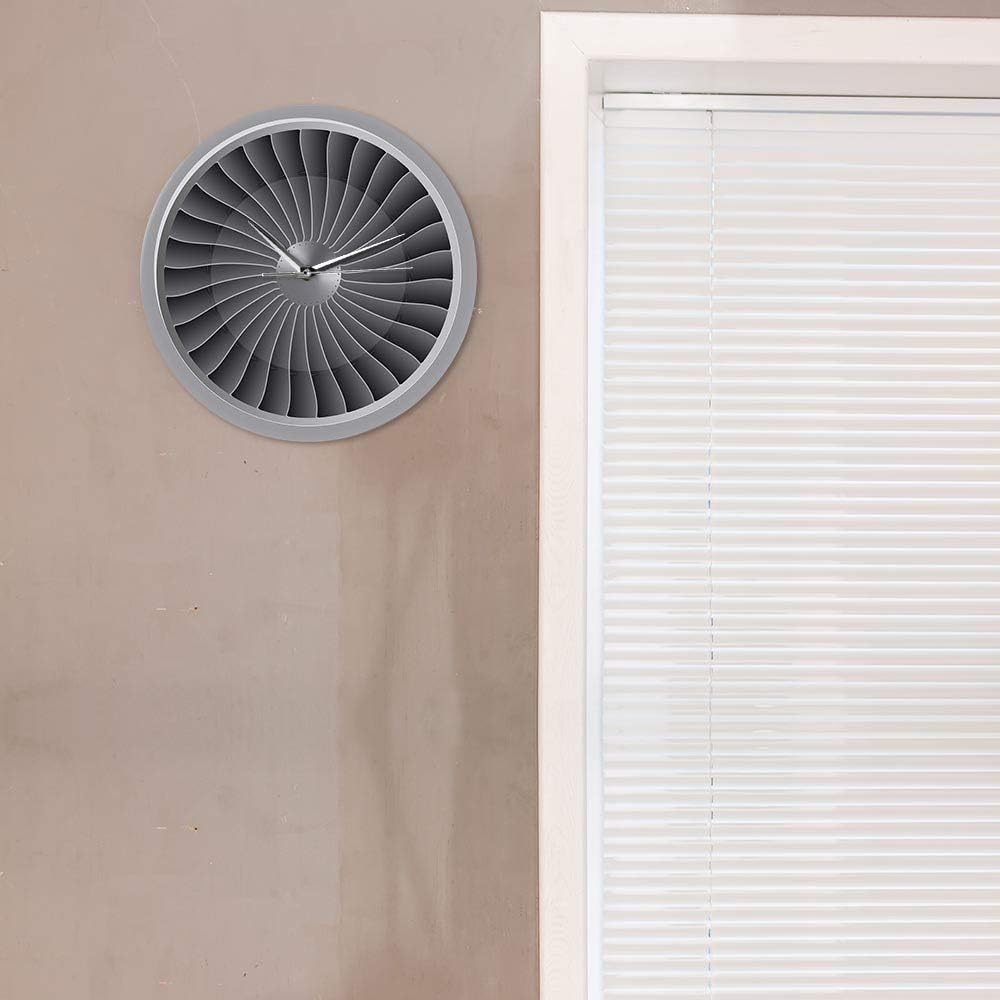
ภาพ: นาฬิกาติดผนัง ELD Aviator จัดแสดงในห้อง เพื่อแสดงให้เห็นถึงความสวยงามในฐานะของตกแต่งชิ้นหนึ่ง
การซ่อมบำรุง
- การทำความสะอาด: เช็ดพื้นผิวนาฬิกาเบาๆ ด้วยผ้าแห้งเนื้อนุ่ม ห้ามใช้สารทำความสะอาดที่มีฤทธิ์กัดกร่อนหรือตัวทำละลาย
- การเปลี่ยนแบตเตอรี่: ควรเปลี่ยนแบตเตอรี่ AA ทุกปี หรือเมื่อนาฬิกาเริ่มเดินไม่ตรงเวลา
- พื้นที่จัดเก็บ: หากเก็บนาฬิกาไว้เป็นเวลานาน ควรถอดแบตเตอรี่ออกเพื่อป้องกันการรั่วไหล
การแก้ไขปัญหา
| ปัญหา | สาเหตุที่เป็นไปได้ | สารละลาย |
|---|---|---|
| นาฬิกาไม่ทำงาน / เข็มนาฬิกาไม่ขยับ | แบตเตอรี่หมดหรือติดตั้งไม่ถูกต้อง | เปลี่ยนแบตเตอรี่ AA ด้วยแบตเตอรี่ใหม่ โดยตรวจสอบให้แน่ใจว่าขั้วบวก/ลบถูกต้อง |
| นาฬิกาเดินช้าลง | แบตเตอรี่เหลือน้อย | เปลี่ยนแบตเตอรี่ AA |
| เสียงดังติ๊กต๊อก | ไม่เกี่ยวข้อง นาฬิกาเรือนนี้มีกลไกการทำงานแบบเงียบ | ไม่ต้องดำเนินการใดๆ นาฬิกาเรือนนี้ออกแบบมาให้ทำงานเงียบสนิท |
ข้อมูลจำเพาะ
| ชื่อสินค้า | นาฬิกาติดผนังนักบิน |
| ยี่ห้อ | ELD |
| หมายเลขรุ่น | 9858822518316 |
| วัสดุ | อะครีลิค |
| ขนาด | เส้นผ่านศูนย์กลาง 30.5 เซนติเมตร (12 นิ้ว) |
| น้ำหนัก | 450 กรัม |
| แหล่งพลังงาน | แบตเตอรี่ AA 1 ก้อน (ไม่รวม) |
| ประเภทการเคลื่อนไหว | ควอตซ์, กลไกเงียบ |
| ประเภทจอภาพ | อนาล็อก |
| ประเภทการติดตั้ง | ติดผนัง |
การรับประกันและการสนับสนุน
สำหรับคำถามหรือปัญหาใดๆ ที่ไม่ได้กล่าวถึงในคู่มือนี้ โปรดติดต่อผู้ค้าปลีกหรือผู้ผลิตโดยตรง ข้อมูลเกี่ยวกับเงื่อนไขการรับประกันเฉพาะอาจแจ้งให้ทราบ ณ จุดซื้อหรือบนบรรจุภัณฑ์ของผลิตภัณฑ์
ผลิตภัณฑ์นี้ได้รับการออกแบบมาเพื่อการใช้งานในระยะยาว หากได้รับการดูแลและบำรุงรักษาอย่างเหมาะสม
Ask a question about this manual
Ask about setup, troubleshooting, compatibility, parts, safety, or missing instructions. Manuals+ will review the question and use this page’s manual context to help answer it.