
SAMOTECH SM202-BT
Samotech® Mini Adapter User Manual
รุ่น: SM202-BT
1. บทนำ
The Samotech® Mini Adapter (SM202-BT) is specifically designed to integrate your Philips Hue Smart Button seamlessly with the Samotech SM223-UK Light Switch Surround. This adapter provides a clean, integrated appearance for your smart home controls, eliminating cluttered walls and tangled wires. It is compatible with standard 86x86mm UK light switches, offering a practical and aesthetic solution for smart lighting control.
2. ข้อมูลด้านความปลอดภัย
- Ensure all power is disconnected from the main electrical supply before attempting any installation or maintenance.
- This product is an adapter and does not carry electrical current. However, it is designed to be installed near live electrical components (light switches).
- Do not expose the adapter to excessive moisture or extreme temperatures.
- เก็บให้พ้นจากมือเด็ก
- หากคุณไม่แน่ใจเกี่ยวกับส่วนใดส่วนหนึ่งของกระบวนการติดตั้ง โปรดปรึกษาช่างไฟฟ้าที่มีคุณสมบัติเหมาะสม
3. เนื้อหาบรรจุภัณฑ์
กรุณาตรวจสอบแพ็คเกจสำหรับรายการต่อไปนี้:
- Samotech® Mini Adapter (SM202-BT)
Note: The SM223-UK Light Switch Surround and Philips Hue Smart Button are sold separately and are required for full functionality.
4. การตั้งค่าและการติดตั้ง
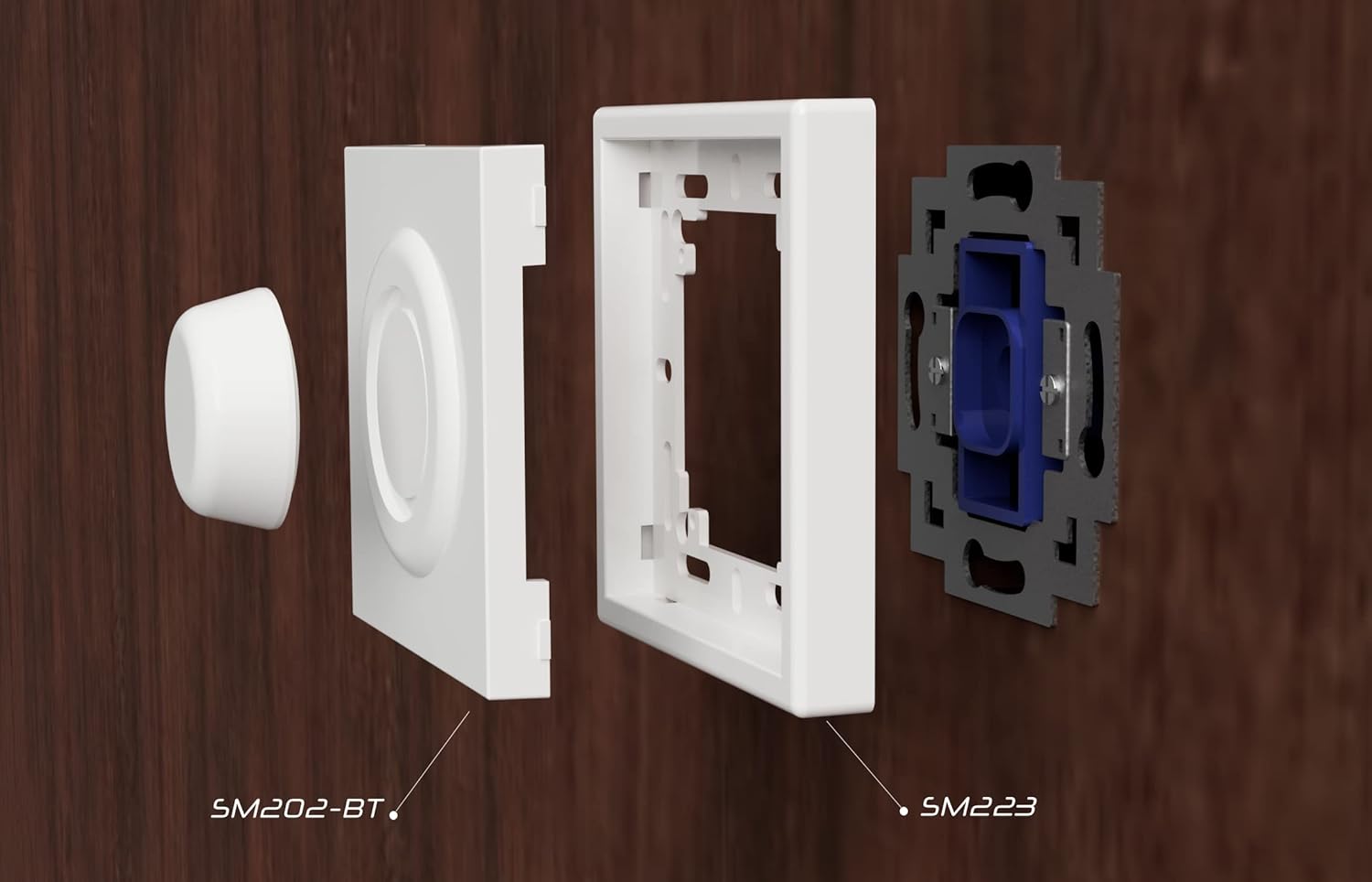
The Samotech Mini Adapter is designed for easy integration with the SM223-UK Light Switch Surround and your existing UK light switch.
4.1 ส่วนประกอบเหนือview
4.2 ขั้นตอนการติดตั้ง
- Prepare the Light Switch: Ensure the power to your light switch is turned off at the main circuit breaker. Remove the existing faceplate of your UK light switch.
- Install the SM223-UK Surround: Position the SM223-UK Light Switch Surround over your existing light switch mechanism. Secure it using the original screws or the screws provided with the surround. Ensure it is flush and stable.
- Insert the Mini Adapter: Take the Samotech Mini Adapter (SM202-BT). Align it with the opening in the SM223-UK Light Switch Surround. The adapter is designed to fit snugly into this opening.
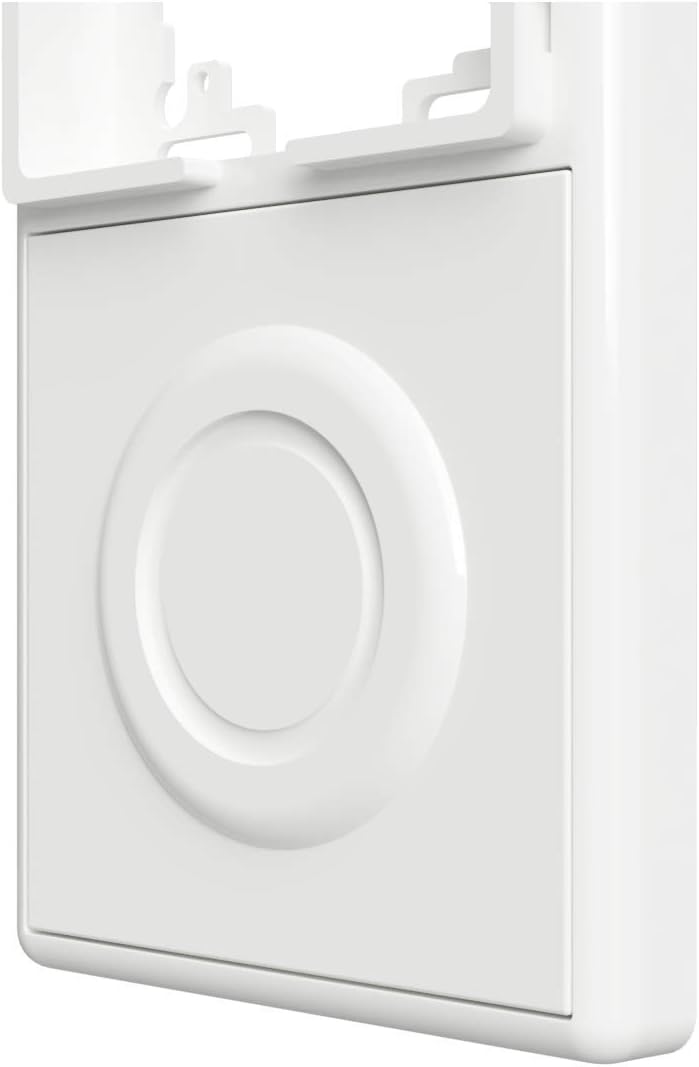
- ยึดอะแดปเตอร์ให้แน่น: Gently push the SM202-BT adapter into the surround until it clicks into place or sits firmly. It should create a seamless surface with the surround.
- Insert Philips Hue Smart Button: Once the adapter is in place, insert your Philips Hue Smart Button into the circular recess of the SM202-BT adapter. The button should fit securely.
- คืนค่าพลัง: Turn the power back on at your main circuit breaker.


5. การใช้งานอะแดปเตอร์
The Samotech Mini Adapter is a passive component designed to hold your Philips Hue Smart Button securely and aesthetically. Once installed, the adapter itself does not require any operation. The functionality of your smart lighting system will be controlled directly through the Philips Hue Smart Button as per its own instructions.
The adapter ensures that the physical light switch remains in the 'ON' position, preventing accidental power cuts to your smart bulbs and maintaining continuous power for your smart lighting system.
6. การบำรุงรักษา
The Samotech Mini Adapter requires minimal maintenance.
- การทำความสะอาด: To clean the adapter, gently wipe it with a soft, dry cloth. For stubborn marks, a slightly damp สามารถใช้ผ้าแล้วเช็ดให้แห้งทันที
- หลีกเลี่ยง: Do not use abrasive cleaners, solvents, or harsh chemicals, as these may damage the material and finish.
- การตรวจสอบ: Periodically check that the adapter remains securely seated within the SM223-UK surround and that the Philips Hue Smart Button fits snugly.
7 การแก้ไขปัญหา
- Adapter does not fit into the surround: Ensure you have the correct Samotech SM223-UK Light Switch Surround. The SM202-BT adapter is specifically designed for this surround. Check for any obstructions or debris in the opening.
- Philips Hue Smart Button does not fit into the adapter: Verify that you are using an official Philips Hue Smart Button. The adapter is precisely molded for this specific button. Do not force the button into the recess.
- Adapter feels loose: Re-check the installation of the SM223-UK surround to ensure it is securely fastened to the wall switch. The adapter should snap firmly into the surround.
- Smart lights are not responding: This issue is typically related to the Philips Hue Smart Button or your Hue Bridge, not the adapter itself. Ensure your Hue system is powered, connected, and the button is properly paired. Check the battery in your Philips Hue Smart Button.
8. ข้อมูลจำเพาะ
| ยี่ห้อ | ซาโมเทค |
| หมายเลขรุ่น | SM202-BT (AK3-AT1-GL-M-X) |
| วัสดุ | อะคริโลไนไตรล์ บิวทาไดอีน สไตรีน (ABS) |
| สี | Black (Note: Product images may show white variant) |
| น้ำหนักสินค้า | 20 กรัม |
| ขนาดแพ็คเกจ | 7.3 x 7.2 x 1.2 ซม. |
| วิธีการติดตั้ง | Screw-In (via surround) |
| Switch Type Compatibility | 1-way, electronic push button (Philips Hue Smart Button) |
| ปลั๊กโปรfile | การติดตั้งบนพื้นผิว |
| การรับรอง | IP44 |
| รวมแบตเตอรี่ | เลขที่ |
| แบตเตอรี่ที่จำเป็น | เลขที่ |
9. การรับประกันและการสนับสนุน
Samotech products are manufactured to high-quality standards. For information regarding warranty coverage and terms, please refer to the documentation provided with your purchase or visit the official Samotech webเว็บไซต์.
If you encounter any issues or have questions about your Samotech Mini Adapter, please contact Samotech customer support through their official channels. Provide your product model (SM202-BT) and a detailed description of your query for efficient assistance.
การสนับสนุนทางออนไลน์: Visit the SAMOTECH Store on Amazon or their official webเว็บไซต์นี้มีส่วนคำถามที่พบบ่อยและข้อมูลการติดต่อ
เอกสารที่เกี่ยวข้อง - SM202-BT
 |
SAMOTECH SM323 Matter-Over-Thread Smart Dimmer Manual Installation and operation guide for the SAMOTECH SM323 Matter-Over-Thread Smart Dimmer, covering wiring, pairing, and brightness settings. |
 |
Samotech SM323-WF Smart WiFi LED Dimmer Switch Installation and Settings Guide Comprehensive guide for the Samotech SM323-WF Smart WiFi LED Dimmer Switch, covering installation, wiring diagrams, settings, app connectivity, voice control, and warranty information. |
 |
SAMOTECH ZigBee In-Wall Smart Switch SM308-S User Manual & Installation Guide Comprehensive guide for the SAMOTECH SM308-S ZigBee In-Wall Smart Switch, covering installation, operation, network pairing, and wiring for smart home automation. Features include support for various switch types, soft start, and compatibility with ZigBee 3.0 systems. |
 |
คู่มือการติดตั้งและการใช้งานสวิตช์หรี่ไฟ Smart Zigbee ของ Samotech SM323(v2) คู่มือฉบับสมบูรณ์สำหรับสวิตช์หรี่ไฟอัจฉริยะ Samotech SM323(v2) Zigbee ครอบคลุมรายละเอียดทางเทคนิค การเดินสาย การจับคู่ การตั้งค่าความสว่าง และแหล่งกำเนิดแสงที่ใช้งานร่วมกันได้ เรียนรู้วิธีการติดตั้งและใช้งานสวิตช์หรี่ไฟ Zigbee ของคุณเพื่อประสิทธิภาพสูงสุด |
 |
คู่มือการซ่อมบำรุงรถยก Komatsu CX20 Series คู่มือการซ่อมบำรุงรถยก Komatsu รุ่น CX20 ฉบับสมบูรณ์ ครอบคลุมการบำรุงรักษา การซ่อมแซม การแก้ไขปัญหา ความปลอดภัย และข้อมูลจำเพาะสำหรับรถยกรุ่นที่ใช้น้ำมันเบนซิน ก๊าซ LPG และดีเซล รวมถึงข้อมูลการควบคุมการปล่อยมลพิษของ EPA |
 |
Surat Persetujuan Penggunaan Tanda SNI untuk Produk Merek JETE Dokumen persetujuan penggunaan Tanda SNI/Kesesuaian yang diterbitkan oleh Badan Standardisasi dan Kebijakan Jasa Industri (BSKJI) Kementerian Perindustrian kepada PT Doran Sukses Indonesia untuk produk merek JETE, sesuai standar SNI IEC 62368-1:2014. |
Ask a question about this manual
Ask about setup, troubleshooting, compatibility, parts, safety, or missing instructions. Manuals+ will review the question and use this page’s manual context to help answer it.