
การแนะนำ
The Audizio RP310 is a high-quality belt-driven turntable designed for playing vinyl records. It features an integrated preamplifier, automatic return function, and a high-performance Audio Technica cartridge. This manual provides detailed instructions for setting up, operating, and maintaining your RP310 turntable to ensure optimal performance and longevity.
คำแนะนำด้านความปลอดภัยที่สำคัญ
- อ่านคำแนะนำทั้งหมดอย่างละเอียดก่อนใช้งานอุปกรณ์
- เก็บคู่มือนี้ไว้เพื่อใช้อ้างอิงในอนาคต
- อย่าให้เครื่องโดนฝนหรือความชื้นเพื่อป้องกันไฟไหม้หรือไฟฟ้าช็อต
- ตรวจสอบให้แน่ใจว่ามีการระบายอากาศที่เหมาะสม อย่าปิดกั้นช่องระบายอากาศใดๆ
- วางเครื่องบนพื้นผิวเรียบและมั่นคง
- ใช้เฉพาะอุปกรณ์เสริม/สิ่งที่แนบที่ผู้ผลิตกำหนดเท่านั้น
- ถอดปลั๊กเครื่องในระหว่างที่เกิดพายุฝนฟ้าคะนองหรือเมื่อไม่ได้ใช้งานเป็นเวลานาน
- ส่งต่อการบริการทั้งหมดไปยังบุคลากรบริการที่มีคุณสมบัติเหมาะสม
เนื้อหาแพ็คเกจ
ตรวจสอบว่ามีสิ่งของทั้งหมดที่ระบุไว้ด้านล่างนี้อยู่ในบรรจุภัณฑ์หรือไม่:
- Audizio RP310 Turntable Unit
- คู่มือการใช้งาน
- แผ่นรองจานยาง
- อาร์ซีเอเคเบิ้ล
- อะแดปเตอร์ 12V
- ผ้าคลุมป้องกันฝุ่น
สินค้าเกินview
The Audizio RP310 turntable is designed for high-fidelity vinyl playback with user-friendly features.
- Automatic Return Function: The tonearm automatically returns to its rest position after playback.
- Audio Technica Cartridge: Equipped with a high-performance Audio Technica AT-3600L MM cartridge and diamond stylus for superior sound reproduction.
- โครงสร้างทนทาน: Features a solid wooden housing with a high-gloss black finish for enhanced stability and aesthetics.
- ฝาครอบกันฝุ่นแบบถอดได้: Protects the turntable from dust and debris when not in use.
- การเชื่อมต่อ USB: Allows for direct connection to a computer for converting vinyl records to MP3 digital files.
- การเล่นแบบสองความเร็ว: Supports both 33 1/3 and 45 RPM records.
- Auto-Lift Tonearm: The tonearm features an auto-lift function for gentle record handling.
- Shock-Absorbing Feet: Minimizes vibrations for stable playback.
- Adjustable Tracking System: Allows for fine-tuning the tracking force between 1.5 and 3 grams for optimal stylus-to-groove contact.
- ในตัวPreampเครื่องฟอก: Enables direct connection to any standard line-level input on an ampเครื่องขยายเสียงหรือลำโพงที่มีกำลังขยาย
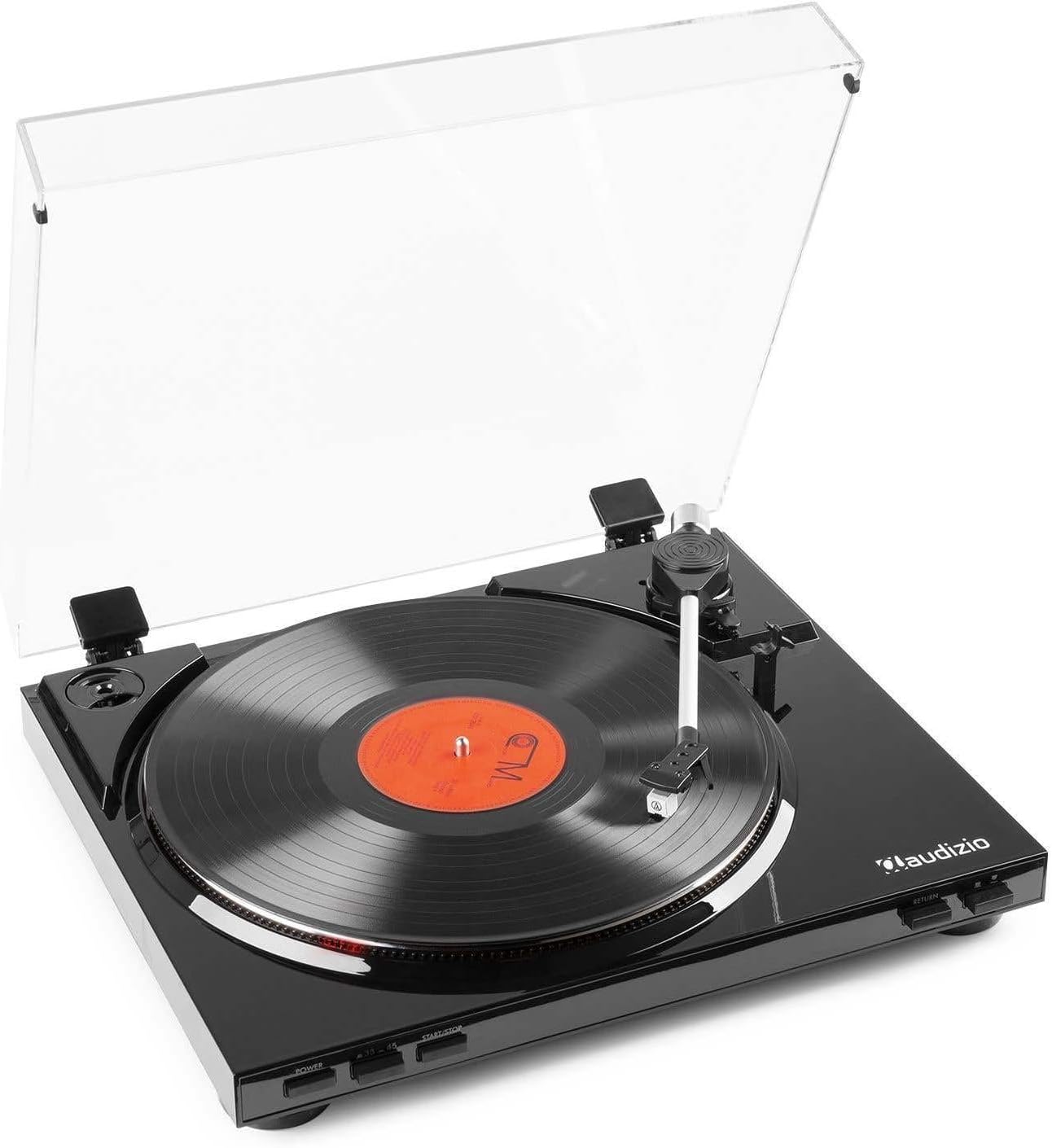
รูปที่ 1: The Audizio RP310 turntable with its dust cover open, showcasing a vinyl record on the platter and the tonearm in position.

รูปที่ 2: สูงสุด view of the Audizio RP310 turntable with the protective dust cover closed, highlighting its sleek black finish.
คู่มือการติดตั้ง
- การแกะกล่อง: นำเครื่องเล่นแผ่นเสียงออกจากบรรจุภัณฑ์อย่างระมัดระวัง เก็บวัสดุบรรจุภัณฑ์ทั้งหมดไว้สำหรับการขนส่งหรือจัดเก็บในอนาคต
- การจัดวาง: วางเครื่องเล่นแผ่นเสียงบนพื้นผิวที่มั่นคงและเรียบเสมอกัน ห่างจากแสงแดดโดยตรง แหล่งความร้อน และการสั่นสะเทือนมากเกินไป ตรวจสอบให้แน่ใจว่ามีพื้นที่เพียงพอสำหรับฝาครอบกันฝุ่นที่จะเปิดออกได้จนสุด
- การติดตั้งฝาครอบกันฝุ่น: เสียบบานพับของฝาครอบกันฝุ่นเข้าไปในช่องที่ตรงกันที่ด้านหลังของตัวเครื่องเล่นแผ่นเสียง
- Platter and Mat: Place the platter onto the spindle. Then, place the rubber turntable mat on top of the platter.
- Tonearm Balance and Tracking Force:
- ค่อยๆ ถอดฝาครอบป้องกันปากกาออก
- Carefully balance the tonearm by adjusting the counterweight until it floats horizontally.
- Once balanced, set the tracking force to the recommended range of 1.5 to 3 grams by rotating the counterweight. Refer to the cartridge manufacturer's specifications for the precise recommended force.

รูปที่ 3: Detail of the tonearm and counterweight, illustrating the adjustable tracking system.
- การเชื่อมต่อเสียง: Connect the supplied RCA cable from the "AUDIO OUT" ports on the rear of the turntable to a standard line-level input (e.g., "AUX," "CD," or "LINE IN") on your ampเครื่องขยายเสียงหรือลำโพงที่มีกำลังขยาย Do not connect to a "PHONO" input, as the RP310 has a built-in preampชีวิต.
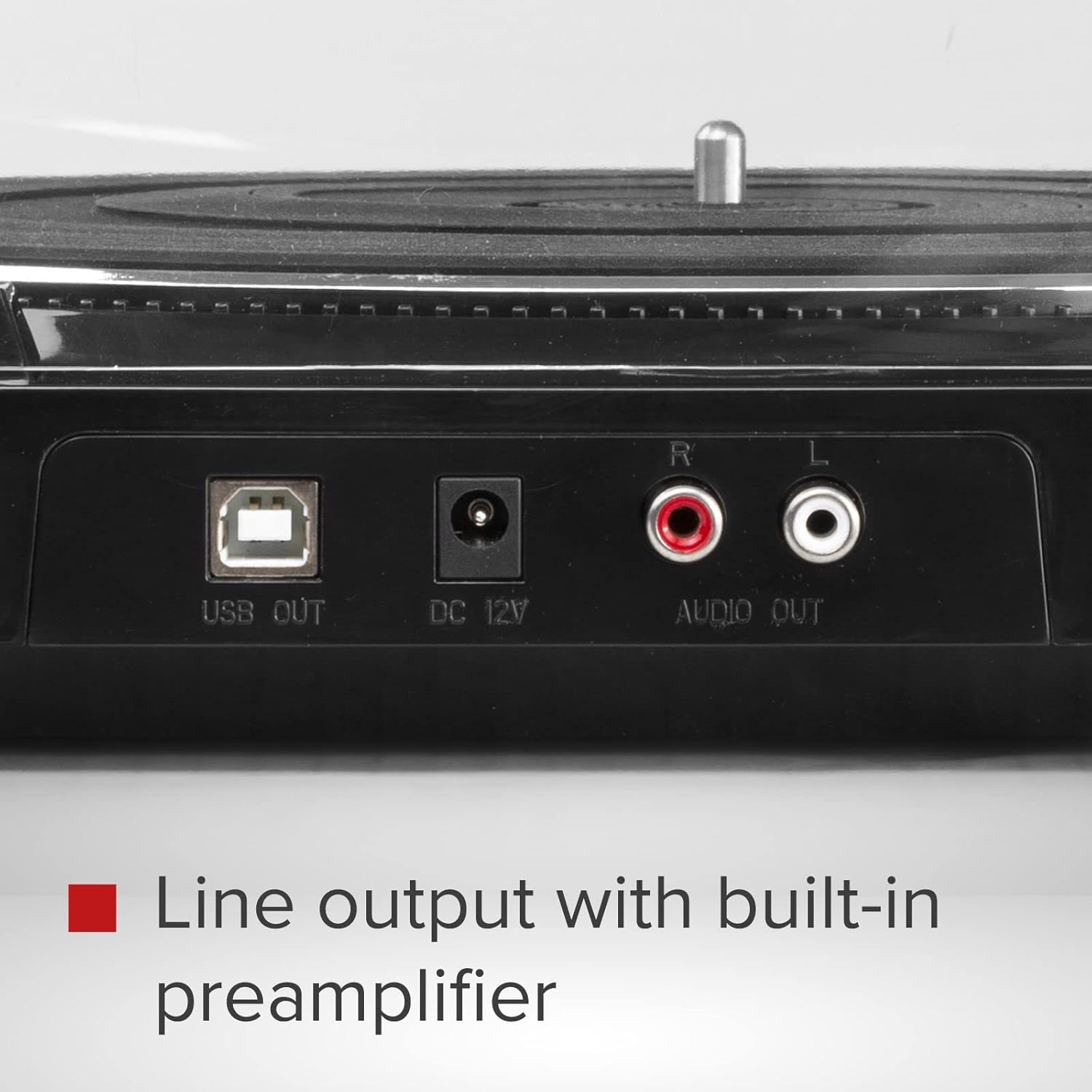
รูปที่ 4: Rear panel connections including USB Out, DC 12V power input, and RCA Audio Out ports.
- การเชื่อมต่อไฟฟ้า: Connect the 12V power adapter to the "DC 12V" input on the rear of the turntable, then plug the adapter into a suitable wall outlet.
คำแนะนำการใช้งาน
- เปิดเครื่อง: กดปุ่ม พลัง button located on the front panel to turn on the turntable.
- เลือกความเร็ว: กดปุ่ม 33/45 button to select the appropriate playback speed (33 1/3 RPM or 45 RPM) for your record. The selected speed will be indicated by an LED.
- บันทึกสถานที่: Carefully place a vinyl record on the turntable platter. If playing a 45 RPM single, use the included adapter if necessary.
- เริ่มการเล่น:
- กดปุ่ม เริ่ม/หยุด button. The platter will begin to rotate.
- Manually lift the tonearm using the cueing lever and position it over the desired track on the record.
- ลดคันโยกขึ้นลงเพื่อวางเข็มลงบนแผ่นเสียงอย่างเบามือ
- Alternatively, for automatic start, simply move the tonearm over the record, and it will automatically lower.
- การส่งคืนอัตโนมัติ: At the end of the record, the tonearm will automatically lift, return to its rest position, and the platter will stop rotating.
- หยุดการเล่น: To stop playback manually at any time, lift the tonearm using the cueing lever, return it to its rest, and press the เริ่ม/หยุด button to stop the platter.

รูปที่ 5: Front panel controls for power, speed selection, and start/stop functions.
USB Recording (Vinyl to MP3)
The Audizio RP310 allows you to convert your vinyl records into digital MP3 files using a computer. This feature is ideal for archiving your collection or listening to your records on portable devices.
- เชื่อมต่อกับคอมพิวเตอร์: Use a USB cable (not always included, but mentioned in feature bullets as "supplied cable") to connect the "USB OUT" port on the turntable to an available USB port on your PC or Mac computer.
- ติดตั้งซอฟต์แวร์: Install the provided recording software on your computer. If no software CD is included, check the Audizio website for compatible software downloads. Audacity is a commonly used free audio recording software that is compatible with most USB turntables.
- กำหนดค่าซอฟต์แวร์: Open the recording software and select the Audizio RP310 as the audio input device. Adjust recording levels as needed to prevent clipping or distortion.
- เริ่มการบันทึก: Begin playing your vinyl record on the turntable as described in the "Operating Instructions" section. Simultaneously, initiate recording within the software.
- บันทึก Files: Once the record side is finished, stop the recording in the software and save the audio as an MP3 file. You may need to edit the track breaks and metadata within the software.
การซ่อมบำรุง
- การทำความสะอาดสไตลัส: Regularly clean the stylus using a soft brush designed for stylus cleaning, brushing gently from back to front. A dirty stylus can degrade sound quality and damage records.
- การทำความสะอาดหน่วย: Wipe the turntable's surface and dust cover with a soft, dry, or slightly damp ผ้า. หลีกเลี่ยงการใช้น้ำยาทำความสะอาดหรือตัวทำละลายที่มีฤทธิ์กัดกร่อน
- การดูแลรักษาเอกสาร: รักษาแผ่นเสียงของคุณให้สะอาดและปราศจากฝุ่น เก็บแผ่นเสียงในแนวตั้งในซองเพื่อป้องกันการบิดเบี้ยว
- การเปลี่ยนหัวเข็ม: The stylus has a limited lifespan (typically 300-1000 hours of playback). Replace it when you notice a decrease in sound quality or visible wear. Consult your dealer for a replacement Audio Technica AT-3600L stylus.
การแก้ไขปัญหา
| ปัญหา | สาเหตุที่เป็นไปได้ | สารละลาย |
|---|---|---|
| ไม่มีไฟฟ้า | ไม่ได้เชื่อมต่ออะแดปเตอร์ไฟหรือเต้ารับไฟฟ้าชำรุด | Ensure the power adapter is securely connected to the turntable and a working power outlet. Check the power button. |
| ไม่มีเสียงหรือเสียงเบา | การเชื่อมต่อเสียงไม่ถูกต้อง; ampไม่ได้เลือกอินพุตแอมพลิฟายเออร์ ระดับเสียงต่ำเกินไป | Verify RCA cables are correctly connected to a LINE IN input on your ampเลือกแหล่งสัญญาณเข้าที่ถูกต้องบนเครื่องขยายเสียงของคุณ amplifier and increase volume. |
| เสียงกระตุกหรือเสียงผิดเพี้ยน | Dirty record or stylus; incorrect tracking force; turntable not level. | Clean the record and stylus. Re-adjust the tracking force. Ensure the turntable is on a stable, level surface. |
| ความเร็วในการเล่นไม่ถูกต้อง | Wrong speed selected; belt issue. | Ensure the correct speed (33 or 45 RPM) is selected. Check if the drive belt is properly seated around the motor pulley and platter. |
| Tonearm does not return automatically | Mechanism obstruction or malfunction. | Ensure no obstructions are preventing the tonearm's movement. If the issue persists, contact customer support. |
ข้อมูลจำเพาะทางเทคนิค
| แบบอย่าง | Audizio RP310 |
| ความเร็ว | 33 1/3, 45 รอบต่อนาที |
| ประเภทไดรฟ์ | สายพานไดรฟ์ |
| ตลับหมึก | Audio Technica AT-3600L MM |
| ช่วงกำลังติดตาม | 1.5 - 3 grams |
| การเชื่อมต่อขาออก | อาร์ซีเอ ไลน์เอาท์ |
| เอาท์พุต USB | Yes (for MP3 conversion) |
| แหล่งจ่ายไฟ | 12V DC Adapter (230 VAC/50 Hz input) |
| ขนาด (กว้าง x ยาว x สูง) | 40 x 36 x 9 ซม. |
| น้ำหนัก | 2.7 กก. |
การรับประกันและการสนับสนุน
For warranty information, technical support, or service inquiries, please refer to the warranty card included with your product or contact your retailer or the Audizio customer service department. Please have your model number (RP310) and purchase date available when contacting support.