
1. สินค้าหมดview
The BESTTEN USOT-D-3A-L is a heavy-duty digital programmable timer designed for outdoor use. It features a 7-day programming cycle, a built-in clock, and three grounded outlets, allowing for automated control of outdoor lighting, decorations, and appliances. Its weatherproof construction ensures reliable operation in various outdoor conditions.
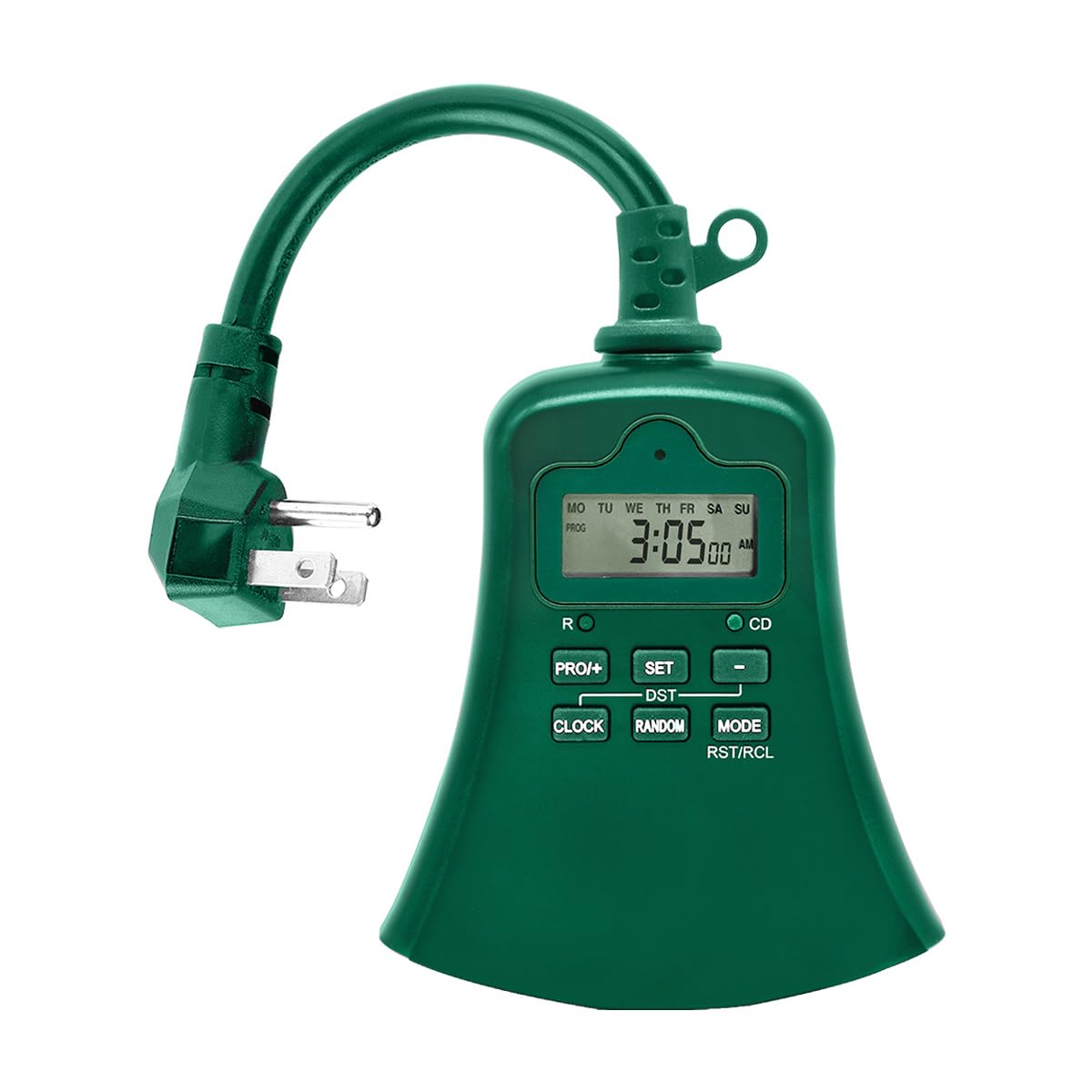
ภาพที่ 1.1: ด้านหน้า view of the BESTTEN USOT-D-3A-L Outdoor Digital Programmable Timer, showing the display, control buttons, and three grounded outlets.
2. คำแนะนำด้านความปลอดภัยที่สำคัญ
Please read and understand all safety instructions before using this product. Failure to follow these instructions may result in fire, electric shock, or injury.
- ใช้กลางแจ้งเท่านั้น: This timer is designed for outdoor use. Ensure it is installed in a location protected from direct water spray, though its weatherproof design offers protection against rain.
- การต่อลงดิน: ควรเสียบตัวตั้งเวลาเข้ากับเต้ารับ 3 ขาที่มีสายดินเสมอ ห้ามถอดขาปลั๊กสายดินออก
- คะแนนไฟฟ้า: อย่าใช้กำลังไฟเกินกว่าพิกัดไฟฟ้าของตัวตั้งเวลา โปรดดูรายละเอียดเพิ่มเติมในส่วนข้อมูลจำเพาะ
- การแช่น้ำ: ห้ามจุ่มตัวตั้งเวลาลงในน้ำ
- เด็ก: เก็บให้พ้นจากมือเด็ก
- การซ่อมบำรุง: ห้ามเปิดหรือซ่อมแซมตัวตั้งเวลาด้วยตนเอง โปรดส่งต่อให้ช่างผู้ชำนาญการเป็นผู้ดำเนินการซ่อมบำรุง
- สายไฟต่อพ่วง: If using an extension cord, ensure it is rated for outdoor use and can handle the total amperage of the connected devices.
3. คุณสมบัติของผลิตภัณฑ์
- 7-Day Digital Programming: Set up to 20 ON/OFF programs per day for individual days or groups of days.
- เต้ารับแบบมีสายดิน 3 ช่อง: ควบคุมอุปกรณ์หลายเครื่องพร้อมกัน
- การออกแบบที่ทนฝนและแดด: Durable construction suitable for outdoor environments.
- ฟังก์ชันจับเวลาถอยหลัง: Set a specific duration for devices to remain ON.
- การแทนที่ด้วยตนเอง: Easily switch between ON, OFF, and AUTO modes.
- ระบบสำรองแบตเตอรี่ในตัว: รักษาการตั้งค่าโปรแกรมไว้แม้ไฟดับtagใช่
- รายชื่อ ETL: ได้รับการรับรองมาตรฐานความปลอดภัยและคุณภาพ
4. เนื้อหาบรรจุภัณฑ์
ตรวจสอบให้แน่ใจว่ามีสินค้าครบถ้วนก่อนเปิดบรรจุภัณฑ์:
- BESTTEN USOT-D-3A-L Outdoor Digital Programmable Timer
- คู่มือการใช้งาน
5. การติดตั้ง
- เลือกตำแหน่ง: Select a suitable outdoor location for the timer. Ensure it is near a grounded 3-prong electrical outlet and where the connected devices will reach. While weatherproof, avoid locations where it might be submerged or exposed to direct, high-pressure water spray.
- การติดตั้ง (ทางเลือก): The timer can be hung using the integrated keyhole slot on the back. Use a screw (not included) appropriate for your mounting surface.
- เสียบปลั๊กตัวตั้งเวลา: Insert the timer's plug into a grounded 3-prong outdoor electrical outlet. The display should illuminate.
- เชื่อมต่ออุปกรณ์: Plug your outdoor lights or appliances into the three grounded outlets on the bottom of the timer. Ensure the total load does not exceed the timer's maximum rating.
Image 5.1: Illustration of the timer plugged into an outdoor GFCI outlet, with three devices connected to its outlets.
6. การตั้งค่าและการเขียนโปรแกรม
Before programming, familiarize yourself with the control buttons:
- นาฬิกา: ใช้สำหรับตั้งเวลาและวันปัจจุบัน
- โปรแกรม: Used to enter and exit programming mode for ON/OFF times.
- เปิด/ปิด/อัตโนมัติ: Cycles through ON, OFF, and AUTO modes.
- วัน: Adjusts the day of the week during time setting or program setting.
- ชั่วโมง: ปรับชั่วโมงระหว่างการตั้งเวลาหรือการตั้งค่าโปรแกรม
- นาที: ใช้สำหรับปรับค่านาทีระหว่างการตั้งเวลาหรือการตั้งค่าโปรแกรม
- รีสตัล/อาร์ซีแอล: Resets the timer or recalls program settings.
6.1. การรีเซ็ตเริ่มต้น
It is recommended to perform a full reset before first use or after a prolonged period of inactivity.
- Locate the small RST/RCL ปุ่ม.
- Using a pointed object (e.g., a pen tip), press the RST/RCL button. The display will clear, and the timer will reset to default settings.
6.2 การตั้งเวลาและวันปัจจุบัน
- กดปุ่มค้างไว้ นาฬิกา กดปุ่ม หน้าจอจะแสดงเวลาปัจจุบัน
- ขณะถืออยู่ นาฬิกา, กดปุ่ม วัน button repeatedly until the correct day of the week is displayed (MO, TU, WE, TH, FR, SA, SU).
- ขณะถืออยู่ นาฬิกา, กดปุ่ม ชั่วโมง button repeatedly to set the correct hour (12-hour format with AM/PM).
- ขณะถืออยู่ นาฬิกา, กดปุ่ม นาที กดปุ่มซ้ำๆ เพื่อตั้งนาทีให้ถูกต้อง
- ปล่อยตัว นาฬิกา ปุ่มนี้ เวลาและวันปัจจุบันถูกตั้งค่าเรียบร้อยแล้ว
6.3. การตั้งโปรแกรมเวลาเปิด/ปิด
ตัวตั้งเวลาสามารถตั้งโปรแกรมเปิด/ปิดได้สูงสุด 20 โปรแกรม แต่ละโปรแกรมประกอบด้วยเวลาเปิดและเวลาปิด
- กดปุ่ม โปรเจกต์ button once. The display will show "1 ON" and the time will flash. This is for the first ON program.
- กด วัน repeatedly to select the desired day(s) for this program. Options include: specific day (MO, TU, etc.), all weekdays (MO TU WE TH FR), all weekend days (SA SU), all 7 days (MO TU WE TH FR SA SU), or various combinations.
- กด ชั่วโมง เพื่อตั้งเวลาเปิดใช้งานที่ต้องการ
- กด นาที เพื่อตั้งค่านาทีที่ต้องการเปิดใช้งาน
- กด โปรเจกต์ again. The display will show "1 OFF" and the time will flash. This is for the first OFF program.
- Repeat steps 2-4 to set the desired OFF time for the first program. The day selection will automatically match the ON program.
- กด โปรเจกต์ again to move to the next program ("2 ON"). Repeat the process for up to 20 programs.
- หากต้องการออกจากโหมดการตั้งโปรแกรมเมื่อใดก็ตาม ให้กดปุ่ม นาฬิกา ปุ่ม.
วิธีการล้างโปรแกรม: ในขณะที่ viewing the specific ON or OFF program you wish to clear, press the RST/RCL button. The program will be replaced with "--:--".
6.4. ฟังก์ชันตัวจับเวลาถอยหลัง
The countdown function allows you to turn on or off a device for a specific duration.
- ตรวจสอบให้แน่ใจว่าตัวจับเวลาเปิดใช้งานอยู่ ออโต้ โหมด.
- กดปุ่มค้างไว้ ON / OFF / AUTO button for approximately 3 seconds. The display will show "CD" (Countdown).
- ใช้ ชั่วโมง และ นาที ปุ่มสำหรับตั้งค่าระยะเวลาการนับถอยหลังที่ต้องการ
- กด ON / OFF / AUTO again to start the countdown. The connected device will turn ON (if currently OFF) or OFF (if currently ON) for the set duration.
- To cancel the countdown, press ON / OFF / AUTO อีกครั้งหนึ่ง
7. โหมดการทำงาน
กดปุ่ม ON / OFF / AUTO button repeatedly to cycle through the operating modes:
- อัตโนมัติ: ตัวตั้งเวลาจะทำงานตามเวลาเปิด/ปิดที่ตั้งโปรแกรมไว้ นี่คือโหมดการทำงานมาตรฐานสำหรับการควบคุมอัตโนมัติ
- บน: The connected devices will remain continuously ON, overriding any programmed settings. The display will show "ON".
- ปิด: The connected devices will remain continuously OFF, overriding any programmed settings. The display will show "OFF".
Always ensure the timer is in ออโต้ mode for programmed schedules to function.
8. การบำรุงรักษา
- การทำความสะอาด: ถอดปลั๊กตัวตั้งเวลาออกจากเต้ารับไฟฟ้าก่อนทำความสะอาด เช็ดภายนอกด้วยผ้าเนื้อนุ่มและแห้งamp ผ้า. อย่าใช้สารเคมีที่รุนแรงหรือน้ำยาทำความสะอาดที่มีฤทธิ์กัดกร่อน
- พื้นที่จัดเก็บ: หากจะจัดเก็บเครื่องจับเวลาเป็นเวลานาน ควรถอดปลั๊กออกและเก็บไว้ในที่แห้งและเย็น
- แบตเตอรี่: The internal battery is designed to retain settings during power outages. If the display is consistently blank or settings are lost frequently, the internal battery may need servicing by a qualified technician.
9 การแก้ไขปัญหา
| ปัญหา | สาเหตุที่เป็นไปได้ | สารละลาย |
|---|---|---|
| หน้าจอแสดงผลของตัวจับเวลาว่างเปล่า | No power to the timer; internal battery depleted. | Ensure the timer is securely plugged into a live outlet. If the problem persists, the internal battery may need charging (leave plugged in for 24 hours) or replacement. |
| Devices are not turning ON/OFF at programmed times. | Timer is not in AUTO mode; incorrect program settings; devices not properly connected. | กด ON / OFF / AUTO จนกว่าจะแสดงคำว่า "AUTO"view your program settings (Section 6.3) for accuracy. Ensure devices are securely plugged into the timer. |
| Timer is ON/OFF continuously, ignoring programs. | Timer is in ON or OFF mode. | กด ON / OFF / AUTO จนกว่าจะแสดงคำว่า "AUTO" |
| ความยากลำบากในการเขียนโปรแกรม | Incorrect button sequence; unfamiliarity with controls. | Refer to Section 6.3 for detailed programming steps. Perform an initial reset (Section 6.1) and try again. |
10. ข้อมูลจำเพาะ
| หมายเลขรุ่น | USOT-D-3A-L |
| ระดับไฟฟ้า | 125V AC, 60Hz, 15A Resistive, 1875W |
| จำนวนจุดจำหน่าย | เต้ารับสายดิน 3 ช่อง |
| วงจรการเขียนโปรแกรม | 7-Day, up to 20 ON/OFF programs |
| วัสดุ | โพลีคาร์บอเนต |
| น้ำหนักสินค้า | 8.5 ออนซ์ (0.53 ปอนด์) |
| การรับรอง | รายชื่อ ETL |
11. การรับประกันและการสนับสนุนลูกค้า
BESTTEN products are designed and manufactured to the highest quality standards. For warranty information, technical support, or customer service inquiries, please contact BESTTEN directly through their official webไซต์หรือผู้ค้าปลีกที่ซื้อผลิตภัณฑ์
Please have your model number (USOT-D-3A-L) and purchase information ready when contacting support.