
การแนะนำ
ขอบคุณสำหรับการซื้อasing the LEDWOOD ACCESS100 Portable Bluetooth Speaker. This manual provides detailed instructions for setting up, operating, and maintaining your speaker to ensure optimal performance and longevity. Please read this manual thoroughly before using the product.

Image: The LEDWOOD ACCESS100 portable Bluetooth speaker, showcasing its cylindrical design and integrated carrying strap.
เนื้อหาแพ็คเกจ
ตรวจสอบให้แน่ใจว่ามีสินค้าทั้งหมดที่ระบุไว้ด้านล่างนี้อยู่ในแพ็คเกจของคุณ:
- 1 x LEDWOOD ACCESS100 Bluetooth Speaker
- 1 x Charging Cable (USB-A to Micro-USB)
- 1 x สายสัญญาณเสียง (AUX 3.5 มม.)
- 1 x คู่มือผู้ใช้
- 1 x สายสะพาย

Image: The LEDWOOD ACCESS100 speaker shown within its retail packaging box.
สินค้าเกินview
การควบคุมและพอร์ต
โปรดทำความคุ้นเคยกับปุ่มควบคุมและพอร์ตเชื่อมต่อของลำโพง:

ภาพ: รายละเอียด view of the speaker's control panel, showing buttons and input ports.
- ช่องเสียบการ์ด MicroSD: Insert a MicroSD card for direct music playback.
- พอร์ต USB: เสียบแฟลชไดรฟ์ USB เพื่อเล่นเพลงโดยตรง
- พอร์ตชาร์จ DC 5V: เสียบสายชาร์จที่นี่
- อินพุต AUX: Connect external audio devices using the 3.5mm audio cable.
- Previous Track / Volume Down (V-): กดสั้นๆ เพื่อเล่นเพลงก่อนหน้า กดค้างเพื่อลดระดับเสียง
- Next Track / Volume Up (V+): กดสั้นๆ เพื่อเล่นเพลงถัดไป กดค้างเพื่อเพิ่มระดับเสียง
- ปุ่มเปิด/ปิด: Long press to power on/off. Short press to play/pause in Bluetooth/USB/MicroSD mode.
- ปุ่มโหมด (M): Short press to switch between Bluetooth, AUX, USB, MicroSD, and FM Radio modes.
- ปุ่มเล่น/หยุดชั่วคราว / ปุ่ม TWS: Short press to play/pause. Long press to activate TWS pairing (in Bluetooth mode).
การตั้งค่า
การชาร์จลำโพง
ก่อนใช้งานครั้งแรก ควรชาร์จลำโพงให้เต็ม
- เชื่อมต่อสายชาร์จ USB ที่ให้มาเข้ากับพอร์ต DC 5V บนลำโพง
- เชื่อมต่อปลายอีกด้านหนึ่งของสาย USB เข้ากับอะแดปเตอร์ไฟ USB (ไม่รวมอยู่ด้วย) หรือพอร์ต USB ของคอมพิวเตอร์
- ไฟแสดงสถานะการชาร์จจะสว่างขึ้นในระหว่างการชาร์จ และดับลงเมื่อชาร์จเต็ม
การเปิด/ปิดเครื่อง
- ในการเปิดเครื่อง ให้กดปุ่มค้างไว้ ปุ่มเปิดปิด จนกว่าคุณจะได้ยินเสียงแจ้งเตือน
- หากต้องการปิดเครื่อง ให้กดปุ่มค้างไว้ ปุ่มเปิดปิด ทำซ้ำไปเรื่อยๆ จนกว่าลำโพงจะปิดลง
คำแนะนำการใช้งาน
โหมดบลูทู ธ
The speaker enters Bluetooth pairing mode automatically when powered on, or when selected via the Mode button.
- Ensure the speaker is powered on and in Bluetooth mode (indicated by an audible prompt).
- เปิดใช้งานบลูทูธบนสมาร์ทโฟน แท็บเล็ต หรืออุปกรณ์อื่นที่เข้ากันได้ของคุณ
- ค้นหา "LEDWOOD ACCESS100" in your device's Bluetooth settings and select it to pair.
- Once paired, you will hear a confirmation sound. You can now play audio from your device through the speaker.
- การควบคุม:
- การพิมพ์แบบสั้น ปุ่มเปิดปิด เพื่อเล่น/หยุดชั่วคราว
- การพิมพ์แบบสั้น V- for Previous Track.
- การพิมพ์แบบสั้น V+ for Next Track.
- กดแบบยาว V- to Decrease Volume.
- กดแบบยาว V+ to Increase Volume.

Image: An icon representing wireless connectivity, indicating Bluetooth functionality.
ฟังก์ชัน True Wireless Stereo (TWS)
The TWS function allows you to pair two LEDWOOD ACCESS100 speakers together for a stereo sound experience.
- Ensure both ACCESS100 speakers are powered on and in Bluetooth mode, but not yet connected to any device.
- บนลำโพงตัวใดตัวหนึ่ง (ซึ่งจะเป็นลำโพงหลัก) ให้กดปุ่มค้างไว้ Play/Pause / TWS Button. You will hear an indication sound.
- The two speakers will automatically search and pair with each other. Once successfully paired, you will hear a confirmation sound.
- Now, connect your smartphone or tablet to the primary speaker via Bluetooth as described in the "Bluetooth Mode" section.
- ขณะนี้เสียงจะเล่นในระบบสเตอริโอผ่านลำโพงทั้งสองข้าง

Image: An icon representing True Wireless Stereo (TWS) functionality, showing two interconnected loops.
โหมด AUX
Use the AUX mode to connect devices without Bluetooth capability.
- เชื่อมต่อปลายด้านหนึ่งของสายสัญญาณเสียงขนาด 3.5 มม. เข้ากับพอร์ตอินพุต AUX บนลำโพง
- ต่อปลายอีกด้านหนึ่งเข้ากับช่องเสียบเอาต์พุตเสียงของอุปกรณ์ภายนอกของคุณ (เช่น เครื่องเล่น MP3, คอมพิวเตอร์)
- กดปุ่ม ปุ่มโหมด (M) repeatedly until you hear the "AUX mode" prompt.
- ควบคุมการเล่นและระดับเสียงได้โดยตรงจากอุปกรณ์ที่เชื่อมต่อของคุณ
USB / MicroSD Card Mode
Play music directly from a USB flash drive or MicroSD card.
- Insert a USB flash drive into the USB port or a MicroSD card into the MicroSD card slot.
- The speaker will automatically switch to the corresponding mode and begin playing music. If not, press the ปุ่มโหมด (M) to select USB or MicroSD mode.
- การควบคุม:
- การพิมพ์แบบสั้น ปุ่มเปิดปิด เพื่อเล่น/หยุดชั่วคราว
- การพิมพ์แบบสั้น V- for Previous Track.
- การพิมพ์แบบสั้น V+ for Next Track.
- กดแบบยาว V- to Decrease Volume.
- กดแบบยาว V+ to Increase Volume.
โหมดวิทยุ FM
ฟังสถานีวิทยุ FM ที่คุณชื่นชอบ
- กดปุ่ม ปุ่มโหมด (M) repeatedly until you hear the "FM Radio" prompt.
- To automatically scan and save available stations, long press the Play/Pause / TWS Buttonลำโพงจะสแกนและบันทึกสถานีต่างๆ
- To switch between saved stations, short press the V- or V+ ปุ่ม
- กดแบบยาว V- to Decrease Volume.
- กดแบบยาว V+ to Increase Volume.
การซ่อมบำรุง
- การทำความสะอาด: ใช้ผ้านุ่มและแห้งเช็ดทำความสะอาดพื้นผิวของลำโพง ห้ามใช้น้ำยาทำความสะอาดหรือตัวทำละลายที่มีฤทธิ์กัดกร่อน
- พื้นที่จัดเก็บ: เก็บลำโพงไว้ในที่แห้งและเย็น หลีกเลี่ยงแสงแดดโดยตรงและอุณหภูมิที่สูงหรือต่ำเกินไป
- การดูแลแบตเตอรี่ เพื่อยืดอายุการใช้งานแบตเตอรี่ ควรหลีกเลี่ยงการปล่อยประจุแบตเตอรี่จนหมดบ่อยๆ ควรชาร์จลำโพงเป็นประจำ แม้จะไม่ได้ใช้งานเป็นเวลานานก็ตาม
- ความต้านทานน้ำ: ลำโพงตัวนี้คือ ไม่ กันน้ำได้ หลีกเลี่ยงการสัมผัสน้ำหรือความชื้นมากเกินไป
การแก้ไขปัญหา
| ปัญหา | สาเหตุที่เป็นไปได้ | สารละลาย |
|---|---|---|
| ลำโพงไม่เปิดเครื่อง | แบตเตอรี่อ่อน | ชาร์จลำโพงให้เต็ม |
| ไม่มีเสียงจากลำโพง | ระดับเสียงต่ำเกินไป; โหมดไม่ถูกต้อง; อุปกรณ์ไม่ได้เชื่อมต่อ | Increase volume on speaker and connected device. Ensure correct mode (Bluetooth, AUX, USB, MicroSD, FM). Re-pair Bluetooth device or check cable connection. |
| การจับคู่บลูทูธล้มเหลว | ลำโพงไม่ได้อยู่ในโหมดจับคู่ อุปกรณ์อยู่ไกลเกินไป มีสัญญาณรบกวน | Ensure speaker is in Bluetooth pairing mode. Move device closer to speaker (within 10 meters). Turn off other Bluetooth devices. |
| การจับคู่ TWS ล้มเหลว | ลำโพงไม่ได้อยู่ในโหมดจับคู่ TWS และอยู่ห่างกันเกินไป | Ensure both speakers are in Bluetooth mode and not connected to any device. Long press the TWS button on one speaker. Keep speakers close during pairing. |
| USB/MicroSD playback issues. | ไม่ได้รับการสนับสนุน file format; corrupted media; incorrect mode. | รับรองเสียง files are in a supported format (e.g., MP3). Try a different USB drive or MicroSD card. Press Mode button to select correct input. |
| การรับสัญญาณวิทยุ FM ไม่ดี | สัญญาณอ่อน; มีสัญญาณรบกวนจากสภาพแวดล้อม | ย้ายลำโพงไปยังตำแหน่งอื่น แล้วทำการค้นหาสถานีวิทยุอีกครั้ง |
ข้อมูลจำเพาะ
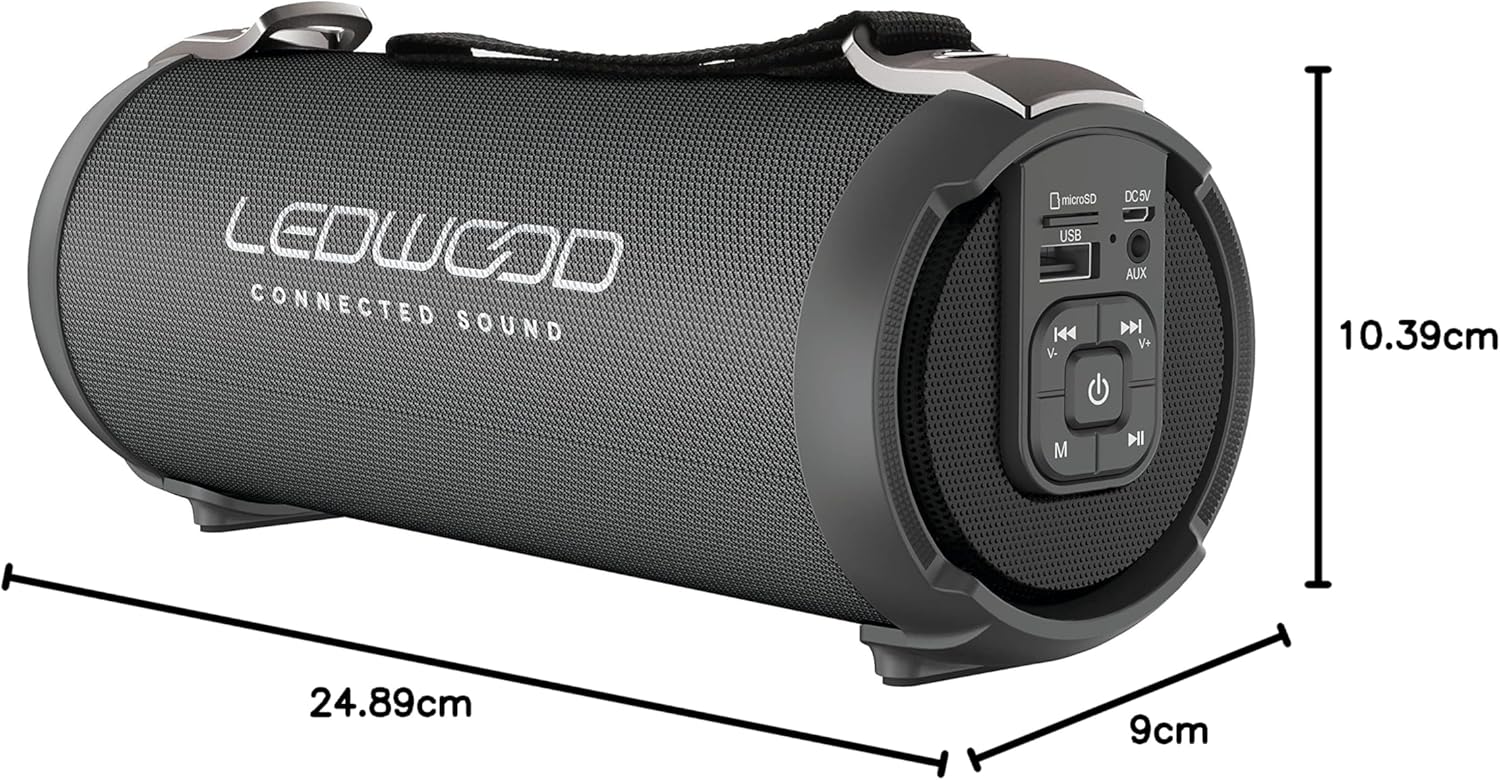
Image: The LEDWOOD ACCESS100 speaker with its length, width, and height dimensions indicated.
| คุณสมบัติ | รายละเอียด |
|---|---|
| ชื่อรุ่น | การเข้าถึง 100 |
| ยี่ห้อ | Ledwood |
| เทคโนโลยีการเชื่อมต่อ | บลูทูธ |
| ช่วงสาย | สูงถึง 10 เมตร (33 ฟุต) |
| โหมดเอาต์พุตเสียง | สเตอริโอ (2.0 ช่อง) |
| Speaker Output Power (RMS) | 8.5 วัตต์ |
| กำลังขับสูงสุด | 100 วัตต์ |
| คุณสมบัติพิเศษ | USB Port, MicroSD Card Slot, AUX Input, FM Radio, TWS Function |
| แหล่งพลังงาน | Battery Powered (rechargeable via USB cable) |
| ขนาดสินค้า (กว้าง x ยาว x สูง) | 24.9 ซม. x 9 ซม. x 10.4 ซม. (9.8 x 3.5 x 4.1 นิ้ว) |
| น้ำหนัก | 820 กรัม (1.8 ปอนด์) |
| สี | สีดำ |
| กันน้ำ | เลขที่ |
| อุปกรณ์ที่รองรับ | สมาร์ทโฟนแท็บเล็ต |
ข้อมูลด้านความปลอดภัย
- ห้ามให้ลำโพงสัมผัสกับอุณหภูมิที่สูงหรือต่ำเกินไป แสงแดดโดยตรง หรือความชื้นสูง
- ห้ามถอดประกอบ ซ่อมแซม หรือดัดแปลงลำโพงด้วยตนเอง การกระทำดังกล่าวจะทำให้การรับประกันเป็นโมฆะ
- เก็บลำโพงให้ห่างจากเด็กและสัตว์เลี้ยง
- ใช้เฉพาะสายชาร์จที่ให้มาหรือที่เทียบเท่าที่ได้รับการรับรองเท่านั้น
- หลีกเลี่ยงการฟังในระดับเสียงที่สูงเป็นเวลานานเพื่อป้องกันความเสียหายจากการได้ยิน
- กำจัดผลิตภัณฑ์และแบตเตอรี่อย่างมีความรับผิดชอบตามกฎระเบียบท้องถิ่น
การรับประกันและการสนับสนุน
This product comes with a standard manufacturer's warranty. For detailed warranty terms and conditions, please refer to the warranty card included in your package or contact Ledwood customer support.
For technical support, troubleshooting assistance, or general inquiries, please visit the official Ledwood webหรือติดต่อฝ่ายบริการลูกค้า โดยทั่วไปข้อมูลการติดต่อจะอยู่บนบรรจุภัณฑ์ของผลิตภัณฑ์หรือเอกสารอย่างเป็นทางการของแบรนด์ webเว็บไซต์.