
1. บทนำ
Thank you for choosing the Caliber HPG318DAB Portable DAB+/FM Radio. This device offers high-quality digital and analog radio reception, a compact design for portability, and convenient alarm functions. This manual provides essential information for the safe and efficient use of your radio.
2. ข้อมูลด้านความปลอดภัย
- โปรดอ่านคำแนะนำทั้งหมดอย่างละเอียดก่อนใช้งาน และเก็บไว้เพื่อใช้อ้างอิงในอนาคต
- ห้ามให้อุปกรณ์โดนฝน ความชื้น หรืออุณหภูมิที่สูงหรือต่ำเกินไป
- หลีกเลี่ยงการวางอุปกรณ์ใกล้แหล่งความร้อนหรือแสงแดดโดยตรง
- ห้ามถอดประกอบหรือพยายามซ่อมแซมอุปกรณ์ด้วยตนเอง แนะนำให้ส่งช่างผู้ชำนาญเข้ารับบริการทั้งหมด
- ใช้เฉพาะสายชาร์จและอะแดปเตอร์ที่ให้มาเท่านั้น
- เก็บให้พ้นจากมือเด็ก
3. เนื้อหาบรรจุภัณฑ์
ตรวจสอบให้แน่ใจว่ามีรายการทั้งหมดอยู่ในบรรจุภัณฑ์:
- Caliber HPG318DAB Portable DAB+/FM Radio Unit
- คู่มือการใช้งาน
- สายชาร์จ USB
- อะแดปเตอร์แปลงไฟ
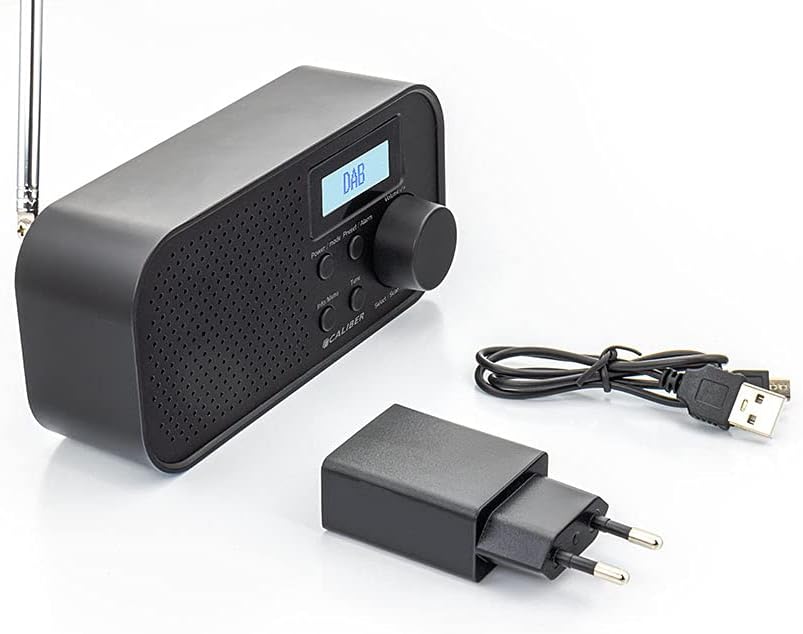
Image: Caliber HPG318DAB radio unit, USB charging cable, and power adapter.
4. สินค้าหมดview
4.1 แผงควบคุมด้านหน้า
ภาพ: ด้านหน้า view of the Caliber HPG318DAB radio, highlighting the LCD screen, speaker grille, and control buttons.
- หน้าจอ LCD: Displays station information, time, and menu options.
- ปุ่มเปิด / ปิดโหมด: Turns the radio on/off and switches between DAB+ and FM modes.
- ปุ่มเมนู/ข้อมูล: Accesses menu settings and displays additional information.
- ปุ่มตั้งค่าล่วงหน้า/ปุ่มตั้งปลุก: Saves/recalls preset stations and sets alarm functions.
- Select/Scan Button: Confirms selections and initiates station scans.
- ปุ่มเลื่อนปลุก: ปิดเสียงเตือนชั่วคราว
- ปุ่มปรับระดับเสียง: ปรับระดับเสียง
- ตะแกรงลำโพง: เอาท์พุตเสียง
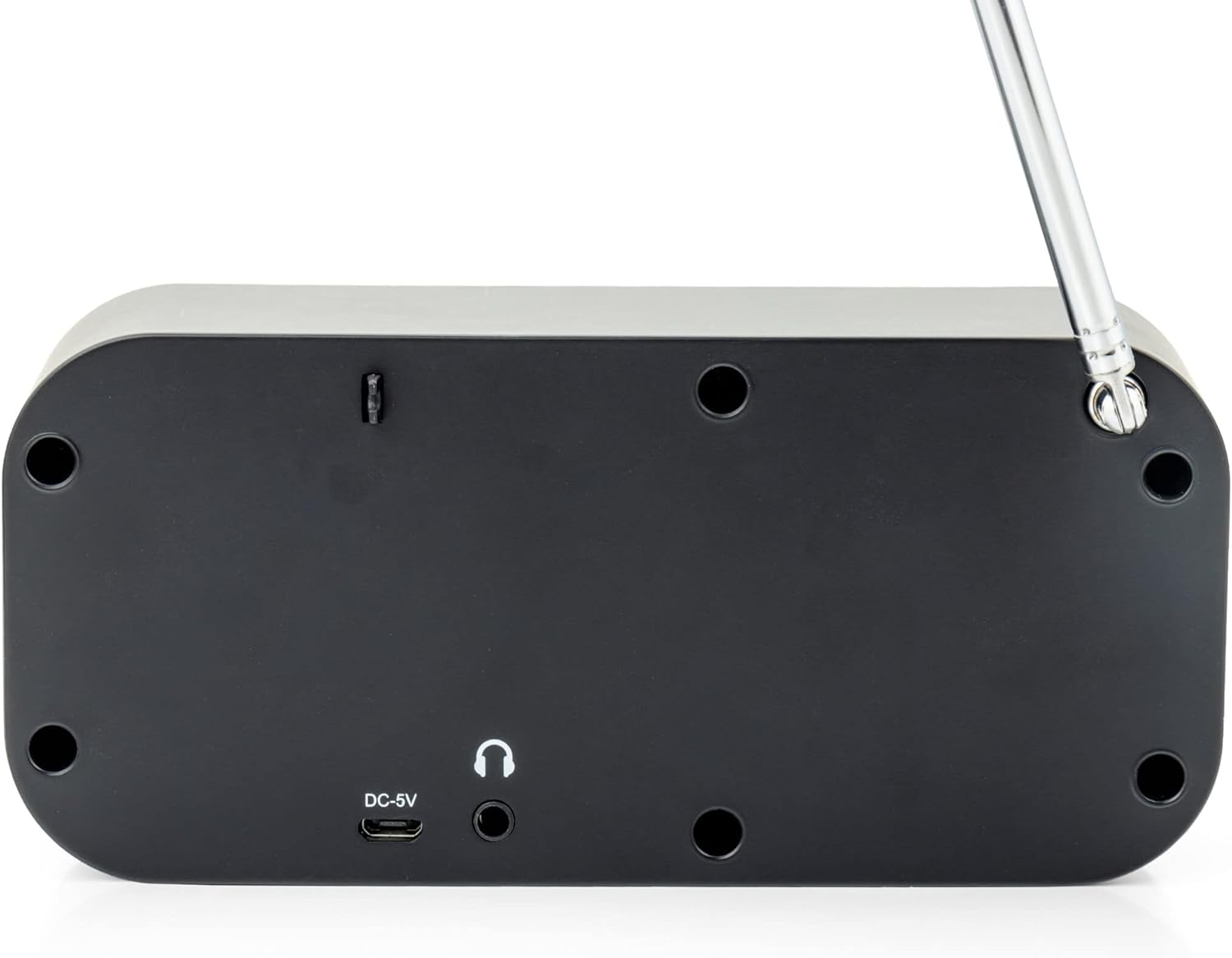
4.2 การเชื่อมต่อแผงด้านหลัง

ภาพ: ด้านหลัง view of the Caliber HPG318DAB radio, showing the DC-5V charging port, 3.5mm headphone jack, and telescopic antenna.
- อินพุต DC-5V: เสียบสายชาร์จ USB เข้ากับช่องนี้
- แจ็คหูฟัง 3.5 มม.: For connecting headphones or earphones.
- เสาอากาศยืดไสลด์: ยืดออกเพื่อการรับสัญญาณวิทยุที่ดีที่สุด
5. การตั้งค่า
5.1 การชาร์จแบตเตอรี่
The Caliber HPG318DAB features a built-in rechargeable battery, providing up to 8 hours of playback on a full charge.
- Connect the small end of the provided USB charging cable to the อินพุต DC-5V พอร์ตที่ด้านหลังของวิทยุ
- Connect the larger end of the USB cable to the provided power adapter.
- เสียบอะแดปเตอร์ไฟเข้ากับเต้ารับไฟฟ้ามาตรฐาน
- The charging indicator on the LCD screen will show the charging status. Once fully charged, the indicator will change.
หมายเหตุ: ขอแนะนำให้ชาร์จแบตเตอรี่ให้เต็มก่อนใช้งานครั้งแรก
5.2 การปรับเสาอากาศ
For optimal radio reception, fully extend the telescopic antenna located on the rear of the device. Adjust its position to improve signal strength if reception is poor.
6. คู่มือการใช้งาน
6.1 การเปิด/ปิดเครื่องและการเลือกโหมด
- เพื่อเปิดวิทยุ ONกดปุ่มค้างไว้ พลังงาน/โหมด ปุ่ม.
- เพื่อเปิดวิทยุ ปิดกดปุ่มค้างไว้ พลังงาน/โหมด ปุ่มอีกครั้ง
- การสลับไปมาระหว่าง แดบ+ และ FM modes, short press the พลังงาน/โหมด button while the radio is on. The current mode will be displayed on the LCD screen.
6.2 การใช้งานวิทยุ DAB+
- เปลี่ยนไปใช้โหมด DAB+ โดยใช้ พลังงาน/โหมด ปุ่ม.
- The radio will automatically perform a full scan for available DAB+ stations upon first use or if no stations are found. To initiate a manual scan, press the เมนู/ข้อมูล button, navigate to 'Full Scan', and press Select/Scan.
- ใช้ ปุ่มปรับระดับเสียง เพื่อเลื่อนดูรายชื่อสถานีที่มีอยู่ กด Select/Scan เพื่อเลือกสถานี
- To save a station as a preset (up to 10 presets): While listening to a station, press and hold the ตั้งค่าล่วงหน้า/นาฬิกาปลุก ปุ่ม ใช้ปุ่ม ปุ่มปรับระดับเสียง เพื่อเลือกหมายเลขที่กำหนดไว้ล่วงหน้า (1-10) จากนั้นกด Select/Scan เพื่อยืนยัน.
- To recall a preset station: Short press the ตั้งค่าล่วงหน้า/นาฬิกาปลุก ปุ่ม ใช้ ปุ่มปรับระดับเสียง เพื่อเลือกหมายเลขที่ตั้งไว้ล่วงหน้าที่ต้องการ จากนั้นกด Select/Scan.
- กดปุ่ม เมนู/ข้อมูล ปุ่มที่จะ view additional information (e.g., program type, signal strength, time) provided by Radio Data System (RDS).
การใช้งานวิทยุ FM 6.3
- สลับไปที่โหมด FM โดยใช้ พลังงาน/โหมด ปุ่ม.
- To automatically scan for stations: Press and hold the Select/Scan กดปุ่ม วิทยุจะทำการสแกนหาคลื่นและหยุดที่สถานีที่มีสัญญาณแรงที่สุดถัดไป
- สำหรับการปรับจูนด้วยตนเอง: หมุน ปุ่มปรับระดับเสียง to adjust the frequency in small increments.
- To save a station as a preset (up to 10 presets): While listening to a station, press and hold the ตั้งค่าล่วงหน้า/นาฬิกาปลุก ปุ่ม ใช้ปุ่ม ปุ่มปรับระดับเสียง เพื่อเลือกหมายเลขที่กำหนดไว้ล่วงหน้า (1-10) จากนั้นกด Select/Scan เพื่อยืนยัน.
- To recall a preset station: Short press the ตั้งค่าล่วงหน้า/นาฬิกาปลุก ปุ่ม ใช้ ปุ่มปรับระดับเสียง เพื่อเลือกหมายเลขที่ตั้งไว้ล่วงหน้าที่ต้องการ จากนั้นกด Select/Scan.
- กดปุ่ม เมนู/ข้อมูล ปุ่มที่จะ view additional information (e.g., station name, program type) provided by Radio Data System (RDS).
6.4 การควบคุมระดับเสียง
หมุนขนาดใหญ่ ปุ่มปรับระดับเสียง หมุนตามเข็มนาฬิกาเพื่อเพิ่มระดับเสียง และหมุนทวนเข็มนาฬิกาเพื่อลดระดับเสียง
6.5 การใช้หูฟัง
Connect any standard 3.5mm headphones or earphones to the แจ็คหูฟังขนาด 3.5 มม. on the rear of the radio for private listening. The internal speaker will automatically mute when headphones are connected.
6.6 ฟังก์ชั่นปลุก
The radio includes alarm clock and sleep timer functions.
การตั้งนาฬิกาปลุก:
- กดปุ่มค้างไว้ ตั้งค่าล่วงหน้า/นาฬิกาปลุก button until the alarm setup menu appears.
- ใช้ ปุ่มปรับระดับเสียง to navigate through options like Alarm 1, Alarm 2, Time, Source (Buzzer/DAB/FM), and Volume. Press Select/Scan เพื่อยืนยันการตั้งค่าแต่ละรายการ
- Set the desired alarm time, choose your preferred alarm source (buzzer, DAB+ station, or FM station), and set the alarm volume.
- Ensure the alarm is set to 'On' in the menu.
การใช้ฟังก์ชันเลื่อน:
เมื่อเสียงปลุกดัง ให้กด งีบหลับ button to temporarily pause the alarm for a short period (e.g., 9 minutes). The alarm will sound again after the snooze period.
การตั้งค่าตัวตั้งเวลาปิดเครื่อง:
- กดปุ่ม เมนู/ข้อมูล ปุ่ม.
- Navigate to the 'Sleep' option using the ปุ่มปรับระดับเสียง และกด Select/Scan.
- Select the desired sleep timer duration (e.g., 15, 30, 45, 60, 90 minutes, or Off). The radio will automatically turn off after the selected time.
7. การบำรุงรักษา
7.1 การทำความสะอาด
To clean the radio, use a soft, dry cloth. Do not use abrasive cleaners, waxes, or solvents as they may damage the finish.
7.2 พื้นที่จัดเก็บ
When not in use for extended periods, store the radio in a cool, dry place away from direct sunlight and extreme temperatures. Ensure the battery is partially charged before storage to maintain its lifespan.
7.3 การดูแลแบตเตอรี่
To prolong the life of the built-in Lithium-ion battery, avoid fully discharging it frequently. Charge the radio regularly, even if not in constant use.
8 การแก้ไขปัญหา
| ปัญหา | สาเหตุที่เป็นไปได้ | สารละลาย |
|---|---|---|
| วิทยุไม่เปิด | แบตเตอรี่หมด | Connect the radio to power using the USB cable and adapter to charge the battery. |
| การรับสัญญาณวิทยุไม่ดี (DAB+/FM) | เสาอากาศไม่ยืดออกหรือพื้นที่สัญญาณไม่ดี | Fully extend the telescopic antenna and adjust its position. Try moving the radio to a different location. |
| ไม่มีเสียง. | ระดับเสียงเบาเกินไป หรือเสียบหูฟังอยู่ | เพิ่มระดับเสียงโดยใช้ ปุ่มปรับระดับเสียง. Disconnect headphones if you want sound from the speaker. |
| สัญญาณเตือนภัยไม่ดัง | Alarm not set correctly or turned off. | Check alarm settings (time, source, volume, 'On' status) in the menu. |
9. ข้อมูลจำเพาะ
| คุณสมบัติ | ข้อมูลจำเพาะ |
|---|---|
| หมายเลขรุ่น | เอชพีจี318ดีบี |
| ขนาด (กว้าง x ยาว x สูง) | 15 x 4 x 6.5 ซม. |
| น้ำหนัก | 255 กรัม |
| แหล่งพลังงาน | Battery-Powered (1 Lithium-ion battery required) |
| อายุการใช้งานแบตเตอรี่ | นานถึง 8 ชั่วโมง |
| แถบความถี่วิทยุที่รองรับ | ตบเบา ๆ +, เอฟเอ็ม |
| เทคโนโลยีการเชื่อมต่อ | AUX (for headphones), USB (for charging) |
| Maximum Speaker Output | 25 วัตต์ |
| วัสดุ | พลาสติก |
| สี | สีดำ |
| คุณสมบัติพิเศษ | Portable, Alarm Function, RDS, LCD Screen |
10. การรับประกันและการสนับสนุน
For warranty information and customer support, please refer to the documentation provided with your purchase or visit the official Caliber webไซต์ เก็บหลักฐานการซื้อของคุณไว้เพื่อใช้ในกรณีเรียกร้องการรับประกัน