
1. บทนำ
This manual provides essential instructions for the safe and efficient use of your Generic charger, designed for Zebra TC51, TC52, TC56, TC57, TC52x, and TC57x Android Scanners. Please read this manual thoroughly before operating the device to ensure proper functionality and longevity.
2. ข้อมูลด้านความปลอดภัย
- Use only the provided power supply with the charger.
- อย่าให้ที่ชาร์จโดนน้ำหรือความชื้นมากเกินไป
- ควรหลีกเลี่ยงการทำเครื่องชาร์จตกหรือกระแทกอย่างรุนแรง
- เก็บให้พ้นจากมือเด็ก
- อย่าพยายามถอดประกอบหรือดัดแปลงเครื่องชาร์จ
3. เนื้อหาบรรจุภัณฑ์
ตรวจสอบว่ามีรายการทั้งหมดอยู่ในแพ็คเกจของคุณ:
- Generic Charging Cradle
- แหล่งจ่ายไฟ (อะแดปเตอร์ AC)

Image: The Generic charging cradle and power supply, shown with a compatible Zebra scanner for illustration.
4. สินค้าหมดview
The Generic charger is designed to provide reliable power to your Zebra TC51, TC52, TC56, TC57, TC52x, and TC57x Android Scanners. It features a removable insert to accommodate devices with or without a protective boot/case.

ภาพ: รายละเอียด view of the Generic charger cradle, highlighting its design.
5. คำแนะนำในการตั้งค่า
5.1 การเชื่อมต่อเครื่องชาร์จ
- Connect the DC power connector from the power supply to the machine's interface on the charging cradle.
- เสียบปลั๊กแหล่งจ่ายไฟเข้ากับเต้ารับไฟฟ้ามาตรฐาน
5.2 Adjusting for Protective Case (Removable Insert)
The charging cradle features a removable insert (shim) to allow charging of your Zebra scanner with or without a protective boot/case.
- For devices without a protective case: Ensure the insert is in place within the charging cradle.
- For devices with a protective case: Gently remove the insert from the charging cradle. This provides additional space for the device with its case.
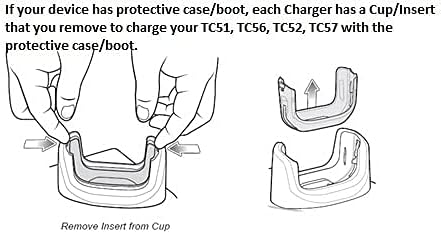
Image: Diagram illustrating the process of removing the insert from the charging cup to accommodate a device with a protective case.

ภาพ: ภาพระยะใกล้ view of the removable insert, highlighting its design and how it fits into the charging cradle.
5.3 คู่มือการตั้งค่าภาพ
Video: A short demonstration of the charger and its fast-charging capabilities for your workday.
Video: An operational demonstration of the scanner charger cable for Zebra TC51, showing connection and charging status.
Video: A demonstration of the charger cradle for Zebra TC5X series, including how to insert and remove the device for charging.
Video: A visual guide on using the USB charger cable for Zebra TC51, TC510K, TC52, TC56, TC57 models.
6. คู่มือการใช้งาน
6.1 การชาร์จอุปกรณ์ของคุณ
- ตรวจสอบให้แน่ใจว่าเครื่องชาร์จเชื่อมต่อกับแหล่งจ่ายไฟอย่างถูกต้อง
- Carefully place your Zebra scanner into the charging cradle, ensuring the charging contacts align.
- A charging indicator light (usually red or orange) on the scanner or cradle will illuminate to confirm charging has begun.
- The indicator light will change (e.g., to green) or turn off when charging is complete.
7. การบำรุงรักษา
- Clean the charging contacts on both the cradle and your device regularly with a dry, soft cloth to ensure optimal connection.
- เก็บที่ชาร์จไว้ในที่เย็นและแห้งเมื่อไม่ได้ใช้งาน
- Avoid wrapping the cable too tightly to prevent damage.
8 การแก้ไขปัญหา
8.1 อุปกรณ์ไม่ชาร์จ
- ตรวจสอบการเชื่อมต่อพลังงาน: Ensure the power supply is securely plugged into both the wall outlet and the charging cradle.
- Verify Device Placement: Make sure the Zebra scanner is correctly seated in the cradle and the charging contacts are aligned.
- ตรวจสอบรายชื่อผู้ติดต่อ: Clean the charging contacts on both the device and the cradle for any debris or corrosion.
- แผ่นรองแบบถอดได้: If using a protective case, ensure the removable insert has been taken out of the cradle. If not using a case, ensure the insert is properly seated.
- ลองร้านอื่น: Test the charger with a different electrical outlet to rule out power source issues.
9. ข้อมูลจำเพาะ
| คุณสมบัติ | ข้อมูลจำเพาะ |
|---|---|
| ยี่ห้อ | ทั่วไป |
| อุปกรณ์ที่รองรับ | Zebra TC51, TC52, TC56, TC57, TC52x, TC57x Android Scanners |
| ประเภทขั้วต่อ | 2 พิน |
| แหล่งพลังงาน | สายไฟ |
| วัดtage | 15 วัตต์ |
| ปริมาณการส่งออกtage | 5 โวลต์ |
| กระแสไฟขาออก | 3 Amps |
| คุณสมบัติพิเศษ | Removable Insert for Protective Case |
| เทคโนโลยีการเชื่อมต่อ | ยูเอสบี |
| ประเภทการติดตั้ง | ที่วางบนโต๊ะ |
| สี | สีดำ |
10. ข้อมูลการรับประกัน
โปรดดูรายละเอียดจากบรรจุภัณฑ์ของผลิตภัณฑ์หรือคำแนะนำจากผู้ค้าปลีก website for specific warranty details. Keep your proof of purchase for any warranty claims.
11. การสนับสนุนลูกค้า
For further assistance, technical support, or inquiries, please contact the retailer or manufacturer directly. Contact information can typically be found on the product packaging or the seller's online store page.


