
1. บทนำ
The Alesis Recital Grand is an 88-key digital piano designed to provide an authentic piano playing experience. It features graded hammer-action weighted keys and a selection of 16 realistic built-in sounds. This instrument is suitable for various skill levels, from beginners to advanced players, offering a comprehensive set of features for practice and performance. This manual provides detailed instructions for setting up, operating, and maintaining your Recital Grand digital piano.
2. เนื้อหาบรรจุภัณฑ์
Verify that all items listed below are included in your package. If any items are missing or damaged, please contact Alesis support.
- Recital Grand Digital Piano
- อะแดปเตอร์แปลงไฟ
- เพลงพักผ่อน
- ซัสเทนเพดัล
- การ์ดดาวน์โหลดซอฟต์แวร์
- คู่มือการใช้งาน (เอกสารนี้)
- คู่มือความปลอดภัยและการรับประกัน

Image: The Alesis Recital Grand digital piano shown with its essential accessories: a sustain pedal, a music rest, and the power adapter. These components are crucial for the instrument's functionality and user convenience.
3. การตั้งค่า
Follow these steps to set up your Alesis Recital Grand digital piano:
- การจัดวาง: Place the digital piano on a stable, flat surface or a compatible keyboard stand. Ensure there is adequate space for playing and connecting cables.
- พักดนตรี: Insert the music rest into the designated slot on the top panel of the piano.
- เหยียบคันเร่ง: Connect the included sustain pedal to the 'Sustain Pedal' input on the rear panel of the piano.
- การเชื่อมต่อไฟฟ้า: Connect the power adapter to the 'DC 12V' input on the rear panel, then plug the adapter into a power outlet.
- เปิดเครื่อง: Press the Power button located on the top left of the control panel to turn on the instrument.
- Headphones/External Audio (Optional): For private practice, connect headphones to the 1/4" (6.35mm) or 1/8" (3.5mm) headphone outputs. For external amplification, connect the 1/4" (6.35mm) stereo outputs to an ampเครื่องขยายเสียงหรือคอนโซลผสมเสียง

ภาพ: รายละเอียด view of the rear panel connectivity options on the Alesis Recital Grand. This includes ports for USB, the sustain pedal, stereo 1/4-inch outputs, and an auxiliary input, illustrating how to connect various external devices.
4. คุณสมบัติ
The Alesis Recital Grand offers a range of features designed to enhance your playing experience:
- 88 Graded Hammer-Action Weighted Keys: Provides a realistic piano feel with heavier touch in the lower register and lighter touch in the upper register. Adjustable touch response allows customization.
- 16 Premium Multi-Sampled Voices: Includes Grand Piano, Electric Piano, Organ, Synthesizers, and more, offering a diverse sound palette.
- 128 Max Polyphony: Ensures that notes do not cut off prematurely, even when playing complex passages with sustain.
- 50W Micro-Array Speaker System: Custom-voiced speakers deliver clear, full, and realistic sound in any environment.
- 5 Adjustable Reverb FX: Adds depth and ambiance to your sound.
- โหมดแยก: Divides the keyboard into two zones, allowing you to play different instrument tones with each hand simultaneously.
- โหมดเลเยอร์: Stacks two different instrument tones to be played together with each key press.
- โหมดบทเรียน: Divides the keyboard into two zones with the same pitch and voice, ideal for student and teacher to play together.
- โหมดบันทึก: Allows you to record and playback your performances for review and practice.
- การเชื่อมต่อ: Stereo 1/4" (6.35mm) outputs, 1/4" (6.35mm) and 1/8" (3.5mm) headphone outputs, and USB-MIDI output for connection to computers or educational software.

Image: A user demonstrates the Alesis Recital Grand, emphasizing its 88 full-sized, graded hammer-action keys and the adjustable touch response feature, which provides a customizable playing feel.

Image: The control panel of the Alesis Recital Grand, illustrating the dedicated buttons for Split, Layer, Lesson, and Record modes. This image also highlights the integration with Melodics and Skoove for enhanced learning.
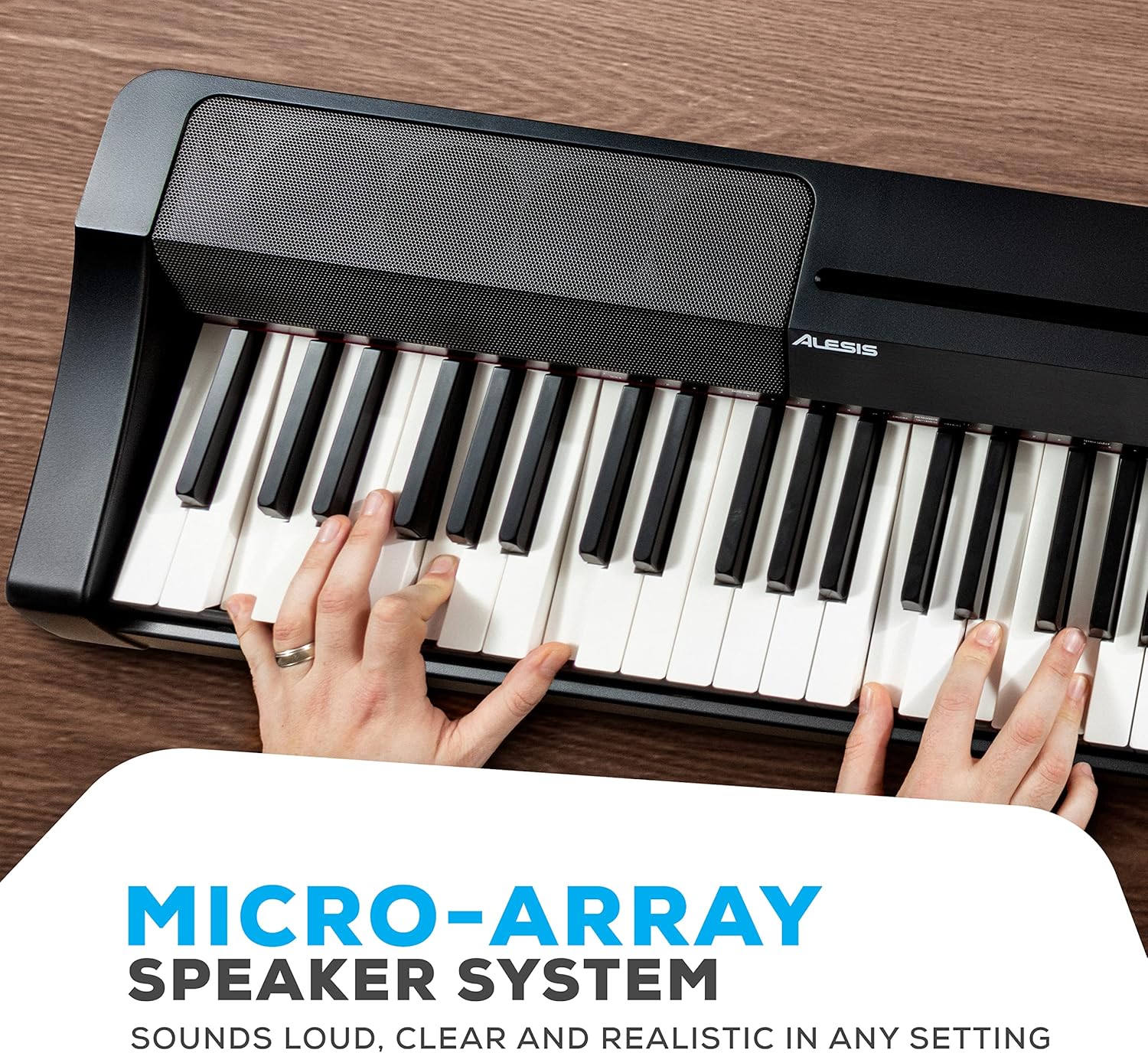
ภาพ: รายละเอียด view of the Alesis Recital Grand's micro-array speaker system, designed to deliver clear and powerful audio output.
5. คู่มือการใช้งาน
5.1 การเปิด/ปิดเครื่องและระดับเสียง
- พลัง: กดปุ่ม พลัง ปุ่มสำหรับเปิดหรือปิดเปียโน
- ปริมาณ: ใช้ ปริมาณ knob to adjust the overall output level of the piano.
5.2 การเลือกเสียง
The Recital Grand features 16 built-in voices, accessible via dedicated buttons and combinations:
- กดปุ่ม เปียโน button to select the Grand Piano voice. Hold the Piano button to access the Dark Piano or Harpsichord variations.
- กดปุ่ม เปียโนไฟฟ้า button to select the MK1/Suitcase Electric Piano voice. Hold the Electric Piano button to access the Wurlitzer or FM Piano variations.
- Similarly, use the ออร์แกน, สาย, ซินธ์, และ เบส buttons to select their primary voices and hold them for variations.
5.3 Split and Layer Modes
- โหมดแยก: กดปุ่ม แยก button. The keyboard will be divided into two sections, each playing a different voice. The split point can be adjusted.
- โหมดเลเยอร์: กดปุ่ม ชั้น button. Two selected voices will sound simultaneously when a key is pressed.
5.4 Lesson and Record Modes
- โหมดบทเรียน: กดปุ่ม บทเรียน button to activate. This mode is useful for teaching, as it duplicates the keyboard range.
- โหมดบันทึก: กดปุ่ม บันทึก/เริ่ม/หยุด button to begin recording your performance. Press it again to stop. Press the เล่น button to listen to your recorded track.
5.5 เอฟเฟกต์
- เสียงสะท้อน: ใช้ เสียงสะท้อน button to cycle through and adjust the 5 available reverb effects.
Video: An official Alesis performance video demonstrating the sound and playability of the Recital Grand digital piano. This video showcases various voices and musical styles.
Video: An official Alesis demonstration video providing an overview of the Recital Grand's features and sound capabilities. This video highlights key aspects of the instrument's design and functionality.
6. การบำรุงรักษา
Proper care will ensure the longevity and optimal performance of your Alesis Recital Grand:
- การทำความสะอาด: ใช้ผ้าแห้งนุ่มเช็ดทำความสะอาดพื้นผิวเปียโน สำหรับคราบสกปรกที่ติดแน่น ให้ใช้ผ้าชุบน้ำหมาดๆ เช็ดเบาๆamp สามารถใช้ผ้าเช็ดทำความสะอาดได้ ตามด้วยผ้าแห้งเช็ดอีกครั้ง หลีกเลี่ยงน้ำยาทำความสะอาดที่มีฤทธิ์กัดกร่อน สารละลาย หรือแว็กซ์
- การทำความสะอาดกุญแจ: ค่อยๆ เช็ดแป้นคีย์ด้วยผ้าเนื้อนุ่มที่ชุบน้ำยาเล็กน้อยamp ผ้า. อย่าใช้ผ้าที่ชื้นมากเกินไป
- พื้นที่จัดเก็บ: When not in use, cover the piano with a dust cover to protect it from dust and debris. Avoid placing heavy objects on the keys or control panel.
- สิ่งแวดล้อม: Keep the piano away from direct sunlight, heat sources, and areas with high humidity or extreme temperature changes.
- การขนส่ง: When moving the piano, ensure it is properly secured to prevent damage.
7 การแก้ไขปัญหา
If you encounter issues with your Alesis Recital Grand, refer to the following common problems and solutions:
| ปัญหา | สาเหตุที่เป็นไปได้ | สารละลาย |
|---|---|---|
| ไม่มีเสียง | ระดับเสียงเบาเกินไป; เสียบหูฟังแล้ว; ภายนอก amplifier off/disconnected. | Increase volume knob; disconnect headphones; check external ampการเชื่อมต่อและแหล่งจ่ายไฟของเครื่องขยายเสียง |
| ปุ่มไม่ตอบสนองหรือสัมผัสไม่สม่ำเสมอ | Touch sensitivity setting; dust/debris under keys. | Adjust touch sensitivity setting (refer to full user manual); gently clean keys. |
| เสียงเพี้ยน | Volume too high; incorrect audio cable connection; faulty speakers/headphones. | Lower volume; ensure audio cables are correctly connected; test with different headphones/speakers. |
| MIDI ใช้งานไม่ได้ | Incorrect USB-MIDI connection; driver issues; software settings. | Ensure USB cable is securely connected; install necessary drivers; check MIDI settings in your software. |
For more detailed troubleshooting or issues not listed here, please refer to the full User Manual (PDF) available on the Alesis website or contact Alesis customer support.
8. ข้อมูลจำเพาะ
Below are the technical specifications for the Alesis Recital Grand digital piano:
- ยี่ห้อ: Alesis
- ชื่อรุ่น : การแสดงดนตรีแกรนด์
- จำนวนคีย์: 88
- ประเภทคีย์: Graded Hammer-Action Weighted Keys
- เสียง: 16 Premium Multi-Sampled Voices
- โพลีโฟนี: สูงสุด 128
- ผลกระทบ: 5 Adjustable Reverb FX
- ระบบลำโพง: 50W Micro-Array
- การเชื่อมต่อ: Stereo 1/4" (6.35mm) Outputs, 1/4" (6.35mm) Headphone Jack, 1/8" (3.5mm) Headphone Jack, USB-MIDI Output, Sustain Pedal Input, Power Adapter Input
- แหล่งพลังงาน: ใช้ไฟฟ้าแบบมีสาย (12V DC)
- ขนาด (D x W x H): 9.65" x 57.87" x 15.55" (24.5 ซม. x 147 ซม. x 39.5 ซม.)
- น้ำหนักสินค้า: 12.8 กิโลกรัม (28.2 ปอนด์)
- สี: สีดำ
- ระดับสกิล: ตั้งแต่ระดับเริ่มต้นจนถึงระดับมืออาชีพ

Image: A diagram illustrating the physical dimensions of the Alesis Recital Grand digital piano, including its length, width, and height.
9. การรับประกันและการสนับสนุน
9.1 ข้อมูลการรับประกัน
The Alesis Recital Grand digital piano comes with a การรับประกันจากผู้ผลิต 1 ปี. This warranty covers defects in materials and workmanship under normal use. Please retain your proof of purchase for warranty claims. For full details regarding warranty terms and conditions, refer to the Safety & Warranty Manual included in your package or visit the official Alesis webเว็บไซต์.
9.2 การสนับสนุนลูกค้า
For technical assistance, product inquiries, or warranty service, please contact Alesis customer support through their official website. You can typically find support contact information, FAQs, and additional resources at www.alesis.com/support.
Additionally, a comprehensive User Manual (PDF) is available for download from the Alesis website, providing more in-depth information on all features and functions.