
การแนะนำ
Thank you for choosing the GAN XIN 5-Inch 6-Digit LED Race Timing Clock. This manual provides detailed instructions for the setup, operation, and maintenance of your new timing device. Please read this manual thoroughly before use to ensure proper functionality and longevity of the product.

Image: The GAN XIN LED Race Timing Clock in a typical sporting event setting.
คุณสมบัติผลิตภัณฑ์
- จอแสดงผล LED ขนาดใหญ่: Features 5-inch LED digits for clear visibility up to 124 feet (38 meters).
- สีจอแสดงผลหลากหลาย: Available in red, yellow, blue, green, and white.
- โครงสร้างทนทาน: Built with a professional circuit board for low failure rate and an aluminum alloy frame for reliability.
- ฟังก์ชั่นอเนกประสงค์: Includes Clock (12/24 hour), Countdown, Count Up, and Stopwatch modes.
- ตัวเลือกการควบคุมแบบคู่: Easily operated via an included remote control (up to 40ft range) or the "GX_Remote" mobile application (Bluetooth, up to 50ft range) for iOS and Android.
- การแจ้งเตือนด้วยเสียง: Equipped with a buzzer (80-85 decibels) to signal the end of countdown/count up cycles.
- การติดตั้งแบบยืดหยุ่น: Supports wall-mounting (bracket and screws included) or tripod installation (tripod sold separately).
การตั้งค่า
1. การเปิดออกและการตรวจสอบ
Carefully remove all components from the packaging. Inspect the clock and accessories for any signs of damage. Contact customer service if any parts are missing or damaged.
2. การเชื่อมต่อไฟฟ้า
Connect the provided power adapter to the clock and then plug it into a standard electrical outlet. The clock will power on automatically.
3. การติดตั้งแบตเตอรี่รีโมทคอนโทรล
Open the battery compartment on the back of the remote control. Insert two AAA batteries (not included), ensuring correct polarity. Close the compartment.
4. ตัวเลือกการติดตั้ง
- ติดผนัง: Use the included wall-mount bracket and screws to securely attach the clock to a wall. Ensure the mounting surface is sturdy enough to support the clock's weight.
- การติดตั้งขาตั้งกล้อง: If using a tripod (ASIN: B0B1QP5RTR, sold separately), attach the clock to the tripod mount. Ensure the tripod is stable before use.

Image: Clock dimensions, illustrating the 27-inch length, 7.4-inch height, and 5-inch LED digit size.
คำแนะนำการใช้งาน
The GAN XIN timing clock offers four primary functions: Clock, Countdown, Count Up, and Stopwatch. Use the remote control or mobile app to switch between modes and adjust settings.
1. โหมดนาฬิกา
In Clock mode, the display shows the current time in [HH:MM:SS] format.
- To switch between 12-hour and 24-hour formats, press the [A+] กุญแจบนรีโมทคอนโทรล
- Refer to the remote control instructions for setting the current time.
2. โหมดนับถอยหลัง
This mode counts down from a set time [HH:MM:SS] to 00:00:00.
- Enter the desired countdown time using the remote control or app.
- กด [เริ่ม] เพื่อเริ่มการนับถอยหลัง
- กด [หยุด] เพื่อหยุดการนับถอยหลัง กด [เริ่ม] อีกครั้งเพื่อดำเนินการต่อ
- When the countdown reaches 00:00:00, the buzzer will sound.
3. Count Up Mode
This mode counts up from 00:00:00 to a maximum of 99:59:59 [HH:MM:SS].
- กด [เริ่ม] เพื่อเริ่มนับขึ้นไป
- กด [หยุด] to pause the count up. Press [เริ่ม] อีกครั้งเพื่อดำเนินการต่อ
- The buzzer will sound if a specific target time is set and reached (refer to advanced settings in the app).
4. โหมดจับเวลา
The stopwatch mode displays time in [MM:SS:MS] (minutes:seconds:milliseconds).
- กด [เริ่ม] to begin the stopwatch.
- กด [หยุด] เพื่อหยุดนาฬิกาจับเวลาชั่วคราว กด [เริ่ม] อีกครั้งเพื่อดำเนินการต่อ
- กด [รีเซ็ต] to clear the stopwatch to 00:00:00.

Image: Illustration of the clock displaying its four main functions: Clock, Count Up, Countdown, and Stopwatch.
Remote Control and Mobile App Usage
รีโมทคอนโทรล
The included remote control allows for easy operation of all clock functions from up to 40 feet away. Ensure the remote has fresh AAA batteries and is pointed towards the clock's receiver.
Mobile Application (GX_Remote)
The "GX_Remote" app is available for iOS and Android devices. It connects via Bluetooth and offers control from up to 50 feet. ค้นหา "GX_Remote" in your device's app store to download and install.
- ตรวจสอบให้แน่ใจว่าได้เปิดใช้งาน Bluetooth บนอุปกรณ์มือถือของคุณ
- Open the "GX_Remote" app and follow the on-screen instructions to pair with your GAN XIN clock.
- The app provides an intuitive interface for setting modes, times, and other advanced features.
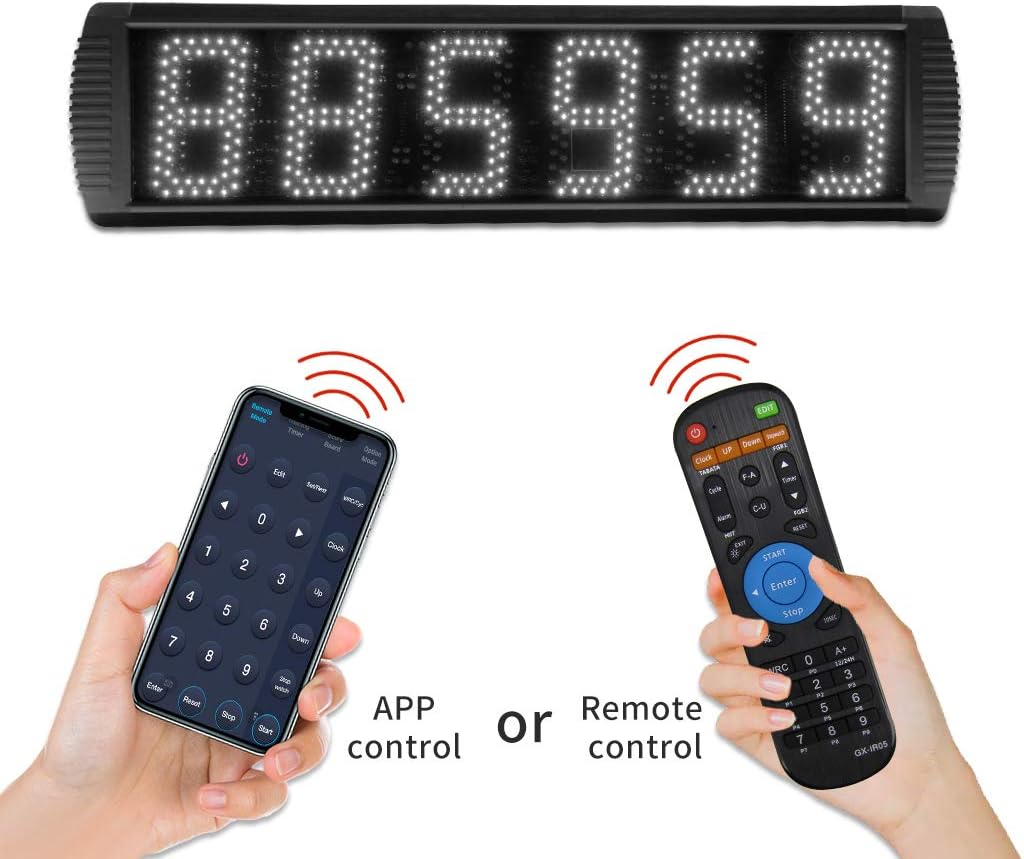
Image: Demonstrates control via either the mobile app or the physical remote control.
การปรับความสว่าง
The clock features 5 levels of brightness adjustment to suit various lighting conditions. Use the remote control or mobile app to cycle through the brightness settings until the desired level is achieved.

Image: Visual representation of the 5 levels of brightness adjustment for the LED display.
การซ่อมบำรุง
การทำความสะอาด
To clean the clock, gently wipe the display and frame with a soft, dry, or slightly damp ใช้ผ้าเช็ดทำความสะอาดเท่านั้น ห้ามใช้สารทำความสะอาดที่มีฤทธิ์กัดกร่อน สารละลาย หรือความชื้นมากเกินไป เพราะอาจทำให้ชิ้นส่วนอิเล็กทรอนิกส์เสียหายได้
การพิจารณาด้านสิ่งแวดล้อม
This product is not waterproof. It is recommended for indoor use or outdoor use only when there is no rain. Avoid exposing the clock to extreme temperatures, direct sunlight for prolonged periods, or high humidity.
พื้นที่จัดเก็บ
If storing the clock for an extended period, disconnect it from power and remove batteries from the remote control. Store in a cool, dry place.
การแก้ไขปัญหา
- นาฬิกาไม่เปิดใช้งาน: ตรวจสอบให้แน่ใจว่าอะแดปเตอร์ไฟฟ้าเชื่อมต่อกับนาฬิกาและเต้ารับไฟฟ้าที่ใช้งานได้แน่นหนา
- การควบคุมระยะไกลไม่ทำงาน: Check if the AAA batteries are correctly inserted and have sufficient charge. Ensure there are no obstructions between the remote and the clock.
- แอปไม่เชื่อมต่อ: Verify that Bluetooth is enabled on your mobile device and that the clock is powered on. Try restarting the app or your device.
- ปัญหาการแสดงผล: If the display is dim or flickering, check the brightness settings. If issues persist, disconnect power for a few minutes and reconnect.
For further assistance, please contact GAN XIN customer support.
ข้อมูลจำเพาะ
| หมายเลขรุ่น | GS6T-5RGB |
| ประเภทจอภาพ | 5-inch 6-Digit LED |
| ขนาดสินค้า (กว้าง x ยาว x สูง) | 27.1" x 7.4" x 1.6" (68.8 ซม. x 18.8 ซม. x 4.1 ซม.) |
| น้ำหนักสินค้า | 5 ปอนด์ (2.27 กก.) |
| วัสดุ | กรอบอลูมิเนียมอัลลอยด์ |
| วิธีการควบคุม | Infrared Remote Control, Bluetooth Mobile App ("GX_Remote") |
| ระดับเสียงกริ่ง | 80-85 เดซิเบล |
| แหล่งพลังงาน | อะแดปเตอร์แปลงไฟ AC (มีให้ในชุด) |
| สี | White LED display (on black frame) |

Image: Internal components and frame details, highlighting the HD display, professional board, and aluminum alloy frame.
การรับประกันและการสนับสนุน
GAN XIN products are manufactured with quality and reliability in mind. For specific warranty details, please refer to the warranty card included with your product or visit the official GAN XIN website. If you encounter any issues or have questions regarding your timing clock, please contact GAN XIN customer support through their official channels or the retailer where the product was purchased.
ผู้ผลิต: HANGZHOU GANXIN ELECTRONIC CO.LTD