
1. บทนำ
This manual provides detailed instructions for the proper setup, operation, and maintenance of your GAMFAMI Multi-Function Charging Stand with Cooling Fan. This accessory is designed to enhance your PlayStation 5 gaming experience by providing vertical storage, efficient cooling, and convenient charging for your PS5 DualSense controllers. It is compatible with both PS5 Disc and Digital Editions.
2. เนื้อหาบรรจุภัณฑ์
โปรดตรวจสอบว่ารายการทั้งหมดที่ระบุไว้ด้านล่างมีอยู่ในแพ็คเกจของคุณหรือไม่:
- Multi-Function Charging Stand
- หูฟัง Holder
- 4 Controller Charging Adapters
- สายไฟ USB
- คู่มือการใช้งาน (เอกสารนี้)
Note: The PS5 console, PS5 controllers, and power adapter are not included.

Image: All components of the charging stand laid out, including the base, vertical support, headphone holder, and charging adapters.
3. คำแนะนำในการตั้งค่า
- วางขาตั้ง: Position the multi-function charging stand on a stable, flat surface.
- Install PS5 Console: Carefully insert your PS5 console (Disc or Digital Edition) into the designated vertical slot on the stand. Ensure it is seated securely. A screw is provided to fasten the console to the stand for added stability.
- Attach Headphone Holder: Connect the headphone holder to the top of the vertical support on the stand.
- เชื่อมต่อพลังงาน: Plug the provided USB power cable into the Type-C input port on the back of the stand. Connect the other end of the USB cable to a 5V/1.5-2A power adapter (not included) or a suitable USB power source.

ภาพ: ภาพระยะใกล้ view showing the bottom of the PS5 console being attached to the stand with a screw for secure vertical placement.
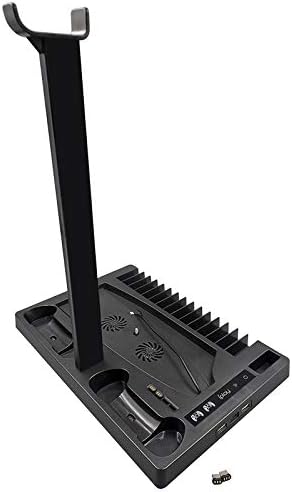
Image: The multi-function stand fully assembled, holding a PS5 console, two DualSense controllers, and a pair of gaming headphones.
4. คู่มือการใช้งาน
4.1 เปิด/ปิดเครื่อง
สัมผัส LED power icon on the stand to turn the unit on or off. The LED lights will illuminate when the stand is active.
4.2 การชาร์จคอนโทรลเลอร์
- Insert a charging adapter into the USB-C port of your PS5 DualSense controller.
- Place the controller into one of the two charging docks on the stand.
- The LED indicator for that dock will turn สีแดง to signify active charging.
- Once the controller is fully charged, the LED indicator will turn สีเขียว.
For optimal charging performance, it is recommended to use a 5V/1.5-2A power adapter.
4.3 การทำงานของพัดลมระบายความร้อน
The stand features two built-in cooling fans to help dissipate heat from your PS5 console.
- สัมผัส ไอคอนแฟน on the stand to cycle through the fan speeds: Low, Medium, High, and Off.
- Adjust the fan speed based on your console's temperature and usage intensity.
4.4 คุณสมบัติการจัดเก็บข้อมูล
- Game Slots: The stand includes 15 dedicated slots for storing your PS5 game discs.
- Headphone Holder: Utilize the attached holder to conveniently store your gaming headphones.
- Media Remote Slot: A dedicated slot is available for your PS5 media remote.
4.5 ฟังก์ชันการทำงานของฮับ USB
The stand provides additional connectivity options:
- 2 USB HUB Output Ports: These ports can be used to charge other USB-powered devices or connect additional accessories.
- 1 Type-C Input Port: This port allows the stand to be powered by a wall adapter, enabling controller charging even when your PS5 console is turned off.

ภาพ: รายละเอียด view of the stand's front, showing the LED charging status indicators, fan control button, and additional USB-A and USB-C ports.
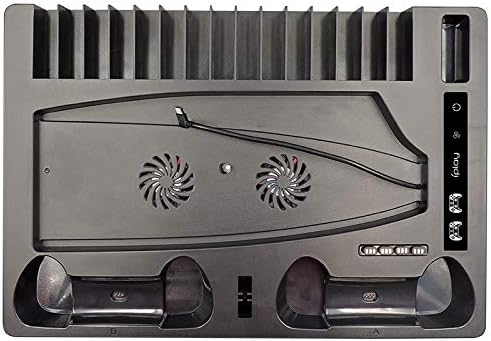
Image: An overhead perspective of the stand, highlighting the two cooling fan vents, controller charging docks, and the array of game storage slots.
Video: This video demonstrates the unboxing, assembly, and various functions of the GAMFAMI Multi-Function Charging Stand, including console placement, controller charging, and fan operation.
5. การบำรุงรักษา
- Keep the stand clean by wiping it with a soft, dry cloth. Avoid using abrasive cleaners or solvents.
- Ensure that the cooling fan vents are free from dust and obstructions to maintain optimal airflow.
- หลีกเลี่ยงการให้ผลิตภัณฑ์สัมผัสกับของเหลวหรือความชื้นที่มากเกินไป
6 การแก้ไขปัญหา
6.1 Controllers Not Charging
- Ensure the charging stand is powered on (LED power icon illuminated).
- Verify that the USB power cable is securely connected to the stand and a working power source (5V/1.5-2A adapter recommended).
- Check if the controller charging adapters are correctly inserted into both the controllers and the charging docks on the stand.
- Confirm that the controller's battery is not already full (green LED indicates full charge).
6.2 Cooling Fan Not Operating
- Ensure the charging stand is powered on.
- Press the fan icon to cycle through the fan speed settings.
- Check for any physical obstructions in the fan vents.
6.3 Stand Not Powering On
- Verify that the USB power cable is securely connected to the stand and the power source.
- Test the power adapter or USB port with another device to ensure it is functional.
7. ข้อมูลจำเพาะ
| ขนาดสินค้า | 12.87 x 8.86 x 1.77 นิ้ว |
| น้ำหนักสินค้า | 2.57 ปอนด์ |
| หมายเลขรุ่น | GMEKIT01-SRK5 |
| ผู้ผลิต | GAMFAMI |
| อุปกรณ์ที่รองรับ | PS5 Disc/Digital Edition, PS5 DualSense Controllers, Headphones, Media Remote |
| กำลังไฟเข้า | Type-C (requires 5V/1.5-2A adapter) |
| พอร์ตเอาท์พุต | 2x USB HUB, 2x Controller Charging Docks |
8. การรับประกันและการสนับสนุน
For warranty information, technical assistance, or customer support, please refer to the contact details provided with your product packaging or visit the official GAMFAMI webไซต์นี้ โปรดเก็บใบเสร็จรับเงินที่ซื้อไว้เพื่อใช้เรียกร้องการรับประกัน