
การแนะนำ
Thank you for choosing the Heyday Round Portable Bluetooth Speaker with Loop. This manual provides essential information for setting up, operating, and maintaining your speaker. Please read it thoroughly before use and retain it for future reference.
This portable speaker is designed for on-the-go audio, offering Bluetooth connectivity for seamless music streaming from your compatible devices. Its water-resistant construction makes it suitable for various environments, and the integrated loop provides convenient portability.
ข้อมูลด้านความปลอดภัย
- อย่าวางลำโพงไว้ในที่ที่มีอุณหภูมิสูงหรือต่ำเกินไป หรือโดนแสงแดดโดยตรงเป็นเวลานาน
- หลีกเลี่ยงการทำตกหรือให้ลำโพงได้รับแรงกระแทกรุนแรง
- ห้ามถอดประกอบ ซ่อมแซม หรือดัดแปลงลำโพงด้วยตนเอง โปรดติดต่อช่างผู้ชำนาญการเพื่อทำการซ่อมแซม
- Keep the speaker away from water and liquids, despite its water-resistant design. Do not submerge it.
- ใช้เฉพาะสาย USB ที่ให้มาในการชาร์จ
- ทิ้งแบตเตอรี่และลำโพงตามระเบียบข้อบังคับของท้องถิ่น
เนื้อหาแพ็คเกจ
- Heyday Round Portable Bluetooth Speaker with Loop
- สายชาร์จ USB
- คู่มือการใช้งาน (เอกสารนี้)
สินค้าเกินview
Familiarize yourself with the speaker's components:
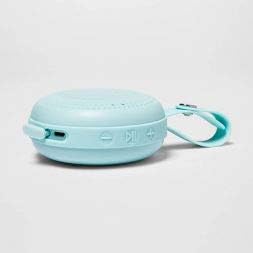
ภาพ: ด้านข้าง view of the Heyday Round Portable Bluetooth Speaker. This image displays the USB charging port, the power button, and the volume/track control buttons on the side of the speaker.
- ปุ่มเปิด/ปิด: กดค้างไว้เพื่อเปิดหรือปิดลำโพง
- พอร์ตชาร์จ USB: Connect the USB cable here to charge the speaker.
- ปุ่มลดระดับเสียง / ปุ่มเพลงก่อนหน้า: กดเพื่อลดระดับเสียง กดค้างไว้เพื่อไปยังแทร็กก่อนหน้า
- ปุ่มเล่น/หยุดชั่วคราว / โทรออก: Press to play or pause music. Press to answer or end a call. Press and hold to reject a call.
- ปุ่มเพิ่มระดับเสียง / ปุ่มเพลงถัดไป: กดเพื่อเพิ่มระดับเสียง กดค้างไว้เพื่อไปยังเพลงถัดไป
- ไฟแสดงสถานะ LED: แสดงสถานะพลังงาน การชาร์จ และบลูทูธ
- Integrated Loop: For convenient carrying or hanging.
การตั้งค่า
1. ชาร์จลำโพง
ก่อนใช้งานครั้งแรก ควรชาร์จลำโพงให้เต็ม
- เสียบปลายเล็กของสายชาร์จ USB ที่ให้มาเข้ากับพอร์ตชาร์จ USB บนลำโพง
- ต่อปลายสาย USB ด้านยาวเข้ากับอะแดปเตอร์แปลงไฟ USB (ไม่ได้รวมอยู่ในชุด) หรือพอร์ต USB ของคอมพิวเตอร์
- ไฟแสดงสถานะ LED จะสว่างขึ้นในระหว่างการชาร์จ และดับลงเมื่อชาร์จเต็มแล้ว
- โดยทั่วไปการชาร์จเต็มจะใช้เวลาประมาณ 2-3 ชั่วโมง
2. การเปิด/ปิดเครื่อง
- To turn on: Press and hold the Power Button for approximately 3 seconds. You will hear an audible prompt, and the LED indicator will flash.
- To turn off: Press and hold the Power Button for approximately 3 seconds. You will hear an audible prompt, and the LED indicator will turn off.
3. การจับคู่บลูทู ธ
เชื่อมต่อลำโพงของคุณกับอุปกรณ์ที่รองรับบลูทูธ (เช่น สมาร์ทโฟน แท็บเล็ต)
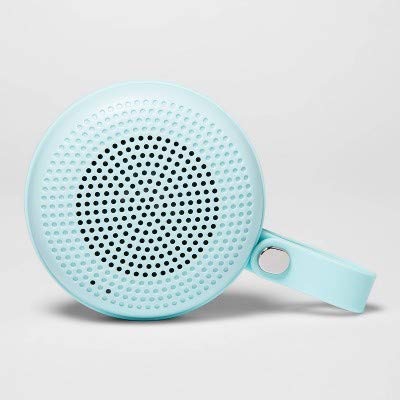
Image: The Heyday Round Portable Bluetooth Speaker in its light teal color, showcasing its compact, round design and integrated loop.
- Ensure the speaker is charged and powered on. The LED indicator will flash rapidly, indicating it's in pairing mode.
- บนอุปกรณ์ของคุณ ไปที่การตั้งค่า Bluetooth และเปิดใช้งาน Bluetooth
- ค้นหา available devices. The speaker will appear as "HEYDAY SPEAKER" or similar.
- เลือกผู้พูดจากรายการเพื่อเชื่อมต่อ
- Once successfully paired, the LED indicator will stop flashing and remain solid, and you will hear a confirmation tone.
- ลำโพงจะพยายามเชื่อมต่อกับอุปกรณ์ที่จับคู่ไว้ครั้งสุดท้ายโดยอัตโนมัติเมื่อเปิดเครื่อง
การใช้งานลำโพง
การเล่นเสียง
- After pairing, open your music app or audio source on your device and begin playback.
- กดปุ่ม ปุ่มเล่น/หยุดชั่วคราว เพื่อหยุดชั่วคราวหรือเล่นต่อ
- กดปุ่ม ปุ่มเพิ่มระดับเสียง (+) เพื่อเพิ่มระดับเสียง กดค้างไว้เพื่อข้ามไปยังเพลงถัดไป
- กดปุ่ม ปุ่มลดเสียง (-) to decrease volume. Press and hold to go back to the previous track.
การจัดการโทรศัพท์
- When a call comes in, the music will pause. Press the ปุ่มเล่น/หยุดชั่วคราว เพื่อรับสาย
- หากต้องการวางสาย ให้กด ปุ่มเล่น/หยุดชั่วคราว อีกครั้ง.
- ในการปฏิเสธสายเรียกเข้า ให้กด . ค้างไว้ ปุ่มเล่น/หยุดชั่วคราว เป็นเวลาประมาณ 2 วินาที
ความต้านทานต่อน้ำ
The speaker features a water-resistant design, making it suitable for outdoor use and protection against splashes. However, it is ไม่ waterproof. Do not submerge the speaker in water or expose it to heavy rain for extended periods.
การซ่อมบำรุง
- การทำความสะอาด: เช็ดลำโพงด้วยผ้าแห้งนุ่มๆ หรือผ้าชุบน้ำหมาดๆamp ผ้า ห้ามใช้น้ำยาทำความสะอาดที่มีฤทธิ์กัดกร่อน แอลกอฮอล์ หรือตัวทำละลายเคมี
- พื้นที่จัดเก็บ: เมื่อไม่ได้ใช้งานเป็นเวลานาน ควรเก็บลำโพงไว้ในที่แห้งและเย็น หลีกเลี่ยงแสงแดดโดยตรง
- การดูแลแบตเตอรี่ To prolong battery life, avoid fully discharging the speaker frequently. Recharge it regularly, even if not in constant use.
การแก้ไขปัญหา
| ปัญหา | สารละลาย |
|---|---|
| ลําโพงไม่เปิดขึ้น | ตรวจสอบให้แน่ใจว่าลำโพงชาร์จเต็มแล้ว เชื่อมต่อกับแหล่งจ่ายไฟด้วยสาย USB |
| ไม่สามารถจับคู่กับอุปกรณ์บลูทูธได้ |
|
| ไม่มีเสียงหรือเสียงเบา |
|
| คุณภาพเสียงไม่ดี |
|
ข้อมูลจำเพาะ
| ชื่อรุ่น | Round Portable Bluetooth Speaker with Loop |
| ยี่ห้อ | สวัสดี |
| เทคโนโลยีการเชื่อมต่อ | บลูทูธ, ยูเอสบี |
| แหล่งพลังงาน | ใช้พลังงานจากแบตเตอรี่ |
| อายุการใช้งานแบตเตอรี่ | ประมาณ 5 ชั่วโมง |
| เวลาในการชาร์จ | ประมาณ 2-3 ชั่วโมง |
| ความต้านทานต่อน้ำ | ใช่ (กันน้ำ) |
| ASIN | B091P75C5L |
| ยูพีซี/จีทีอิน | 191907191868 |
ข้อมูลการรับประกัน
Heyday products are designed for quality and reliability. For specific warranty details, please refer to the warranty card included with your purchase or visit the official Heyday website. Typically, a limited warranty covers manufacturing defects for a specified period from the date of purchase.
การสนับสนุนลูกค้า
If you encounter any issues or have questions not covered in this manual, please contact Heyday customer support. Refer to your product packaging or the official Heyday website for contact information, including phone numbers, email addresses, or support portals.
For online resources, you may visit the Heyday official page (Note: Heyday is a Target brand).