
1. บทนำ
This manual provides detailed instructions for the installation, setup, and operation of your LoraTap 5th Generation Smart Roller Shutter Switch. Please read this manual thoroughly before installation and use to ensure proper function and safety.
2. ข้อมูลด้านความปลอดภัย
- ความปลอดภัยทางไฟฟ้า: Installation must be performed by a qualified electrician or a person with a thorough understanding of electrical systems. Always turn off power at the circuit breaker before installation or maintenance.
- ต้องการลวดเป็นกลาง: This device requires a neutral wire for operation. Ensure your electrical box has a neutral wire available before attempting installation.
- ปฏิบัติการฉบับที่tage: The switch is designed for 240V AC systems. Do not connect to other voltagระบบอี
- โหลดสูงสุด: Do not exceed the maximum load of 2400W (10A) for connected devices.
- สำหรับใช้ภายในอาคารเท่านั้น: This product is intended for indoor use in dry environments. Avoid exposure to moisture or extreme temperatures.
3. สินค้าหมดview
The LoraTap 5th Gen Smart Roller Shutter Switch offers advanced control over your roller blinds, curtains, or awnings. It is compatible with electronic or motorized actuators. Key features include:
- เปอร์เซ็นtagอี การควบคุม: Open or close blinds to a specific percentage (0-100%) via the Smart Life app or voice commands.
- การควบคุมด้วยเสียง: เข้ากันได้กับ Amazon Alexa และ Google Home เพื่อการใช้งานแบบแฮนด์ฟรี
- ฟังก์ชั่นจับเวลา: Schedule automatic opening and closing times through the Smart Life app.
- รีโมทคอนโทรล: Control your blinds from anywhere using the Smart Life/Tuya app on your smartphone.
- การควบคุมและการแชร์ในกลุ่ม: Control multiple switches as a group and share device access with family members.

ภาพ: เหนือview of LoraTap Smart Roller Shutter Switch key features including percentage control, timer, voice control, and app remote control.

Image: The LoraTap Smart Roller Shutter Switch alongside a smartphone displaying the Smart Life app interface, highlighting the percentage control feature for blinds.

ภาพ: อดีตamples of compatible window coverings such as Venetian blinds, roller blinds, and awnings. The image includes a note indicating a typical motor wattage of less than 600W for such applications, while the switch itself supports up to 2400W.
4. ข้อมูลจำเพาะ
| หมายเลขรุ่น | SC400W-EU-V5T2 |
| ยี่ห้อ | ลอร่าแท็ป |
| ปฏิบัติการฉบับที่tage | 240 โวลต์เอซี |
| คะแนนปัจจุบัน | 10 Ampที่นั่น |
| วัดtage | 2400 วัตต์ (สูงสุด) |
| โปรโตคอลการเชื่อมต่อ | ไวไฟ |
| ประเภทการติดตั้ง | ติดผนัง |
| วัสดุ | เอบีเอส |
| ระดับการป้องกันน้ำและฝุ่น (IP) | IP20 |
| การปฏิบัติตาม | ได้รับการรับรอง CE |
| จำนวนตำแหน่ง | 101 (for 0-100% control) |
| ขนาดแพ็คเกจ | 10.5 x 10.3 x 4.4 ซม. |
| น้ำหนักแพ็คเกจ | 140 กรัม |

Image: Front, side, and back dimensions of the switch, along with a wiring diagram showing input L, input N, output N, output L1, and output L2. Note: Earth wire connection is not required.
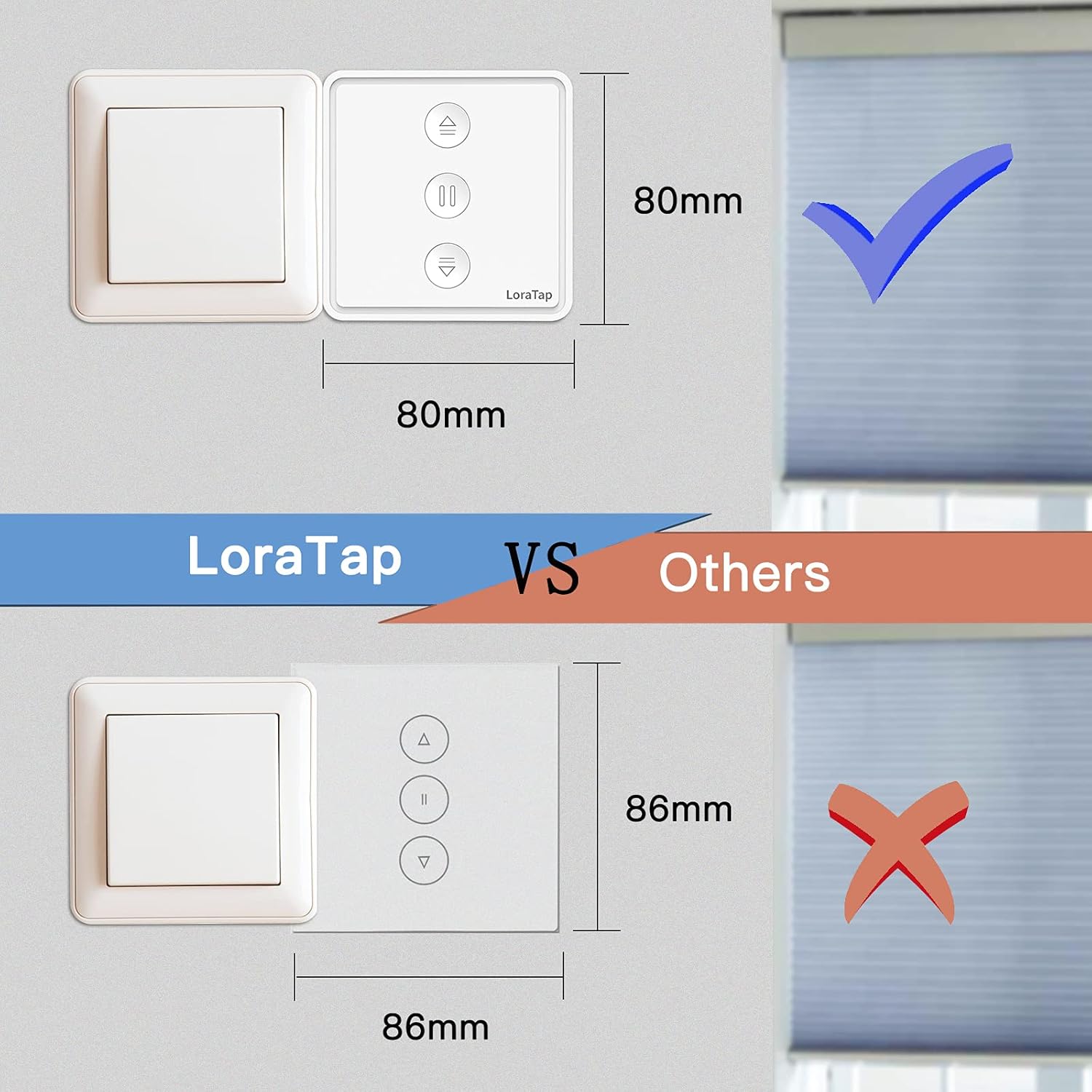
Image: A visual comparison illustrating the compact size of the LoraTap switch (80mm x 80mm) compared to larger standard switches (86mm x 86mm), indicating compatibility with standard wall boxes.
5. การติดตั้ง
สำคัญ: Ensure power is turned off at the main circuit breaker before beginning installation. If you are unsure about electrical wiring, consult a qualified electrician.
- เตรียมเดินสายไฟ: Identify the Live (L), Neutral (N), and motor wires (Up/Down/Common) from your existing roller shutter system. This switch requires a neutral wire.
- เชื่อมต่อสายไฟ: ดูแผนภาพการเดินสายไฟด้านล่าง
- Connect the Live wire from your power supply to the 'Input L' terminal on the switch.
- Connect the Neutral wire from your power supply to the 'Input N' terminal on the switch.
- Connect the motor's Common wire to the 'Output N' terminal on the switch.
- Connect the motor's Up wire to the 'Output L1' terminal on the switch.
- Connect the motor's Down wire to the 'Output L2' terminal on the switch.
- Note: An Earth wire connection is not required for this switch.
- เมานต์สวิตช์: Carefully place the wired switch into the wall box and secure it with screws. Attach the faceplate.
- คืนค่าพลัง: เปิดไฟที่เบรกเกอร์อีกครั้ง
Image: Detailed wiring diagram for the LoraTap switch. Ensure correct connection of Input L (Live), Input N (Neutral), Output N (Motor Common), Output L1 (Motor Up), and Output L2 (Motor Down). The diagram explicitly states no need to connect the Earth Wire.
6. การตั้งค่า
- ดาวน์โหลดแอพ: Download the "Smart Life" or "Tuya Smart" app from your smartphone's app store (iOS or Android).
- ลงทะเบียน/เข้าสู่ระบบ: สร้างบัญชีหรือเข้าสู่ระบบบัญชีที่มีอยู่ของคุณ
- เข้าสู่โหมดจับคู่: After powering on the switch, the LED indicator should blink rapidly. If not, press and hold the central pause button for approximately 5 seconds until it blinks rapidly to enter pairing mode.
- เพิ่มอุปกรณ์: In the app, tap the "+" icon to add a device. The app should automatically discover the switch. If not, manually select "Curtain Switch" or "Roller Shutter Switch" from the device list.
- เชื่อมต่อกับ Wi-Fi: Follow the in-app instructions to connect the switch to your 2.4GHz Wi-Fi network. (5GHz Wi-Fi is not supported).
- การสอบเทียบ: Once connected, the app will prompt you to calibrate the motor's travel time. This is crucial for accurate percentagอี การควบคุม
- Follow the app's instructions to fully open and fully close your blinds. The switch will record the time taken for each action.
- Accurate calibration ensures precise percentage positioning.
7. คู่มือการใช้งาน
7.1 การควบคุมด้วยตนเอง
The switch has three physical buttons:
- ลูกศรขึ้น (▲): กดเพื่อเปิดม่าน
- Pause (▮▮): กดเพื่อหยุดมู่ลี่ที่ตำแหน่งปัจจุบัน
- ลูกศรลง (▼): กดเพื่อปิดม่าน
7.2 App Control (Smart Life/Tuya App)
After successful setup, you can control your blinds via the app:
- Open/Close/Pause: Use the dedicated buttons in the app interface.
- เปอร์เซ็นtagอี การควบคุม: Use the slider in the app to set the blinds to any desired percentage (เช่น เปิด 50%)
- ฟังก์ชั่นจับเวลา:
- In the app, navigate to the switch's control interface.
- Select the "Timer" or "Schedule" option.
- Set desired times for opening or closing the blinds. You can also specify the percentage for scheduled actions.
- บันทึกตารางเวลาของคุณไว้
- การควบคุมกลุ่ม: Create groups of multiple LoraTap switches in the app to control them simultaneously.
- การแชร์อุปกรณ์: Share control of the switch with other family members by inviting them through the app.

Image: A smartphone screen displaying the Smart Life app's timer function, allowing users to schedule automatic opening and closing of curtains at specific times, such as 8:00 AM and 10:00 PM.

Image: The LoraTap switch next to an illustration of device sharing, indicating that control of the smart switch can be easily shared with multiple family members via the app.
7.3 การควบคุมด้วยเสียง
Integrate your LoraTap switch with Amazon Alexa or Google Home for voice commands:
- เชื่อมโยงบัญชี: ในแอป Alexa หรือ Google Home ให้เปิดใช้ทักษะ/การดำเนินการ "Smart Life" หรือ "Tuya Smart" และเชื่อมโยงบัญชีของคุณ
- ค้นพบอุปกรณ์: บอกผู้ช่วยเสียงของคุณให้ "ค้นหาอุปกรณ์"
- คำสั่งเสียง: ใช้คำสั่งเช่น:
- "Alexa, open [Device Name]"
- "Hey Google, close [Device Name]"
- "Alexa, set [Device Name] to 50 percent"
- "Hey Google, pause [Device Name]"
8. การบำรุงรักษา
- การทำความสะอาด: เช็ดพื้นผิวสวิตช์ด้วยผ้านุ่มและแห้ง ห้ามใช้น้ำยาทำความสะอาดที่มีฤทธิ์กัดกร่อนหรือตัวทำละลาย
- การตรวจสอบปกติ: Periodically check the physical condition of the switch and wiring for any signs of damage.
- การอัปเดตซอฟต์แวร์: Keep your Smart Life/Tuya app updated to ensure optimal performance and access to new features.
9 การแก้ไขปัญหา
| ปัญหา | สาเหตุที่เป็นไปได้ / วิธีแก้ไข |
|---|---|
| สวิตช์ไม่ตอบสนอง / ไม่มีไฟ |
|
| ไม่สามารถจับคู่กับแอปได้ |
|
| Inaccurate percentage การควบคุม |
|
| การควบคุมด้วยเสียงไม่ทำงาน |
|
10. การรับประกันและการสนับสนุน
LoraTap provides a รับประกัน 3 ปี for this product. LoraTap has over 10 years of experience in the research, development, and production of radio and smart switches. All LoraTap products are certified according to European standards.
For technical support or warranty claims, please contact LoraTapuk customer service through your purchase platform or visit the official LoraTap webเว็บไซต์สำหรับข้อมูลการติดต่อ