
1. บทนำ
This manual provides detailed instructions for the installation, operation, and maintenance of the Aideepen PWM DC Motor Speed Controller, Model BLM-30A. This device is designed to control the speed of DC motors by adjusting the Pulse Width Modulation (PWM) signal. It features a wide input voltage range, high current capacity, and a clear LED display for precise speed monitoring.
คุณสมบัติหลัก:
- โครงสร้างทนทาน: Manufactured from robust materials for enhanced durability and wear resistance.
- ติดตั้งง่าย: Equipped with screw terminals for convenient and quick wiring.
- จอแสดงผลดิจิตอล LED: แสดงความเร็วมอเตอร์เป็นเปอร์เซ็นต์tage of the maximum speed, allowing for easy data reading.
- ฉบับกว้างtagอี ช่วง: Supports DC input voltages from 6V to 60V, compatible with 12V, 24V, 36V, and 48V power supplies.
- กระแสไฟฟ้าขาออกสูง: Provides an adjustable output current from 0A to 30A.
- ประสิทธิภาพที่มั่นคง: Features an instant start/stop switch and a rotary potentiometer for reliable and precise speed control.
2. ข้อมูลด้านความปลอดภัย
โปรดอ่านและทำความเข้าใจคำแนะนำด้านความปลอดภัยทั้งหมดก่อนติดตั้งหรือใช้งานอุปกรณ์นี้ การไม่ปฏิบัติตามคำแนะนำเหล่านี้อาจส่งผลให้เกิดไฟฟ้าช็อต ไฟไหม้ หรือการบาดเจ็บร้ายแรงได้
- ตรวจสอบให้แน่ใจว่าตัดการเชื่อมต่อแหล่งจ่ายไฟก่อนที่จะทำการต่อสายไฟใดๆ
- ตรวจสอบว่าปริมาณอินพุตtage and current ratings match the specifications of the controller and your motor.
- ห้ามใช้กระแสไฟฟ้าเกินพิกัดสูงสุด 30A
- Install the controller in a dry, well-ventilated area, away from flammable materials.
- Avoid short circuits during wiring and operation.
- This device is intended for DC motors only. Do not connect to AC power.
3. สินค้าหมดview
The Aideepen PWM DC Motor Speed Controller features a compact design with an intuitive interface.

รูปที่ 3.1 : ด้านหน้า view of the speed controller, highlighting the LED display, SET button, PWM OUT indicator, and the multi-function rotary knob for speed adjustment and start/stop control.

Figure 3.2: Close-up of the LED digital display, which indicates the motor speed as a percentage.

Figure 3.3: Close-up of the rotary knob, used for adjusting speed and initiating motor start/stop functions.
4. ข้อมูลจำเพาะ
| พารามิเตอร์ | ค่า |
|---|---|
| หมายเลขรุ่น | BLM-30A (A7XI0023) |
| อินพุต Voltagอี เรนจ์ | แรงดันไฟฟ้ากระแสตรง 6V - 60V |
| กระแสไฟขาออก | 0A - 30A (Continuous current: 20A) |
| ช่วงความเร็ว | 0% - 100% |
| ประเภทการควบคุม | การควบคุมกระแสไฟ |
| ความถี่ควบคุม | 15กิโลเฮิรตซ์ |
| วิธีการปรับ | Potentiometer (Rotary Knob) |
| ประเภทสายไฟ | สกรูเทอร์มินัล |
| ขนาดสินค้า (กว้าง x ยาว x สูง) | 9 x 6 x 3.5 ซม. (ประมาณ 3.54 x 2.36 x 1.38 นิ้ว) |
| น้ำหนัก | 100 กรัม |
5. การตั้งค่าและการติดตั้ง
Follow these steps to correctly install and wire your motor speed controller.
คำแนะนำในการเดินสายไฟ:

Figure 5.1: Wiring diagram illustrating the connection points for power input and motor output.
- กำลังไฟเข้า: Connect your DC power supply to the terminals labeled 'Input positive 6-60V' (positive) and 'negative power supply' (negative). Ensure the voltage อยู่ในช่วงแรงดันไฟฟ้ากระแสตรง 6V-60V
- มอเตอร์เอาท์พุต: Connect your DC motor to the terminals labeled 'motor positive' (positive) and 'motor negative' (negative).
- การเชื่อมต่อที่ปลอดภัย: Tighten all screw terminals to ensure a secure and stable connection. Loose connections can cause overheating or malfunction.
Always double-check your wiring before applying power to prevent damage to the controller or motor.
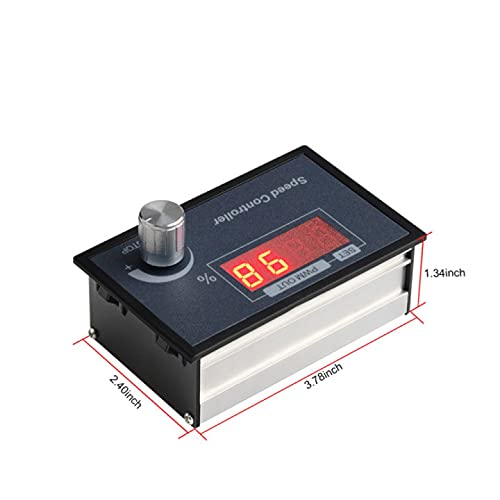
Figure 5.2: Detail of the screw terminals for power and motor connections.
6. คู่มือการใช้งาน
Once the controller is correctly wired and powered on, you can begin operating your DC motor.
- เปิดเครื่อง: Apply power to the controller. The LED display will illuminate, showing the current speed percentage.
- Start/Stop Function: The rotary knob also functions as a start/stop switch. A short press of the knob will start or stop the motor.
- การปรับความเร็ว: Rotate the knob clockwise to increase the motor speed and counter-clockwise to decrease it. The LED display will show the speed as a percentagอี (0-100%)
- Setting Mode (Advanced): A long press of the rotary knob will enter the setting mode for advanced parameters. Refer to specific product documentation or manufacturer support for details on advanced settings if needed.

Figure 6.1: Controller interface with labels for function, parameter value, and rotary knob operation.
7. การบำรุงรักษา
เพื่อให้มั่นใจได้ถึงอายุการใช้งานที่ยาวนานและประสิทธิภาพสูงสุดของตัวควบคุมความเร็วของมอเตอร์ DC แบบ PWM ของ Aideepen โปรดปฏิบัติตามคำแนะนำในการบำรุงรักษาเหล่านี้:
- การทำความสะอาด: Periodically clean the exterior of the controller with a soft, dry cloth. Do not use liquid cleaners or solvents.
- การตรวจสอบ: Regularly inspect the wiring connections for any signs of looseness, corrosion, or damage. Tighten connections as needed.
- การระบายอากาศ : ตรวจสอบให้แน่ใจว่าช่องระบายอากาศไม่ถูกปิดกั้นเพื่อป้องกันความร้อนสูงเกินไป
- พื้นที่จัดเก็บ: If storing the controller for an extended period, keep it in a dry, dust-free environment.
8 การแก้ไขปัญหา
หากคุณพบปัญหาเกี่ยวกับตัวควบคุมความเร็วของมอเตอร์ โปรดดูคู่มือการแก้ไขปัญหาต่อไปนี้:
| ปัญหา | สาเหตุที่เป็นไปได้ | สารละลาย |
|---|---|---|
| มอเตอร์ไม่สตาร์ท | No power supply; Incorrect wiring; Motor in stop mode; Faulty motor. | ตรวจสอบการเชื่อมต่อสายไฟและแรงดันไฟฟ้าtage; Verify wiring according to Figure 5.1; Short press the rotary knob to start the motor; Test motor independently. |
| Motor speed cannot be adjusted | Rotary knob malfunction; Controller fault. | Ensure the knob rotates freely; If issue persists, contact support. |
| LED display is off or flickering | No power; Low input voltage; การเชื่อมต่อหลวม | Check power supply; Ensure input voltage is within 6-60V; Inspect and tighten all wiring connections. |
| คอนโทรลเลอร์ร้อนเกินไป | Overload; Poor ventilation; Short circuit. | Reduce motor load; Ensure adequate airflow around the controller; Check for short circuits in wiring. |
9. การรับประกันและการสนับสนุน
Information regarding specific warranty terms and conditions for the Aideepen PWM DC Motor Speed Controller is not available in this document. For warranty claims, technical support, or further assistance, please contact your retailer or the manufacturer directly through their official support channels.
Please have your product model (BLM-30A) and purchase details ready when contacting support.