
1. บทนำ
This manual provides comprehensive instructions for the installation, operation, and maintenance of the ACTI CORPORATION A418 6MP Network Outdoor Bullet Camera. Please read this manual thoroughly before using the product to ensure proper setup and optimal performance. Keep this manual for future reference.
2. สินค้าหมดview
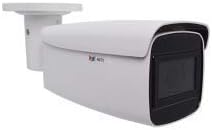
The ACTI CORPORATION A418 is a robust 6-megapixel network outdoor bullet camera designed for high-quality surveillance. It features a 2.7-13.5mm 5X zoom lens with auto-focus capabilities, adaptive IR illumination for night vision up to 85 meters, and superior Wide Dynamic Range (WDR) of 150 dB for clear images in challenging lighting conditions. The camera supports H.265/H.264 video compression, delivers 1440p at 30 frames per second, and includes 3D Digital Noise Reduction (DNR). It is built with an IP68 weatherproof and IK10 vandal-proof metal casing, making it suitable for harsh outdoor environments. Connectivity options include PoE/DC12V power and an RJ45 connection.
คุณสมบัติหลัก:
- เซ็นเซอร์: 1/2.7" Progressive Scan CMOS with 3072 x 2048 resolution.
- เลนส์: 2.7-13.5mm, 5X Zoom Lens with Auto Focus.
- ระยะอินฟราเรด: Up to 85 meters with 4 IR LEDs (850 nm).
- การปรับปรุงภาพ: Extreme WDR (150 dB) and 2D + 3D DNR.
- ความทนทาน: IP68 weatherproof and IK10 vandal-proof metal casing.
- การเชื่อมต่อ: RJ45 for network, PoE/DC12V for power.
- พื้นที่จัดเก็บ: MicroSD/MicroSDHC/MicroSDXC card slot.
3. Components and Connections
The A418 camera comes with essential components for its operation. Familiarize yourself with the various ports and connections on the device.
ส่วนประกอบที่รวมอยู่:
- ACTI CORPORATION A418 6MP Network Outdoor Bullet Camera (1 unit)

Connection Points Explained:
- 1. พอร์ตอีเธอร์เน็ต: RJ45 connector for network connection and Power over Ethernet (PoE).
- 2. Digital Input / Output (DI/DO): สำหรับเชื่อมต่อเซ็นเซอร์หรืออุปกรณ์เตือนภัยภายนอก
- 3. อินพุต/เอาต์พุตเสียง: For connecting external microphone and speaker.
- 4. ช่องเสียบไฟ DC 12V: แหล่งจ่ายไฟสำรองหากไม่ได้ใช้ PoE
- 5. ปุ่มรีเซ็ต: ใช้เพื่อคืนการตั้งค่าเริ่มต้นจากโรงงาน
- 6. Analog Video Output Connector: For local video output during installation or troubleshooting.
- 7. ช่องเสียบการ์ดหน่วยความจำ: Supports MicroSD/MicroSDHC/MicroSDXC for local storage.
4. การตั้งค่าและการติดตั้ง
Proper installation is crucial for the camera's performance and longevity. The A418 is designed for outdoor security applications and can be mounted using optional accessories.
4.1 การติดตั้งทางกายภาพ:
- เลือกตำแหน่ง: เลือกสถานที่กลางแจ้งที่เหมาะสมซึ่งมีพื้นที่ตามที่ต้องการ view and is within range of your network and power source. Consider the camera's IP68 weatherproof and IK10 vandal-proof ratings for optimal placement.
- การติดตั้ง: Securely mount the camera using appropriate screws and mounting hardware (not included). Ensure the mounting surface can support the camera's weight (15.8 ounces).
- ปรับมุม: Adjust the camera's angle and orientation to cover the desired surveillance area.

4.2 Power and Network Connection:
- แหล่งจ่ายไฟ: Connect the camera to power using either Power over Ethernet (PoE) via the RJ45 Ethernet port or by connecting a DC 12V power adapter to the DC 12V Power Input.
- การเชื่อมต่อเครือข่าย: Connect an Ethernet cable from your network switch or router to the camera's RJ45 Ethernet Port. The camera supports Wi-Fi for wireless communication technology.
- การ์ด MicroSD (อุปกรณ์เสริม): Insert a MicroSD/MicroSDHC/MicroSDXC card into the memory card slot for local video storage.
5. การใช้งานกล้อง
Once installed and connected, the camera can be accessed and configured through a network interface.
5.1 Initial Access:
- ค้นพบกล้องถ่ายรูป: Use the manufacturer's provided software or a network scanner to discover the camera's IP address on your network.
- เข้าสู่ระบบ: เข้าถึงกล้อง web อินเทอร์เฟซโดยป้อนที่อยู่ IP ลงใน web browser. Log in using the default credentials (refer to the camera's quick start guide or manufacturer's website for default username/password).
- เปลี่ยนรหัสผ่าน: เพื่อความปลอดภัย ให้เปลี่ยนรหัสผ่านเริ่มต้นทันทีเมื่อเข้าสู่ระบบครั้งแรก
5.2 Configuration and Features:
- การตั้งค่าวิดีโอ: Configure video resolution (up to 6 MP, 3072 x 2048), frame rate (30 fps), compression (H.265/H.264), and image quality settings.
- การควบคุมเลนส์: Utilize the 5X optical zoom and auto-focus features to achieve a clear and precise view.
- การส่องสว่างด้วยอินฟราเรด: The adaptive IR LEDs automatically adjust intensity based on ambient light for optimal night vision up to 85 meters.
- WDR and DNR: Leverage Extreme WDR (150 dB) and 2D/3D DNR for improved image clarity in high-contrast or low-light scenes.
- การตรวจจับการเคลื่อนไหว: Set up motion-only alerts and configure detection zones and sensitivity.
- พื้นที่จัดเก็บ: Configure recording to the inserted MicroSD card or a Network Video Recorder (NVR).
- เสียง: If external audio devices are connected, configure audio input/output settings.
6. การบำรุงรักษา
การบำรุงรักษาอย่างสม่ำเสมอจะช่วยให้กล้องของคุณมีอายุการใช้งานยาวนานและทำงานได้อย่างมีประสิทธิภาพสูงสุด
- การทำความสะอาด: ทำความสะอาดเลนส์และตัวเรือนกล้องเป็นระยะด้วยผ้านุ่มๆamp ผ้า. ห้ามใช้สารเคมีรุนแรงหรือวัสดุกัดกร่อน
- อัพเดตเฟิร์มแวร์: ตรวจสอบ ACTi webเว็บไซต์นี้สำหรับการอัปเดตเฟิร์มแวร์อย่างสม่ำเสมอ การอัปเดตเฟิร์มแวร์อย่างสม่ำเสมอช่วยให้มั่นใจได้ว่าจะสามารถเข้าถึงฟีเจอร์ล่าสุด แพตช์ความปลอดภัย และการปรับปรุงประสิทธิภาพได้
- การตรวจสอบสายเคเบิล: Periodically inspect all cables and connections for any signs of wear or damage, especially in outdoor environments.
7 การแก้ไขปัญหา
This section addresses common issues you might encounter with your A418 camera.
- ไม่มีไฟฟ้า: Ensure both PoE and DC12V power sources are correctly connected and active. Check power cables and network cables for damage.
- ไม่มีภาพวิดีโอ: Verify network connectivity. Ensure the camera's IP address is correct and accessible. Check firewall settings on your network.
- คุณภาพของภาพต่ำ: Clean the lens. Adjust focus and zoom settings. Check lighting conditions and ensure WDR/DNR settings are optimized.
- ปัญหาการเชื่อมต่อเครือข่าย: Verify the Ethernet cable is securely connected. Check network settings (IP address, subnet mask, gateway). Ensure no IP address conflicts exist on the network.
- กล้องไม่ตอบสนอง: If the camera becomes unresponsive, try power cycling it. If the issue persists, use the reset button (refer to Figure 3.1) to restore factory default settings. Note that this will erase all custom configurations.
8. ข้อมูลจำเพาะ
Detailed technical specifications for the ACTI CORPORATION A418 camera.
| คุณสมบัติ | ข้อมูลจำเพาะ |
|---|---|
| หมายเลขรุ่น | เอ418 |
| ผู้ผลิต | ACTI CORPORATION |
| ความละเอียดในการจับภาพวิดีโอ | 6 ล้านพิกเซล (3072 x 2048) |
| อัตราเฟรม | 30 เฟรมต่อวินาที |
| เลนส์ | 2.7-13.5mm, 5X Zoom Lens |
| ประเภทโฟกัส | โฟกัสอัตโนมัติ |
| ช่วง IR | สูงถึง 85 ม. |
| ดับเบิ้ลยูดีอาร์ | Extreme WDR (150 dB) |
| DNR | 2D + 3D DNR |
| การให้คะแนนการคุ้มครองระหว่างประเทศ | IP68 |
| การต่อต้านการก่อวินาศกรรม | IK10 (metal casing) |
| แหล่งพลังงาน | PoE / DC12V |
| เทคโนโลยีการเชื่อมต่อ | ไร้สาย (Wi-Fi), แบบมีสาย (RJ45) |
| พื้นที่จัดเก็บ | MicroSD/MicroSDHC/MicroSDXC |
| ฟอร์มแฟกเตอร์ | กระสุน |
| วัสดุ | โลหะ |
| ขนาดรายการ (ยาว x กว้าง x สูง) | 11.7 x 4.1 x 4.1 นิ้ว |
| น้ำหนักสินค้า | 15.8 ออนซ์ |
| การใช้ที่แนะนำ | การรักษาความปลอดภัยภายนอกอาคาร |
| ยูพีซี | 764227914365 |
9. การรับประกันและการสนับสนุน
For information regarding product warranty, please refer to the warranty card included with your purchase or visit the official ACTi Corporation website. Support resources, including FAQs, software downloads, and contact information, are also available on the manufacturer's webเว็บไซต์.
If you require technical assistance, please contact ACTi Corporation customer support or your authorized reseller.