การแนะนำ
This manual provides comprehensive instructions for the installation, operation, and maintenance of your Generic X550-T2 Dual Port 10GB Ethernet Adapter. Please read this manual thoroughly before installation and retain it for future reference.
ข้อมูลด้านความปลอดภัย
- Ensure your computer is powered off and unplugged from the wall outlet before installing or removing the adapter.
- Discharge any static electricity from your body by touching a grounded metal object before handling the adapter.
- Handle the adapter by its edges to avoid touching components on the circuit board.
- อย่าให้ตัวอะแดปเตอร์โดนความชื้นหรืออุณหภูมิที่สูงหรือต่ำเกินไป
เนื้อหาแพ็คเกจ
ตรวจสอบว่ามีรายการทั้งหมดอยู่ในแพ็คเกจ:
- Generic X550-T2 Dual Port 10GB Ethernet Adapter
- โปรต่ำfile bracket (if applicable, for small form factor PCs)
- Driver CD (or instructions for driver download)
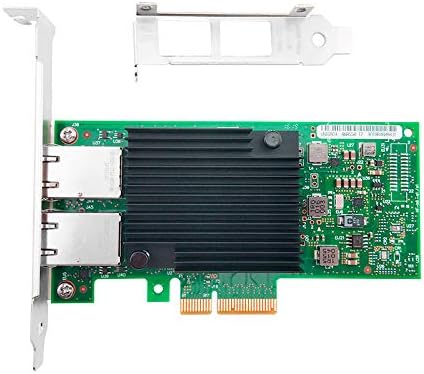
Image 1: The X550-T2 Dual Port 10GB Ethernet Adapter, showing the main board and included brackets.
การติดตั้งและการตั้งค่า
- ระบบปิดเครื่อง: ปิดคอมพิวเตอร์ของคุณอย่างสมบูรณ์และถอดสายไฟออกจากเต้าเสียบที่ผนัง
- เปิดเคสคอมพิวเตอร์: ถอดแผงด้านข้างของเคสคอมพิวเตอร์ของคุณเพื่อเข้าถึงเมนบอร์ด
- ค้นหาสล็อต PCI-E: Identify an available PCI Express (PCI-E) x4 or larger slot on your motherboard.
- ถอดฝาครอบช่อง: Carefully remove the metal slot cover corresponding to the chosen PCI-E slot on the back of your computer case.
- ติดตั้งอะแดปเตอร์: Align the adapter with the PCI-E slot and firmly press it down until it is securely seated. Ensure the bracket is flush with the case opening.
- อะแดปเตอร์ที่ปลอดภัย: Use a screw to secure the adapter's bracket to the computer case.
- ปิดคดี: เปลี่ยนแผงด้านข้างเคสคอมพิวเตอร์
- เชื่อมต่อพลังงานอีกครั้ง: เสียบสายไฟกลับเข้ากับเต้าเสียบที่ผนังและเปิดคอมพิวเตอร์ของคุณ
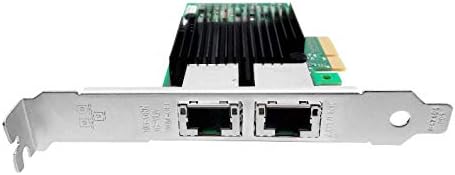
ภาพที่ 2: ภาพระยะใกล้ view of the dual RJ45 ports on the adapter, ready for network cable connection.
คำแนะนำการใช้งาน
การติดตั้งไดร์เวอร์
Upon first boot after installation, your operating system (e.g., Windows) may automatically detect and install the necessary drivers. If not, follow these steps:
- ใส่แผ่นซีดีไดร์เวอร์: If provided, insert the driver CD into your computer's optical drive and follow the on-screen instructions.
- ดาวน์โหลดไดรเวอร์: If no CD is provided or for updated drivers, visit the manufacturer's website (or a reputable driver download site for Generic products) and download the appropriate drivers for the X550-T2 adapter and your operating system.
- ติดตั้งไดรเวอร์: Run the downloaded driver installer and follow the prompts. Restart your computer if prompted.
การเชื่อมต่อเครือข่าย
Once drivers are installed, connect your network cables:
- Connect one end of a standard RJ45 Ethernet cable to one of the ports on the X550-T2 adapter.
- Connect the other end of the Ethernet cable to your network switch, router, or directly to another 10GB Ethernet device.
- Repeat for the second port if dual connectivity is desired.
- Verify network connectivity through your operating system's network settings.
การซ่อมบำรุง
- Keep the computer case clean and free of dust to ensure proper airflow and prevent overheating of the adapter.
- Periodically check for updated drivers on the manufacturer's webไซต์เพื่อให้มั่นใจถึงประสิทธิภาพและความเข้ากันได้ที่เหมาะสมที่สุด
- Avoid physical impact or bending of the adapter.
การแก้ไขปัญหา
- No network connectivity after installation:
- Ensure the adapter is fully seated in the PCI-E slot.
- Verify that the network cables are securely connected to both the adapter and the network device.
- Check if the drivers are correctly installed in your operating system's Device Manager. Reinstall drivers if necessary.
- Confirm that the network switch/router is powered on and functioning correctly.
- Slow network speeds:
- Ensure you are using CAT6a or CAT7 Ethernet cables for 10GB speeds.
- Verify that your network switch/router supports 10GB Ethernet.
- Update the network adapter drivers to the latest version.
- Check for other network congestion or issues on your network.
- Adapter not detected by the system:
- Reseat the adapter in the PCI-E slot.
- ลองติดตั้งอะแดปเตอร์ในช่อง PCI-E อื่นหากมี
- Ensure your motherboard's BIOS/UEFI settings are configured to enable PCI-E slots.
ข้อมูลจำเพาะ
| คุณสมบัติ | รายละเอียด |
|---|---|
| หมายเลขรุ่น | 902867-001 |
| ฮาร์ดแวร์อินเตอร์เฟซ | Ethernet, PCI Express x4 |
| โปรโตคอลการเชื่อมโยงข้อมูล | อีเธอร์เน็ต |
| อัตราการถ่ายโอนข้อมูล | 10 กิกะบิตต่อวินาที |
| พอร์ต | RJ45 คู่ |
| อุปกรณ์ที่รองรับ | เดสก์ท็อปพีซี |
| ตระกูลระบบปฏิบัติการที่เข้ากันได้ | Windows (and likely Linux/macOS with appropriate drivers) |
| น้ำหนักสินค้า | 7 ออนซ์ |
| ขนาดแพ็คเกจ | 8.93 x 5.78 x 1.33 นิ้ว |
การรับประกันและการสนับสนุน
For warranty information and technical support, please refer to the documentation provided with your purchase or contact the retailer. As this is a Generic product, specific warranty terms may vary by seller.


