
1. บทนำ
This manual provides instructions for the ALLIMITY EN3V39S remote control, designed as a replacement for Sharp televisions. This remote control requires no programming or setup; simply insert batteries to begin use.
2. เนื้อหาบรรจุภัณฑ์
- 1 x ALLIMITY EN3V39S Remote Control
3. การตั้งค่า: การติดตั้งแบตเตอรี่
To prepare your remote control for use, follow these steps to install the batteries:
- ค้นหาฝาปิดช่องใส่แบตเตอรี่ที่ด้านหลังของรีโมทคอนโทรล
- กดแท็บลงแล้วเลื่อนฝาลงเพื่อเปิดช่อง
- Insert two AAA alkaline batteries, ensuring the positive (+) and negative (-) terminals align correctly with the markings inside the compartment.
- เลื่อนฝาปิดช่องใส่แบตเตอรี่กลับเข้าที่จนกระทั่งล็อคเข้าที่อย่างแน่นหนา
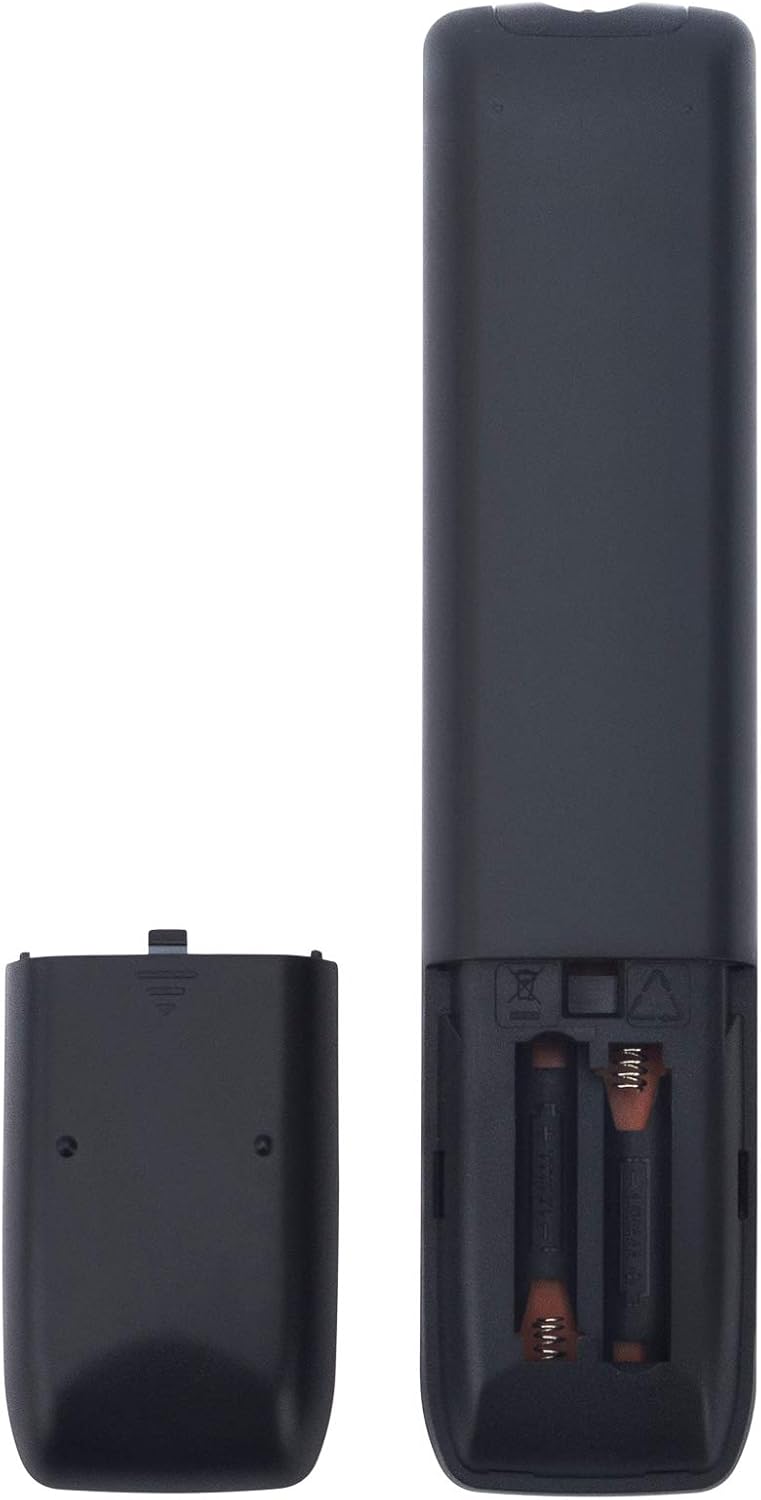
ภาพ: ด้านหลัง view of the remote control with the battery cover open, illustrating battery insertion.
The remote control is now ready for use with your Sharp TV without any additional programming.
4. คู่มือการใช้งาน
The ALLIMITY EN3V39S remote control provides direct access to various functions of your Sharp TV. Point the remote control directly at your television's infrared receiver for optimal performance.

ภาพ: ด้านหน้า view of the ALLIMITY EN3V39S remote control, displaying its button layout.
ฟังก์ชั่นพื้นฐาน:
- พลัง (●): เปิดหรือปิดทีวี
- ป้อนข้อมูล: Selects the video input source (e.g., HDMI 1, AV).
- ปุ่มตัวเลข (0-9): กรอกหมายเลขช่องโดยตรง
- ปริมาณ (+/-): ปรับระดับเสียง
- CH (▲/▼): เปลี่ยนช่องโทรทัศน์ขึ้นหรือลง
- ปิดเสียง (🔇): ปิดหรือเปิดเสียงทีวี
- ปุ่มนำทาง (▲/▼/◀/▶): นำทางผ่านเมนูและตัวเลือก
- ตกลง: ยืนยันการเลือกในเมนู
- กลับ: กลับไปยังเมนูหรือหน้าจอก่อนหน้า
- ทางออก: ออกจากเมนูหรือแอพพลิเคชันปัจจุบัน
คุณสมบัติพิเศษ:
- แอป: Accesses the TV's smart applications menu.
- Netflix, Claro video, Tikilive, YouTube: ปุ่มเฉพาะสำหรับการเข้าถึงบริการสตรีมมิ่งเหล่านี้อย่างรวดเร็ว
- Picture, Sound, Aspect, Sleep: Direct access to TV settings for picture, sound, aspect ratio, and sleep timer.
- ซีซี: เปิดใช้งานหรือปิดใช้งานคำบรรยายภาพ
- บ้าน (🏠): กลับสู่หน้าจอหลักของทีวี
- Media Playback Controls (◀◀, ▶▶, ▮▮, ▶, ■): Control media playback (rewind, fast forward, pause, play, stop).
5. การบำรุงรักษา
เพื่อให้แน่ใจว่ารีโมทคอนโทรลของคุณมีอายุการใช้งานยาวนานและทำงานได้อย่างถูกต้อง:
- การทำความสะอาด: เช็ดรีโมทคอนโทรลด้วยผ้านุ่มและแห้ง ห้ามใช้น้ำยาทำความสะอาดหรือวัสดุที่มีฤทธิ์กัดกร่อน
- การเปลี่ยนแบตเตอรี่: Replace batteries when the remote's response becomes sluggish or stops working. Always replace both batteries at the same time with new AAA alkaline batteries.
- พื้นที่จัดเก็บ: เก็บรีโมทไว้ในที่แห้งและเย็น ห่างจากแสงแดดโดยตรงและอุณหภูมิที่สูงหรือต่ำมาก
- หลีกเลี่ยงการหยด: ปกป้องรีโมตจากแรงกระแทก เพราะการตกอาจทำให้ส่วนประกอบภายในเสียหายได้
6 การแก้ไขปัญหา
If you encounter issues with your remote control, consider the following:
- รีโมตไม่ตอบสนอง:
- ตรวจสอบว่าใส่แบตเตอรี่ถูกต้องตามขั้ว (+/-)
- เปลี่ยนแบตเตอรี่เก่าด้วยแบตเตอรี่อัลคาไลน์ AAA ใหม่
- ตรวจสอบให้แน่ใจว่าไม่มีสิ่งกีดขวางระหว่างรีโมทคอนโทรลและเซ็นเซอร์อินฟราเรดของทีวี
- Confirm you are pointing the remote directly at the TV.
- ขอบเขตจำกัด:
- The maximum effective range is approximately 10 meters (33 feet). Ensure you are within this range.
- Weak batteries can reduce the remote's effective range. Replace them if necessary.
- ปุ่มบางปุ่มใช้งานไม่ได้:
- Ensure the TV is fully powered on and not in a standby mode that might restrict certain functions.
- If only certain buttons fail, it might indicate a physical issue with the remote.
7. ข้อมูลจำเพาะ
| คุณสมบัติ | รายละเอียด |
|---|---|
| ยี่ห้อ | ความเสมอภาค |
| หมายเลขรุ่น | EN3V39S |
| อุปกรณ์ที่รองรับ | Sharp Televisions |
| เทคโนโลยีการเชื่อมต่อ | อินฟราเรด |
| คุณสมบัติพิเศษ | ไม่จำเป็นต้องเขียนโปรแกรม |
| จำนวนอุปกรณ์ที่รองรับสูงสุด | 1 |
| จำนวนปุ่ม | 20 |
| ประเภทตัวควบคุม | ปุ่มควบคุม |
| ระยะสูงสุด | 10 เมตร (ประมาณ 33 ฟุต) |
| ประเภทแบตเตอรี่ | แบตเตอรี่อัลคาไลน์ AAA 2 ก้อน (ไม่รวม) |
| น้ำหนักสินค้า | 3.36 ออนซ์ (ประมาณ 95 กรัม) |
| ขนาดรายการ (ยาว x กว้าง x สูง) | 6"L x 2"W x 0.5"H (ประมาณ 15.24 x 5.08 x 1.27 ซม.) |
8. การรับประกันและการสนับสนุน
For information regarding warranty coverage or customer support, please refer to your purchase documentation or contact the seller directly. Keep your proof of purchase for any warranty claims.