
1. บทนำ
This user manual provides essential information for the safe and efficient operation of your Redmi Smart LED TV X55. Please read this manual thoroughly before using the product and retain it for future reference.
The Redmi Smart LED TV X55 offers a 55-inch 4K Ultra HD display, powered by Android TV, and features advanced audio and visual technologies for an immersive entertainment experience.
2. ข้อมูลด้านความปลอดภัยที่สำคัญ
ปฏิบัติตามข้อควรระวังด้านความปลอดภัยพื้นฐานเสมอเมื่อใช้ผลิตภัณฑ์นี้ เพื่อลดความเสี่ยงต่อการเกิดไฟไหม้ ไฟฟ้าช็อต และการบาดเจ็บ
- อย่าให้ทีวีโดนฝนหรือความชื้น
- อย่าเปิดทีวีasinง. ส่งต่อการบริการทั้งหมดให้กับบุคลากรที่มีคุณสมบัติ
- ตรวจสอบให้แน่ใจว่ามีการระบายอากาศที่เหมาะสมรอบๆ ทีวี
- Use only the power cord and accessories supplied by the manufacturer.
- เก็บทีวีให้ห่างจากแสงแดดโดยตรง แหล่งความร้อน และสนามแม่เหล็กแรงสูง
- เช็ดทำความสะอาดทีวีด้วยผ้าแห้งนุ่มๆ ห้ามใช้น้ำยาทำความสะอาดหรือสเปรย์กระป๋อง
3. เนื้อหาบรรจุภัณฑ์
เมื่อแกะกล่องแล้ว โปรดตรวจสอบว่าสิ่งของทั้งหมดที่ระบุไว้ด้านล่างครบถ้วนและอยู่ในสภาพดี:
- 1 x Redmi Smart LED TV X55
- ฐานตั้งโต๊ะ 2 ชิ้น
- 1 x รีโมทคอนโทรล
- สกรู 4 ตัว สำหรับประกอบขาตั้ง
- 1 x คู่มือผู้ใช้ (เอกสารนี้)
- สายไฟ 1 เส้น
4. สินค้าหมดview
The Redmi Smart LED TV X55 is designed to deliver a premium viewing and audio experience. Below are its key features and components.
4.1. Visual Features
Experience stunning clarity and vibrant colors with the 55-inch 4K LED panel. Advanced technologies enhance your viewการลง:
- 4K LED Panel: Delivers ultra-high-definition resolution for sharp images.
- Dolby Vision และ HDR10: Provides superior contrast, brightness, and color depth.
- HLG (Hybrid Log-Gamma): Supports broadcast HDR content.
- Reality Flow & Vivid Picture Engine: Enhances motion smoothness and picture quality.
- MEMC (การประมาณการเคลื่อนไหว, การชดเชยการเคลื่อนไหว): Reduces motion blur for fast-paced scenes.

รูปที่ 1 : ด้านหน้า view of the Redmi Smart LED TV X55.

รูปที่ 2: เกินview of key visual features including Dolby Vision, 4K HDR, and Vivid Picture Engine.
4.2. คุณสมบัติด้านเสียง
Immerse yourself in rich, powerful sound with the integrated audio system:
- 30W Output Speakers: Delivers clear and robust sound.
- ระบบเสียง Dolby: Provides enhanced sound quality for movies and music.
- DTS เสมือน:X: สร้างประสบการณ์เสียงแบบหลายมิติ
- Dolby Atmos Pass-through via eARC: Allows for advanced audio formats to be sent to compatible sound systems.
- DTS-HD: High-definition audio decoding for a cinematic sound.
4.3. Smart Features & Performance
The Redmi Smart LED TV X55 runs on Android TV 10, offering a user-friendly interface and access to a vast ecosystem of apps.
- แอนดรอยด์ทีวี 10: Provides a smooth and intuitive smart TV experience.
- PatchWall 4 with IMDb Integration: A curated content platform with smart recommendations and IMDb ratings.
- โปรเซสเซอร์ควอดคอร์: Ensures seamless performance and quick app loading.
- แรม 2GB + พื้นที่เก็บข้อมูล 16GB: Ample memory and storage for apps and system operations.
- Built-in Wi-Fi (2x2 Dual Band) & Chromecast: Easy wireless connectivity and content casting from mobile devices.
- โอเค Google: Voice control for searching content, controlling smart home devices, and more.
- โหมดเวลาแฝงต่ำอัตโนมัติ (ALLM): ปรับการตั้งค่าให้เหมาะสมสำหรับการเล่นเกม ลดความหน่วงในการป้อนข้อมูล
- Miracast: Wireless display mirroring from compatible devices.
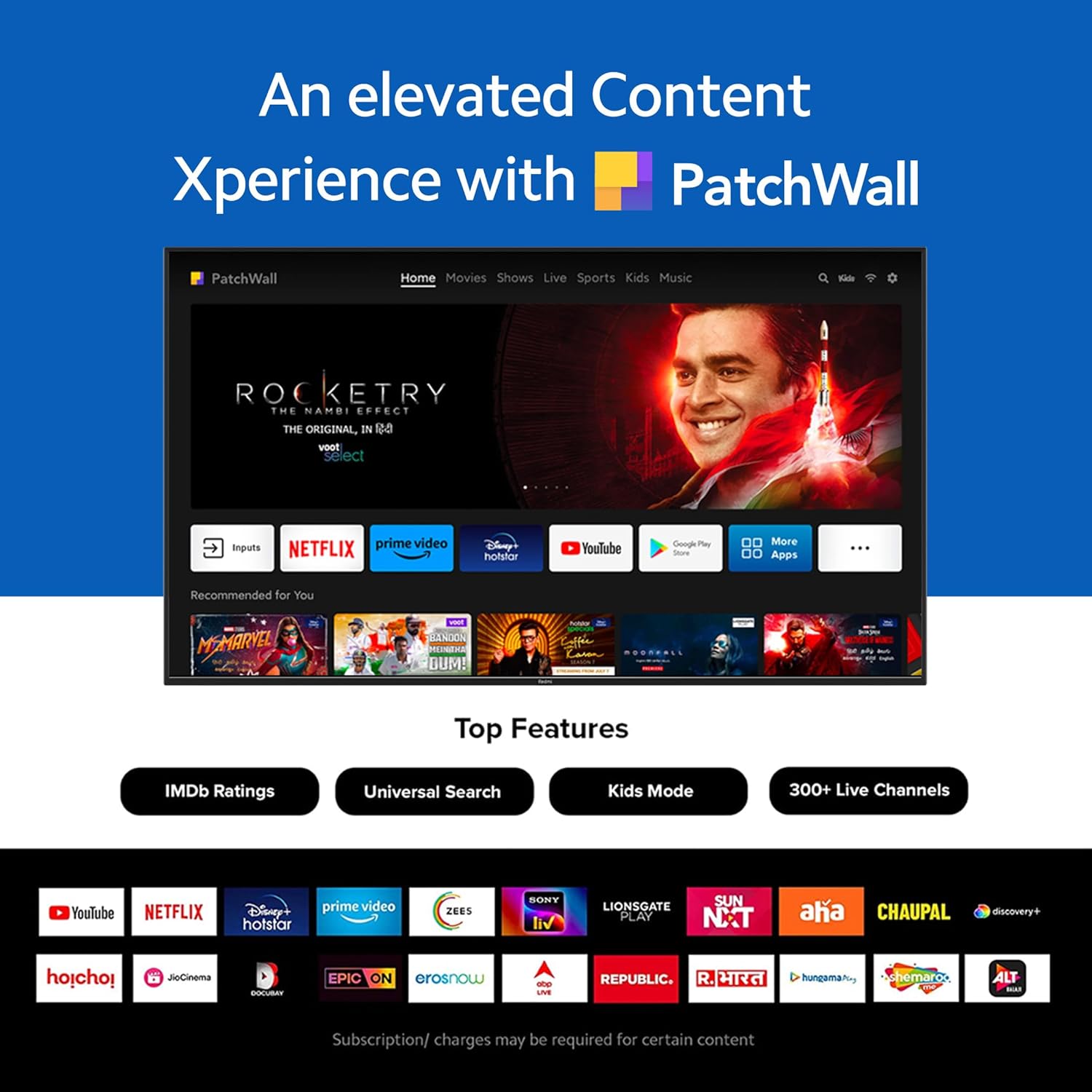
Figure 3: The PatchWall interface displaying various streaming apps and content.

Figure 4: Details on the TV's performance, including 2GB RAM, 16GB Storage, and Quad-core A55 processor.

Figure 5: Android TV 10 interface with Google Play, Ok Google, and Chromecast built-in.
4.4. การเชื่อมต่อ
The TV offers multiple connectivity options for various devices:
- HDMI2.1: Multiple ports for high-definition audio and video input, supporting eARC.
- ยูเอสบี 2.0: สำหรับเชื่อมต่ออุปกรณ์จัดเก็บข้อมูลภายนอก
- อีเธอร์เน็ต: การเชื่อมต่อเครือข่ายแบบใช้สาย
- พอร์ตออปติคอล: เอาต์พุตเสียงดิจิตอล
- พอร์ตเสียง 3.5 มม.: สำหรับหูฟังหรือลำโพงภายนอก
- Bluetooth 5.0 with BLE: Wireless connectivity for audio devices and accessories.

รูปที่ 6: ด้านหลัง view of the Redmi Smart TV X55 highlighting various input/output ports.

Figure 7: Close-up of the TV's ports, including HDMI 2.1, USB 2.0, Ethernet, Optical, and Headphone Jack.
5. คู่มือการติดตั้ง
5.1. การติดตั้งทางกายภาพ
Your Redmi Smart LED TV X55 can be installed on a table stand or wall-mounted.
- วิธีการติดตั้งขาตั้งโต๊ะ: Attach the two provided table stand bases to the bottom of the TV using the included screws. Ensure the TV is placed on a stable, flat surface.
- การติดตั้งแบบติดผนัง: For wall mounting, use a compatible VESA wall mount kit (sold separately). Follow the instructions provided with the wall mount kit and ensure professional installation for safety.

Figure 8: Dimensions of the Redmi Smart TV X55 for planning installation.
5.2. การเปิดเครื่องและการเชื่อมต่อเครือข่ายครั้งแรก
- เชื่อมต่อสายไฟเข้ากับทีวีและเต้าเสียบไฟ
- กดปุ่มเปิดปิดบนรีโมทคอนโทรลหรือทีวี
- Follow the on-screen instructions to select your language, country, and connect to your Wi-Fi network or plug in an Ethernet cable.
- Sign in with your Google account to access Android TV features and the Play Store.
5.3. Setting Up Alexa Control
You can control your Redmi TV hands-free with Alexa devices. Follow these steps to set up Alexa:
Video 1: Instructions on how to set up Alexa control for your Redmi Smart TV.
To enable advanced settings for Alexa control, refer to the following video guide:
Video 2: Guide to enabling advanced settings on Redmi TV for Alexa control.
6. คู่มือการใช้งาน
6.1. รีโมทคอนโทรล
The sleek remote control provides quick access to essential functions:
- การตื่นอย่างรวดเร็ว: เปิดทีวีในเวลาไม่ถึง 5 วินาที
- ปิดเสียงด่วน: Double-tap the volume down button to mute.
- การตั้งค่าด่วน: กดปุ่ม PatchWall ค้างไว้เพื่อเข้าสู่เมนูการตั้งค่าด่วน

Figure 9: The sleek remote control for the Redmi Smart TV X55, highlighting quick access features.
6.2. Navigating the Smart TV Interface
Use the remote's directional pad and OK button to navigate through the Android TV and PatchWall interfaces. Access apps, settings, and content recommendations easily.
6.3. การควบคุมด้วยเสียง
Press the dedicated voice assistant button on your remote and speak commands to control your TV, search for content, or interact with connected smart home devices via Ok Google or Alexa.
6.4. App Usage and Casting
The TV supports popular streaming services like Prime Video, Netflix, Disney+ Hotstar, YouTube, and Apple TV. You can also cast content from your mobile devices using Chromecast built-in or Miracast.
7. การบำรุงรักษา
- การทำความสะอาด: Gently wipe the screen and TV body with a soft, dry, lint-free cloth. Do not use abrasive cleaners or solvents.
- การอัปเดตซอฟต์แวร์: Ensure your TV's software is up to date for optimal performance and security. Navigate to Settings > Device Preferences > About > System update to check for updates.
- การจัดการพลังงาน: ถอดปลั๊กทีวีในระหว่างที่มีพายุฝนฟ้าคะนองหรือเมื่อไม่ได้ใช้งานเป็นเวลานาน
8 การแก้ไขปัญหา
If you encounter issues with your Redmi Smart LED TV X55, refer to the following common problems and solutions:
| ปัญหา | วิธีแก้ปัญหาที่เป็นไปได้ |
|---|---|
| ไม่มีไฟฟ้า | ตรวจสอบว่าสายไฟเสียบแน่นดีแล้ว และปลั๊กไฟใช้งานได้หรือไม่ ลองเสียบกับปลั๊กไฟอื่นดู |
| ไม่มีภาพแต่มีเสียง | Ensure the correct input source is selected. Check HDMI cable connections. |
| ไม่มีเสียงแต่มีภาพ | Check volume levels and mute status. Verify audio output settings (e.g., internal speakers, external soundbar). |
| รีโมตคอนโทรลไม่ทำงาน | เปลี่ยนแบตเตอรี่ ตรวจสอบให้แน่ใจว่าไม่มีสิ่งกีดขวางระหว่างรีโมทและทีวี หากจำเป็น ให้เชื่อมต่อรีโมทใหม่อีกครั้ง |
| ปัญหาการเชื่อมต่อเครือข่าย | Restart your router and modem. Check Wi-Fi password. Try connecting via Ethernet. |
9. ข้อมูลจำเพาะ
Detailed technical specifications for the Redmi Smart LED TV X55:
| คุณสมบัติ | ข้อมูลจำเพาะ |
|---|---|
| ยี่ห้อ | เรดหมี่ |
| ชื่อรุ่น | เอ็กซ์55 |
| ขนาดหน้าจอ | 55 นิ้ว |
| เทคโนโลยีการแสดงผล | LED-LCD |
| ปณิธาน | 3840 x 2160 พิกเซล (4K) |
| อัตราการรีเฟรช | 60 เฮิรตซ์ |
| ระบบปฏิบัติการ | แอนดรอยด์ทีวี 10 |
| โปรเซสเซอร์ | ควอดคอร์ A55 |
| แรม | 2GB |
| พื้นที่จัดเก็บ | 16GB |
| เอาท์พุตเสียง | 30 วัตต์ |
| เทคโนโลยีการเชื่อมต่อ | HDMI, USB, Wi-Fi (2x2 Dual Band), Ethernet, Bluetooth 5.0 |
| พอร์ต HDMI | 3 (HDMI 2.1, รองรับ eARC) |
| พอร์ต USB | 2 (ยูเอสบี 2.0) |
| Viewอิงแองเกิล | 178 องศา |
| อัตราส่วนภาพ | 16:9 น. |
| น้ำหนักสินค้า | 15 กก. 300 ก. |
| ประเภทการติดตั้ง | Wall Mount; Table Mount |
10. การรับประกันและการสนับสนุน
Your Redmi Smart LED TV X55 comes with a standard brand warranty. For specific warranty terms, duration, and service procedures, please refer to the warranty card included in your package or visit the official Redmi support webเว็บไซต์.

Figure 10: Information regarding Mi Extended Warranty, offering benefits like zero documentation, genuine spare parts, cashless repairs, authorized service centers, and on-site support.
For installation services, Amazon will coordinate with the brand within 48 hours of delivery. Scheduled delivery options are available in select cities. Installation charges may apply.